2016 LEXUS NX200T led
[x] Cancel search: ledPage 125 of 660
1253-2. Opening, closing and locking the doors
3
Operation of each component
NX200t_OM_USA_OM78081U
■Back door closer (vehicles with a power back door)
In the event that the back door is left slight ly open, the back door closer will automatically
close it to the fully closed position.
Whatever the state of the engine switch, the back door closer operates.
■Operation of the power back door (vehicles with a power back door)
●A buzzer sounds and the emergency flashers flash twice to indicate that the back door
is opening/closing.
●When the power back door operations are OFF, the power back door does not oper-
ate but it can be opened and closed by hand.
●When the power back door automatically op ens, if an abnormality due to people or
objects is detected, operation will stop.
■Back door reserve lock function (vehicles with a power back door)
This function is a function which reserves locking of all doors, beforehand, when the back
door is open. When the follow is done, all th e doors except the back door are locked and
then back door will also be locked at the same time it is closed.
Close all doors, except the back door.
Push the wireless lock button during the au tomatic closing operation of the back door.
■When reconnecting the battery (vehicles with a power back door)
To enable the power back door to operate properly, close the back door manually.
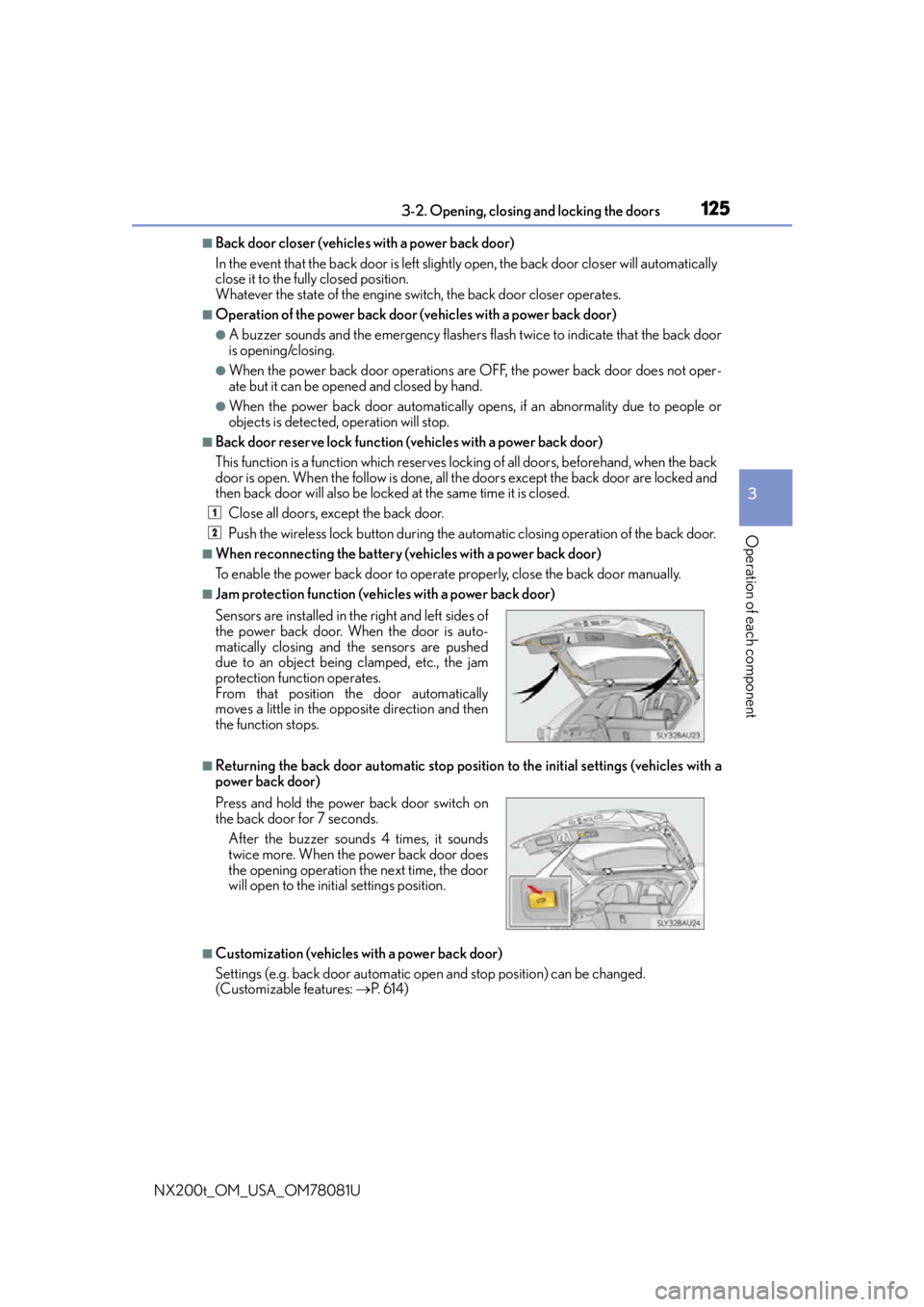
■Jam protection function (vehicles with a power back door)
■Returning the back door automatic stop position to the initial settings (vehicles with a
power back door)
■Customization (vehicles with a power back door)
Settings (e.g. back door automatic open and stop position) can be changed.
(Customizable features: P. 6 1 4 )
Sensors are installed in th
e right and left sides of
the power back door. When the door is auto-
matically closing and the sensors are pushed
due to an object being clamped, etc., the jam
protection function operates.
From that position the door automatically
moves a little in the opposite direction and then
the function stops.
Press and hold the power back door switch on
the back door for 7 seconds.
After the buzzer sounds 4 times, it sounds
twice more. When the power back door does
the opening operation the next time, the door
will open to the init ial settings position.
1
2
Page 128 of 660

1283-2. Opening, closing and locking the doors
NX200t_OM_USA_OM78081U
WA R N I N G
■Back door closer (vehicles with a power back door)
●Use caution when using the back door closer as it still operates when the power back
door system is canceled.
■Power back door (if equipped)
Observe the following precautions when operating the power back door.
Failure to do so may cause death or serious injury.
●Check the safety of the surrounding area to make sure there are no obstacles or any-
thing that could cause any of your belongings to get caught.
●If anyone is in the vicinity, make sure they are safe and let them know that the back
door is about to open or close.
●If the power back door system is canceled while the back door is operating during
automatic operation, the back door stops operating. Take extra care when on an
incline, as the back door may open or close suddenly.
●If the operating conditions of the power back door are no longer met, a buzzer may
sound and the back door may stop opening or closing. The back door then has to be
operated manually. Take extra care in this situation, as the back door may move
abruptly.
●On an incline, the back door may sudden ly shut after it opens automatically. Make
sure the back door is secured.
●In the following situations, the power back door may detect an abnormality and auto-
matic operation may be stopped. In this case, the back door has to be operated man-
ually. Take extra care in this situation, as the stopped back door may suddenly open or
close, causing an accident.
• When the back door contacts an obstacle
• When the battery voltage suddenly drops, such as when the engine switch is turned to IGNITION ON mode or the engine is started during automatic opera-
tion
●In the event that the back door is left slightly
open, the back door closer will automatically
close it to the fully closed position. It takes
several seconds before the back door closer
begins to operate. Be careful not to get fin-
gers caught or anything else in the back door,
as this may cause bone fractures or other
serious injuries.
Page 130 of 660

1303-2. Opening, closing and locking the doors
NX200t_OM_USA_OM78081U
NOTICE
■Back door spindles (vehicles with a power back door)
The back door is equipped with spindl es that hold the back door in place.
Observe the following precautions.
Failure to do so may cause damage to the b ack door spindle, resulting in malfunction.
●Do not place your hand on the spindle or apply lateral forces to it.
■To prevent back door closer malfunct ion (vehicles with a power back door)
Do not apply excessive force to the back door while the back door closer is operating.
■To prevent damage to the power back door (if equipped)
●Make sure that there is no ice between the back door and frame that would prevent
movement of the back door. Operating the power back door when excessive load is
present on the back door may cause a malfunction.
●Do not apply excessive force to the back door while the power back door is operat-
ing.
●Take care not to damage the sensors (installed on the right and left edges of the
power back door) with a knife or other sharp object. If the sensor is disconnected, the
power back door will not close automatically.
●Do not attach any fore ign objects, such as
stickers, plastic sheets, or adhesives to the
spindle rod.
●Do not touch the spindle rod with gloves or
other fabric items.
●Do not attach heavy accessories to the back
door. When attaching, ask your Lexus dealer
for details.Spindles
Page 136 of 660

1363-2. Opening, closing and locking the doors
NX200t_OM_USA_OM78081U
■Certification for the smart access system with push-button start
For vehicles sold in the U.S.A.
FCC ID: HYQ23AAB
FCC ID: HYQ14FBA
FCC ID: HYQ14CBB
FCC ID: NI4TMLF12-4
NOTE:
This device complies with part 15 of the FC C Rules. Operation is subject to the following
two conditions: (1) This device may not caus e harmful interference, and (2) this device
must accept any interference received, incl uding interference that may cause undesired
operation.
FCC WARNING:
Changes or modifications not expressly approved by the party responsible for compli-
ance could void the user’s authority to operate the equipment.
For vehicles sold in Canada
NOTE:
This device complies with Industry Canada’s licence-exempt RSSs. Operation is subject
to the following two conditions: (1) This de vice may not cause interference; and (2) This
device must accept any interference, includ ing interference that may cause undesired
operation of the device.
WA R N I N G
■Caution regarding interference with electronic devices
●People with implantable cardiac pacemakers, cardiac resynchronization therapy-
pacemakers or implantable cardioverter de fibrillators should keep away from the
smart access system with pu sh-button start antennas. (P. 131)
The radio waves may affect the operation of such devices. If necessary, the entry
function can be disabled. Ask your Lexus dealer for details, such as the frequency of
radio waves and timing of the emitted radio waves. Then, consult your doctor to see if
you should disable the entry function.
●Users of any electrical medical device other than implantable cardiac pacemakers,
cardiac resynchronization therapy-pacemakers or implantable cardioverter defibril-
lators should consult the ma nufacturer of the device for information about its opera-
tion under the influence of radio waves.
Radio waves could have unexpected effe cts on the operation of such medical
devices.
Ask your Lexus dealer for details on disabling the entry function.
Page 146 of 660

1463-3. Adjusting the seats
NX200t_OM_USA_OM78081U
Your preferred driving position (the posi tion of the driver’s seat, steering wheel
and outside rear view mirrors) can be recorded and recalled by pressing a but-
ton.
Three different driving positions can be recorded into memory.
■Recording procedure
Check that the shift lever is in P.
Turn the engine switch to IGNITION ON mode.
Adjust the driver’s seat, steering wheel and outside rear view mirrors to the
desired positions.
While pressing the “SET” button,
or within 3 seconds after the
“SET” button is pressed, press
button “1”, “2” or “3” until the
buzzer sounds.
If the selected button has already
been preset, the previously recorded
position will be overwritten.
■Recall procedureCheck that the shift lever is in P.
Turn the engine switch to IGNITION ON mode.
Press one of the buttons for the
driving position you want to recall
until the buzzer sounds.
Driving position memory
1
2
3
4
1
2
3
Page 147 of 660

1473-3. Adjusting the seats
3
Operation of each component
NX200t_OM_USA_OM78081U
■To stop the position recall operation part-way through
Perform any of the following:
●Press the “SET” button.
●Press button “1”, “2” or “3”.
●Operate any of the seat adjustment switches (only cancels seat position recall).
●Operate the tilt and telescopic steering co ntrol switch (only cancels steering wheel
position recall).
■Seat positions that can be memorized ( P. 1 3 7 )
The adjusted positions other than the position adjusted by lumbar support switch can be
recorded.
■Operating the driving position memory after turning the engine switch off
Recorded seat positions can be activated up to 180 seconds after the driver’s door is
opened and another 60 seconds after it is closed again.
■In order to correctly use the dr iving position memory function
If a seat position is already in the furthest po ssible position and the seat is operated in the
same direction, the recorded position may be slightly different when it is recalled.
Each electronic key (including a card key) can be registered to recall your pre-
ferred driving position.
■Registering procedure
Record your driving position to button “1”, “2” or “3” before performing the
following:
Carry only the key you want to regist er, and then close the driver’s door.
If 2 or more keys are in the vehicle, the driving position cannot be recorded
properly.
Check that the shift lever is in P.
Turn the engine switch to IGNITION ON mode.
Recall the driving position that you want to record.
While pressing the recalled but-
ton, press and hold the door lock
switch (either lock or unlock) until
the buzzer sounds.
If the button could not be registered,
the buzzer sounds continuously for
approximately 3 seconds.
Memory recall function
1
2
3
4
Page 148 of 660

1483-3. Adjusting the seats
NX200t_OM_USA_OM78081U
■Recall procedure Carry the electronic key that has been registered to the driving position,
and then unlock and open the driver’s door using the smart access system
with push-button start or wireless remote control.
The driving position will move to the reco rded position (not including the steering
wheel). However, the seat will move to a po sition slightly behind the recorded posi-
tion in order to make entering the vehicle easier.
If the driving position is in a position th at has already been recorded, the seat and
outside rear view mirrors will not move.
Turn the engine switch to ACCESSORY mode or IGNITION ON mode,
or fasten a seat belt.
The seat and steering wheel will move to the recorded position.
■Cancelation procedure
Carry only the key you want to cancel and then close the driver’s door.
If 2 or more keys are in the vehicle, the driving position cannot be canceled
properly.
Turn the engine switch to IGNITION ON mode.
While pressing the “SET” button, press and hold the door lock switch
(either lock or unlock) unt il the buzzer sounds twice.
If it could not be canceled, the buzzer sounds continuously for approximately 3
seconds.
■Recalling the driving position using the memory recall function
●Different driving positions can be registered for each electronic key. Therefore, the
driving position that is recalled may be different depending on the key being carried.
●If a door other than the driver’s door is unlocked with the smart access system with
push-button start, the driving position cannot be recalled. In this case, press the driving
position button which has been set.
■Customization
The unlock door settings of the memory re call function can be customized. (Customiz-
able features: P. 6 1 4 )
WA R N I N G
■Seat adjustment caution
Take care during seat adjustment so that th e seat does not strike the rear passenger or
squeeze your body against the steering wheel.
1
2
1
2
Page 149 of 660
1493-3. Adjusting the seats
3
Operation of each component
NX200t_OM_USA_OM78081U
Head restraints
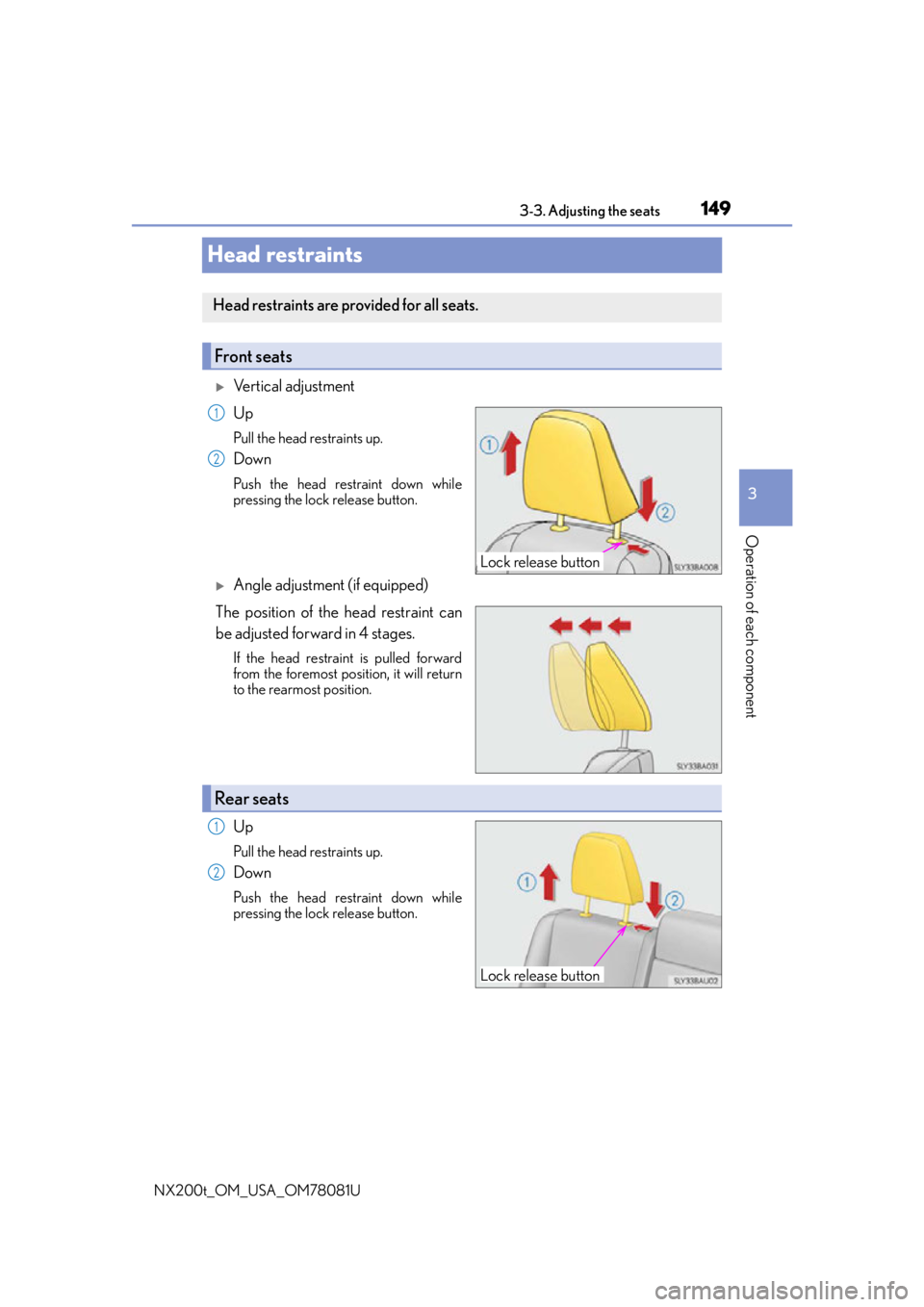
Vertical adjustment
Up
Pull the head restraints up.
Down
Push the head restraint down while
pressing the lock release button.
Angle adjustment (if equipped)
The position of the head restraint can
be adjusted forward in 4 stages.
If the head restraint is pulled forward
from the foremost position, it will return
to the rearmost position.
Up
Pull the head restraints up.
Down
Push the head restraint down while
pressing the lock release button.
Head restraints are provided for all seats.
Front seats
Lock release button
1
2
Rear seats
Lock release button
1
2