Page 316 of 632

316
LX570_OM_OM60N01U_(U)4-5. Using the driving support systems
Operate the Multi-terrain Select mode
select switch during Multi-terrain
Select control to select a mode.
Once the mode is confirmed, the mode
name will be displayed and the control
will switch.
■Automatic system cancelation
In the following situations, the Multi-terrain Se
lect indicator will go off, and Multi-terrain
Select will be canceled automatically.
●When the four-wheel drive control switch is in H4.
●When Active TRAC and VSC are off.
■When it is difficult to generate traction
MUD & SAND mode provides the largest amount of tire slippage, followed by LOOSE
ROCK, MOGUL, ROCK & DIRT and ROCK mode.
Drivability can be improved by selecting a mo de which provides a smaller amount of tire
slippage than the current mode when the amount of tire slippage is large, or conversely
selecting a mode which provides a larger amou nt of tire slippage than the current mode
when the amount of ti re slippage is small.
■When the vehicle is stuck
Switching the transfer and differential
For the operation of the following functions, refer to the following pages.
●Four-wheel drive system ( P. 3 0 5 )
●Center differential lock ( P. 3 0 6 )
■When the brake system operates continuously
The brake system may overheat. In this case, a buzzer will sound, the TRAC OFF indica-
tor will flash, and Multi-terrain Select will be temporarily inoperable. In this event, stop
the vehicle immediately in a safe place, and allow the brake system to cool down suffi-
ciently. (There is no problem wi th continuing normal driving.)
After a short time, the TRAC OFF indicator will go off, and you will be able to use Multi-
terrain Select.
■When there is a malfunction in the system
The slip indicator light will come on. Have the vehicle inspected by your Lexus dealer
immediately.
Switching modes
Page 319 of 632
LX570_OM_OM60N01U_(U)
3194-5. Using the driving support systems
4
Driving
■Screens when the four-wheel drive control switch is in L4
●When checking the area to the front and sides of the vehicle
●When checking the condition of the road surface under the vehicle
Front view & dual side viewFront view & dual side view (front
magnified)
P. 3 2 7 P. 3 2 7
Under vehicle terrain view & dual
side viewUnder vehicle terrain view & dual
side view (front magnified)
P. 3 3 1 P. 3 3 1
Page 320 of 632
320
LX570_OM_OM60N01U_(U)4-5. Using the driving support systems
●When checking the area to the rear of the vehicle
■Screens when the four-wheel drive control switch is in H4
●When checking the area to the front
of the vehicle (panoramic view & wide
front view)
P. 3 3 5
●When checking the area to the sides of the vehicle (dual side view)
P. 3 3 7
Rear view & dual side viewWide rear view
P. 3 3 3 P. 3 3 3
Page 324 of 632
324
LX570_OM_OM60N01U_(U)4-5. Using the driving support systems
The screen display can be switched by operating the switches as follows while
the Multi-terrain Monitor screen is displayed. (Screens that can be displayed will
vary depending on the positions of the shift lever and four-wheel drive control
switch)
■Screens when the four-wheel drive control switch is in L4
:Press
: Select
: Select
: Operate the shift lever
Changing the Multi-terrain Monitor screen
Page 326 of 632
326
LX570_OM_OM60N01U_(U)4-5. Using the driving support systems
■Screens when the four-wheel drive control switch is in H4
:Press
: Select
: Operate the shift lever
*1: The displayed screen differs when the outside rear view mirrors are retracted.
*2: The screen display can be switched by touching the image from the camera on the
screen.
*1
*2*1
Navigation screen, information set-
tings screen, etc.
Dual side view: P. 3 3 7
Panoramic view & wide front view:
P. 3 3 5 Panoramic view & rear view:
P. 3 4 0
Wide rear view: P. 3 4 01
2
3
4
5
Page 327 of 632

LX570_OM_OM60N01U_(U)
3274-5. Using the driving support systems
4
Driving
■Multi-terrain Monitor screen display
The amount of time that the Multi-terrain Monitor screen is displayed changes as follows
according to the vehicle speed at th e time the VIEW switch was pressed.
The Multi-terrain Monitor screen is displayed if the vehicle speed is approximately 7 mph
(12 km/h) or less when the camera switch is pressed.
If the vehicle speed exceeds approximately 7 mph (12 km/h), the Multi-terrain Monitor
display is canceled.
The various screens of the Multi-terrain Monitor display information to support
several different driving situations, such as when checking for obstacles when
moving forward or in reverse, or when judging road surface conditions during
off-road driving.
■Front view & dual side view
Front view & dual side view can be used to check the area around the front of
the vehicle. • In addition to an image of the front of the vehicle, guide lines are displayed in a composite view to provide refere nce for when deciding a direction to
move forward in.
• If the VIEW switch is pressed while the screen is displayed, the screen switches from normal to magnified display. (Pressing the switch again
returns the screen to the normal display)
• If the steering wheel is turned 270 or more, guide lines and other features
to support turning are automatically displayed.
Screen display and functions
Page 328 of 632
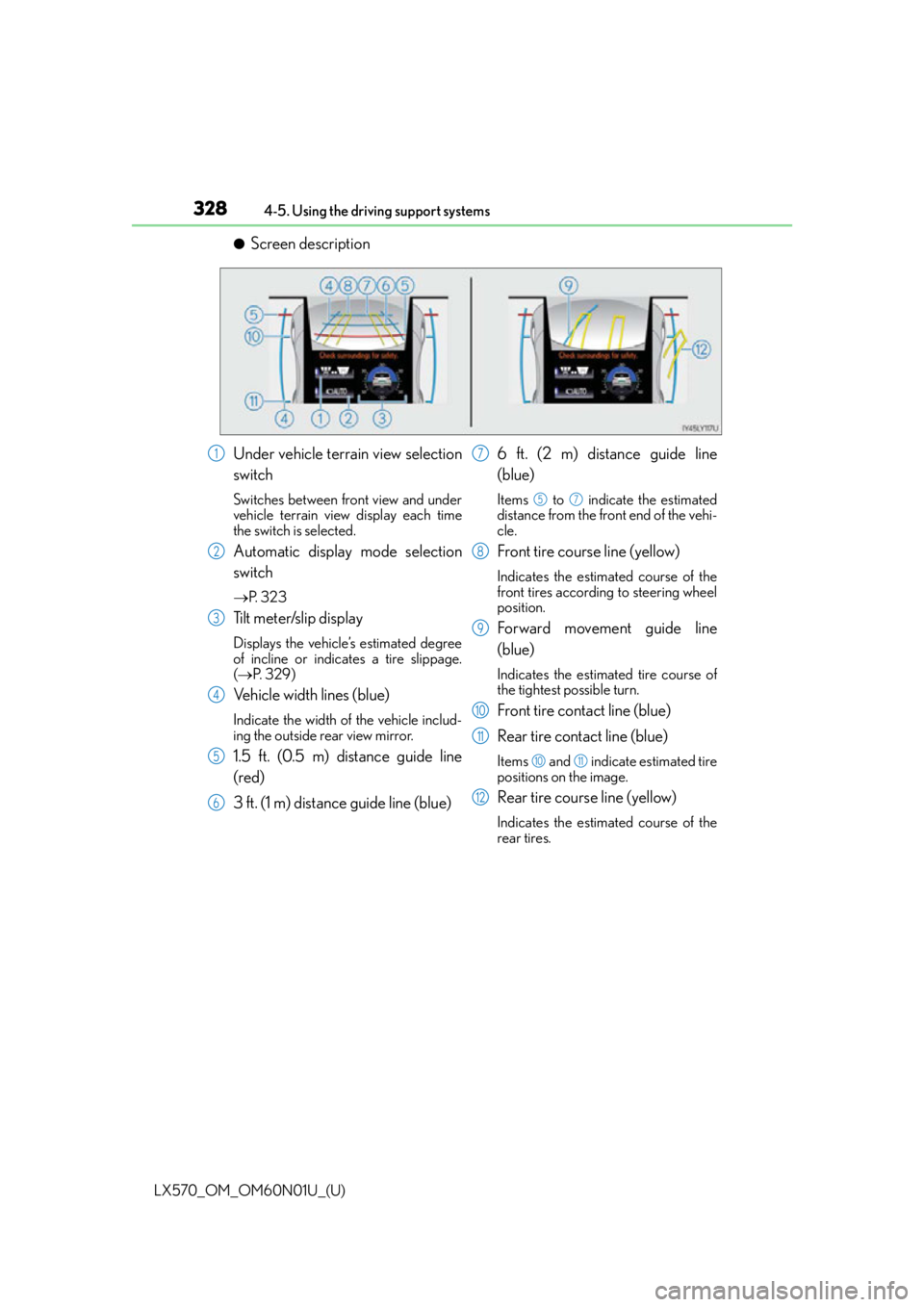
328
LX570_OM_OM60N01U_(U)4-5. Using the driving support systems
●Screen description
Under vehicle terrain view selection
switch
Switches between front view and under
vehicle terrain view display each time
the switch is selected.
Automatic display mode selection
switch
P. 3 2 3
Tilt meter/slip display
Displays the vehicle’s estimated degree
of incline or indicates a tire slippage.
( P. 3 2 9 )
Vehicle width lines (blue)
Indicate the width of the vehicle includ-
ing the outside rear view mirror.
1.5 ft. (0.5 m) distance guide line
(red)
3 ft. (1 m) distance guide line (blue) 6 ft. (2 m) distance guide line
(blue)
Items to indicate the estimated
distance from the front end of the vehi-
cle.
Front tire course line (yellow)
Indicates the estimated course of the
front tires according to steering wheel
position.
Forward movement guide line
(blue)
Indicates the estimated tire course of
the tightest possible turn.
Front tire contact line (blue)
Rear tire contact line (blue)
Items and indicate estimated tire
positions on the image.
Rear tire course line (yellow)
Indicates the estimated course of the
rear tires.
1
2
3
4
5
6
7
57
8
9
10
11
1011
12
Page 329 of 632
LX570_OM_OM60N01U_(U)
3294-5. Using the driving support systems
4
Driving
●Front view rotating display function
This function operates when the four-wheel drive control switch is in L4.
The front view image is automatically adjusted to be parallel and assist the
driver to check road surface conditio ns regardless of the vehicle inclina-
tion.
●Tilt meter
Tilt meter displays the vehicle
inclination to the front, rear, left
and right within a range of 0 to
approximately 30 .
Degree markers of incline to
the front and rear
Indicates the vehicle inclination in
degrees in the front and rear
directions.
Degree markers of incline to the left and right
Indicates the vehicle inclin ation in degrees in the left and right directions.
Po i n t e r
Indicates the degree of the vehicle inc lination in comparison to a parallel line.
1
2
3


