Page 261 of 632

LX570_OM_OM60N01U_(U)
2614-5. Using the driving support systems
4
Driving
●In some situations such as the following, sufficient braking force may not be obtained,
preventing the system from performing properly:
• If the braking functions cannot operate to their full extent, such as when the brake parts are extremely cold, extremely hot, or wet
• If the vehicle is not properly maintained (brakes or tires are excessively worn, improper tire inflation pressure, etc.)
• When the vehicle is being driven on a gravel road or other slippery surface
●Some pedestrians such as the following may not be detected by the radar sensor and
camera sensor, preventing the system from operating properly
*5:
• Pedestrians shorter than approximately 3.2 ft. (100 cm) or taller than approximately 6.5 ft. (2 m)
• Pedestrians wearing oversized clothing (a rain coat, long skirt, etc.), making their sil- houette obscure
• Pedestrians who are carrying large baggage, holding an umbrella, etc., hiding part
of their body
• Pedestrians who are bending forward or squatting
• Pedestrians who are pushing a stroller, wheelchair, bicycle or other vehicle
• Groups of pedestrians which are close together
• Pedestrians who are wearing white and look extremely bright
• Pedestrians in the dark, such as at night or while in a tunnel
• Pedestrians whose clothing appears to be nearly the same color or brightness as
their surroundings
• Pedestrians near walls, fences, guardrails, or large objects
• Pedestrians who are on a metal object (man hole cover, steel plate, etc.) on the road
• Pedestrians who are walking fast
• Pedestrians who are changing speed abruptly
• Pedestrians running out from behind a vehicle or a large object
• Pedestrians who are extremely close to the side of the vehicle (outside rear view mirror, etc.)
*5: Depending on the region in which the ve hicle was sold, the pedestrian detection
function may not be available.
Page 318 of 632
318
LX570_OM_OM60N01U_(U)4-5. Using the driving support systems
Multi-terrain Monitor
The following screens can be select
ed according to driving conditions.
• Screens that can be selected vary depe nding on conditions such as shift posi-
tion and vehicle speed. ( P. 3 2 4 )
• Depending on the displayed screen, th e display can be switched from normal
to wide view display.
The Multi-terrain Monitor helps the driv er to check the vehicle surroundings.
It assists in determining the conditions around the driver in a variety of situa-
tions, such as when judging conditions during off-road driving or checking for
obstacles when parking.
WA R N I N G
■When using the Multi- terrain Monitor system
Observe the following precautions to avoid an accident that could result in death or
serious injuries.
●Never rely solely on the Multi-terrain Moni tor. As with unequipped vehicles, drive
carefully while directly confirming the safety of your surroundings and the area to the
rear of the vehicle. Take particular care to avoid parked cars and other obstacles.
●Due to the characteristics of the camera lens, the actual position and distance of peo-
ple and other obstacles will differ from those shown on the Multi-terrain Monitor
screen. Directly confirm the safety of your surroundings before driving.
●Do not drive while only looking at the scre en. When driving, make sure to directly
confirm the safety of your surroundings, su ch as by visually checking the area and
using the vehicle’s mirrors.
●In low temperatures, the screen may darken or the images may become faint.
Images of moving objects in particular may distort or disappear from the screen.
Therefore, make sure to drive carefully while directly visually confirming the safety of
your surroundings.
Multi-terrain Monitor screens
Page 321 of 632
LX570_OM_OM60N01U_(U)
3214-5. Using the driving support systems
4
Driving
●When checking the area to the rear of the vehicle
●When checking the area to the sides, front and rear of the vehicle (with out-
side rear view mirrors retracted)
Panoramic view & rear viewWide rear view
P. 3 4 0 P. 3 4 0
Side view & wide front viewSide view & rear view
P. 3 4 6 P. 3 4 6
Dual side view
P. 3 4 6
Page 326 of 632
326
LX570_OM_OM60N01U_(U)4-5. Using the driving support systems
■Screens when the four-wheel drive control switch is in H4
:Press
: Select
: Operate the shift lever
*1: The displayed screen differs when the outside rear view mirrors are retracted.
*2: The screen display can be switched by touching the image from the camera on the
screen.
*1
*2*1
Navigation screen, information set-
tings screen, etc.
Dual side view: P. 3 3 7
Panoramic view & wide front view:
P. 3 3 5 Panoramic view & rear view:
P. 3 4 0
Wide rear view: P. 3 4 01
2
3
4
5
Page 328 of 632
328
LX570_OM_OM60N01U_(U)4-5. Using the driving support systems
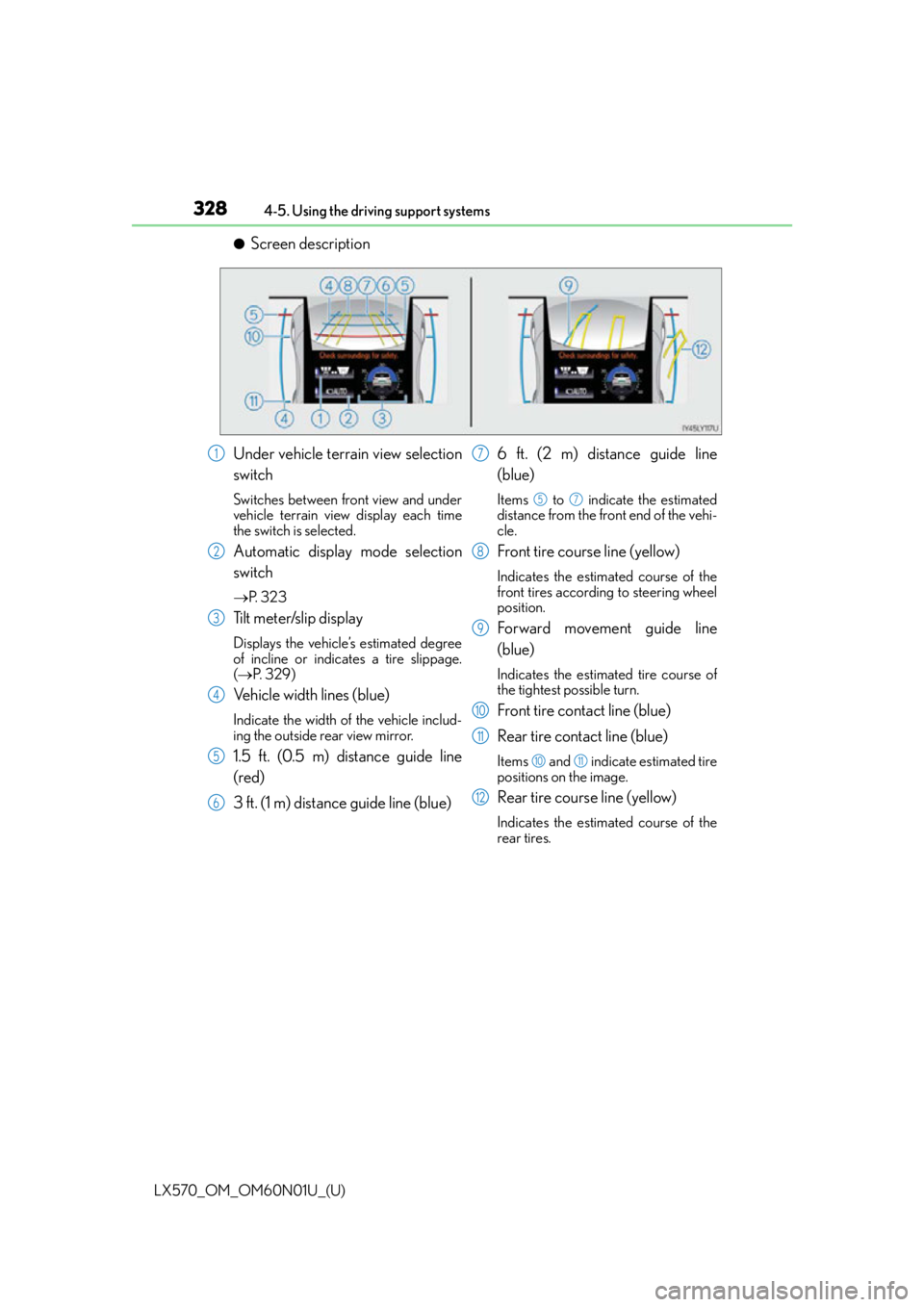
●Screen description
Under vehicle terrain view selection
switch
Switches between front view and under
vehicle terrain view display each time
the switch is selected.
Automatic display mode selection
switch
P. 3 2 3
Tilt meter/slip display
Displays the vehicle’s estimated degree
of incline or indicates a tire slippage.
( P. 3 2 9 )
Vehicle width lines (blue)
Indicate the width of the vehicle includ-
ing the outside rear view mirror.
1.5 ft. (0.5 m) distance guide line
(red)
3 ft. (1 m) distance guide line (blue) 6 ft. (2 m) distance guide line
(blue)
Items to indicate the estimated
distance from the front end of the vehi-
cle.
Front tire course line (yellow)
Indicates the estimated course of the
front tires according to steering wheel
position.
Forward movement guide line
(blue)
Indicates the estimated tire course of
the tightest possible turn.
Front tire contact line (blue)
Rear tire contact line (blue)
Items and indicate estimated tire
positions on the image.
Rear tire course line (yellow)
Indicates the estimated course of the
rear tires.
1
2
3
4
5
6
7
57
8
9
10
11
1011
12
Page 333 of 632
LX570_OM_OM60N01U_(U)
3334-5. Using the driving support systems
4
Driving
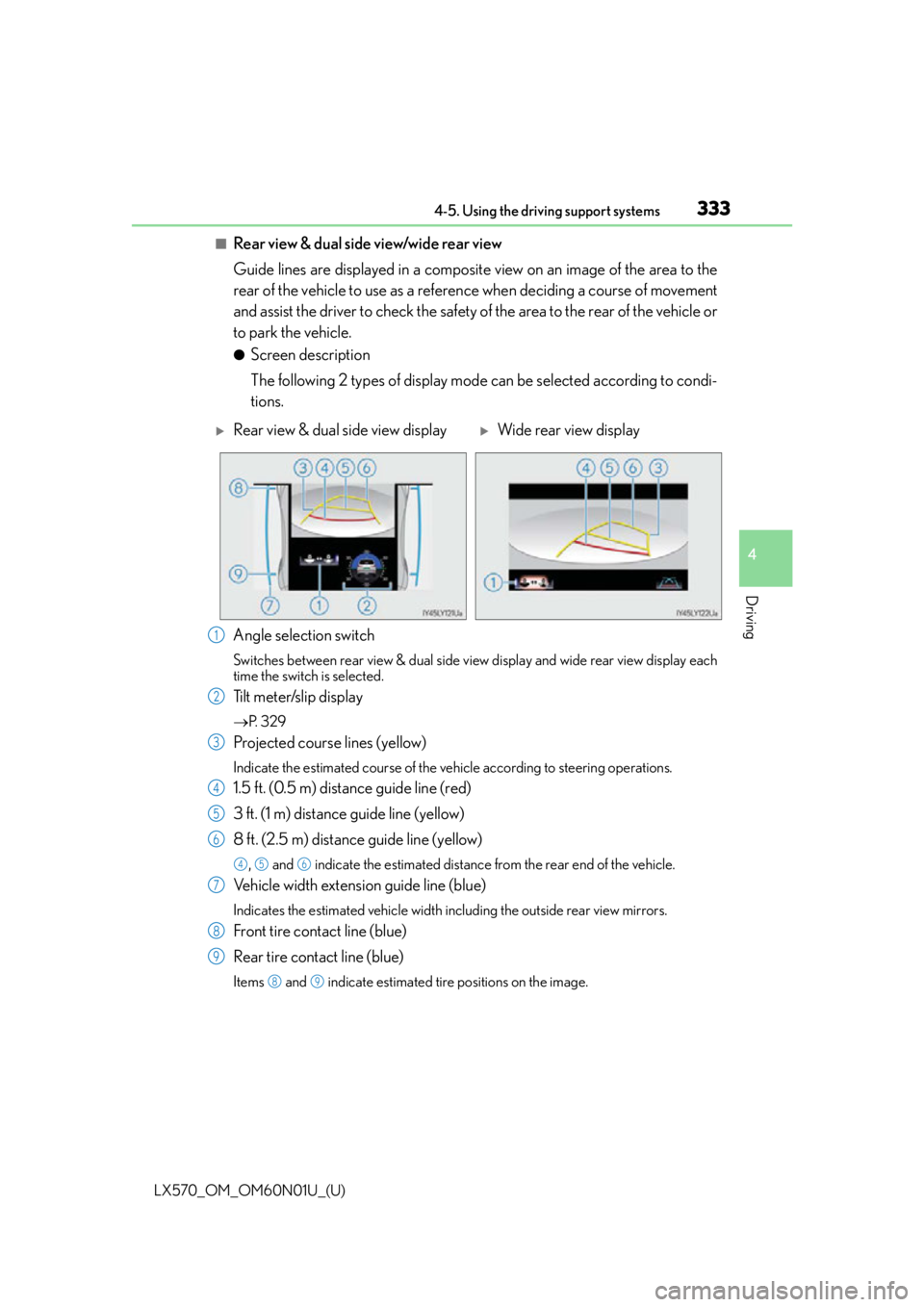
■Rear view & dual side view/wide rear view
Guide lines are displayed in a composite view on an image of the area to the
rear of the vehicle to use as a reference when deciding a course of movement
and assist the driver to check the safety of the area to the rear of the vehicle or
to park the vehicle.
●Screen description
The following 2 types of display mode can be selected according to condi-
tions.
Angle selection switch
Switches between rear view & dual side vi ew display and wide rear view display each
time the switch is selected.
Tilt meter/slip display
P. 3 2 9
Projected course lines (yellow)
Indicate the estimated course of the vehicle according to steering operations.
1.5 ft. (0.5 m) distance guide line (red)
3 ft. (1 m) distance guide line (yellow)
8 ft. (2.5 m) distance guide line (yellow)
, and indicate the estimated distance from the rear end of the vehicle.
Vehicle width extension guide line (blue)
Indicates the estimated vehicle width including the outside rear view mirrors.
Front tire contact line (blue)
Rear tire contact line (blue)
Items and indicate estimated tire positions on the image.
Rear view & dual side view displayWide rear view display
1
2
3
4
5
6
456
7
8
9
89
Page 337 of 632
LX570_OM_OM60N01U_(U)
3374-5. Using the driving support systems
4
Driving
■Dual side view
The image from the both side cameras is displayed and assists the driver to
check conditions on the sides of the vehicle or to confirm the safety of narrow
roads.
●Screen description
Side view (left front side)
Side view (right front side)
Display area
Vehicle width lines (blue)
Indicate the estimated vehicle
width including the outside rear
view mirrors.
Front distance guide line (red)
Indicates a distance approximately 1.6 ft. (0.5 m) from the front end of the vehi-
cle.
Front tire contact line (blue)
Indicates the estimated front tire position on the image.
Automatic display mode selection switch
P. 3 2 3
1
2
3
4
5
6
7
Page 339 of 632
LX570_OM_OM60N01U_(U)
3394-5. Using the driving support systems
4
Driving
■Dual side view
●The screen can be displayed when the shift lever is in P, D or N.
●When the outside rear view mirrors are retracted, the displayed area changes (the area
on the screen that is not masked in black). (P. 3 4 6 )
WA R N I N G
■Guide lines
The tire position indicator lines and vehicle position indicator lines may differ from
actual vehicle positions depending on the number of passengers, cargo weight, road
grade, road surface conditions, brightness of the surrounding environment, etc. Always
drive the vehicle while confirming the safety of your surroundings.


