2016 LEXUS LX570 lights
[x] Cancel search: lightsPage 86 of 632

86
LX570_OM_OM60N01U_(U)2. Instrument cluster
*1: These lights turn on when the engine switch is turned to IGNITION ON mode to
indicate that a system check is being perfor med. They will turn off after the engine is
on, or after a few seconds. There may be a malfunction in a system if the lights do not
turn on, or turn off. Have the vehicle inspected by your Lexus dealer.
*2: The light flashes to indicate that the system is operating.
*3: The light turns on when the system is turned off.
*4: In order to confirm operation, the BSM outs ide rear view mirror indicators illumi-
nate in the following situations:
• When the engine switch is turned to IGNITION ON mode while the system is set to on.
• When the system is set to on while the engine switch is in IGNITION ON mode.
If the system is functioning correctly, the BSM outside rear view mirror indicators
will turn off after a few seconds.
If the BSM outside rear view mirror indicat ors do not illuminate or do not turn off,
there may be a malfunction with the system.
If this occurs, have the vehicle inspected by your Lexus dealer.
*5: This light illuminates on the outside rear view mirrors.
*6: This light illuminates on the center panel.
*7: When the outside temperature is approximately 37 F (3 C) or lower, the indicator
will flash for approximately 10 seconds, then stay on.
(if equipped)
Intuitive parking assist
indicator ( P. 2 8 9 ) Turn Assist function
indicator (
P. 3 0 9 )
*1, 3
(if equipped)
PCS warning light
( P. 2 5 0 )
(U.S.A.)
Parking brake indicator
( P. 2 1 7 )
(if equipped)
BSM (Blind Spot Monitor)
indicator ( P. 3 6 5 )
(Canada)
Parking brake indicator
( P. 2 1 7 )
*4, 5
(if equipped)
BSM (Blind Spot Monitor)
outside rear view mirror
indicators ( P. 3 6 5 ) TRAC OFF indicator
(
P. 3 8 0 )
(if equipped)
RCTA (Rear Cross Traffic
Alert) indicator ( P. 3 7 3 )*7Low outside temperature
indicator ( P. 88)
*6“A I R B A G O N /
OFF” indicator
( P. 5 1 )
Page 89 of 632

LX570_OM_OM60N01U_(U)
892. Instrument cluster
2
Instrument cluster
Odometer and trip meter display
Odometer:
Displays the total distance the vehicle has been driven
Tr i p m e t e r :
Displays the distance the vehicle has been driven since the meter was last reset. Trip
meters A and B can be used to record an d display different distances independently.
Shift position and shift range display
Displays the selected shift position or selected shift range (P. 2 1 0 )
4-Wheel AHC display
Display the status of 4-Wheel AHC (A ctive Height Control Suspension). (P. 2 9 7 )
Outside temperature
Displays the outside temperature within the range of -40 F (-40 C) to 122 F
(50 C). Low outside temperature indicator comes on when the ambient temperature
is 37 F (3 C) or lower.
Odometer/trip meter display change button
Switches between odometer and trip meter displays
Instrument panel light control dial
The brightness of the instrume nt panel light can be adjusted
Switches between odometer and trip
meter displays. When the trip meter is
displayed, pressing and holding the
button will reset the trip meter.
The brightness of the instrument panel lights can be adjusted.
Darker
Brighter
Changing the display
8
9
10
11
12
13
Instrument panel light control
1
2
Page 90 of 632

90
LX570_OM_OM60N01U_(U)2. Instrument cluster
■The meters and display illuminate when
The engine switch is in IGNITION ON mode.
■The brightness of the instrument panel lights
When the tail lights are turned on, the meter’
s brightness will be reduced slightly unless
the meter brightness leve l adjustment is set to the brightest setting.
If the tail lights are turned on when the surroundings are dark, the meter’s brightness will
be reduced slightly. However, when the surroundings are bright, such as during the day-
time, the meter’s brightness will not be reduced even if the tail lights are turned on.
■Customization
The meter display can be customized on the multi-information display. (P. 585)
WA R N I N G
■The information display at low temperatures
Allow the interior of the vehicle to warm up before using the liquid crystal information
display. At extremely low temperatures, th e information display monitor may respond
slowly, and display changes may be delayed.
For example, there is a lag between the driver’s shifting and the new gear number
appearing on the display. This lag could cau se the driver to downshift again, causing
rapid and excessive engine braking and po ssibly an accident resulting in death or
injury.
NOTICE
■To prevent damage to the engine and its components
●Do not let the indicator needle of the tachometer enter the red zone, which indicates
the maximum engine speed.
●The engine may be overheating if the engine coolant temperature gauge is in the red
zone (H). In this case, immediately stop the vehicle in a safe place, and check the
engine after it has cooled completely. ( P. 5 5 6 )
■Vo l t m e t e r
When the voltmeter indicates 19 V or higher or 9 V or lower while the engine is run-
ning, there may be a battery or charging system malfunction. Have the vehicle
inspected at your Lexus dealer.
■Engine oil pressure gauge
When the value of the engine oil pressure gauge drops while the engine is running,
stop the vehicle in a safe place immediat ely and check the amount of engine oil.
( P. 4 7 5 )
When the oil pressure drops even though th e engine oil amount has not decreased, or
if the oil pressure does not increase when engine oil is added, contact your Lexus
dealer, as there may be a proble m with the lubrication system.
Page 111 of 632
LX570_OM_OM60N01U_(U)
1113-1. Key information
3
Operation of each component
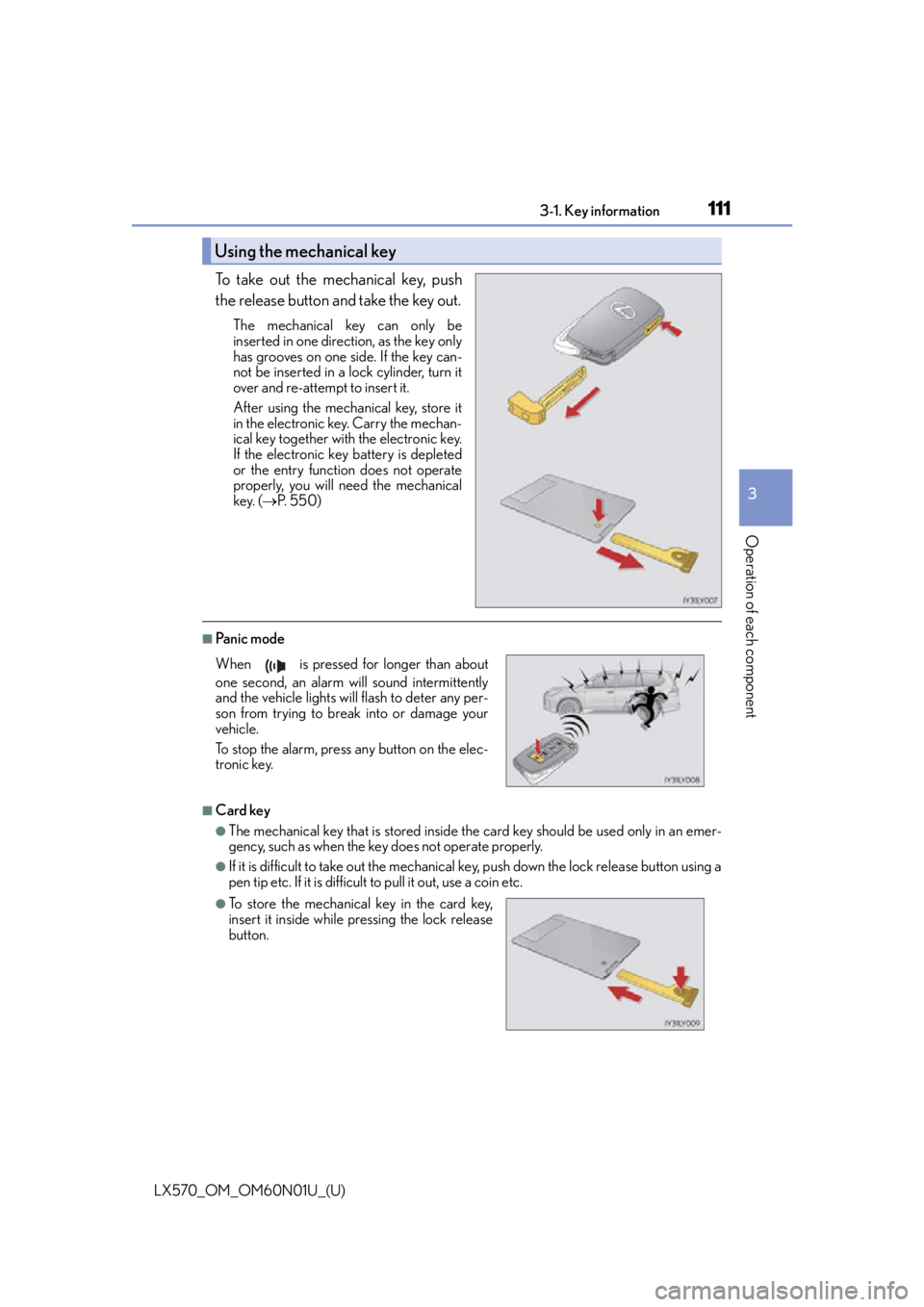
To take out the mechanical key, push
the release button and take the key out.
The mechanical key can only be
inserted in one direction, as the key only
has grooves on one side. If the key can-
not be inserted in a lock cylinder, turn it
over and re-attempt to insert it.
After using the mechanical key, store it
in the electronic key. Carry the mechan-
ical key together with the electronic key.
If the electronic key battery is depleted
or the entry function does not operate
properly, you will need the mechanical
key. (P. 5 5 0 )
■Panic mode
■Card key
●The mechanical key that is stored inside the card key should be used only in an emer-
gency, such as when the key does not operate properly.
●If it is difficult to take out the mechanical key, push down the lock release button using a
pen tip etc. If it is difficult to pull it out, use a coin etc.
Using the mechanical key
When is pressed for longer than about
one second, an alarm will sound intermittently
and the vehicle lights will flash to deter any per-
son from trying to break into or damage your
vehicle.
To stop the alarm, press any button on the elec-
tronic key.
●To store the mechanical key in the card key,
insert it inside while pressing the lock release
button.
Page 160 of 632

1603-4. Adjusting the steering wheel and mirrors
LX570_OM_OM60N01U_(U)
Inside rear view mirror
The height of the rear view mirror can be adjusted to suit your driving posture.
Adjust the height of the rear view mir-
ror by moving it up and down.
Responding to the level of brightness of the headlights of vehicles behind, the
reflected light is automatically reduced.
Changing automatic anti-glare func-
tion mode
ON/OFF
When the automatic anti-glare function
is in ON mode, the indicator illuminates.
The function will set to ON mode each
time the engine switch is turned to
IGNITION ON mode.
Pressing the button turns the function to
OFF mode. (The indicator also turns
off.)
■To prevent sensor error
The rear view mirror’s position can be adjusted to enable sufficient confirma-
tion of the rear view.
Adjusting the height of rear view mirror
Anti-glare function
Indicator
To ensure that the sens ors operate properly, do
not touch or cover them.
Page 173 of 632

173
LX570_OM_OM60N01U_(U)
4Driving
4-1. Before drivingDriving the vehicle ....................... 174
Cargo and luggage .................... 182
Vehicle load limits ....................... 186
Trailer towing ................................. 187
Dinghy towing..............................204
4-2. Driving procedures Engine (ignition) switch .......... 205
Automatic transmission ............ 210
Turn signal lever ........................... 216
Parking brake ................................ 217
4-3. Operating the lights and wipers
Headlight switch .........................220
Automatic High Beam ............. 224
Fog light switch............................ 229
Windshield wipers and washer........................................... 231
Rear window wiper and washer..........................................235
Headlight cleaner switch ....... 238 4-4. Refueling
Opening the fuel tank cap ..... 239
4-5. Using the driving support systems
Lexus Safety System+ .............. 242
PCS (Pre-Collision system) ........................................250
LDA (Lane Departure Alert) ............................................ 263
Dynamic radar cruise control with full-speed
range .............................................. 271
Cruise control ............................. 283
Driving mode select switch ........................................... 286
Intuitive parking assist .............. 289
4-Wheel AHC (Active Height Control
Suspension) ................................297
Four-wheel drive system .........305
Crawl Control (with Turn Assist function).........................309
Multi-terrain Select .................... 314
Multi-terrain Monitor ................ 318
BSM (Blind Spot Monitor) ..... 365 • BSM function ......................... 369
• RCTA function ...................... 373
Driving assist systems............... 379
4-6. Driving tips Winter driving tips .....................384
Off-road precautions ............... 387
Page 195 of 632

LX570_OM_OM60N01U_(U)
1954-1. Before driving
4
Driving
Hitch receiver pin hole position:
45.3 in. (1151 mm)
Use the wire harness stored in the rear
end under the vehicle body.
Please consult your dealer when installin g trailer lights, as incorrect installation
may cause damage to the vehicle’s lights. Please take care to comply with your
state’s laws when installing trailer lights.
■Service connector for towing brake controller
Your vehicle is equipped with a service connector for the trailer brake controller. Please
consult your dealer when installing trailer brake systems to the vehicle.
Positions for towing hitch receiver
1
Connecting trailer lights
Page 197 of 632

LX570_OM_OM60N01U_(U)
1974-1. Before driving
4
Driving
Your vehicle will handle differently when towing a trailer. Help to avoid an acci-
dent, death or serious injury, keep the following in mind when towing:
●Speed limits for towing a trailer vary by state or province. Do not exceed the
posted towing speed limit.
●Lexus recommends that the vehicle-trailer speed limit is 65 mph (104 km/h)
on a flat, straight, dry road. Do not exceed this limit, the posted towing speed
limit or the speed limit for your trailer as set forth in your trailer owner’s man-
ual, whichever is lowest. Instability of the towing vehicle-trailer combination
(trailer sway) increases as speed increases. Exceeding speed limits may cause
loss of control.
●Before starting out, check the trailer lights, tires and the vehicle-trailer con-
nections. Recheck after driving a short distance.
●Practice turning, stopping and reversing with the trailer attached in an area
away from traffic until you become accustomed to the feel of the vehicle-
trailer combination.
●Reversing with a trailer attached is di fficult and requires practice. Grip the
bottom of the steering wheel and move your hand to the left to move the
trailer to the left. Move your hand to the right to move the trailer to the right.
(This is generally opposite to reversing without a trailer attached.) Avoid sharp
or prolonged turning. Have someone gu ide you when reversing to reduce the
risk of an accident.
●As stopping distance is increased when towing a trailer, vehicle-to-vehicle dis-
tance should be increased. For each 10 mph (16 km/h) of speed, allow at least
one vehicle and trailer length.
●Avoid sudden braking as you may skid, re sulting in the trailer jackknifing and
loss of vehicle control. This is especially true on wet or slippery surfaces.
Trailer towing tips