2016 Lexus GS350 Brake
[x] Cancel search: BrakePage 288 of 624
288
GS350_200t_GS F_OM_OM30E86U_(U)4-5. Using the driving support systems
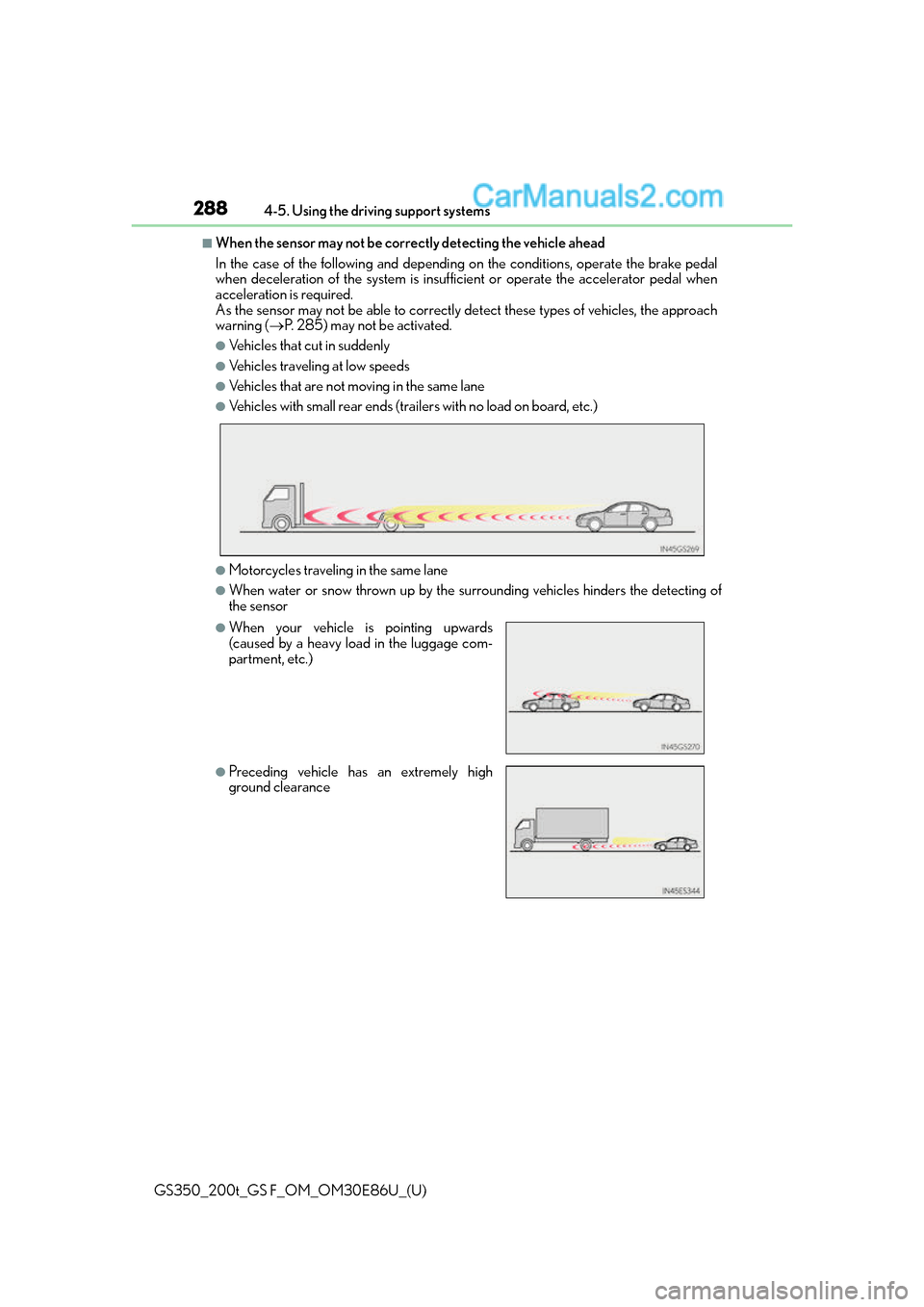
■When the sensor may not be correctly detecting the vehicle ahead
In the case of the following and depending on the conditions, operate the brake pedal
when deceleration of the system is insuff
icient or operate the accelerator pedal when
acceleration is required.
As the sensor may not be able to correctly detect these types of vehicles, the approach
warning ( P. 285) may not be activated.
●Vehicles that cut in suddenly
●Vehicles traveling at low speeds
●Vehicles that are not moving in the same lane
●Vehicles with small rear ends (traile rs with no load on board, etc.)
●Motorcycles traveling in the same lane
●When water or snow thrown up by the surrounding vehicles hinders the detecting of
the sensor
●When your vehicle is pointing upwards
(caused by a heavy load in the luggage com-
partment, etc.)
●Preceding vehicle has an extremely high
ground clearance
Page 289 of 624

GS350_200t_GS F_OM_OM30E86U_(U)
2894-5. Using the driving support systems
4
Driving
■Conditions under which the vehicle-to-vehicle distance control mode may not function
correctly
In the case of the following conditions, op erate the brake pedal (or accelerator pedal,
depending on the situ ation) as necessary.
As the sensor may not be able to correctly detect vehicles ahead, the system may not
operate properly.
●When the vehicle ahead of you decelerates suddenly
●When the road curves or when the lanes are
narrow
●When steering wheel operation or your posi-
tion in the lane is unstable
Page 291 of 624

GS350_200t_GS F_OM_OM30E86U_(U)
2914-5. Using the driving support systems
4
Driving
To change the set speed, operate the lever until the desired set speed is obtained.Increases the speed
Decreases the speed
Fine adjustment: Mo mentarily move the
lever in the desired direction.
Large adjustment: Hold the lever in the
desired direction.
The set speed will be increase d or decreased as follows:
Fine adjustment: By approximately 1 mph (1.6 km/h) each time the lever is operated.
Large adjustment: The set speed can be incr eased or decreased continually until the
lever is released.
Pulling the lever toward you cancels
the constant speed control.
The speed setting is also canceled when
the brakes are applied.
Pushing the lever up resumes the
constant speed control.
Resuming is available when the vehicle
speed is more than approximately 25
mph (40 km/h).
■Cruise control can be set when
●The shift lever is in D.
●Range 4 or higher of D has been se lected by using the paddle shift.
●Vehicle speed is above approximately 25 mph (40 km/h).
■Accelerating after setting the vehicle speed
●The vehicle can be accelerated normally. After acceleration, the set speed resumes.
●Even without canceling the cruise control, the set speed can be increased by first accel-
erating the vehicle to the desired speed and then pushing the lever down to set the new
speed.
Adjusting the set speed
1
2
Canceling and resuming the constant speed control
1
2
Page 308 of 624

308
GS350_200t_GS F_OM_OM30E86U_(U)4-5. Using the driving support systems
Driving assist systems
◆ABS (Anti-lock Brake System)
Helps to prevent wheel lock when the brakes are applied suddenly, or if the
brakes are applied while drivin
g on a slippery road surface
◆Brake assist
Generates an increased level of braking force after the brake pedal is
depressed when the system detects a panic stop situation
◆VSC (Vehicle Stability Control)
Helps the driver to control skidding when swerving suddenly or turning on
slippery road surfaces
◆Enhanced VSC (Enhanced Vehicle Stability Control)
Provides cooperative control of the ABS, TRAC, VSC and EPS.
Helps to maintain directional stability when swerving on slippery road sur-
faces by controlling steering performance.
◆TRAC (Traction Control)
Helps to maintain drive power and prevent the drive wheels from spinning
when starting the vehicle or accelerating on slippery roads
◆Hill-start assist control
Helps to prevent the vehicle from rolling backward when starting on an
incline.
To help enhance driving safety and performance, the following systems oper-
ate automatically in response to various driving situations. Be aware, however,
that these systems are supplementary and should not be relied upon too
heavily when operating the vehicle.
Page 309 of 624

GS350_200t_GS F_OM_OM30E86U_(U)
3094-5. Using the driving support systems
4
Driving
◆VGRS (Variable Gear Ratio Steering) (if equipped)
Adjusts the front wheel turning angle in accordance with the vehicle speed
and steering wheel movement
◆DRS (Dynamic Rear Steering) (if equipped)
Contributes to the turning characteristics and responsiveness of the vehicle
by slightly adjusting the rear wheel angle of the vehicle in accordance with
steering wheel movement
◆EPS (Electric Power Steering)
Employs an electric motor to reduce the amount of effort needed to turn the
steering wheel
◆AVS (Adaptive Variable Suspension system) (if equipped)
By independently controlling the dampin g force of the shock absorbers for
each of the 4 wheels according to the road and driving conditions, this system
helps riding comfort with superior st eering stability, and helps good vehicle
posture
When SPORT S+ mode is selected by the driving mode select switch, the
damping force is suitable for sporty driving ( P. 2 9 3 )
◆LDH (Lexus Dynamic Handling system) (if equipped)
Provides independent control of th e VGRS, DRS and EPS. Contributes to
turning characteristics at low speeds, responsiveness at medium speeds and
safety at high speeds by controlling the steering angle of the front and rear
wheels in accordance with the steering wheel operation and vehicle speed
◆VDIM (Vehicle Dynamics Integrated Management)
Provides integrated control of the ABS, brake assist, TRAC, VSC, hill-start
assist control, EPS, VGRS (if equi pped) and DRS (if equipped) systems
Helps to maintain vehicle stability when swerving on slippery road surfaces by
controlling the brakes, engine output, steering assist, and steering ratio and
rear wheel angle
Page 311 of 624

GS350_200t_GS F_OM_OM30E86U_(U)
3114-5. Using the driving support systems
4
Driving
To turn the TRAC system off, quickly press and release .
GS350/GS200t: The “Traction Control Turned Off” will be shown on the multi-infor-
mation display.
GS F: The “TRAC OFF” indicator light will come on.
Press again to turn the system back on.
■Turning off both TRAC/VSC systems
GS350/GS200t
To turn the TRAC/VSC systems off, press and hold for more than 3 seconds while
the vehicle is stopped. The VSC OFF indicator light will come on an d the “Traction Control Turned Off” will
be shown on the multi-information display.
*1
Press again to turn the systems back on.
GS F
To turn the TRAC and VSC systems off, press and hold for more than 3 seconds. The “TRAC OFF” indicator light and the VSC OFF indicator light will come on.
*2
Press again to turn the systems back on.
*1: On vehicles with PCS (Pre-Collision System), pre-collision brake assist, pre-collisionbraking, and steering control (performed through cooperative control of PCS [Pre-
Collision System] and LDH) (if equipped) w ill also be disabled. The pre-collision sys-
tem warning light will come on and a message will be displayed on the multi-informa-
tion display. ( P. 4 5 9 )
*2: On vehicles with PCS (Pre-Collision System ), pre-collision brake assist and pre-colli-
sion braking will also be disabled. The PC S (Pre-Collision System) warning light will
come on and a message will be displaye d on the multi-information display. (P. 4 5 9 )
Page 312 of 624

312
GS350_200t_GS F_OM_OM30E86U_(U)4-5. Using the driving support systems
■Expert mode (GS F)
When expert mode is selected, it is possible
to drive in a more sporty manner than other
drive modes. Expert mode disables the TRAC and VSC systems but the engine and
brakes may be controlled depending on the vehicle behavior.
■When the message is displayed on the mu lti-information display showing that TRAC
has been disabled even if has not been pressed (GS350/GS200t)
TRAC and hill-start assist control cannot be operated. Contact your Lexus dealer.
■When the “TRAC OFF” indica tor light comes on even if has not been pressed
(GS F)
TRAC and hill-start assist control cannot be operated. Contact your Lexus dealer.
■VGRS is disabled when
VGRS may stop operating in the following situations.
In this event, the steering wheel may move fr om its straight forward position, but it will
return when the system restarts.
●The steering wheel is operated for an extended period of time while the vehicle is
stopped or is moving very slowly.
●When force is continuously app lied for a long time with the steering wheel turned as far
as it will go.
The center position of the steering wheel may change when VGRS is disabled. However,
the position will return to normal after VGRS is reactivated.
■When the battery is disconnected
The steering wheel may move fr om its straight forward position, but this will be corrected
automatically when driving. To select expert mode, press when in
SPORT S+ mode.
The “EXPERT” indicator will come on together
with the TRAC OFF and VSC OFF indicators.
To cancel expert mode, press or use the
driving mode select swit ch to select a driving
mode other than SPORT S+ mode.
Page 313 of 624

GS350_200t_GS F_OM_OM30E86U_(U)
3134-5. Using the driving support systems
4
Driving
■Sounds and vibrations caused by the ABS, brake assist, VSC, TRAC, Hill-start assist
control and VGRS systems
●A sound may be heard from the engine compartment when the brake pedal is
depressed repeatedly, when the engine is started or just after the vehicle begins to
move. This sound does not indicate that a malfunction has occurred in any of these sys-
tems.
●Any of the following condit ions may occur when the above systems are operating.
None of these indicates that a malfunction has occurred.
• Vibrations may be felt through the vehicle body and steering.
• A motor sound may be heard after the vehicle comes to a stop.
• The brake pedal may pulsate slig htly after the ABS is activated.
• The brake pedal may move down s lightly after the ABS is activated.
■EPS, VGRS and DRS operation sound
When the steering wheel is operated, a motor sound (whirring sound) may be heard.
This does not indicate a malfunction.
■Automatic reactivation of TRAC and VSC systems
After turning the TRAC and VSC systems off, the systems will be automatically re-
enabled in the following situations:
●When the engine switch is turned off
●If only the TRAC system is turned off, the TRAC will turn on when vehicle speed
increases
If both TRAC and VSC systems are turned off, automatic re-enabling will not occur
when vehicle speed increases.
■Reduced effectiveness of the EPS system
The effectiveness of the EPS system is reduced to prevent the system from overheating
when there is frequent steering input over an extended period of time. The steering
wheel may feel heavy as a result. Should this occur, refrain from excessive steering input
or stop the vehicle and turn the engine of f. The EPS system should return to normal
within 10 minutes.
■Operating conditions of hill-start assist control
When the following four conditions are met, the hill-start assist control will operate;
●The shift lever is in a position other than N or P (when starting off forward/backward on
an upward incline).
●The vehicle is stopped.
●The accelerator pedal is not depressed.
●The parking brake is not engaged.
■Automatic system cancelation of hill-start assist control
The hill-start assist control will be canceled in any of the following situations;
●The shift lever is shifted to N or P.
●The accelerator pedal is depressed.
●The parking brake is engaged.
●Approximately 2 seconds elapse after the brake pedal is released.