Page 39 of 112
39
ES350_QG_OM33B82U_(U)
nAdjusting the set speed
Increases the speed
Decreases the speed
Fine adjustment: Momentarily move the
lever in the desired direction.
Large adjustment: Hold the lever in the
desired direction.
n Canceling and resuming the constant speed control
Pulling the lever toward you can-
cels the constant speed control.
The speed setting is also canceled
when the brakes are applied.
Pushing the lever up resumes the
constant speed control.
Resuming is available when the
vehicle speed is more than approxi-
mately 25 mph (40 km/h).
1
2
1
2
Page 40 of 112
40
ES350_QG_OM33B82U_(U)
Dynamic Radar Cruise Control (if equipped)
Display
Set speed
Indicators
Vehicle-to-vehicle distance button
Cruise control switch
In vehicle-to-vehicle distance control mode, the vehicle automatically accelerates
and decelerates to match the speed change s of the preceding vehicle even if the
accelerator pedal is not depressed. In c onstant speed control mode, the vehicle
runs at a fixed speed.
1
2
3
4
5
Page 41 of 112
41
ES350_QG_OM33B82U_(U)
nSetting the vehicle speed (vehicle -to-vehicle distance control mode)
Press the “ON/OFF” button to acti-
vate the cruise control.
Radar cruise control indicator will
come on and a message will be
displayed on the multi-informa-
tion display.
Press the button again to deacti-
vate the cruise control.
Accelerate or decelerate, with
accelerator pedal operation, to the
desired vehicle speed (above
approximately 30 mph [50 km/h])
and push the lever down to set the
speed. Cruise control “SET” indicator
will come on.
The vehicle speed at the moment
the lever is released becomes the
set speed.1
2
Page 42 of 112
42
ES350_QG_OM33B82U_(U)
nAdjusting the set speed
Increases the speed
Decreases the speed
Fine adjustment: Momentarily
move the lever in the desired direc-
tion.
Large adjustment: Hold the lever
up or down to change the speed,
and release when the desired speed
is reached.
nChanging the vehicle-to-vehicle di stance (vehicle-to-vehicle distance
control mode)
Pressing the button changes the vehicle-
to-vehicle distance as follows:
Long
Medium
Short
The vehicle-to-vehicle distance is
set automatically to long mode
when the engine switch is turned to
IGNITION ON mode.
If a vehicle is running ahead of you,
the preceding vehicle mark will
also be displayed.
1
2
Preceding
vehicle mark
1
2
3
The vehicle-to-vehicle distance control mo de maintains the preset cruising speed
as long as no vehicle is detected ahead.
Page 43 of 112

43
ES350_QG_OM33B82U_(U)
nCanceling and resuming the speed control
Pulling the lever toward you can-
cels the speed control.
The speed setting is also canceled
when the brake pedal is depressed.
Pushing the lever up resumes the
cruise control and returns vehicle
speed to the set speed.
However, cruise control does not
resume when the vehicle speed is
approximately 25 mph (40 km/h) or
less.
nSelecting constant speed control mode
With the cruise control off, press
and hold the “ON/OFF” button for
1.5 seconds or more.
Immediately after the “ON/OFF”
button is pressed, the radar cruise
control indicator will come on.
Afterwards, it switches to the
cruise control indicator.
Switching to constant speed con-
trol mode is only possible when
operating the lever with the cruise
control off.
Accelerate or decelerate, with
accelerator pedal operation, to the
desired vehicle speed (above
approximately 30 mph [50 km/h])
and push the lever down to set the
speed. Cruise control “SET” indicator
will come on.
The vehicle speed at the moment
the lever is released becomes the
set speed.
1
2
1
2
Page 46 of 112
46
ES350_QG_OM33B82U_(U)
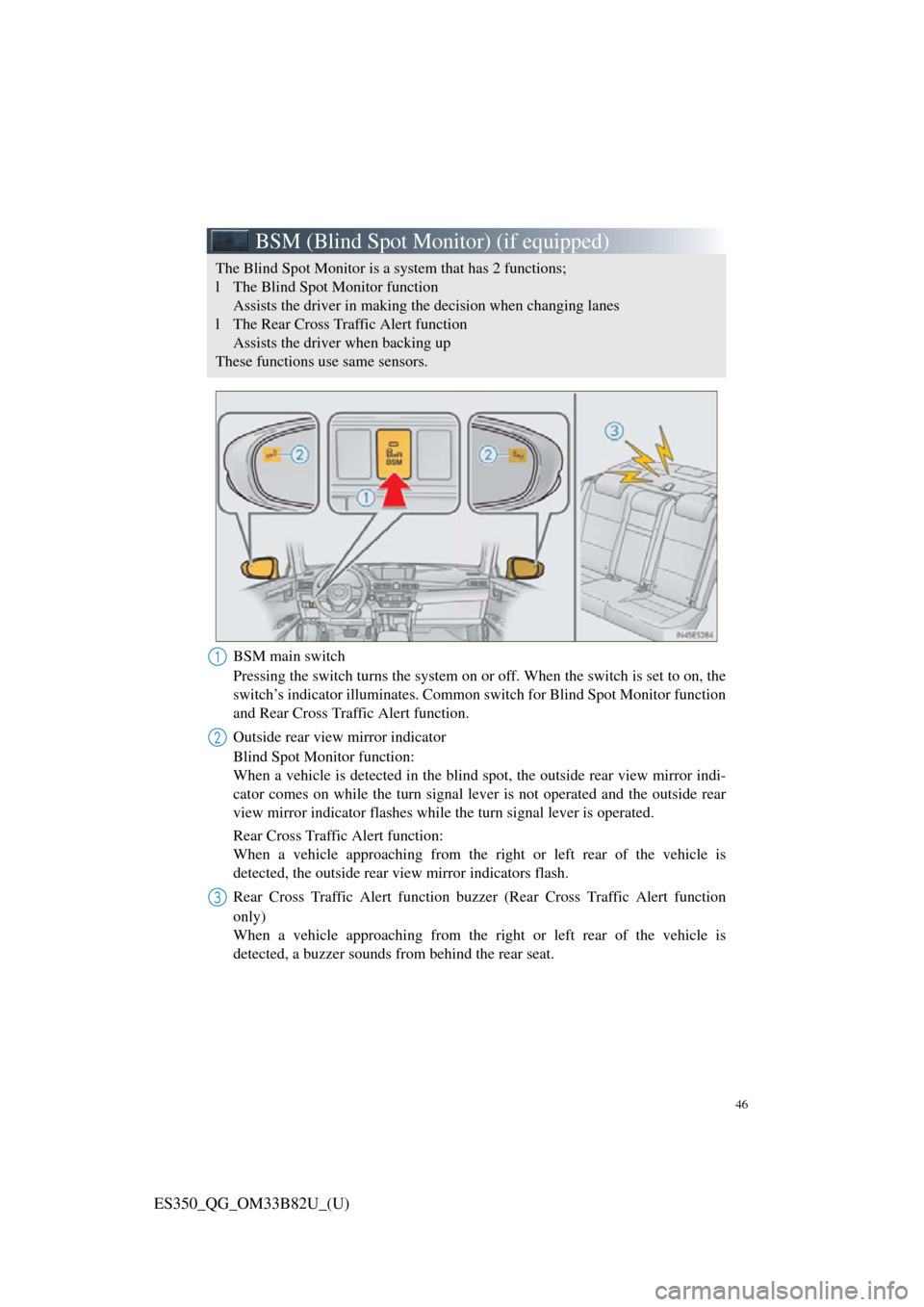
BSM (Blind Spot Monitor) (if equipped)
BSM main switch
Pressing the switch turns the system on or off. When the switch is set to on, the
switch’s indicator illuminates. Common switch for Blind Spot Monitor function
and Rear Cross Traffic Alert function.
Outside rear view mirror indicator
Blind Spot Monitor function:
When a vehicle is detected in the blind spot, the outside rear view mirror indi-
cator comes on while the tu rn signal lever is not operated and the outside rear
view mirror indicator fl ashes while the turn signal lever is operated.
Rear Cross Traffic Alert function:
When a vehicle approaching from the ri ght or left rear of the vehicle is
detected, the outside rear view mirror indicators flash.
Rear Cross Traffic Alert function buzzer (Rear Cross Traffic Alert function
only)
When a vehicle approaching from the ri ght or left rear of the vehicle is
detected, a buzzer sounds from behind the rear seat.
The Blind Spot Monitor is a system that has 2 functions;
l The Blind Spot Monitor function Assists the driver in making th e decision when changing lanes
l The Rear Cross Traffic Alert function Assists the driver when backing up
These functions use same sensors.
1
2
3
Page 48 of 112
48
ES350_QG_OM33B82U_(U)
Tire Pressure Warning System
nThe tire inflation pressure display function
The tire pressure detected by the tire
pressure warning system can be dis-
played on the multi-information dis-
play. ( →P. 2 8 )
The illustration used is intended as an
example, and may differ from the image
that is actually displayed on the multi-
information display.
n Initializing the tire pressure warning system
Press and hold the tire pressure warning
reset switch until the tire pressure warn-
ing light blinks slowly 3 times.
Your vehicle is equipped with a tire pressure warning system that uses tire pres-
sure warning valves and transmitters to detect low tire inflation pressure before
serious problems arise.
Page 50 of 112
49
ES350_QG_OM33B82U_(U)
nMenu
Press the “MENU” button on the
Remote Touch to display the “Menu”
screen.
“Climate” ( →P.78)
“Nav” ( →P.52)
“LEXUS App Suite”
“Info”
“Radio” ( →P.65)
“Media” ( →P.63)
“Phone” ( →P.58)
“Setup”
“Display”
n Home
Three-way split screen
Press the “HOME” button on the
Remote Touch to display the home
screen.
The home screen can display multiple
information screens, such as the naviga-
tion system screen, audio system screen
and fuel consumption screen, simulta-
neously. When a screen is selected, the
selected screen is switched to a full-
screen display.
Displays the condition of the
Bluetooth
® connection
Select to change the display items/
area and the home screen layout.
Two-way split screen
1
2
3
4
5
6
7
8
9
1
2


