Page 22 of 501
Safety features of your vehicle
63
C010103APB
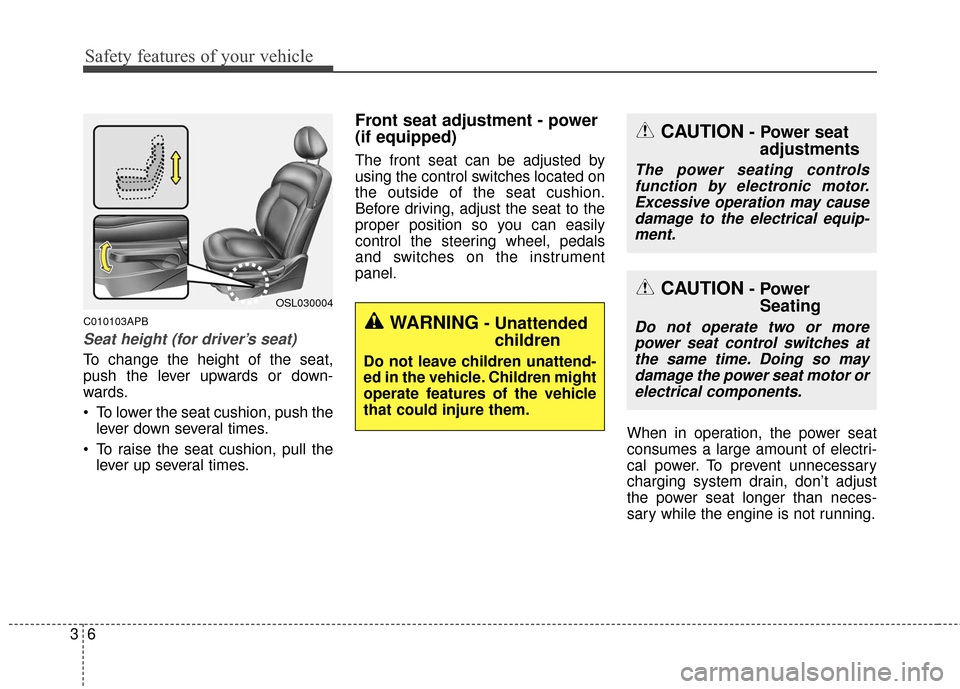
Seat height (for driver’s seat)
To change the height of the seat,
push the lever upwards or down-
wards.
To lower the seat cushion, push thelever down several times.
To raise the seat cushion, pull the lever up several times.
Front seat adjustment - power
(if equipped)
The front seat can be adjusted by
using the control switches located on
the outside of the seat cushion.
Before driving, adjust the seat to the
proper position so you can easily
control the steering wheel, pedals
and switches on the instrument
panel.
When in operation, the power seat
consumes a large amount of electri-
cal power. To prevent unnecessary
charging system drain, don’t adjust
the power seat longer than neces-
sary while the engine is not running.
OSL030004
CAUTION- Power seatadjustments
The power seating controls
function by electronic motor.Excessive operation may causedamage to the electrical equip-ment.
CAUTION- Power Seating
Do not operate two or more
power seat control switches atthe same time. Doing so maydamage the power seat motor orelectrical components.WARNING- Unattended children
Do not leave children unattend-
ed in the vehicle. Children might
operate features of the vehicle
that could injure them.
Page 128 of 501
441
Features of your vehicle
Electric power steering
Power steering uses the motor to
assist you in steering the vehicle. If
the engine is off or if the power steer-
ing system becomes inoperative, the
vehicle may still be steered, but it will
require increased steering effort.
The motor driven power steering is
controlled by the power steering con-
trol unit which senses the steering
wheel torque and vehicle speed to
command the motor.
The steering wheel becomes heavier
as the vehicle’s speed increases and
becomes lighter as the vehicle’s
speed decreases for better control of
the steering wheel.
Should you notice any change in the
effort required to steer during normal
vehicle operation, have the power
steering checked by an authorized
Kia dealer.
✽ ✽NOTICE
The following symptoms may occur
during normal vehicle operation:
• The steering effort is high immedi-
ately after turning the ignition
switch on. This happens as the sys-
tem performs the EPS system
diagnostics. When the diagnostics
is completed, the steering wheel
will return to its normal condition.
• A click noise may be heard from the EPS relay after the ignition
switch is turned to the ON or
LOCK position.
• Motor noise may be heard when the vehicle is at a stop or at a low
driving speed.
• The steering effort increases if the steering wheel is rotated continu-
ously when the vehicle is not in
motion. However, after a few min-
utes, it will return to its normal
conditions.
• When you operate the steering wheel in low temperature, abnor-
mal noise could occur. If tempera-
ture rises, the noise will disappear.
This is a normal condition.
STEERING WHEEL
CAUTION
If the EPS system does not
operate normally, the warninglight will illuminate on theinstrument cluster. The steeringwheel may become difficult tocontrol or operate abnormally.Take your vehicle to an author-ized Kia dealer and have thevehicle checked as soon aspossible.
Page 129 of 501
Features of your vehicle
42
4
D130300AUN
Tilt steering/
Telescope steering
(if equipped)
Tilt steering allows you to adjust the
steering wheel before you drive.
You can also raise the steering wheel
to give your legs more room when
you exit and enter the vehicle (if
equipped).
The steering wheel should be posi-
tioned so that it is comfortable for
you to drive, while permitting you to
see the instrument panel warning
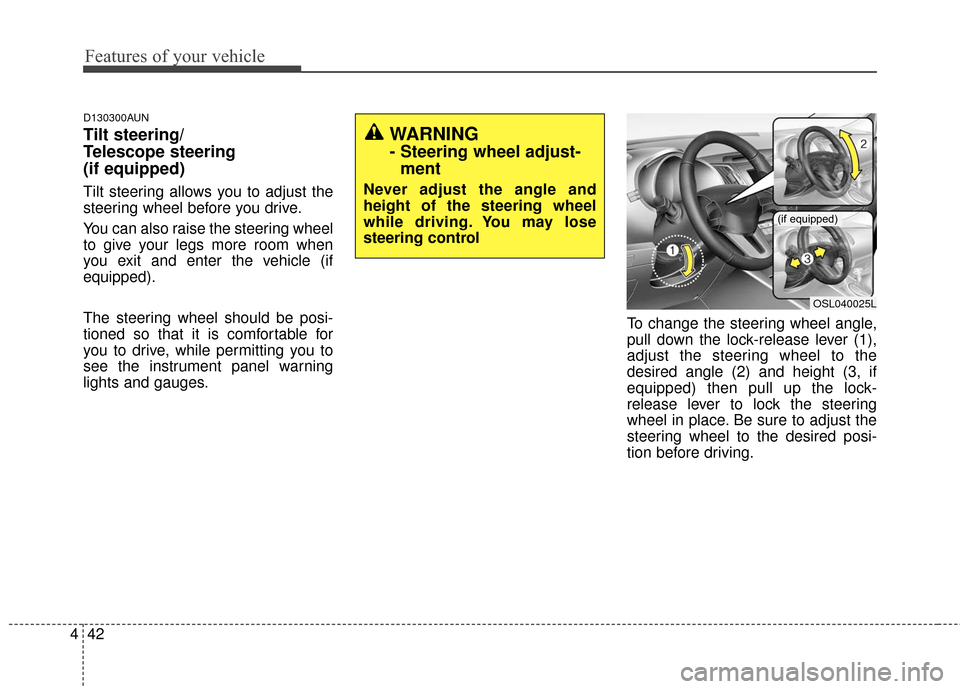
lights and gauges. To change the steering wheel angle,
pull down the lock-release lever (1),
adjust the steering wheel to the
desired angle (2) and height (3, if
equipped) then pull up the lock-
release lever to lock the steering
wheel in place. Be sure to adjust the
steering wheel to the desired posi-
tion before driving.
OSL040025L
(if equipped)
WARNING
- Steering wheel adjust-
ment
Never adjust the angle and
height of the steering wheel
while driving. You may lose
steering control
Page 132 of 501
445
Features of your vehicle
FLEX Steer (if equipped)
The FLEX Steer controls steering
effort as driver's preference or road
condition.
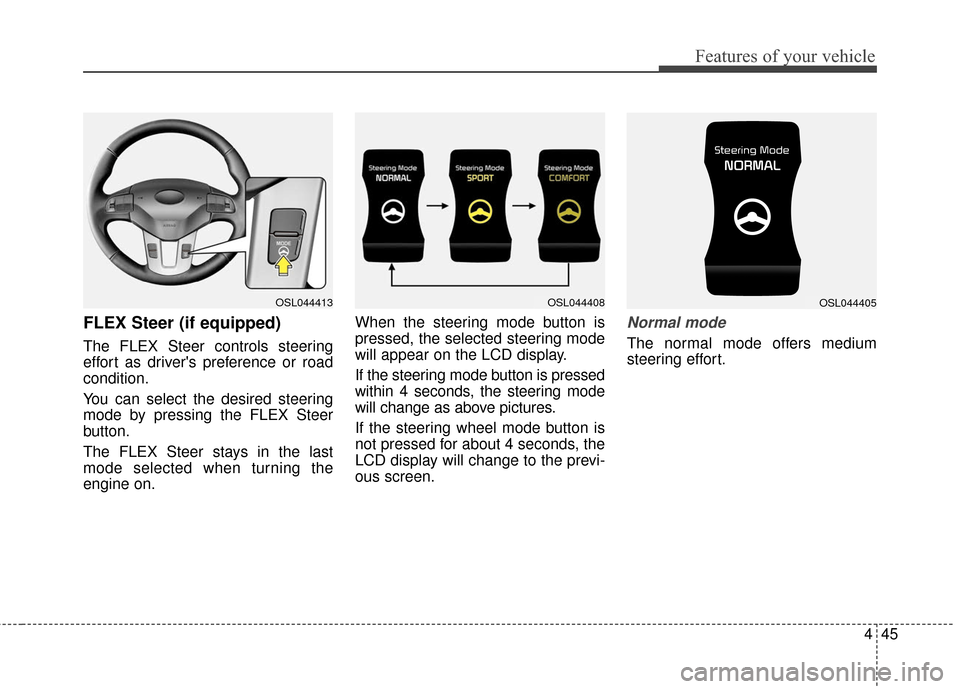
You can select the desired steering
mode by pressing the FLEX Steer
button.
The FLEX Steer stays in the last
mode selected when turning the
engine on.When the steering mode button is
pressed, the selected steering mode
will appear on the LCD display.
If the steering mode button is pressed
within 4 seconds, the steering mode
will change as above pictures.
If the steering wheel mode button is
not pressed for about 4 seconds, the
LCD display will change to the previ-
ous screen.
Normal mode
The normal mode offers medium
steering effort.
OSL044413OSL044408OSL044405
Page 133 of 501
Features of your vehicle
46
4
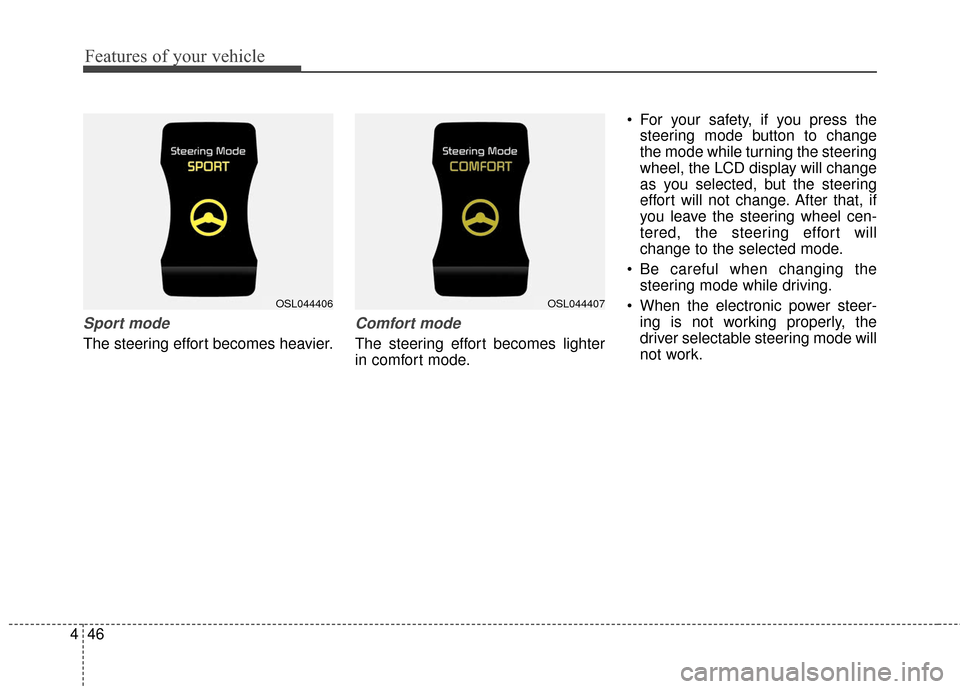
Sport mode
The steering effort becomes heavier.
Comfort mode
The steering effort becomes lighter
in comfort mode. For your safety, if you press the
steering mode button to change
the mode while turning the steering
wheel, the LCD display will change
as you selected, but the steering
effort will not change. After that, if
you leave the steering wheel cen-
tered, the steering effort will
change to the selected mode.
Be careful when changing the steering mode while driving.
When the electronic power steer- ing is not working properly, the
driver selectable steering mode will
not work.
OSL044407OSL044406
Page 270 of 501
![KIA Sportage 2016 QL / 4.G Owners Manual 4183
Features of your vehicle
VOICE RECOGNITION
Using Voice Recognition
Starting Voice Recognition
Shortly press the key on the
steering wheel. Say a commandIf prompt feedback is in [ON], then
the](/manual-img/2/2981/w960_2981-269.png "KIA Sportage 2016 QL / 4.G Owners Manual 4183
Features of your vehicle
VOICE RECOGNITION
Using Voice Recognition
Starting Voice Recognition
Shortly press the key on the
steering wheel. Say a commandIf prompt feedback is in [ON], then
the")
4183
Features of your vehicle
VOICE RECOGNITION
Using Voice Recognition
Starting Voice Recognition
Shortly press the key on the
steering wheel. Say a commandIf prompt feedback is in [ON], then
the system will say “Please say a
command after the beep (BEEP)”
mode, then the system will only say
“(BEEP)”
[On]/[Off], go to [System]
[Prompt Feedback]
command after the voice instruc-
tion and beep tone.
Contact List Best Practices
1)Do not store single-name entries (e.g., “Bob”, “Mom”, “Kim”, etc.).
Instead, always use full names
(including first and last names) for
all contacts (e.g., use “Jacob
Stevenson” instead of “Dad”).
2)Do not use abbreviations (i.e., use “Lieutenant” instead of “Lt.” or
“Sergeant” instead of “Sgt.”).
3)Do not use acronyms (i.e., use “County Finance Department”
instead of “CFD”).
4)Do not use special characters (e.g., “@”, “hyphen -“, “asterisk *”,
ampersand &”).
5)If a name is not recognized from the contact list, change it to a more
descriptive name (e.g., use
“Grandpa Joseph” instead of “Pa
Joe”).
SETUPCLOCK
Page 316 of 501
![KIA Sportage 2016 QL / 4.G Owners Manual 4229
Features of your vehicle
VOICE RECOGNITION
Using Voice Recognition
Starting Voice Recognition
Shortly press the key on the
steering wheel. Say a commandIf prompt feedback is in [ON], then
the](/manual-img/2/2981/w960_2981-315.png "KIA Sportage 2016 QL / 4.G Owners Manual 4229
Features of your vehicle
VOICE RECOGNITION
Using Voice Recognition
Starting Voice Recognition
Shortly press the key on the
steering wheel. Say a commandIf prompt feedback is in [ON], then
the")
4229
Features of your vehicle
VOICE RECOGNITION
Using Voice Recognition
Starting Voice Recognition
Shortly press the key on the
steering wheel. Say a commandIf prompt feedback is in [ON], then
the system will say “Please say a
command after the beep (BEEP)”
mode, then the system will only say
“(BEEP)”
[On]/[Off], go to [System]
[Prompt Feedback]
command after the voice instruc-
tion and beep tone.
Contact List Best Practices
1)Do not store single-name entries (e.g., “Bob”, “Mom”, “Kim”, etc.).
Instead, always use full names
(including first and last names) for
all contacts (e.g., use “Jacob
Stevenson” instead of “Dad”).
2)Do not use abbreviations (i.e., use “Lieutenant” instead of “Lt.” or
“Sergeant” instead of “Sgt.”).
3)Do not use acronyms (i.e., use “County Finance Department”
instead of “CFD”).
4)Do not use special characters (e.g., “@”, “hyphen -“, “asterisk *”,
ampersand &”).
5)If a name is not recognized from the contact list, change it to a more
descriptive name (e.g., use
“Grandpa Joseph” instead of “Pa
Joe”).
SETUPCLOCK
Page 339 of 501
Driving your vehicle
14
5
E050200AUN-C1
Good driving practices
Never take the vehicle out of gear
and coast down a hill. This is
extremely hazardous. Always leave
the vehicle in gear.
Don't "ride" the brakes. This can cause them to overheat and mal-
function. Instead, when you are
driving down a long hill, slow down
and shift to a lower gear. When you
do this, engine braking will help
slow down the vehicle.
Slow down before shifting to a lower gear. This will help avoid
over-revving the engine, which can
cause damage.
Slow down when you encounter cross winds. This gives you much
better control of your vehicle.
Be sure the vehicle is completely stopped before you attempt to shift
into reverse. The transaxle can be
damaged if you do not. To shift into
reverse, depress the clutch, move
the shift lever to neutral, then shift
to the reverse position. Exercise extreme caution when
driving on a slippery surface. Be
especially careful when braking,
accelerating or shifting gears. On a
slippery surface, an abrupt change
in vehicle speed can cause the
drive wheels to lose traction and
the vehicle to go out of control.
Always buckle-up! In a collision, an unbelted occupant is significantly
more likely to be seriously injured
or killed than a properly belted
occupant.
Avoid high speeds when cornering or turning. High speed cornering
and turning increase the risk of
vehicle rollover. Rollover accidents
are violent and unpredictable.
Never exceed posted speed limits.