2016 KIA Sportage display
[x] Cancel search: displayPage 319 of 501
Features of your vehicle
232
4
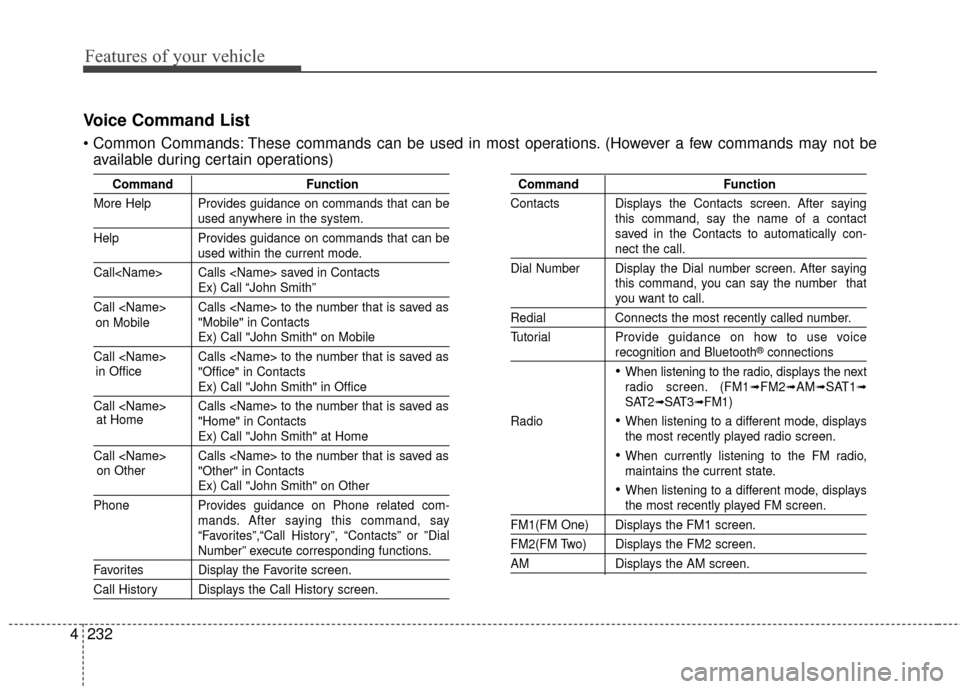
Voice Command List
These commands can be used in most operations. (However a few commands may not be
available during certain operations)
Command Function
More Help Provides guidance on commands that can be
used anywhere in the system.
Help Provides guidance on commands that can be
used within the current mode.
Call
Ex) Call “John Smith”
Call
Ex) Call "John Smith" on Mobile
Call
Ex) Call "John Smith" in Office
Call
Ex) Call "John Smith" at Home
Call
Ex) Call "John Smith" on Other
Phone Provides guidance on Phone related com- mands. After saying this command, say
“Favorites”,“Call History”, “Contacts” or ”Dial
Number” execute corresponding functions.
Favorites Display the Favorite screen.
Call History Displays the Call History screen.
Command Function
Contacts Displays the Contacts screen. After saying this command, say the name of a contact
saved in the Contacts to automatically con-
nect the call.
Dial Number Display the Dial number screen. After saying this command, you can say the number that
you want to call.
RedialConnects the most recently called number.
Tutorial Pro vide guidance on how to use voice
recognition and Bluetooth®connections
When listening to the radio, displays the next
radio screen. (FM1➟FM2➟AM➟SAT1➟SAT2➟SAT3➟FM1)
Radio
When listening to a different mode, displays
the most recently played radio screen.
When currently listening to the FM radio,
maintains the current state.
When listening to a different mode, displaysthe most recently played FM screen.
FM1(FM One) Displays the FM1 screen.
FM2(FM Two) Displays the FM2 screen.
AM Displays the AM screen.
in Office
at Home
on Other
on Mobile
Page 320 of 501
4233
Features of your vehicle
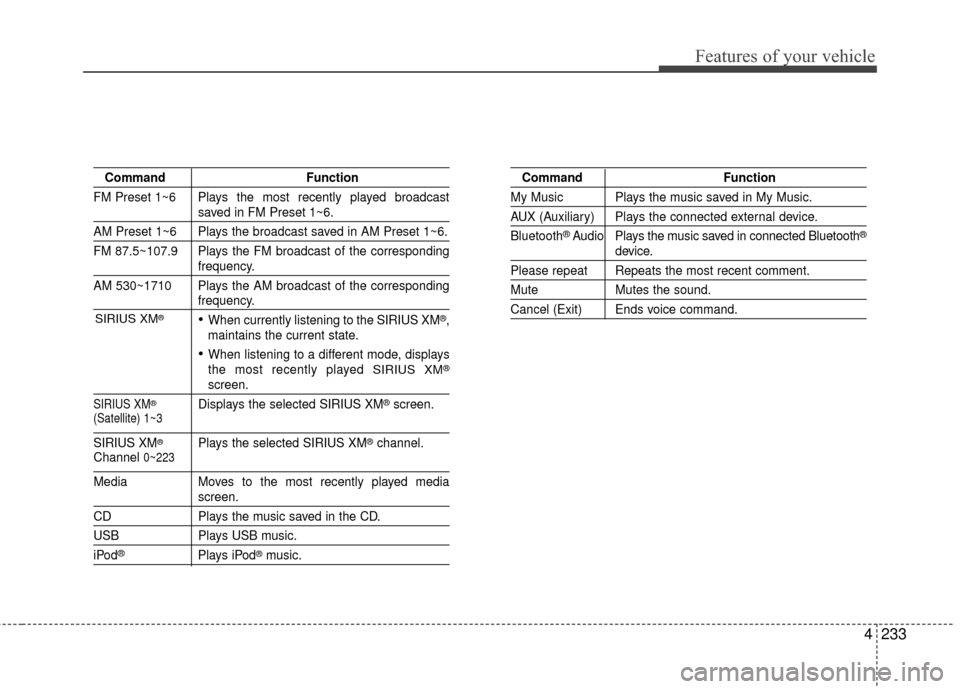
CommandFunction
FM Preset 1~6 Plays the most recently played broadcast
saved in FM Preset 1~6.
AM Preset 1~6 Plays the broadcast saved in AM Preset 1~6.
FM 87.5~107.9 Plays the FM broadcast of the corresponding
frequency.
AM 530~1710 Plays the AM broadcast of the corresponding
frequency.
When currently listening to the SIRIUS XM®,
maintains the current state.
When listening to a different mode, displays
the most recently played SIRIUS XM®
screen.
SIRIUS XM®Displays the selected SIRIUS XM®screen.
SIRIUS XM®Plays the selected SIRIUS XM®channel.
Media Moves to the most recently played mediascreen.
CD Plays the music saved in the CD.
USBPlays USB music.
iPod®Plays iPod®music.
Command Function
My Music Plays the music saved in My Music.
AUX (Auxiliary) Plays the connected external device.
Bluetooth
®Audio Plays the music saved in connected Bluetooth®
device.
Please repeat Repeats the most recent comment.
Mute Mutes the sound.
Cancel (Exit) Ends voice command.
Channel 0~223
(Satellite) 1~3
SIRIUS XM®
Page 321 of 501
Features of your vehicle
234
4
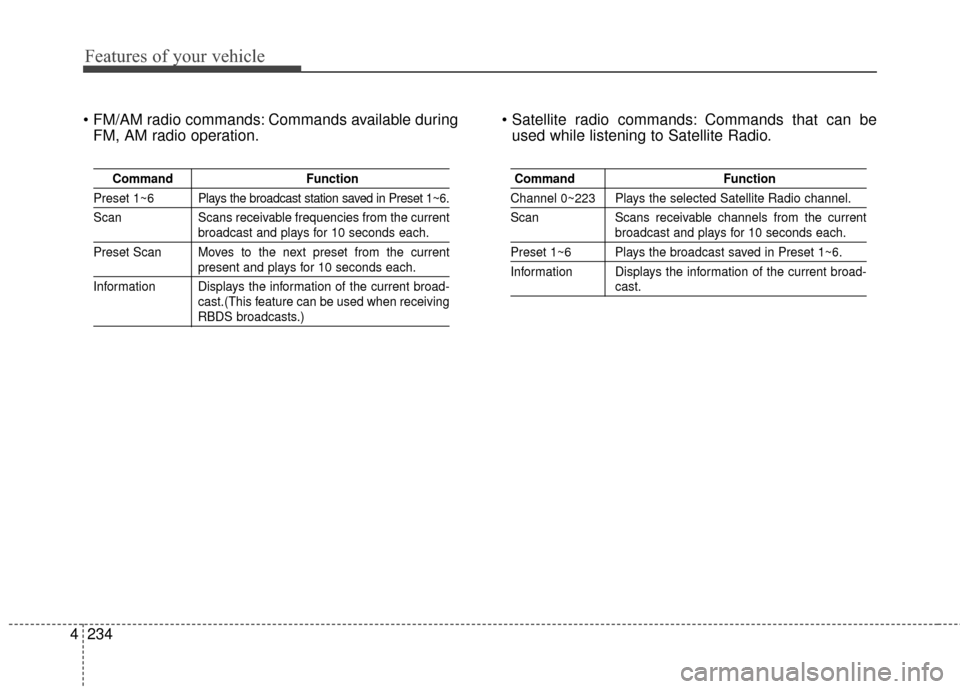
Commands available during
FM, AM radio operation. Commands that can be
used while listening to Satellite Radio.
Command Function
Preset 1~6 Plays the broadcast station saved in Preset 1~6.
Scan Scans receivable frequencies from the current
broadcast and plays for 10 seconds each.
Preset Scan Moves to the next preset from the current
present and plays for 10 seconds each.
Information Displays the information of the current broad- cast.(This feature can be used when receiving
RBDS broadcasts.)
Command Function
Channel 0~223 Plays the selected Satellite Radio channel.
Scan Scans receivable channels from the current
broadcast and plays for 10 seconds each.
Preset 1~6 Plays the broadcast saved in Preset 1~6.
Information Displays the information of the current broad-
cast.
Page 322 of 501
4235
Features of your vehicle
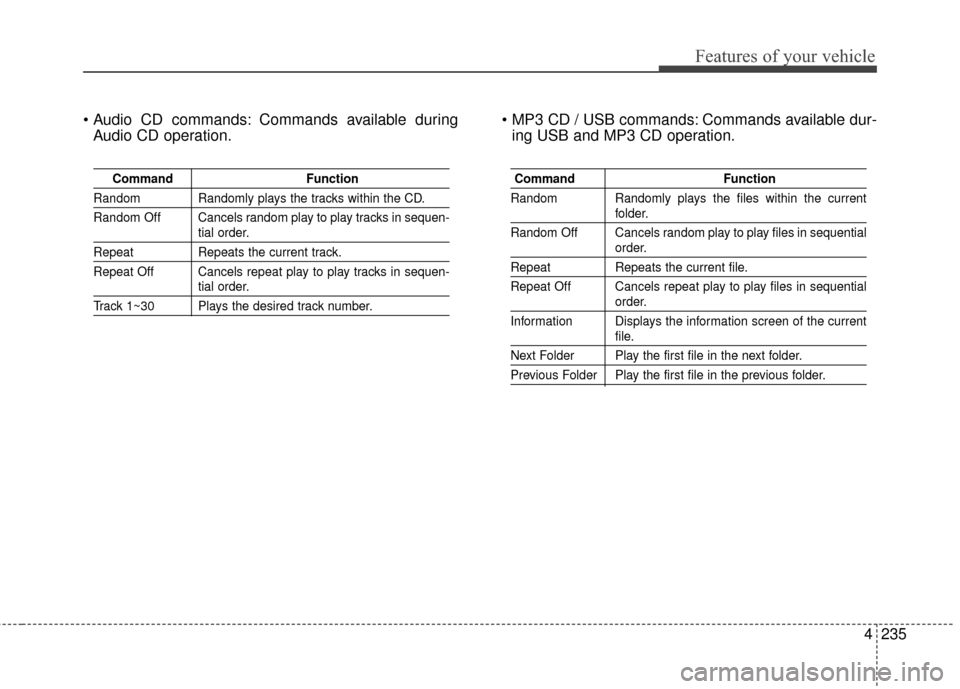
Commands available duringAudio CD operation. Commands available dur-
ing USB and MP3 CD operation.
Command Function
Random Randomly plays the tracks within the CD.
Random Off Cancels random play to play tracks in sequen-
tial order.
RepeatRepeats the current track.
Repeat Off Cancels repeat play to play tracks in sequen-
tial order.
Track 1~30 Plays the desired track number.
Command Function
Random Randomly plays the files within the current
folder.
Random Off Cancels random play to play files in sequential
order.
Repeat Repeats the current file.
Repeat Off Cancels repeat play to play files in sequential
order.
Information Displays the information screen of the current
file.
Next Folder Play the first file in the next folder.
Previous Folder Play the first file in the previous folder.
Page 341 of 501
Driving your vehicle
16
5
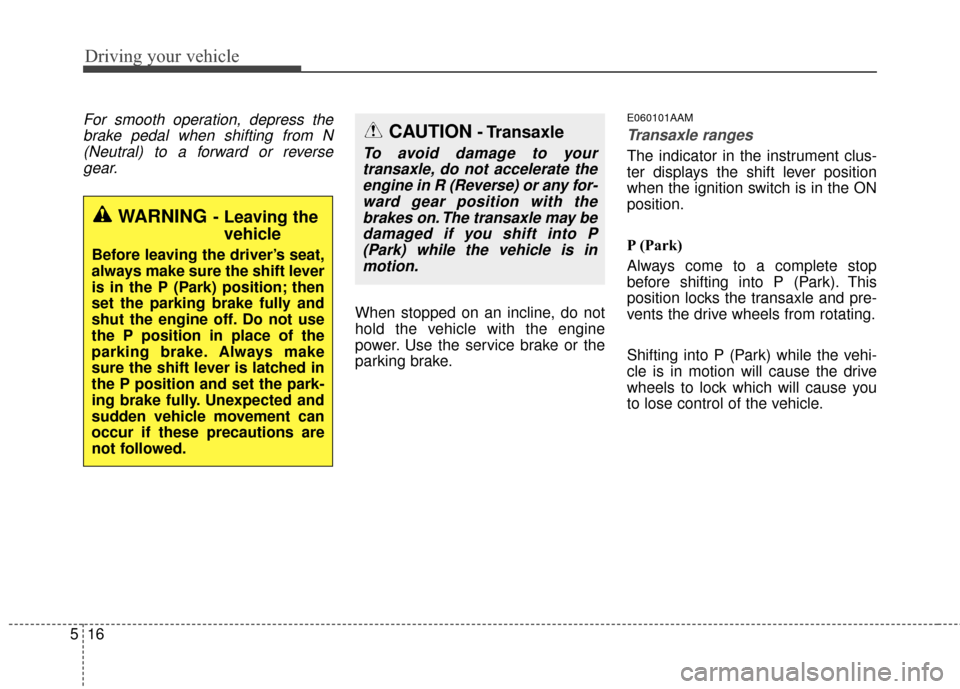
For smooth operation, depress the
brake pedal when shifting from N(Neutral) to a forward or reversegear.
When stopped on an incline, do not
hold the vehicle with the engine
power. Use the service brake or the
parking brake.
E060101AAM
Transaxle ranges
The indicator in the instrument clus-
ter displays the shift lever position
when the ignition switch is in the ON
position.
P (Park)
Always come to a complete stop
before shifting into P (Park). This
position locks the transaxle and pre-
vents the drive wheels from rotating.
Shifting into P (Park) while the vehi-
cle is in motion will cause the drive
wheels to lock which will cause you
to lose control of the vehicle.
WARNING- Leaving the vehicle
Before leaving the driver’s seat,
always make sure the shift lever
is in the P (Park) position; then
set the parking brake fully and
shut the engine off. Do not use
the P position in place of the
parking brake. Always make
sure the shift lever is latched in
the P position and set the park-
ing brake fully. Unexpected and
sudden vehicle movement can
occur if these precautions are
not followed.
CAUTION- Transaxle
To avoid damage to your
transaxle, do not accelerate theengine in R (Reverse) or any for-ward gear position with thebrakes on. The transaxle may bedamaged if you shift into P(Park) while the vehicle is inmotion.
Page 457 of 501
739
Maintenance
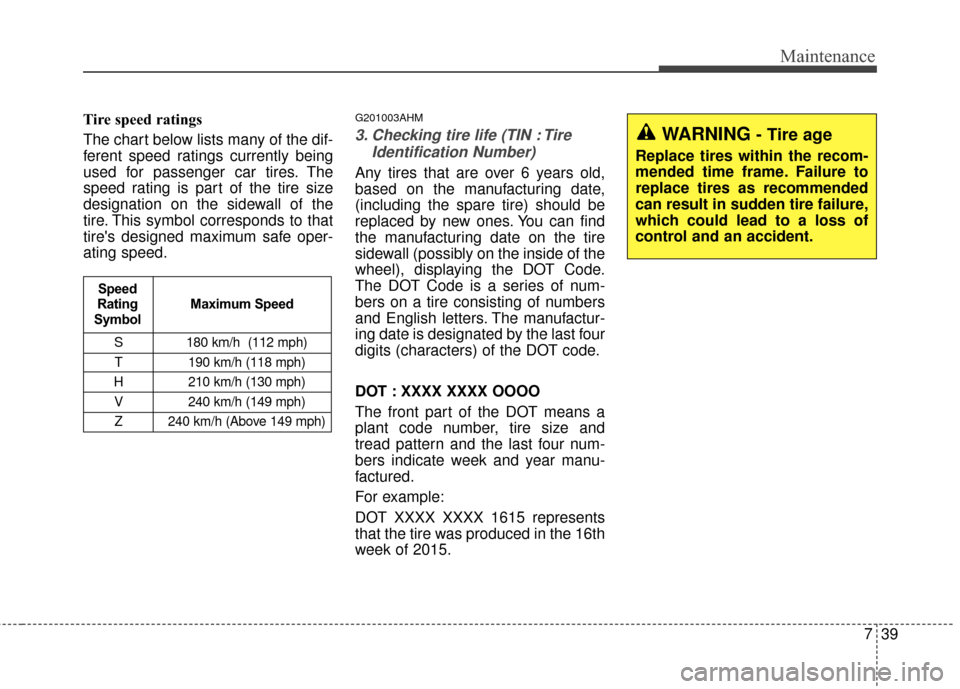
Tire speed ratings
The chart below lists many of the dif-
ferent speed ratings currently being
used for passenger car tires. The
speed rating is part of the tire size
designation on the sidewall of the
tire. This symbol corresponds to that
tire's designed maximum safe oper-
ating speed.G201003AHM
3. Checking tire life (TIN : TireIdentification Number)
Any tires that are over 6 years old,
based on the manufacturing date,
(including the spare tire) should be
replaced by new ones. You can find
the manufacturing date on the tire
sidewall (possibly on the inside of the
wheel), displaying the DOT Code.
The DOT Code is a series of num-
bers on a tire consisting of numbers
and English letters. The manufactur-
ing date is designated by the last four
digits (characters) of the DOT code.
DOT : XXXX XXXX OOOO
The front part of the DOT means a
plant code number, tire size and
tread pattern and the last four num-
bers indicate week and year manu-
factured.
For example:
DOT XXXX XXXX 1615 represents
that the tire was produced in the 16th
week of 2015.
S 180 km/h (112 mph)
T 190 km/h (118 mph)
H 210 km/h (130 mph) V 240 km/h (149 mph)Z 240 km/h (Above 149 mph)
Maximum Speed
Speed
Rating
Symbol
WARNING- Tire age
Replace tires within the recom-
mended time frame. Failure to
replace tires as recommended
can result in sudden tire failure,
which could lead to a loss of
control and an accident.
Page 499 of 501
I5
Index
Maintenance services . . . . . . . . . . . . . . . . . . . . . . . . . . . 7-3Owner maintenance precautions . . . . . . . . . . . . . . . . 7-4
Owner’s responsibility . . . . . . . . . . . . . . . . . . . . . . . . 7-3
Maintenance under severe usage conditions . . . . . . . . 7-12
Manual climate control system. . . . . . . . . . . . . . . . . . . 4-98
Manual transaxle. . . . . . . . . . . . . . . . . . . . . . . . . . . . . . 5-12 Manual transaxle operation . . . . . . . . . . . . . . . . . . . 5-12
Mirrors . . . . . . . . . . . . . . . . . . . . . . . . . . . . . . . . . . . . \
. 4-47 Inside rearview mirror . . . . . . . . . . . . . . . . . . . . . . . 4-47
Outside rearview mirror . . . . . . . . . . . . . . . . . . . . . . 4-51
Normal maintenance schedule . . . . . . . . . . . . . . . . . . . . 7-7
Owner maintenance . . . . . . . . . . . . . . . . . . . . . . . . . . . . 7-5 Owner maintenance schedule. . . . . . . . . . . . . . . . . . . 7-5
Panoramic sunroof . . . . . . . . . . . . . . . . . . . . . . . . . . . . 4-37
Parking brake . . . . . . . . . . . . . . . . . . . . . . . . . . . . . . . . 7-24 Rear-camera display . . . . . . . . . . . . . . . . . . . . . . . . . . . 4-83
Recommended lubricants and capacities . . . . . . . . . . . . 8-4
Recommended SAE viscosity number. . . . . . . . . . . . 8-6
Remote keyless entry . . . . . . . . . . . . . . . . . . . . . . . . . . . 4-7 Battery replacement . . . . . . . . . . . . . . . . . . . . . . . . . . 4-9
Remote keyless entry system operations . . . . . . . . . . 4-7
Transmitter precautions . . . . . . . . . . . . . . . . . . . . . . . 4-8
Road warning . . . . . . . . . . . . . . . . . . . . . . . . . . . . . . . . . 6-2 Hazard warning flasher . . . . . . . . . . . . . . . . . . . . . . . 6-2
Seat belts . . . . . . . . . . . . . . . . . . . . . . . . . . . . . . . . . . . . \
3-22 Care of seat belts . . . . . . . . . . . . . . . . . . . . . . . . . . . 3-36
Pre-tensioner seat belt . . . . . . . . . . . . . . . . . . . . . . . 3-31
Seat belt precautions . . . . . . . . . . . . . . . . . . . . . . . . 3-33
Seat belt restraint system . . . . . . . . . . . . . . . . . . . . . 3-22
Seats . . . . . . . . . . . . . . . . . . . . . . . . . . . . . . . . . . . . \
. . . . 3-2 Front seat . . . . . . . . . . . . . . . . . . . . . . . . . . . . . . . . . . 3-5
Rear seat . . . . . . . . . . . . . . . . . . . . . . . . . . . . . . . . . . 3-15\
Smart key . . . . . . . . . . . . . . . . . . . . . . . . . . . . . . . . . . . 4-\
11 Battery replacement . . . . . . . . . . . . . . . . . . . . . . . . . 4-15
Smart key functions . . . . . . . . . . . . . . . . . . . . . . . . . 4-12
Smart key precautions . . . . . . . . . . . . . . . . . . . . . . . 4-13
Special driving conditions . . . . . . . . . . . . . . . . . . . . . . 5-50 Driving at night . . . . . . . . . . . . . . . . . . . . . . . . . . . . 5-52
M
M
R
S
O
P