Page 3 of 501
1
2
3
4
5
6
7
8I
Introduction
Your vehicle at a glance
Safety features of your vehicle
Features of your vehicle
Driving your vehicle
What to do in an emergency
Maintenance
Specifications & Consumer information
Index
TABLE OF CONTENTS
Page 82 of 501
Safety features of your vehicle
66
3
Problems may arise if the sensor
installation angles are changed
due to the deformation of the front
bumper, front end module, body or
front doors and/or B pillar where
side collision sensors are installed.
Have the vehicle checked and
repaired by an authorized Kia deal-
er.
Your vehicle has been designed to absorb impact and deploy the air
bag(s) in certain collisions.
Installing bumper guards (or side
step or running board) or replacing
a bumper (or front door module)
with non-genuine parts may
adversely affect your vehicle’s col-
lision and air bag deployment per-
formance.
C040801AAM
Air bag inflation conditions
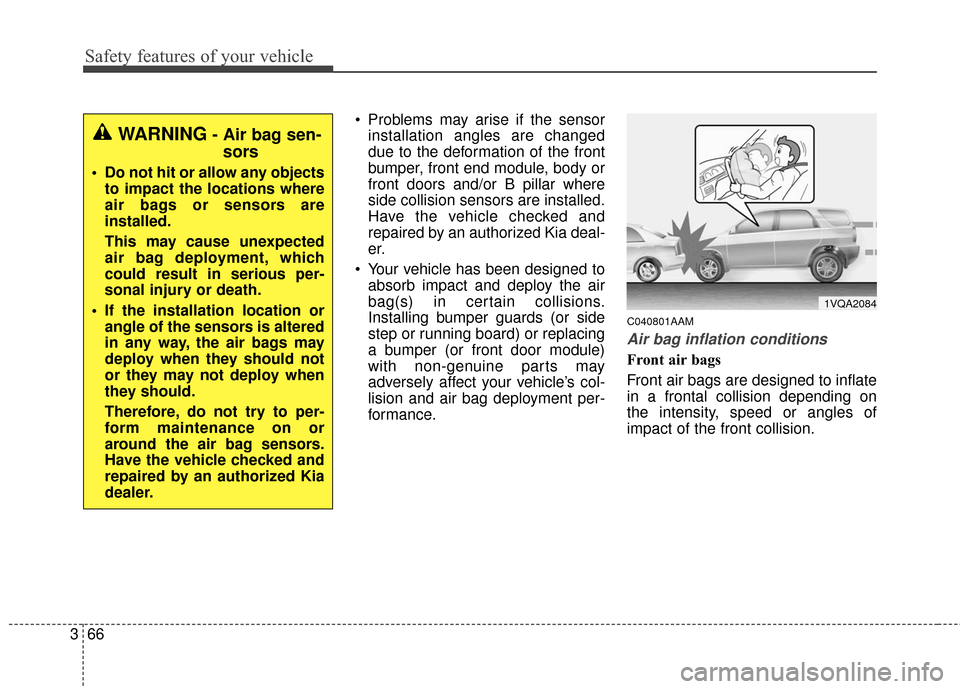
Front air bags
Front air bags are designed to inflate
in a frontal collision depending on
the intensity, speed or angles of
impact of the front collision.
1VQA2084
WARNING- Air bag sen-sors
Do not hit or allow any objects
to impact the locations where
air bags or sensors are
installed.
This may cause unexpected
air bag deployment, which
could result in serious per-
sonal injury or death.
If the installation location or angle of the sensors is altered
in any way, the air bags may
deploy when they should not
or they may not deploy when
they should.
Therefore, do not try to per-
form maintenance on or
around the air bag sensors.
Have the vehicle checked and
repaired by an authorized Kia
dealer.
Page 86 of 501
Safety features of your vehicle
70
3
C041100AUN
SRS Care
The SRS is virtually maintenance-
free and so there are no parts you
can safely service by yourself. If the
SRS air bag warning light does not
illuminate, when you turn the ignition
on, or continuously remains on, or
continuously blinks. have your vehi-
cle immediately inspected by an
authorized Kia dealer.
Any work on the SRS system, such
as removing, installing, repairing, or
any work on the steering wheel, the
front passenger’s panel, front seats
and roof rails must be performed by
an authorized Kia dealer. Improper
handling of the SRS system may
result in serious personal injury. For cleaning the air bag pad covers,
use only a soft, dry cloth or one
which has been moistened with plain
water. Solvents or cleaners could
adversely affect the air bag covers
and proper deployment of the sys-
tem.
If components of the air bag system
must be discarded, or if the vehicle
must be scrapped, certain safety
precautions must be observed. An
authorized Kia dealer knows these
precautions and can give you the
necessary information. Failure to fol-
low these precautions and proce-
dures could increase the risk of per-
sonal injury.
WARNING- Tampering
with SRS
Do not tamper with or discon-
nect SRS wiring, or other compo-
nents of the SRS system. Doing
so could result in the accidental
inflation of the air bags or by ren-
dering the SRS inoperative.
WARNING- TowingVehicle
Always have the ignition off
when your vehicle is being
towed. The side air bags may
inflate if the vehicle is tilted
such as when being towed
because of the rollover sensors
in the vehicle.
Page 148 of 501
461
Features of your vehicle
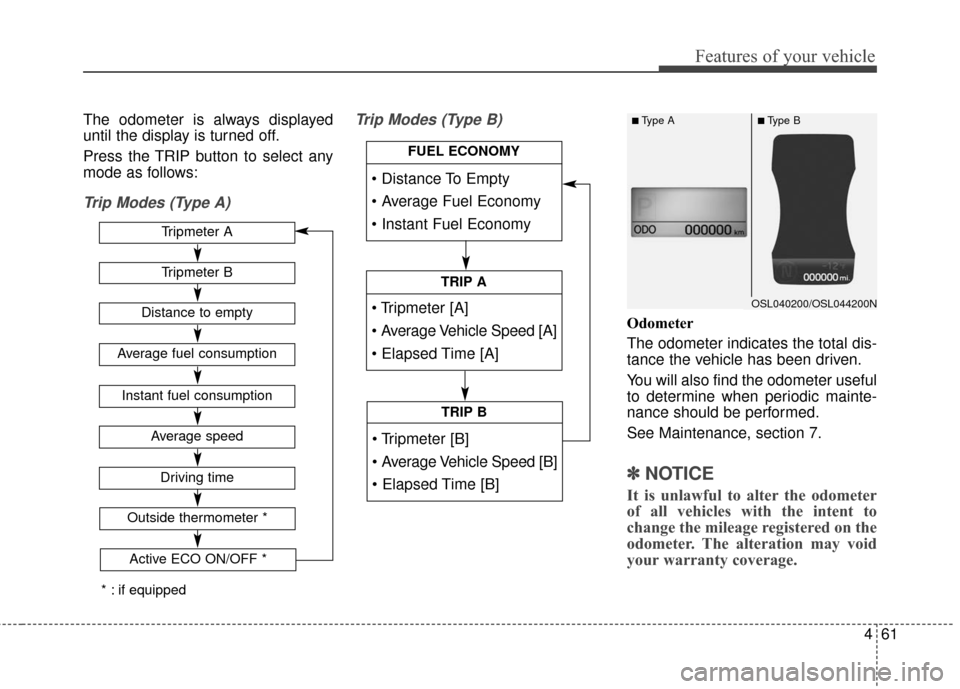
The odometer is always displayed
until the display is turned off.
Press the TRIP button to select any
mode as follows:
Trip Modes (Type A)Trip Modes (Type B)
Odometer
The odometer indicates the total dis-
tance the vehicle has been driven.
You will also find the odometer useful
to determine when periodic mainte-
nance should be performed.
See Maintenance, section 7.
✽ ✽
NOTICE
It is unlawful to alter the odometer
of all vehicles with the intent to
change the mileage registered on the
odometer. The alteration may void
your warranty coverage.
Tripmeter B
Average speed
Driving time
Tripmeter A
Distance to empty
Average fuel consumption
Instant fuel consumption
Outside thermometer *
OSL040200/OSL044200N
■Type A■Type B
Active ECO ON/OFF *
FUEL ECONOMY
TRIP A
TRIP B
* : if equipped
Page 193 of 501
Features of your vehicle
106
4
If you’re unsure about replacing pro-
cedure, have it done by an author-
ized Kia dealer.
✽ ✽
NOTICE
• Replace the filter according to the
Maintenance Schedule.
If the vehicle is being driven in
severe conditions such as dusty or
rough roads, more frequent air
conditioner filter inspections and
changes are required.
• When the air flow rate suddenly decreases, the system should be
checked at an authorized Kia
dealer.
Checking the amount of air
conditioner refrigerant and
compressor lubricant
When the amount of refrigerant is
low, the performance of the air con-
ditioning is reduced. Overfilling also
has a negative impact on the air con-
ditioning system.
Therefore, if abnormal operation is
found, have the system inspected by
an authorized Kia dealer.
WARNING
The oil and refrigerant in your
vehicle's air conditioning sys-
tem is under very high pres-
sure. If proper service proce-
dures are not followed an explo-
sion may result. To reduce the
risk of serious injury or death,
the air conditioning system in
your vehicle should only be
serviced by trained and certi-
fied technicians.
CAUTION
It is important that the correct
type and amount of oil andrefrigerant is used, otherwisedamage to the vehicle. To pre-vent damage, the air condition-ing system in your vehicleshould only be serviced bytrained and certified technicians.
Page 226 of 501
4139
Features of your vehicle
✽
✽NOTICE
Please inquire with your place of
purchase or service maintenance
center prior to changing the position
of any devices installed in your
audio system. Technical expertise is
required to disassemble and/or
install these devices.
Turn on the car ignition before
using this device. Do not operate
the audio system for long periods
of time with the ignition turned off
as such operations may lead to
battery discharge.
In case of product malfunction, please contact your place of pur-
chase or After Service center.
Placing the audio system within an electromagnetic environment may
result in noise interference.CAUTION- Device clean-ing
When cleaning the device,
make sure to turn off thedevice and use a dry andsmooth cloth.
Never use tough materials, chemical cloths, or solvents(alcohol, benzene, thinners,etc.) as such materials maydamage the device panel orcause color/quality deteriora-tion.
Prevent caustic solutions such as perfume and cosmet-ic oil from contacting thedashboard because they maycause damage or discol-oration.
CAUTION
Do not subject the device tosevere shock or impact. Directpressure onto the front side ofthe monitor may cause damageto the LCD or touch screen.
Page 328 of 501
53
Driving your vehicle
E020100AUN
Before entering vehicle
• Be sure that all windows, outsidemirror(s), and outside lights are
clean.
Check the condition of the tires.
Check under the vehicle for any sign of leaks.
Be sure there are no obstacles behind you if you intend to back up.
E020200AUN
Necessary inspections
Fluid levels, such as engine oil,
engine coolant, brake fluid, and
washer fluid should be checked on a
regular basis, at the exact interval
depending on the fluid. Further
details are provided in section 7,
“Maintenance”.
E020300AHM
Before starting
Close and lock all doors.
Position the seat so that all con-trols are easily reached.
Adjust the inside and outside rearview mirrors.
Be sure that all lights work.
Check all gauges.
Check the operation of warning lights when the ignition switch is
turned to the ON position.
Release the parking brake and make sure the brake warning light
goes out.
Buckle your seat belt.
For safe operation, be sure you are
familiar with your vehicle and its
equipment.
BEFORE DRIVING
WARNING
Driving while distracted can
result in a loss of vehicle con-
trol, that may lead to an acci-
dent, severe personal injury,
and death. The driver’s primary
responsibility is in the safe and
legal operation of a vehicle, and
use of any handheld devices,
other equipment, or vehicle sys-
tems which take the driver’s
eyes, attention and focus away
from the safe operation of a
vehicle or which are not permis-
sible by law should never be
used during operation of the
vehicle.
Page 350 of 501
525
Driving your vehicle
✽
✽NOTICE
• Shorten your scheduled mainte-
nance interval if you drive in off-
road conditions such as sand, mud
or water (see “Maintenance under
severe usage conditions” in section
7). Always wash your vehicle thor-
oughly after off-road use, especial-
ly cleaning the bottom of the vehi-
cle.
• A full time four wheel drive vehi- cle cannot be towed by an ordi-
nary tow truck. Make sure that
the vehicle is placed on a flat bed
truck for moving.WARNING - Drivingthrough
water
Drive slowly. If you are driving
too fast in water, the water can
get into the engine compart-
ment and wet the ignition sys-
tem, causing your vehicle to
suddenly stop. If this happens
and your vehicle is in a tilted
position, your vehicle may roll
over.
CAUTION - Mud or snow
Do not run the engine continu-
ously at high rmps to free thevehicle from snow or mud. Doingso could damage the 4WD sys-tem in your vehicle.
WARNING- 4WD driving
Do not attempt quick steering
maneuvers or sharp turns in
4WD mode. Such maneuvers
increase the risk of rollover
accidents. Rollover accidents
are extremely violent and
unpredictable.