10
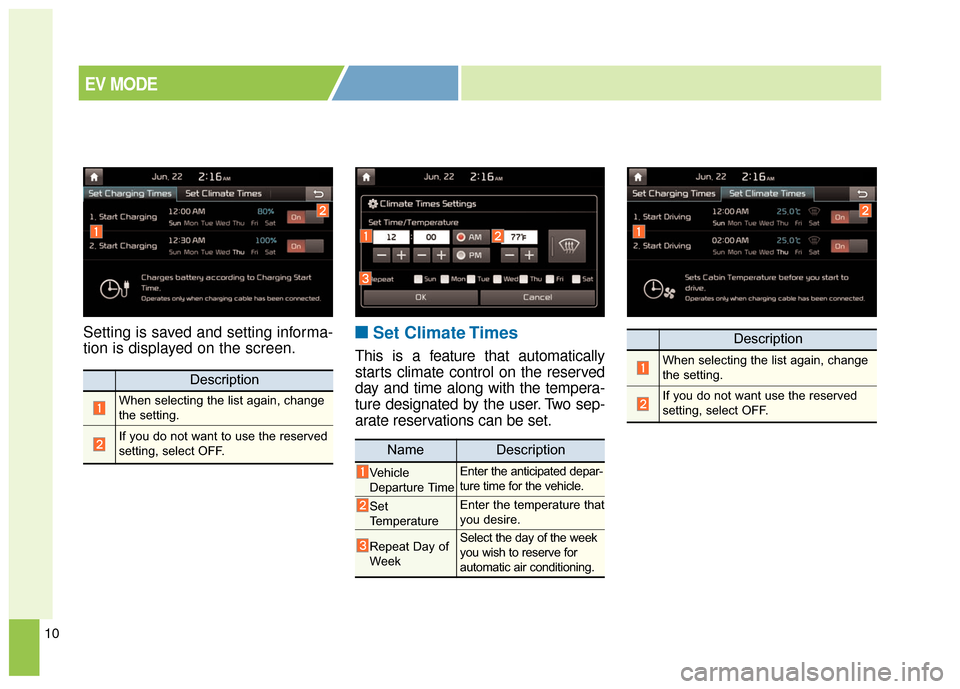
Setting is saved and setting informa-
tion is displayed on the screen.■ ■Set Climate Times
This is a feature that automatically
starts climate control on the reserved
day and time along with the tempera-
ture designated by the user. Two sep-
arate reservations can be set.
Description
When selecting the list again, change
the setting.
If you do not want to use the reserved
setting, select OFF.
Description
When selecting the list again, change
the setting.
If you do not want use the reserved
setting, select OFF.
NameDescription
Vehicle
Departure TimeEnter the anticipated depar-
ture time for the vehicle.
Set
TemperatureEnter the temperature that
you desire.
Repeat Day of
WeekSelect the day of the week
you wish to reserve for
automatic air conditioning.
EV MODE
16
RESERVED CHARGING
To immediately charge the battery
(not at reserved time only) first con-
nect the charging cables. Then, the
Deactivate Reserved Charge button
[ ] should be pressed within three
minutes after the cable connection.
If the battery does not charge after
the Deactivate Reserved Charge
button [ ] has been pressed,
remove the charging cable and
reconnect it.After the Deactivate Reserved
Charge button [ ] has been pressed
(pressed position), you can charge
the battery at any given time.
To change the status to reserved
charging, please press the
Deactivate Reserved Charge button
[ ] again (not pressed position).
❈
Refer to "Normal Charge, Trickle
Charge" for details about connect-
ing the normal charger and the
portable charging cable (ICCB: In-
Cable Control Box).
OPSE0Q40013
![KIA Soul EV 2016 2.G Owners Manual 16
RESERVED CHARGING
To immediately charge the battery
(not at reserved time only) first con-
nect the charging cables. Then, the
Deactivate Reserved Charge button
[ ] should be pressed within three
m](/manual-img/2/2980/w960_2980-480.png "KIA Soul EV 2016 2.G Owners Manual 16
RESERVED CHARGING
To immediately charge the battery
(not at reserved time only) first con-
nect the charging cables. Then, the
Deactivate Reserved Charge button
[ ] should be pressed within three
m")