Page 257 of 524
4187
Features of your vehicle
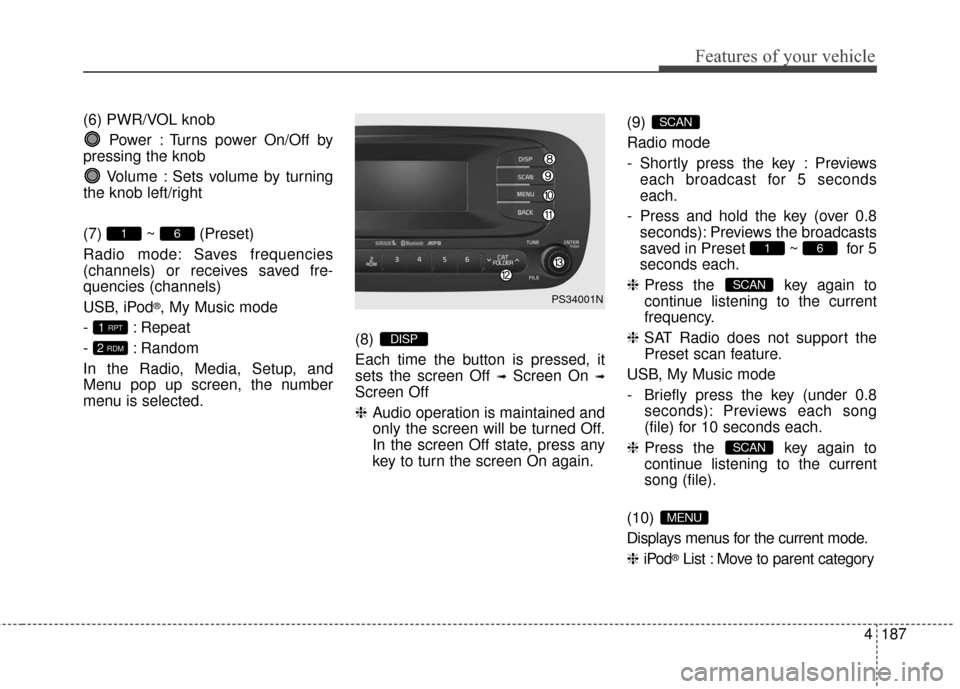
(6) PWR/VOL knobPower : Turns power On/Off by
pressing the knob
Volume : Sets volume by turning
the knob left/right
(7) ~ (Preset)
Radio mode: Saves frequencies
(channels) or receives saved fre-
quencies (channels)
USB, iPod
®, My Music mode
- : Repeat
- : Random
In the Radio, Media, Setup, and
Menu pop up screen, the number
menu is selected. (8)
Each time the button is pressed, it
sets the screen Off
➟Screen On ➟
Screen Off
❈
Audio operation is maintained and
only the screen will be turned Off.
In the screen Off state, press any
key to turn the screen On again. (9)
Radio mode
- Shortly press the key : Previews
each broadcast for 5 seconds
each.
- Press and hold the key (over 0.8 seconds): Previews the broadcasts
saved in Preset ~ for 5
seconds each.
❈ Press the key again to
continue listening to the current
frequency.
❈ SAT Radio does not support the
Preset scan feature.
USB, My Music mode
- Briefly press the key (under 0.8 seconds): Previews each song
(file) for 10 seconds each.
❈ Press the key again to
continue listening to the current
song (file).
(10)
Displays menus for the current mode.
❈ iPod
®List : Move to parent category
MENU
SCAN
SCAN
61
SCAN
DISP2 RDM
1 RPT
61
PS34001N
Page 270 of 524
Features of your vehicle
200
4
Changing Song/File
While song (file) is playing
key
Shortly pressing the key : Plays the current song from the beginning.
❈ If the key is pressed
again within 2 second, the previ-
ous song is played.
Pressing and holding the key (over 0.8 seconds): Rewinds the song.
While song (file) is playing key
Shortly pressing the key : Plays the next song.
Pressing and holding the key (over 0.8 seconds) : Fast forwards the
song.
Scan
While song (file) is playing
key
Scans allsongs from the next song for 10
seconds each.
❈ Press the key again to turn
off.
❈ The SCAN function is not support-
ed in iPod
®mode. Folder Search : USB Mode
While file is playing
(Folder Up) key
While file is playing
(Folder Down) key
❈
If a folder is selected by pressing
the TUNE knob, the first file
within the selected folder will be
played.
❈ In iPod
®mode, moves to the
Parent Folder.
Searching Songs (File)
Turning TUNE knob : Searches for songs (files)
Pressing TUNE knob : Plays selected song (file).
CAT
FOLDER
CAT
FOLDER
SCAN
SCAN
SEEK
TRACK
SEEK
TRACK
SEEK
TRACK
Page 276 of 524
Features of your vehicle
206
4
Starting Bluetooth®Wireless
Technology Audio
Press the key to change
the mode in order of USB➟AUX
➟My Music➟BT Audio.
If BT Audio is selected,
Bluetooth®
Wireless Technology audio will start
playing.
❈ Audio may not automatically start
playing in some mobile phones.
Using the Bluetooth®Wireless
Technology audio features
Press the TUNE knob to play and
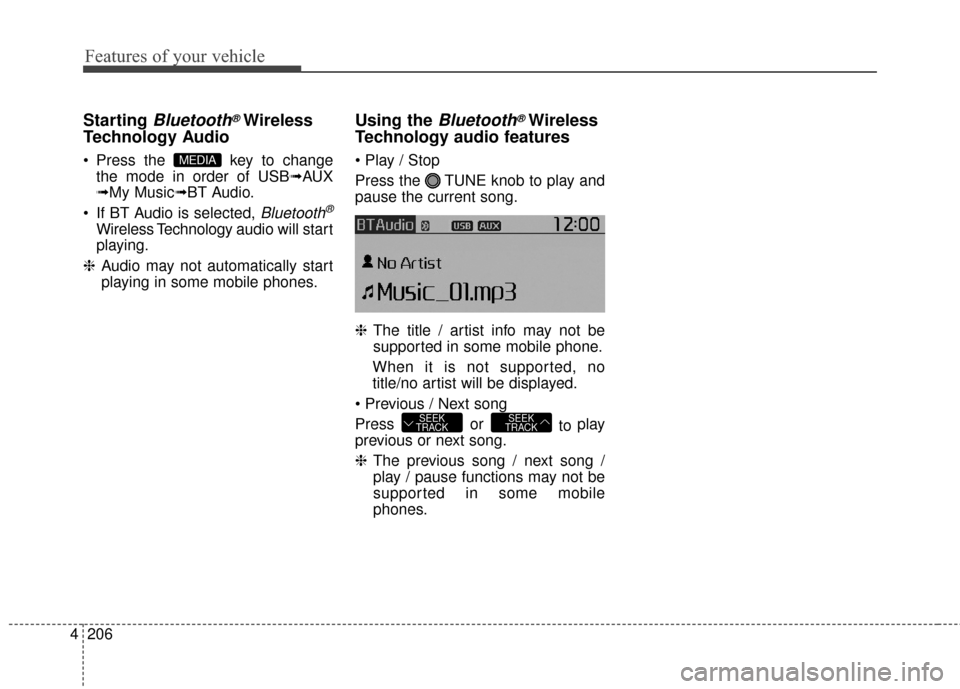
pause the current song.
❈ The title / artist info may not be
supported in some mobile phone.
When it is not supported, no
title/no artist will be displayed.
Press or to play
previous or next song.
❈ The previous song / next song /
play / pause functions may not be
supported in some mobile
phones.
SEEK
TRACKSEEK
TRACK
MEDIA
Page 459 of 524
Index
2I
Active ECO system. . . . . . . . . . . . . . . . . . . . . . . . . . . . 5-10Active ECO operation . . . . . . . . . . . . . . . . . . . . . . . 5-10
Air bag - advanced supplemental restraint system . . . . 3-34 Adding equipment to or modifying your airbag-equipped vehicle . . . . . . . . . . . . . . . . . . . . . . . 3-57
Air bag warning label. . . . . . . . . . . . . . . . . . . . . . . . 3-57
Air bag warning light . . . . . . . . . . . . . . . . . . . . . . . . 3-37
Curtain air bag . . . . . . . . . . . . . . . . . . . . . . . . . . . . . 3-50
Do not installing a child restraint on a front passenger's seat . . . . . . . . . . . . . . . . . . . . . . . . . . . 3-37
Driver's and passenger's front air bag . . . . . . . . . . . 3-46
How does the air bag system operate . . . . . . . . . . . 3-35
Inflation and non-inflation conditions of the air bag . . 3-51
Occupant Detection System (ODS) . . . . . . . . . . . . . 3-41
Side air bag. . . . . . . . . . . . . . . . . . . . . . . . . . . . . . . . 3-49
SRS Care . . . . . . . . . . . . . . . . . . . . . . . . . . . . . . . . . 3-56
SRS components and functions . . . . . . . . . . . . . . . . 3-38
Air conditioning system . . . . . . . . . . . . . . . . . . . . . . . . . 8-3
Appearance care . . . . . . . . . . . . . . . . . . . . . . . . . . . . . . 7-69 Exterior care . . . . . . . . . . . . . . . . . . . . . . . . . . . . . . . 7-69
Interior care . . . . . . . . . . . . . . . . . . . . . . . . . . . . . . . 7-74
Audio system . . . . . . . . . . . . . . . . . . . . . . . . . . . . . . . 4-126 Antenna . . . . . . . . . . . . . . . . . . . . . . . . . . . . . . . . . 4-126
Audio . . . . . . . . . . . . . . . . . . . . . . . . . . . . . . . . . . . 4-\
140
Audio remote control . . . . . . . . . . . . . . . . . . . . . . . 4-127
Aux, USB and iPod
®port . . . . . . . . . . . . . . . . . . . 4-128 How vehicle audio works . . . . . . . . . . . . . . . . . . . . 4-130
Precautions for Safe Driving . . . . . . . . . . . . . . . . . 4-137
Speaker lights . . . . . . . . . . . . . . . . . . . . . . . . . . . . . 4-129
Using iPod
®device . . . . . . . . . . . . . . . . . . . . . . . . 4-135
Using the USB device . . . . . . . . . . . . . . . . . . . . . . 4-134
Voice Recognition . . . . . . . . . . . . . . . . . . . . . . . . . 4-138
When connecting a Bluetooth
®Phone. . . . . . . . . . 4-137
Auto defogging system . . . . . . . . . . . . . . . . . . . . . . . . 4-114
Automatic climate control system . . . . . . . . . . . . . . . . 4-94 Automatic heating and air conditioning. . . . . . . . . . 4-95
Checking the amount of air conditioner refrigerantand compressor lubricant . . . . . . . . . . . . . . . . . . . 4-109
Climate control air filter. . . . . . . . . . . . . . . . . . . . . 4-108
Manual heating and air conditioning . . . . . . . . . . . . 4-96
System operation . . . . . . . . . . . . . . . . . . . . . . . . . . 4-106
Battery. . . . . . . . . . . . . . . . . . . . . . . . . . . . . . . . . . . . \
. . 7-31 Battery recharging . . . . . . . . . . . . . . . . . . . . . . . . . . 7-32
For best battery service . . . . . . . . . . . . . . . . . . . . . . 7-31
Reset items . . . . . . . . . . . . . . . . . . . . . . . . . . . . . . . . 7-33
Before driving . . . . . . . . . . . . . . . . . . . . . . . . . . . . . . . . . 5-3 Before entering vehicle . . . . . . . . . . . . . . . . . . . . . . . 5-3
Before starting . . . . . . . . . . . . . . . . . . . . . . . . . . . . . . 5-3
Necessary inspections . . . . . . . . . . . . . . . . . . . . . . . . 5-3
Brake fluid . . . . . . . . . . . . . . . . . . . . . . . . . . . . . . . . . . 7-23\
A
B