2016 KIA Soul EV display
[x] Cancel search: displayPage 296 of 524
Features of your vehicle
226
4
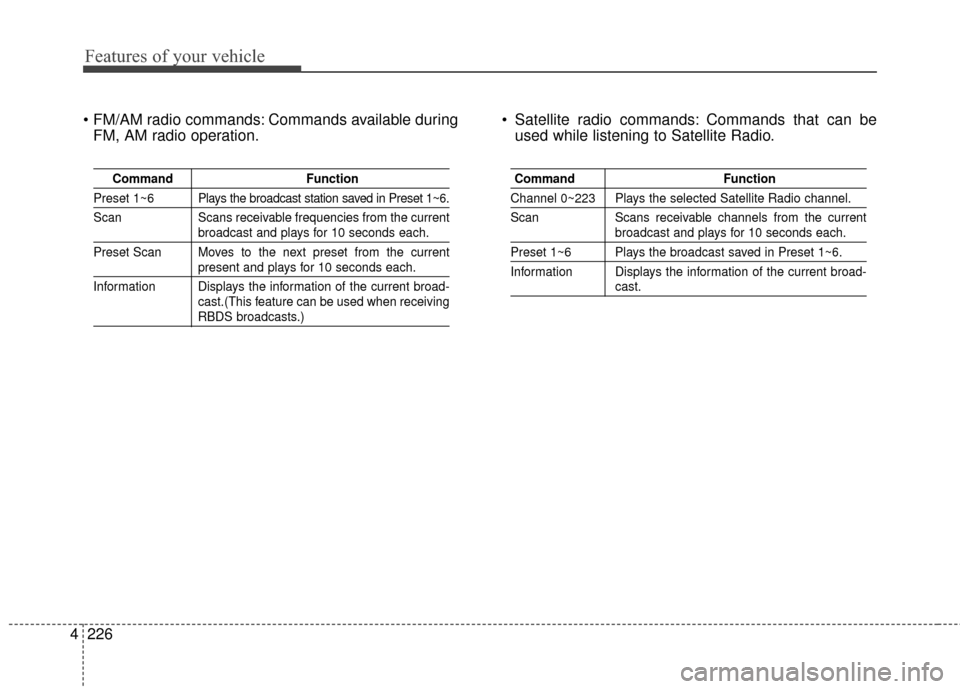
Commands available during
FM, AM radio operation. Satellite radio commands: Commands that can be
used while listening to Satellite Radio.
Command Function
Preset 1~6 Plays the broadcast station saved in Preset 1~6.
Scan Scans receivable frequencies from the current
broadcast and plays for 10 seconds each.
Preset Scan Moves to the next preset from the current
present and plays for 10 seconds each.
Information Displays the information of the current broad- cast.(This feature can be used when receiving
RBDS broadcasts.)
Command Function
Channel 0~223 Plays the selected Satellite Radio channel.
Scan Scans receivable channels from the current
broadcast and plays for 10 seconds each.
Preset 1~6 Plays the broadcast saved in Preset 1~6.
Information Displays the information of the current broad-
cast.
Page 297 of 524
4227
Features of your vehicle
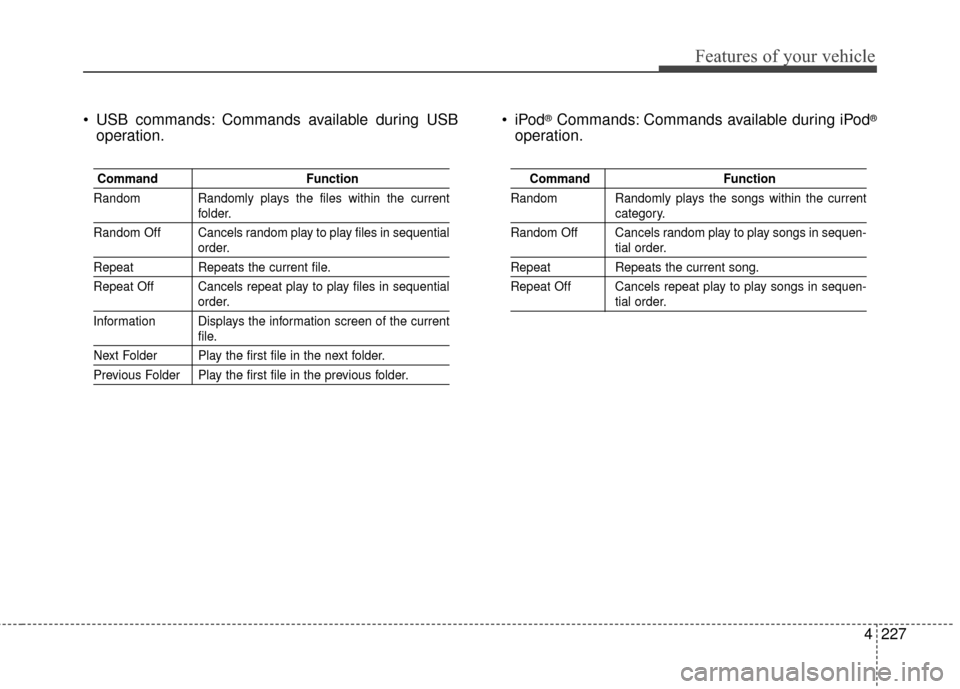
USB commands: Commands available during USBoperation. ®Commands: Commands available during iPod®
operation.
Command
Function
Random Randomly plays the files within the current
folder.
Random Off Cancels random play to play files in sequential
order.
Repeat Repeats the current file.
Repeat Off Cancels repeat play to play files in sequential
order.
Information Displays the information screen of the current
file.
Next Folder Play the first file in the next folder.
Previous Folder Play the first file in the previous folder.
Command Function
Random Randomly plays the songs within the current
category.
Random Off Cancels random play to play songs in sequen-
tial order.
Repeat Repeats the current song.
Repeat Off Cancels repeat play to play songs in sequen-
tial order.
Page 307 of 524
57
Driving your vehicle
Starting the vehicle
1. Carry the smart key or leave itinside the vehicle.
2. Make sure the parking brake is firmly applied
3. Place the transaxle shift lever in P (Park). Depress the brake pedal
fully.
4. Press the POWER button until the ready " " indicator light in the
cluster is turned on. Even if the smart key is in the vehi-
cle, if it is far away from you, the
vehicle may not start.
When the POWER button is in the ACC position or above, if any door is
opened, the system checks for the
smart key. If the smart key is not in
the vehicle, a message "key is not in
the vehicle" will appear on the LCD
display. And if all doors are closed,
the chime will sound for 5 seconds.
The indicator or warning will turn off
while the vehicle is moving. Always
have the smart key with you.
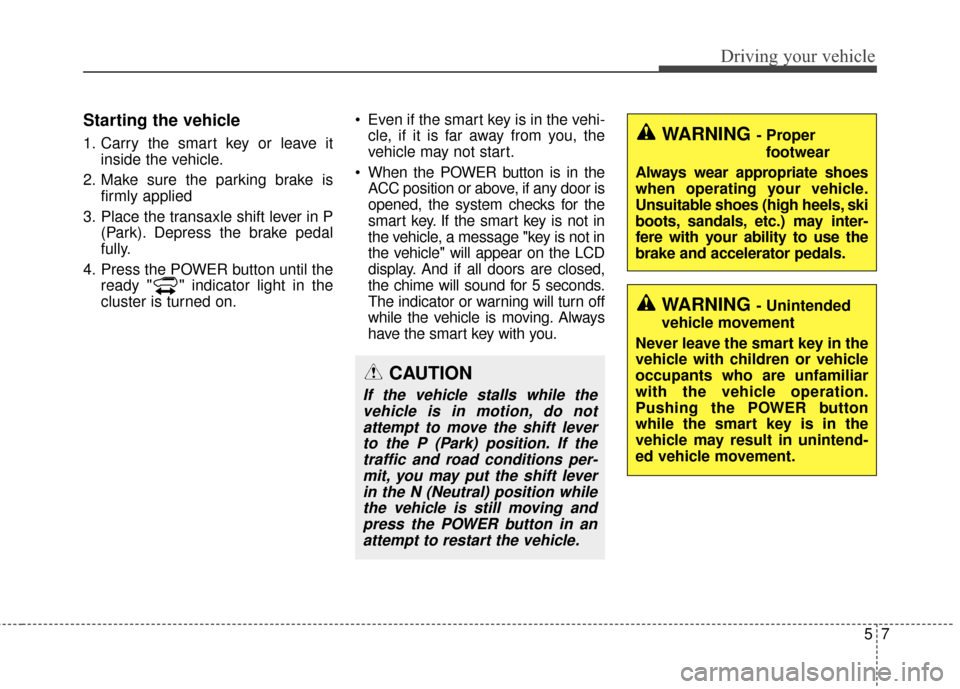
CAUTION
If the vehicle stalls while thevehicle is in motion, do notattempt to move the shift leverto the P (Park) position. If thetraffic and road conditions per-mit, you may put the shift leverin the N (Neutral) position whilethe vehicle is still moving andpress the POWER button in anattempt to restart the vehicle.
WARNING - Unintended
vehicle movement
Never leave the smart key in the
vehicle with children or vehicle
occupants who are unfamiliar
with the vehicle operation.
Pushing the POWER button
while the smart key is in the
vehicle may result in unintend-
ed vehicle movement.
WARNING - Proper footwear
Always wear appropriate shoes
when operating your vehicle.
Unsuitable shoes (high heels, ski
boots, sandals, etc.) may inter-
fere with your ability to use the
brake and accelerator pedals.
Page 312 of 524

Driving your vehicle
12
5
Reduction gear operation
When stopped on an incline, do not
hold the vehicle with the motor
power. Use the service brake or the
parking brake.
Transaxle ranges
The indicator in the instrument clus-
ter displays the shift lever position
when the POWER button is in the
ON position.
P (Park)
Always come to a complete stop
before shifting into P (Park). This
position locks the gear and prevents
the drive wheels from rotating.
Shifting into P (Park) while the vehi-
cle is in motion will cause the drive
wheels to lock which will cause you
to lose control of the vehicle.
WARNING- Leaving the
vehicle
Before leaving the driver’s seat,
always make sure the shift lever
is in the P (Park) position; then
set the parking brake fully and
shut the vehicle off. Do not use
the P position in place of the
parking brake. Always make
sure the shift lever is latched in
the P position and set the park-
ing brake fully. Unexpected and
sudden vehicle movement can
occur if these precautions are
not followed.
CAUTION- Reduction gear
To avoid damage to your reduc-tion gear, do not accelerate thevehicle in R (Reverse) or anyforward gear position with thebrakes on. The reduction gearmay be damaged if you shiftinto P (Park) while the vehicle isin motion.
Page 367 of 524
What to do in an emergency
16
6
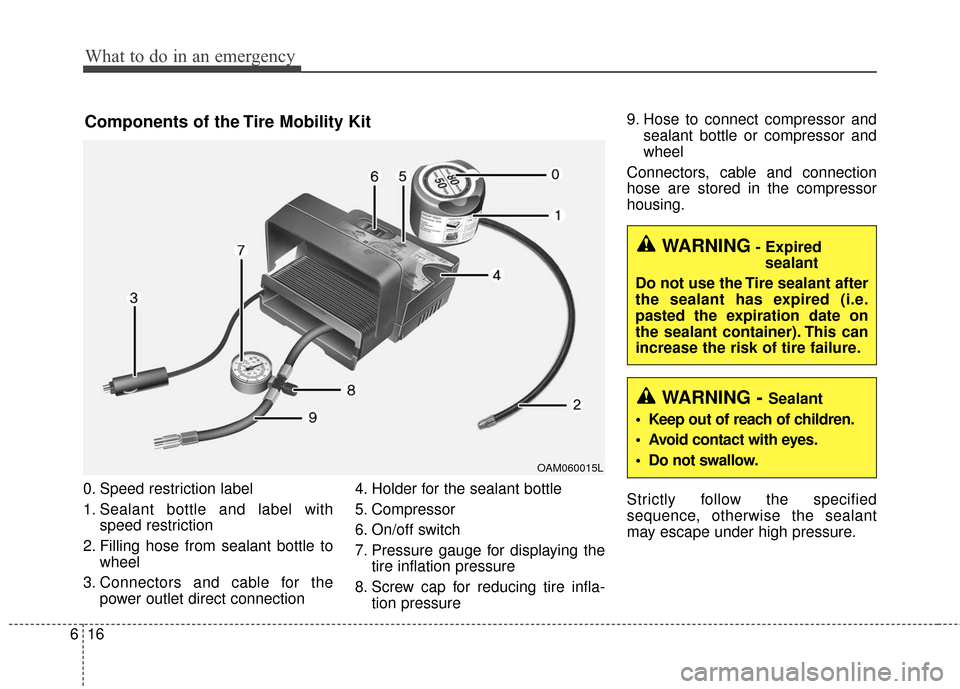
0. Speed restriction label
1. Sealant bottle and label with
speed restriction
2. Filling hose from sealant bottle to wheel
3. Connectors and cable for the power outlet direct connection 4. Holder for the sealant bottle
5. Compressor
6. On/off switch
7. Pressure gauge for displaying the
tire inflation pressure
8. Screw cap for reducing tire infla- tion pressure 9. Hose to connect compressor and
sealant bottle or compressor and
wheel
Connectors, cable and connection
hose are stored in the compressor
housing.
Strictly follow the specified
sequence, otherwise the sealant
may escape under high pressure.
Components of the Tire Mobility Kit
OAM060015L
WARNING- Expired sealant
Do not use the Tire sealant after
the sealant has expired (i.e.
pasted the expiration date on
the sealant container). This can
increase the risk of tire failure.
WARNING - Sealant
• Keep out of reach of children.
Avoid contact with eyes.
Do not swallow.
Page 414 of 524
Maintenance
40
7
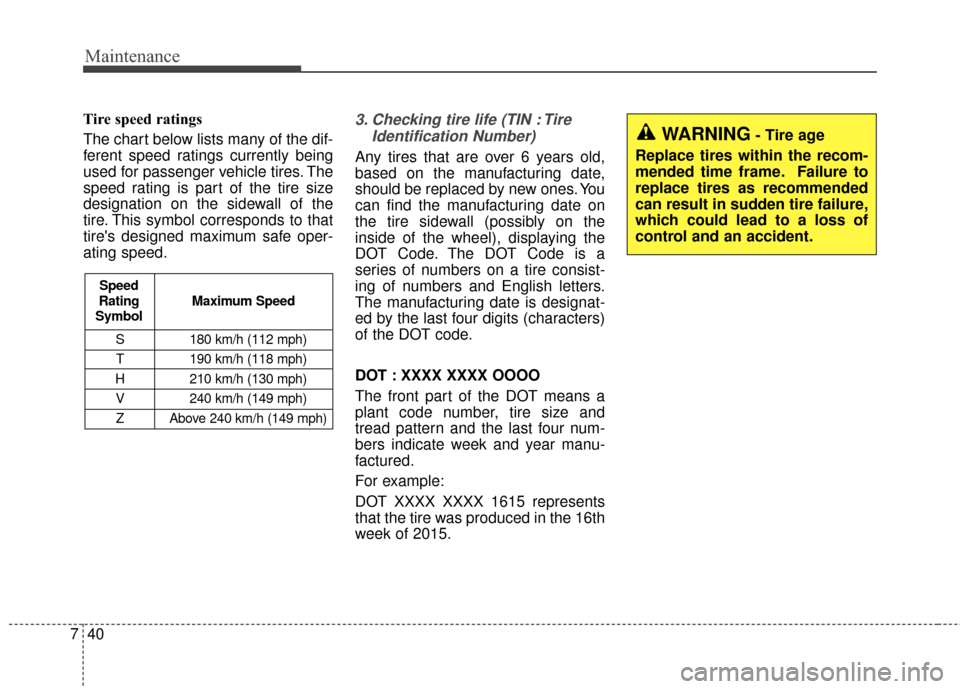
Tire speed ratings
The chart below lists many of the dif-
ferent speed ratings currently being
used for passenger vehicle tires. The
speed rating is part of the tire size
designation on the sidewall of the
tire. This symbol corresponds to that
tire's designed maximum safe oper-
ating speed.3. Checking tire life (TIN : Tire
Identification Number)
Any tires that are over 6 years old,
based on the manufacturing date,
should be replaced by new ones. You
can find the manufacturing date on
the tire sidewall (possibly on the
inside of the wheel), displaying the
DOT Code. The DOT Code is a
series of numbers on a tire consist-
ing of numbers and English letters.
The manufacturing date is designat-
ed by the last four digits (characters)
of the DOT code.
DOT : XXXX XXXX OOOO
The front part of the DOT means a
plant code number, tire size and
tread pattern and the last four num-
bers indicate week and year manu-
factured.
For example:
DOT XXXX XXXX 1615 represents
that the tire was produced in the 16th
week of 2015.
S 180 km/h (112 mph)
T 190 km/h (118 mph)
H 210 km/h (130 mph) V 240 km/h (149 mph)Z Above 240 km/h (149 mph)
Maximum Speed
Speed
Rating
Symbol
WARNING- Tire age
Replace tires within the recom-
mended time frame. Failure to
replace tires as recommended
can result in sudden tire failure,
which could lead to a loss of
control and an accident.
Page 461 of 524

Index
4I
Fuses . . . . . . . . . . . . . . . . . . . . . . . . . . . . . . . . . . . . \
. . . 7-47Fuse/relay panel description. . . . . . . . . . . . . . . . . . . 7-52
Gross vehicle weight . . . . . . . . . . . . . . . . . . . . . . . . . . . 8-3
Hood . . . . . . . . . . . . . . . . . . . . . . . . . . . . . . . . . . . . \
. . . 4-22 Closing the hood . . . . . . . . . . . . . . . . . . . . . . . . . . . 4-22
Opening the hood . . . . . . . . . . . . . . . . . . . . . . . . . . 4-22
If the vehicle overheats . . . . . . . . . . . . . . . . . . . . . . . . . . 6-8
If the vehicle will not start . . . . . . . . . . . . . . . . . . . . . . . 6-4 If vehicle doesn’t turn over or turns over slowly . . . . 6-4
If you have a flat tire (with Tire Mobility Kit). . . . . . . 6-14 Components of the Tire Mobility Kit . . . . . . . . . . . 6-16
Distributing the sealant . . . . . . . . . . . . . . . . . . . . . . 6-18
Introduction . . . . . . . . . . . . . . . . . . . . . . . . . . . . . . . 6-14
Technical Data . . . . . . . . . . . . . . . . . . . . . . . . . . . . . 6-19
Using the Tire Mobility Kit . . . . . . . . . . . . . . . . . . . 6-17
In case of an emergency while driving . . . . . . . . . . . . . . 6-3 If the vehicle stalls at a crossroad or crossing . . . . . . 6-3 If vehicle stalls while driving . . . . . . . . . . . . . . . . . . . 6-3
If you have a flat tire while driving . . . . . . . . . . . . . . 6-3
Instrument cluster . . . . . . . . . . . . . . . . . . . . . . . . . . . . . 4-40 Gauges . . . . . . . . . . . . . . . . . . . . . . . . . . . . . . . . . . . 4-\
42
Instrument Cluster Control. . . . . . . . . . . . . . . . . . . . 4-41
LCD Display Control . . . . . . . . . . . . . . . . . . . . . . . . 4-41
Reduction gear shift indicator . . . . . . . . . . . . . . . . . 4-42
Instrument panel overview . . . . . . . . . . . . . . . . . . . . . . . 2-5
Interior features. . . . . . . . . . . . . . . . . . . . . . . . . . . . . . 4-117 Cargo area cover . . . . . . . . . . . . . . . . . . . . . . . . . . 4-124
Clothes hanger . . . . . . . . . . . . . . . . . . . . . . . . . . . . 4-122
Cup holder . . . . . . . . . . . . . . . . . . . . . . . . . . . . . . . 4-117
Floor mat anchor(s) . . . . . . . . . . . . . . . . . . . . . . . . 4-122
Luggage net holder. . . . . . . . . . . . . . . . . . . . . . . . . 4-123
Power outlet . . . . . . . . . . . . . . . . . . . . . . . . . . . . . . 4-121
Rear seat warmer . . . . . . . . . . . . . . . . . . . . . . . . . . 4-120
Seat air ventilation . . . . . . . . . . . . . . . . . . . . . . . . . 4-120
Seat warmer . . . . . . . . . . . . . . . . . . . . . . . . . . . . . . 4-118
Sunvisor . . . . . . . . . . . . . . . . . . . . . . . . . . . . . . . . . 4-117
Interior light . . . . . . . . . . . . . . . . . . . . . . . . . . . . . . . . . 4-90 Glove box lamp . . . . . . . . . . . . . . . . . . . . . . . . . . . . 4-92
Interior lamp AUTO cut . . . . . . . . . . . . . . . . . . . . . . 4-90
Luggage room lamp . . . . . . . . . . . . . . . . . . . . . . . . . 4-92
Map lamp . . . . . . . . . . . . . . . . . . . . . . . . . . . . . . . . 4-90
Room lamp . . . . . . . . . . . . . . . . . . . . . . . . . . . . . . . . 4-91
Vanity mirror lamp . . . . . . . . . . . . . . . . . . . . . . . . . . 4-92
Interior overview. . . . . . . . . . . . . . . . . . . . . . . . . . . . . . . 2-4
G
H
I
F
Page 462 of 524
I5
Index
LCD Display . . . . . . . . . . . . . . . . . . . . . . . . . . . . . . . . . 4-46A/V Mode. . . . . . . . . . . . . . . . . . . . . . . . . . . . . . . . . 4-48
EV information mode. . . . . . . . . . . . . . . . . . . . . . . . 4-47
LCD Modes . . . . . . . . . . . . . . . . . . . . . . . . . . . . . . . 4-46
Service Mode . . . . . . . . . . . . . . . . . . . . . . . . . . . . . . 4-48
User Settings Mode . . . . . . . . . . . . . . . . . . . . . . . . . 4-49
Warning Messages . . . . . . . . . . . . . . . . . . . . . . . . . . 4-51
Light bulbs . . . . . . . . . . . . . . . . . . . . . . . . . . . . . . . . . . 7-59\
Front light replacement . . . . . . . . . . . . . . . . . . . . . . 7-59
High mounted stop light bulb replacement . . . . . . . 7-66
Interior light bulb replacement. . . . . . . . . . . . . . . . . 7-68
License plate light bulb replacement . . . . . . . . . . . . 7-67
Rear combination light bulb replacement . . . . . . . . 7-64
Side repeater light bulb replacement . . . . . . . . . . . . 7-64
Lighting. . . . . . . . . . . . . . . . . . . . . . . . . . . . . . . . . . . . \
. 4-81 Abnormal lamp operation . . . . . . . . . . . . . . . . . . . . 4-82
Abnormal lamp operation due to stabilization ofelectric control system . . . . . . . . . . . . . . . . . . . . . . 4-82
Battery saver function . . . . . . . . . . . . . . . . . . . . . . . 4-81
Daytime running light . . . . . . . . . . . . . . . . . . . . . . . 4-81
Front fog light . . . . . . . . . . . . . . . . . . . . . . . . . . . . . 4-86
Headlamp escort . . . . . . . . . . . . . . . . . . . . . . . . . . . . 4-81
High beam operation . . . . . . . . . . . . . . . . . . . . . . . . 4-84
Lighting control . . . . . . . . . . . . . . . . . . . . . . . . . . . . 4-82
Turn signals and lane change signals . . . . . . . . . . . . 4-85
Luggage volume . . . . . . . . . . . . . . . . . . . . . . . . . . . . . . . 8-3 Maintenance services . . . . . . . . . . . . . . . . . . . . . . . . . . . 7-3
Owner maintenance precautions . . . . . . . . . . . . . . . . 7-4
Owner’s responsibility . . . . . . . . . . . . . . . . . . . . . . . . 7-3
Mirrors . . . . . . . . . . . . . . . . . . . . . . . . . . . . . . . . . . . . \
. 4-35 Inside rearview mirror . . . . . . . . . . . . . . . . . . . . . . . 4-35
Outside rearview mirror . . . . . . . . . . . . . . . . . . . . . . 4-36
Motor number . . . . . . . . . . . . . . . . . . . . . . . . . . . . . . . . . 8-8
Motor room compartment. . . . . . . . . . . . . . . . . . . . . . . . 2-6
Owner maintenance . . . . . . . . . . . . . . . . . . . . . . . . . . . . 7-5 Owner maintenance schedule. . . . . . . . . . . . . . . . . . . 7-6
Panoramic sunroof . . . . . . . . . . . . . . . . . . . . . . . . . . . . 4-24 Resetting the sunroof . . . . . . . . . . . . . . . . . . . . . . . . . . . . 4-28
Sliding the sunroof . . . . . . . . . . . . . . . . . . . . . . . . . . 4-25
Sunroof open warning . . . . . . . . . . . . . . . . . . . . . . . 4-25
Sunshade. . . . . . . . . . . . . . . . . . . . . . . . . . . . . . . . . . 4-27\
Tilting the sunroof . . . . . . . . . . . . . . . . . . . . . . . . . . 4-26
Parking assist system . . . . . . . . . . . . . . . . . . . . . . . . . . 4-76 Non-operational conditions of parking assist system . . 4-77
Operation of the parking assist system . . . . . . . . . . 4-76
Self-diagnosis . . . . . . . . . . . . . . . . . . . . . . . . . . . . . . 4-78
M
O
P
L