Page 358 of 565

547
Driving your vehicle
Good braking practices
Check to be sure the parking brakeis not engaged and the parking
brake indicator light is out before
driving away.
Driving through water may get the brakes wet. They can also get wet
when the vehicle is washed. Wet
brakes can be dangerous! Your
vehicle will not stop as quickly if the
brakes are wet. Wet brakes may
cause the vehicle to pull to one
side.
To dry the brakes, apply the brakes
lightly until the braking action
returns to normal, taking care to
keep the vehicle under control at
all times. If the braking action does
not return to normal, stop as soon
as it is safe to do so and call an
authorized Kia dealer for assis-
tance. Don't coast down hills with the
vehicle out of gear. This is extreme-
ly hazardous. Keep the vehicle in
gear at all times, use the brakes to
slow down, then shift to a lower
gear so that engine braking will
help you maintain a safe speed.
Don't "ride" the brake pedal. Resting your foot on the brake
pedal while driving can be danger-
ous because the brakes might
overheat and lose their effective-
ness. It also increases the wear of
the brake components.
If a tire goes flat while you are driv- ing, apply the brakes gently and
keep the vehicle pointed straight
ahead while you slow down. When
you are moving slowly enough for it
to be safe to do so, pull off the road
and stop in a safe place. If your vehicle is equipped with an
automatic transaxle, don't let your
vehicle creep forward. To avoid
creeping forward, keep your foot
firmly on the brake pedal when the
vehicle is stopped.
Be cautious when parking on a hill. Firmly engage the parking brake
and place the shift lever in P (auto-
matic transaxle). If your vehicle is
facing downhill, turn the front
wheels into the curb to help keep
the vehicle from rolling. If your vehi-
cle is facing uphill, turn the front
wheels away from the curb to help
keep the vehicle from rolling. If
there is no curb or if it is required
by other conditions to keep the
vehicle from rolling, block the
wheels.
UM CAN (ENG) 5.QXP 12/1/2014 1:03 PM Page 47
Page 360 of 565

549
Driving your vehicle
The cruise control system allows you
to program the vehicle to maintain a
constant speed without depressing
the accelerator pedal.
This system is designed to function
above approximately 30 km/h (20
mph).
If the cruise control is left on,
(CRUISE indicator light in the instru-
ment cluster illuminated) the cruise
control can be switched on acciden-
tally. Keep the cruise control system
off (CRUISE indicator light OFF)
when the cruise control is not in use,
to avoid inadvertently setting a
speed.Use the cruise control system only
when traveling on open highways in
good weather.
Do not use the cruise control when
driving in heavy or varying traffic, or
on slippery (rainy, icy or snow-cov-
ered) or winding roads or over 6%
up-hill or down-hill roads.
✽ ✽
NOTICE
• During normal cruise control
operation, when the SET switch is
activated or reactivated after
applying the brakes, the cruise
control will energize after approx-
imately 3 seconds. This delay is
normal.
• To activate cruise control, depress the brake pedal at least once after
turning the ignition switch to the
ON position or starting the engine.
This is to check if the brake switch
which is important part to cancel
cruise control is in normal condi-
tion.
CRUISE CONTROL SYSTEM
WARNING - Misuse of
Cruise Control
Do not use cruise control if the
traffic situation does not allow
you to drive safely at a constant
speed and with sufficient dis-
tance to the vehicle in front.
OUMA054021
UM CAN (ENG) 5.QXP 12/1/2014 1:03 PM Page 49
Page 361 of 565
Driving your vehicle
50
5
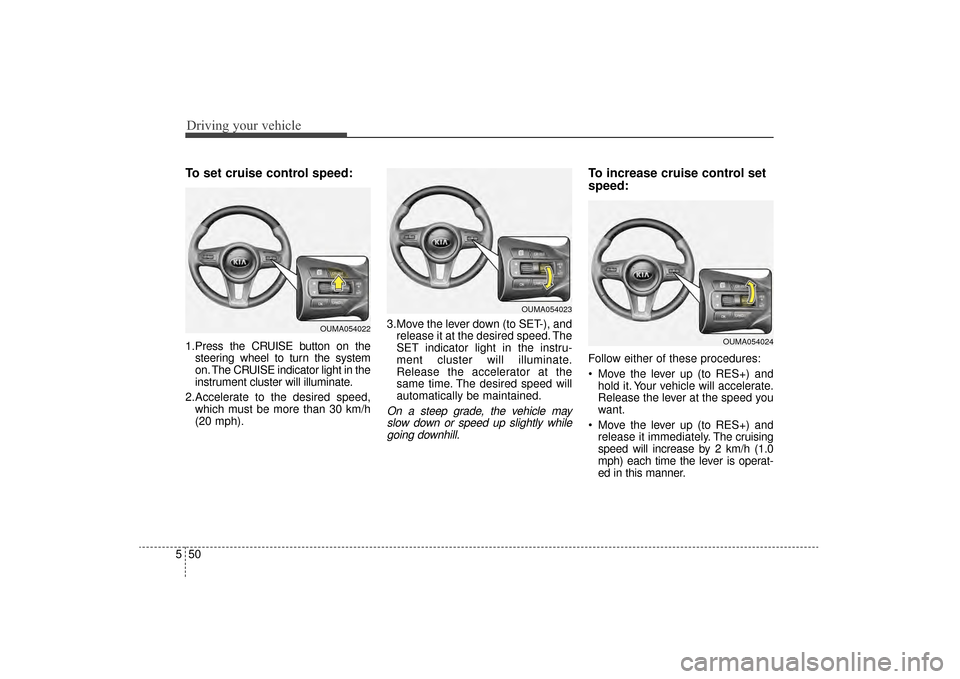
To set cruise control speed:
1.Press the CRUISE button on the
steering wheel to turn the system
on. The CRUISE indicator light in the
instrument cluster will illuminate.
2.Accelerate to the desired speed, which must be more than 30 km/h
(20 mph). 3.Move the lever down (to SET-), and
release it at the desired speed. The
SET indicator light in the instru-
ment cluster will illuminate.
Release the accelerator at the
same time. The desired speed will
automatically be maintained.
On a steep grade, the vehicle mayslow down or speed up slightly whilegoing downhill.
To increase cruise control set
speed:
Follow either of these procedures:
Move the lever up (to RES+) and hold it. Your vehicle will accelerate.
Release the lever at the speed you
want.
Move the lever up (to RES+) and release it immediately. The cruising
speed will increase by 2 km/h (1.0
mph) each time the lever is operat-
ed in this manner.
OUMA054022
OUMA054023
OUMA054024
UM CAN (ENG) 5.QXP 12/1/2014 1:04 PM Page 50
Page 362 of 565
551
Driving your vehicle
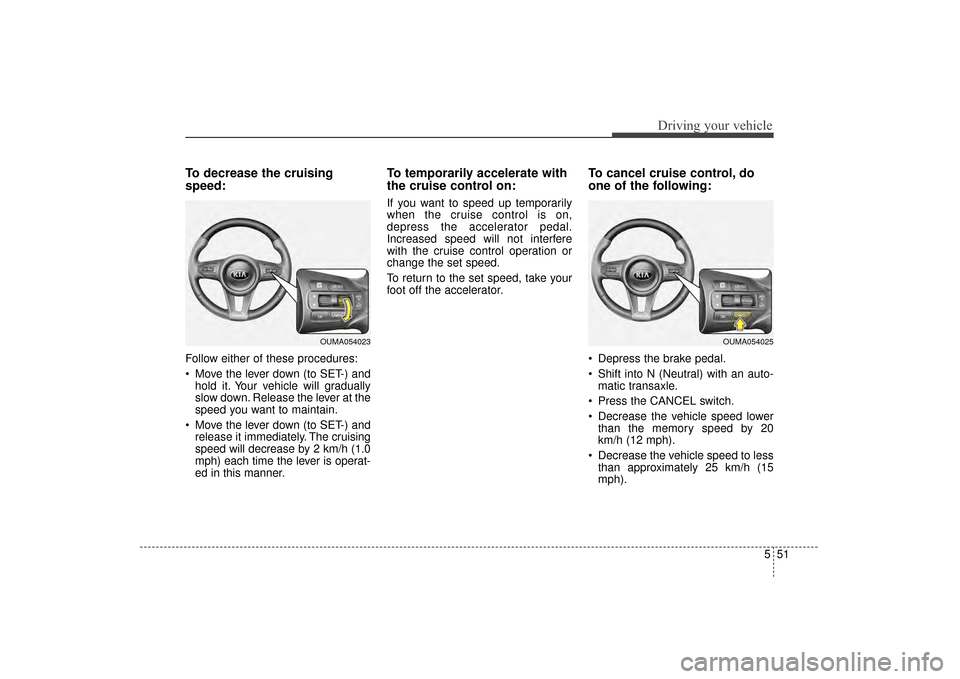
To decrease the cruising
speed:
Follow either of these procedures:
Move the lever down (to SET-) andhold it. Your vehicle will gradually
slow down. Release the lever at the
speed you want to maintain.
Move the lever down (to SET-) and release it immediately. The cruising
speed will decrease by 2 km/h (1.0
mph) each time the lever is operat-
ed in this manner.
To temporarily accelerate with
the cruise control on:
If you want to speed up temporarily
when the cruise control is on,
depress the accelerator pedal.
Increased speed will not interfere
with the cruise control operation or
change the set speed.
To return to the set speed, take your
foot off the accelerator.
To cancel cruise control, do
one of the following:
Depress the brake pedal.
Shift into N (Neutral) with an auto- matic transaxle.
Press the CANCEL switch.
Decrease the vehicle speed lower than the memory speed by 20
km/h (12 mph).
Decrease the vehicle speed to less than approximately 25 km/h (15
mph).
OUMA054025OUMA054023
UM CAN (ENG) 5.QXP 12/1/2014 1:04 PM Page 51
Page 364 of 565

553
Driving your vehicle
ADVANCED SMART CRUISE CONTROL SYSTEM (ASCC) (IF EQUIPPED)
➀Cruise indicator
➁ Set speed
➂ Vehicle-to-vehicle distance
The ASCC allows you to program the
vehicle to maintain a set speed so
long as it is not limited by traffic.
When traffic is encountered the vehi-
cle will slow down to maintain a set
distance behind traffic without
depressing the accelerator or brake
pedal.
WARNING - Advanced
Smart Cruise Control
Inadvertent Activation
If the advanced smart cruise
control is left on (CRUISE indi-
cator in the instrument cluster
illuminated), it can be activated
inadvertently. Keep the
advanced smart cruise control
system off (CRUISE indicator
turn off) when the advanced
smart cruise control is not in
use to avoid setting a speed
which the driver is not aware of.
WARNING- Advanced
Smart Cruise Control
Limitations
The advanced smart cruise control is a supplemental sys-
tem and is not a substitute for
safe driving practices. It is the
responsibility of the driver to
always check the speed and
distance to the vehicle ahead.
(Continued)
OUM054156L
(Continued)
Do not use the advancedsmart cruise control when it
may not be safe to keep the
car at a constant speed, for
instance, driving in heavy or
varying traffic, or on slippery
(rainy, icy or snow-covered) or
winding roads or over 6% up-
hill or down-hill roads.
The advanced smart cruise control system cannot recog-
nize a stopped vehicle, pedes-
trians or an oncoming vehicle.
Always look ahead cautiously
to prevent unexpected and
sudden situations from occur-
ring.
Use the advanced smart cruise control system only
when traveling on open high-
ways in good weather condi-
tions.
UM CAN (ENG) 5.QXP 12/1/2014 1:04 PM Page 53
Page 365 of 565

Driving your vehicle
54
5
Speed setting (ASCC)
To set cruise control speed:
1.Press the CRUISE button, to turn
the system on. The CRUISE indi-
cator in the instrument cluster will
illuminate.
2. Accelerate to the desired speed. (110 mph) : when there is no
vehicle in front
mph) : when there is a vehicle in
front 3. Move the lever down (to SET-),
and release it at the desired
speed. The set speed and vehicle
to vehicle distance on the LDC
screen will illuminate.
4.Release the accelerator pedal. The desired speed will automatically be
maintained.
If there is a vehicle in front of you, thespeed may decrease to maintain thedistance to the vehicle ahead.
On a steep grade, the vehicle mayslow down or speed up slightly whilegoing uphill or downhill. To increase cruise control set
speed:
Follow either of these procedures:
Move the lever up (to RES+), and hold it. Your vehicle set speed will
increase by 10 km/h (5 mph).
Release the lever at the speed you
want.
Move the lever up (to RES+), and release it immediately. The cruising
speed will increase by 1.0 km/h (1
mph) each time you move the lever
up (to RES+) in this manner.
ASCC will operate to a maximum setting of 180 km/h (110 mph).
However all local speed limit laws
must be followed.
OUMA054200
OUMA054201
OUMA054202
UM CAN (ENG) 5.QXP 12/1/2014 1:04 PM Page 54
Page 369 of 565
Driving your vehicle
58
5
Vehicle to vehicle distance
setting (ASCC)
To set vehicle to vehicle distance:
This function allows you to program
the vehicle to maintain relative dis-
tance to the vehicle ahead without
depressing the accelerator pedal or
brake pedal. The vehicle to vehicle distance will
automatically activate when the
ASCC is on.
Select the appropriate distance
according to road conditions and
vehicle speed.
Each time the button is pressed, the
vehicle to vehicle distance changes
as follows:
For example, if you drive at 90 km/h
(56 mph), the distance is maintained
as follows;
Distance 4 - appro
ximately 52.5 m
(172 feet)
Distance 3 - approximately 40 m
(130 feet)
Distance 2 - appro ximately 32.5 m
(106 feet)
Distance 1 - approximately 25 m (82 feet)
✽ ✽NOTICE
The 'Distance 4' is always set when
the system is used for the first time
after starting the engine.
OUMA054210
Distance 4 Distance 3 Distance 2
Distance 1
UM CAN (ENG) 5.QXP 12/1/2014 1:04 PM Page 58
Page 370 of 565
559
Driving your vehicle
The vehicle will maintain the setspeed, when the lane ahead is
clear.
The vehicle will slow down or speed up within selected speed to
maintain the selected distance,
when there is a vehicle ahead of
you in the lane. (A vehicle will
appear in front of your vehicle in
the LCD display only when there is
an actual vehicle in front of you)
If the vehicle ahead speeds up, your vehicle will travel at a steady
cruising speed after accelerating to
the selected speed.
OUM054170L
Distance 4
Distance 2
Distance 3
Distance 1
UM CAN (ENG) 5.QXP 12/1/2014 1:04 PM Page 59

