Features of your vehicle
202
4
When pressed and held (more than
1 second).
- FM, AM mode : automatically
searches broadcast frequencies
and channels.
- CD, USB, iPod
®, My Music mode :
rewinds or fast forwards the track or
file.
(3) MUTE
Mutes audio volume.
(4) MODE
Each time this key is pressed, the
mode is changed in order of FM1,
FM2, AM, CD, USB(iPod), AUX, My
Music, BT Audio.
If the media is not connected or a
disc is not inserted, corresponding
modes will be disabled.
Press and hold the key (more than 1
second) to turn the audio system
on/off.
When power is off, press the key to
turn power back on. (5) (if equipped)
When pressed briefly.
- When pressed in the phone screen,
displays call history screen.
- When pressed in the dial screen, makes a call.
- When pressed in the incoming call screen, answers the call.
- When pressed during call waiting, switches to waiting call (Call Waiting).
When pressed and held (m ore than 1
second).
- When pressed in the
Bluetooth®
Wireless Technology Handsfree
wait mode, redials the last call.
- When pressed during a
Bluetooth®
Wireless Technology Handsfree
call, switches call back to mobile
phone (Private).
- When pressed while calling on the mobile phone, switches call back to
Bluetooth®Wireless Technology
Handsfree (Operates only when
Bluetooth®Wireless Technology
Handsfree is connected). (6) (if equipped)
Ends phone call.
(7) (if equipped)
When pressed briefly.
- Starts voice recognition.
- When selected during a voice
prompt, stops the prompt and con-
verts to voice command waiting
state.
When pressed and held (m ore than 1
second).
- Ends voice recognition.
❈ The
Bluetooth®word mark and
logos are registered trademarks
owned by Bluetooth SIG, Inc. and
any use of such marks by Kia is
under license. Other trademarks
and trade names are those of their
respective owners. A compatible
Bluetooth®enabled cell phone is
required to use
Bluetooth®wire-
less technology.
Page 305 of 644
4203
Features of your vehicle
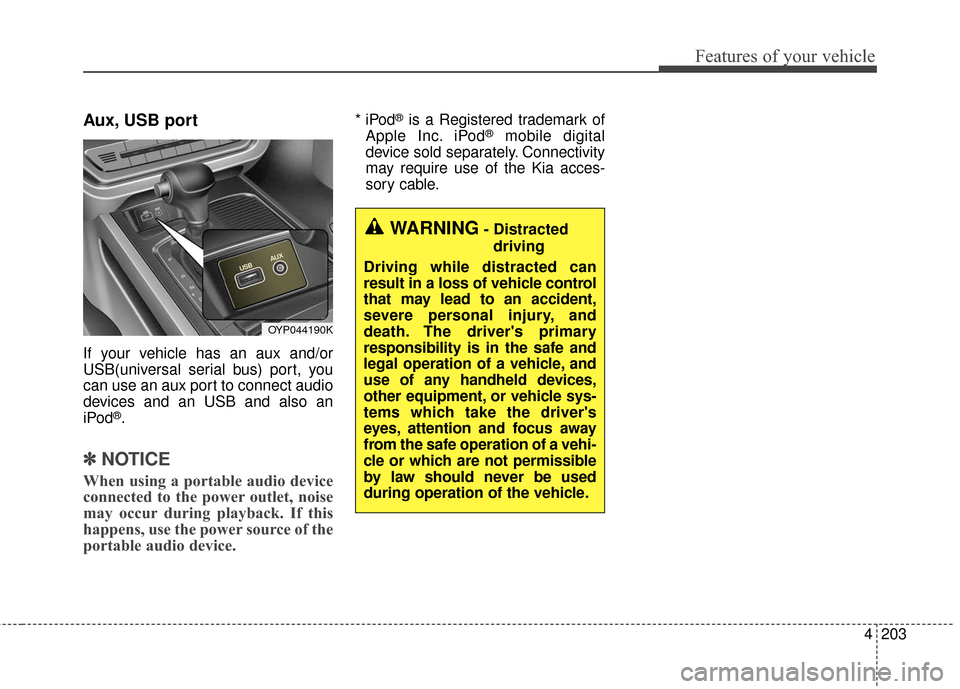
Aux, USB port
If your vehicle has an aux and/or
USB(universal serial bus) port, you
can use an aux port to connect audio
devices and an USB and also an
iPod
®.
✽ ✽NOTICE
When using a portable audio device
connected to the power outlet, noise
may occur during playback. If this
happens, use the power source of the
portable audio device.
* iPod®is a Registered trademark of
Apple Inc. iPod®mobile digital
device sold separately. Connectivity
may require use of the Kia acces-
sory cable.
OYP044190K
WARNING- Distracted
driving
Driving while distracted can
result in a loss of vehicle control
that may lead to an accident,
severe personal injury, and
death. The driver's primary
responsibility is in the safe and
legal operation of a vehicle, and
use of any handheld devices,
other equipment, or vehicle sys-
tems which take the driver's
eyes, attention and focus away
from the safe operation of a vehi-
cle or which are not permissible
by law should never be used
during operation of the vehicle.
Page 318 of 644
Features of your vehicle
216
4
SYSTEM CONTROLLERS
AND FUNCTIONS
❈ Display and settings may differ
depending on the selected audio.
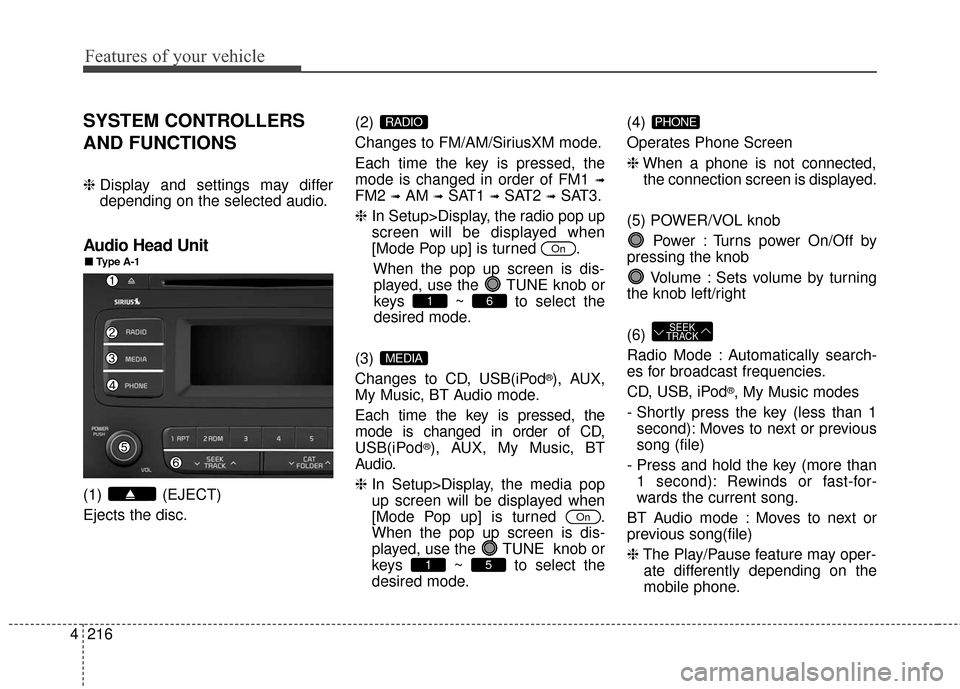
Audio Head Unit
(1) (EJECT)
Ejects the disc. (2)
Changes to FM/AM/SiriusXM mode.
Each time the key is pressed, the
mode is changed in order of FM1
➟
FM2 ➟AM ➟SAT1 ➟SAT2 ➟SAT3.
❈ In Setup>Display, the radio pop up
screen will be displayed when
[Mode Pop up] is turned .
When the pop up screen is dis-played, use the TUNE knob or
keys ~ to select the
desired mode.
(3)
Changes to CD, USB(iPod
®), AUX,
My Music, BT Audio mode.
Each time the key is pressed, the
mode is changed in order of CD,
USB(iPod
®), AUX, My Music, BT
Audio.
❈ In Setup>Display, the media pop
up screen will be displayed when
[Mode Pop up] is turned .
When the pop up screen is dis-
played, use the TUNE knob or
keys ~ to select the
desired mode. (4)
Operates Phone Screen
❈
When a phone is not connected,
the connection screen is displayed.
(5) POWER/VOL knob Power : Turns power On/Off by
pressing the knob
Volume : Sets volume by turning
the knob left/right
(6)
Radio Mode : Automatically search-
es for broadcast frequencies.
CD, USB, iPod
®, My Music modes
- Shortly press the key (less than 1 second): Moves to next or previous
song (file)
- Press and hold the key (more than 1 second): Rewinds or fast-for-
wards the current song.
BT Audio mode : Moves to next or
previous song(file)
❈ The Play/Pause feature may oper-
ate differently depending on the
mobile phone.
SEEK
TRACK
PHONE
51
On
MEDIA
61
On
RADIO
■
■
Type A-1
Page 333 of 644
4231
Features of your vehicle
BASIC METHOD OF USE :
Audio CD / MP3 CD / USB /
iPod
®/ My Music
Press the key to change the
mode in order of CD
➟ USB(iPod®) ➟
AUX ➟ My Music ➟ BT Audio.
The folder/file name is displayed on
the screen.
Page 337 of 644
4235
Features of your vehicle
Copy
Press the key Set [ Copy]
through the TUNE knob or
key.
This is used to copy the current song
into My Music. You can play the
copied Music in My Music mode.
❈If another key is pressed while
copying is in progress, a pop up
asking you whether to cancel copy-
ing is displayed.
❈ If another media is connected or
inserted (USB, CD, iPod
®, AUX)
while copying is in progress, copy-
ing is canceled.
❈ Music will not be played while
copying is in progress.
MENU : iPod®
In iPod®mode, press the key to
set the Repeat, Random, Information
and Search features.
Repeat
Press the key Set [ RPT]
through the
TUNEknob or
key to repeat the current song.
❈ Press RPT again to turn repeat off.
Random
Press the key Set [ RDM]
through the TUNEknob or
key.
Plays all songs within the currently
playing category in random order.
❈ Press RDM again to turn off.
Information
Press the key Set [ Info]
through the
TUNEknob or
key.
Displays information of the current
song.
❈ Press the key to turn off
info display.
Search
Press the key Set [ Search]
through the
TUNEknob or
key.
Displays iPod
®category list.
❈ Searching iPod
®category is
key pressed, move to parent cate-
gory.MENU
4
MENU
MENU
3
MENU
2
MENU
1 RPTMENU
MENU
6
MENU
Page 339 of 644
4237
Features of your vehicle
Delete Selection
Press the key Set [ Del.Sel]
through the TUNEknob or
key.
Songs within My Music are selected
and deleted.
➀ Select the songs you wish to delete
from the list.
➁ After selecting, press key
and select the delete menu.
My Music
Even if memory is available, a
maximum of 6,000 songs can be
stored.
The same song can be copied up to 1,000 times.
Memory info can be checked in the System menu of Setup.
AUX
AUX is used to play external MEDIA
currently connected with the AUX
terminal.
AUX mode will automatically start
when an external device is connect-
ed with the AUX terminal.
If an external device is connected,
you can also press the key to
change to AUX mode.
❈AUX mode cannot be started
unless there is an external device
connected to the AUX terminal.
AUX
Fully insert the AUX cable into the
AUX terminal for use.
MEDIA
MENU
6
MENU
Page 341 of 644
4239
Features of your vehicle
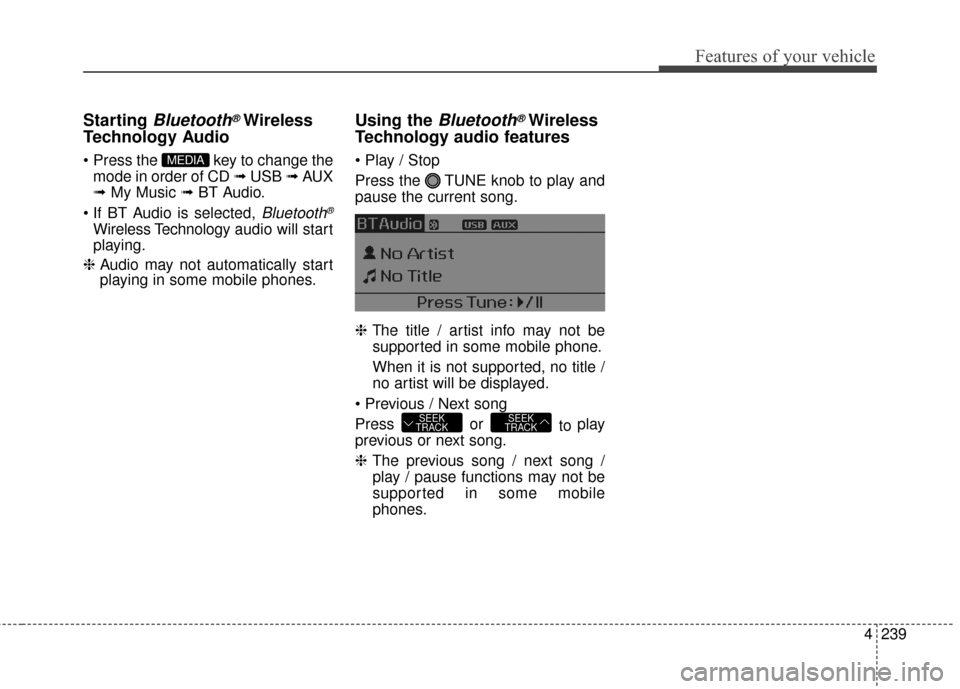
Starting Bluetooth®Wireless
Technology Audio
key to change the
mode in order of CD ➟ USB ➟ AUX
➟ My Music ➟ BT Audio.
Bluetooth®
Wireless Technology audio will start
playing.
❈ Audio may not automatically start
playing in some mobile phones.
Using the Bluetooth®Wireless
Technology audio features
Press the TUNE knob to play and
pause the current song.
❈
The title / artist info may not be
supported in some mobile phone.
When it is not supported, no title /
no artist will be displayed.
Press or to play
previous or next song.
❈ The previous song / next song /
play / pause functions may not be
supported in some mobile
phones.
SEEK
TRACKSEEK
TRACK
MEDIA



![KIA Sedona 2016 3.G Owners Manual 4235
Features of your vehicle
Copy
Press the key Set [ Copy]
through the TUNE knob or
key.
This is used to copy the current song
into My Music. You can play the
copied Music in My Music mode.
❈If](/manual-img/2/2977/w960_2977-336.png "KIA Sedona 2016 3.G Owners Manual 4235
Features of your vehicle
Copy
Press the key Set [ Copy]
through the TUNE knob or
key.
This is used to copy the current song
into My Music. You can play the
copied Music in My Music mode.
❈If")
![KIA Sedona 2016 3.G Owners Manual 4237
Features of your vehicle
Delete Selection
Press the key Set [ Del.Sel]
through the TUNEknob or
key.
Songs within My Music are selected
and deleted.
➀ Select the songs you wish to delete
from](/manual-img/2/2977/w960_2977-338.png "KIA Sedona 2016 3.G Owners Manual 4237
Features of your vehicle
Delete Selection
Press the key Set [ Del.Sel]
through the TUNEknob or
key.
Songs within My Music are selected
and deleted.
➀ Select the songs you wish to delete
from")