Page 198 of 449
Features of your vehicle
4127
Adjust the volume to levels that allowthe driver to hear sounds from outside
of the vehicle. Driving in a state where
external sounds cannot be heard may
lead to accidents.
Pay attention to the volume setting when turning the device on. A sudden
output of extreme volume upon turning
the device on could lead to hearing
impairment. (Adjust the volume to a
suitable levels before turning off the
device.) Turn on the car ignition before using
the audio system. Do not operate the
audio system for long periods of time
with the ignition turned off; such opera-
tions may lead to battery discharge.
In case of product malfunction, please contact your place of purchase or After
Service center.
Placing the audio system within an electromagnetic environment may
result in noise interference.CAUTION
Do not subject the device to severe shock or impact. Directpressure onto the front side of the monitor may cause damage tothe LCD or touch screen.
When cleaning the device, make sure to turn off the audio systemand use a dry and smooth cloth.Never use tough materials, chem- ical cloths, or solvents (alcohol,benzene, thinners, etc.) as such materials may damage the devicepanel or cause color/quality dete- rioration
Do not place beverages close to the audio system. Spilling bever-ages may lead to system mal-function.
Prevent caustic solutions such as perfume and cosmetic oil fromcontacting the dashboard because they may cause damageor discoloration.
Page 201 of 449

Features of your vehicle
130
4 USING iPod
®DEVICE
iPhone®is a registered trademark of
Apple inc.
Some iPod
®models may not support
communication protocol and files may
not play properly.
Supported iPod
®models:
- iPhone®3GS/4
- iPod®touch 1st~4th generation
- iPod®nano 1st~6th generation
- iPod®classic
The order of search or playback of songs in the iPod
®can be different
from the order searched in the audio
system.
If the iPod
®is disabled due to its own
malfunction, reset the iPod®. (Reset:
Refer to iPod®manual)
An iPod®may not operate normally on
low battery.
(Continued)(Continued)
Some iPod
®devices, such as the
iPhone®, can be connected through
the Bluetooth®Wireless Technology
interface. The device must have audio
Bluetooth®Wireless Technology
capability (such as for stereo head-
phone
Bluetooth®Wireless
Technology ). The device can play, but
it will not be controlled by the audio
system.
To use iPod
®features within the audio
mode, use the cable provided upon
purchasing an iPod
®device.
Skipping or improper operation may occur depending on the characteristics
of your iPod
®/iPhone®device.
If your iPhone®is connected to both
the Bluetooth®Wireless Technology
and USB, only iPod®mode will be sup-
ported dur ing Bluetooth®Audio
Streaming. To use Bluetooth®Audio
Streaming, disconnect iPod®cable with
iPhone®.
(Continued)(Continued)
When connecting iPod
®with the iPod®
Power Cable, insert the connector to the
multimedia socket completely. If not
inserted completely, communications
between iPod
®and audio may be inter-
rupted.
When adjusting the sound effects of the iPod
®and the audio system, the
sound effects of both devices will over-
lap and might reduce or distort the
quality of the sound.
Deactivate (turn off) the equalizer func- tion of an iPod
®when adjusting the
audio system’s volume, and turn off the
equalizer of the audio system when
using the equalizer of an iPod
®.
When not using iPod®with car audio,
detach the iPod®cable from iPod®.
Otherwise, iPod®may remain in acces-
sory mode, and may not work properly.
Page 252 of 449

55
Driving your vehicle
Illuminated ignition switch
(if equipped)
Whenever a front door is opened, the
ignition switch will illuminate for your con-
venience, provided the ignition switch is
not in the ON position. The light will go off
immediately when the ignition switch is
turned on. It will also go off after about 30
seconds when the door is closed.
Ignition switch position
LOCK
The ignition key can be removed only in
the LOCK position.
When turning the ignition switch to the
LOCK position, push the key inward at
the ACC position and turn the key toward
the LOCK position.
Before leaving the driver’s seat, always
make sure the shift lever is engaged in
1st gear for the manual transaxle or P
(Park) for automatic transaxle, set the
parking brake fully and shut the engine
off.
ACC (Accessory)
The electrical accessories are operative.
ON
The warning lights can be checked before
the engine is started. This is the normal
running position after the engine is started.
Do not leave the ignition switch ON if theengine is not running to prevent batterydischarge.
START
Turn the ignition switch to the START
position to start the engine. The engine
will crank until you release the key; then
it returns to the ON position. The brake
warning light can be checked in this posi-
tion.
KEY POSITIONS
OUB051001OTD059016
Page 255 of 449

Driving your vehicle
85
ACC(Accessory)
Press the ENGINE START/STOP button
while it is in the OFF position without
depressing the brake pedal.
The electrical accessories are opera-
tional.
If the ENGINE START/STOP button is in
the ACC position for more than 1 hour,
the button is turned off automatically to
prevent battery discharge.
ON
Press the ENGINE START/STOP button
while it is in the ACC position without
depressing the brake pedal.
The warning lights can be checked
before the engine is started. Do not leave
the ENGINE START/STOP button in the
ON position for a long time. The battery
may discharge, because the engine is
not running.
START/RUN
To start the engine, depress the brake
pedal and press the ENGINE START/
STOP button with the shift lever in the P
(Park) or the N (Neutral) position. For
your safety, start the engine with the shift
lever in the P (Park) position.
If you press the ENGINE START/STOP
button without depressing the brake
pedal, the engine will not start and the
button will change as follow:
OFF ➔ ACC ➔ON ➔OFF
OrangeBlueNot illuminated
Page 256 of 449
59
Driving your vehicle
If you leave the ENGINE START/ STOP
button in the ACC or ON position for a
long time, the battery will discharge.
WARNING - Starting vehicle
Never press the ENGINE
START/STOP button while the vehi-
cle is in motion except in an emer-
gency. This would result in loss of
directional control and braking
function, which could cause an
accident.
Page 259 of 449
Driving your vehicle
12
5
✽
✽
NOTICE
• If the battery is weak or the smart key
does not work correctly, you can start
the engine by pressing the engine
start/stop button with the smart key.
• When the stop lamp fuse is blown, you can't start the engine normally.
Replace the fuse with a new one. If it
is not possible, you can start the
engine by pressing the ENGINE
START/STOP button for 10 seconds
while it is in the ACC position. The
engine can start without depressing
the brake pedal. But for your safety
always depress the brake pedal before
starting the engine.
Do not press the ENGINE START/ STOP
button for more than 10 seconds except
when the stop lamp fuse is blown.
OUB055108
Page 263 of 449
Driving your vehicle
16
5
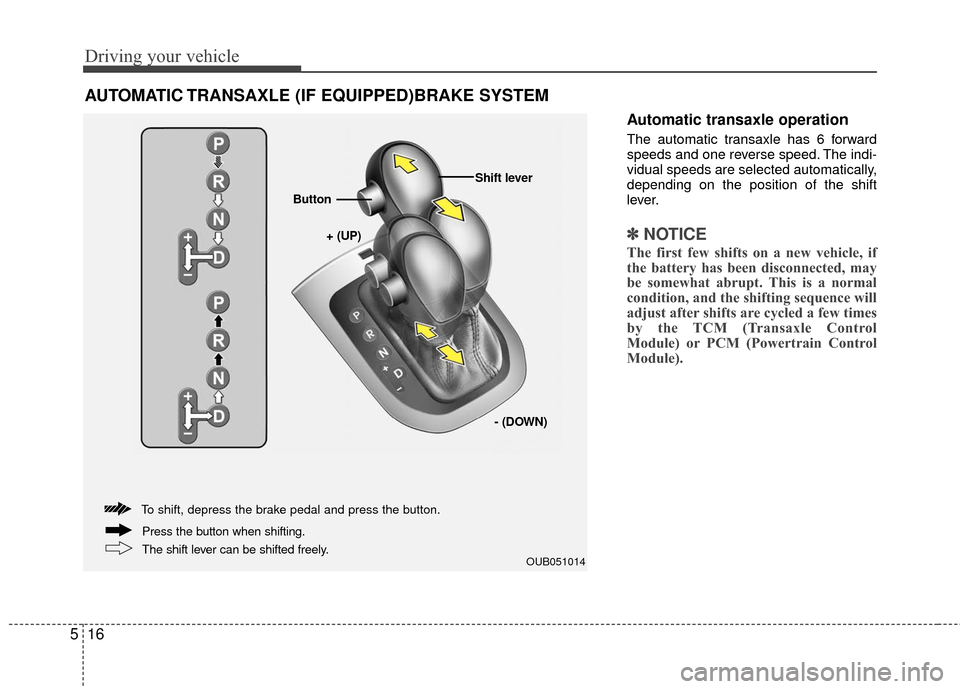
Automatic transaxle operation
The automatic transaxle has 6 forward
speeds and one reverse speed. The indi-
vidual speeds are selected automatically,
depending on the position of the shift
lever.
✽ ✽
NOTICE
The first few shifts on a new vehicle, if
the battery has been disconnected, may
be somewhat abrupt. This is a normal
condition, and the shifting sequence will
adjust after shifts are cycled a few times
by the TCM (Transaxle Control
Module) or PCM (Powertrain Control
Module).
AUTOMATIC TRANSAXLE (IF EQUIPPED)BRAKE SYSTEM
OUB051014
+ (UP)
Button
Shift lever
- (DOWN)
To shift, depress the brake pedal and press the button.
The shift lever can be shifted freely. Press the button when shifting.
Page 274 of 449

527
Driving your vehicle
When you drive on a road with poortraction, such as an icy road, and oper-
ated your brakes continuously, the
ABS will be active continuously and the
ABS warning light may illuminate. Pull
your vehicle over to a safe place and
stop the engine.
Restart the engine. If the ABS warning light is off, then your ABS is normal.
Otherwise, you may have a problem
with the ABS. Contact an authorized
Kia dealer as soon as possible.
✽ ✽ NOTICE
When you jump start your vehicle
because of a drained battery, the engine
may not run as smoothly and the ABS
warning light may turn on at the same
time. This happens because of the low
battery voltage. It does not mean your
ABS has malfunctioned.
• Do not pump your brakes!
• Have the battery recharged before
driving the vehicle.
Electronic stability control (ESC)
The Electronic Stability control (ESC)
system is designed to stabilize the vehicle
during cornering maneuvers. ESC checks
where you are steering and where the
vehicle is actually going. ESC applies the
brakes on individual wheels and
intervenes with the engine management
system to stabilize the vehicle.
No system, no matter how advanced, can
compensate for all driver error and/or
driving conditions. Always drive responsibly. Electronic stability control (ESC) will not
prevent accidents. Excessive speed in
turns, abrupt maneuvers and hydroplan-
ing on wet surfaces can still result in seri-
ous accidents. Only a safe and attentive
driver can prevent accidents by avoiding
maneuvers that cause the vehicle to lose
traction. Even with ESC installed, always
follow all the normal precautions for driv-
ing - including driving at safe speeds for
the conditions.
The Electronic Stability Control (ESC)
system is an electronic system designed
to help the driver maintain vehicle control
under adverse conditions. It is not a
substitute for safe driving practices.
Factors including speed, road conditions
and driver steering input can all affect
whether ESC will be effective in
preventing a loss of control. It is still your
responsibility to drive and corner at
reasonable speeds and to leave a
sufficient margin of safety.
When you apply your brakes under con-
ditions which may lock the wheels, you
may hear a “tik-tik’’ sound from the
brakes, or feel a corresponding sensation
in the brake pedal. This is normal and it
means your ESC is active.
OUB051018