Page 92 of 477
Features of your vehicle
22
4
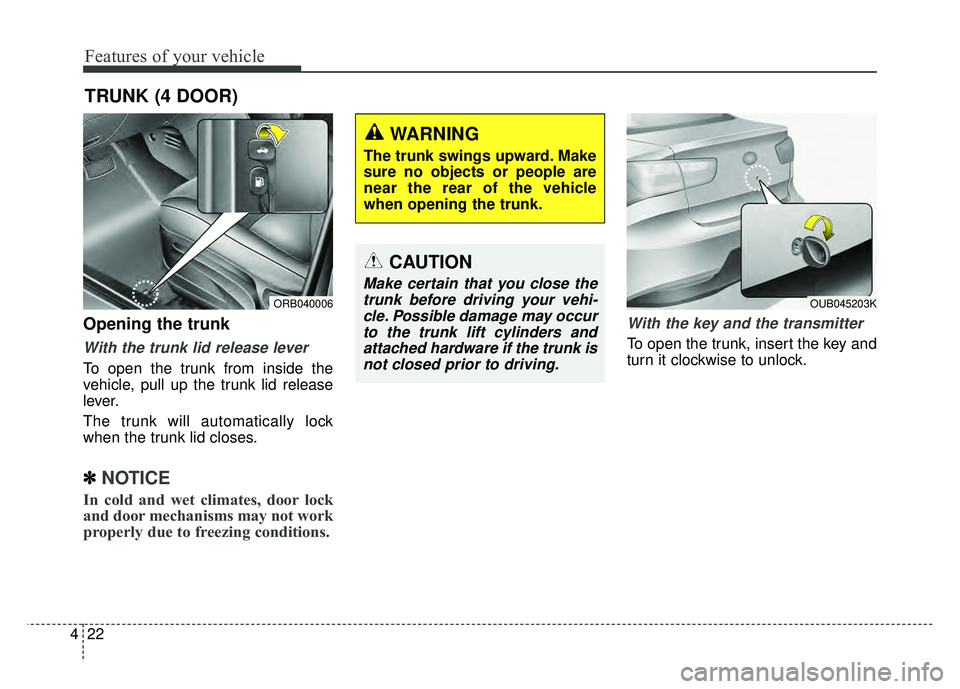
Opening the trunk
With the trunk lid release lever
To open the trunk from inside the
vehicle, pull up the trunk lid release
lever.
The trunk will automatically lock
when the trunk lid closes.
✽ ✽
NOTICE
In cold and wet climates, door lock
and door mechanisms may not work
properly due to freezing conditions.
With the key and the transmitter
To open the trunk, insert the key and
turn it clockwise to unlock.
TRUNK (4 DOOR)
ORB040006
CAUTION
Make certain that you close the
trunk before driving your vehi-cle. Possible damage may occurto the trunk lift cylinders andattached hardware if the trunk isnot closed prior to driving.
WARNING
The trunk swings upward. Make
sure no objects or people are
near the rear of the vehicle
when opening the trunk.
OUB045203K
Page 100 of 477
Features of your vehicle
30
4
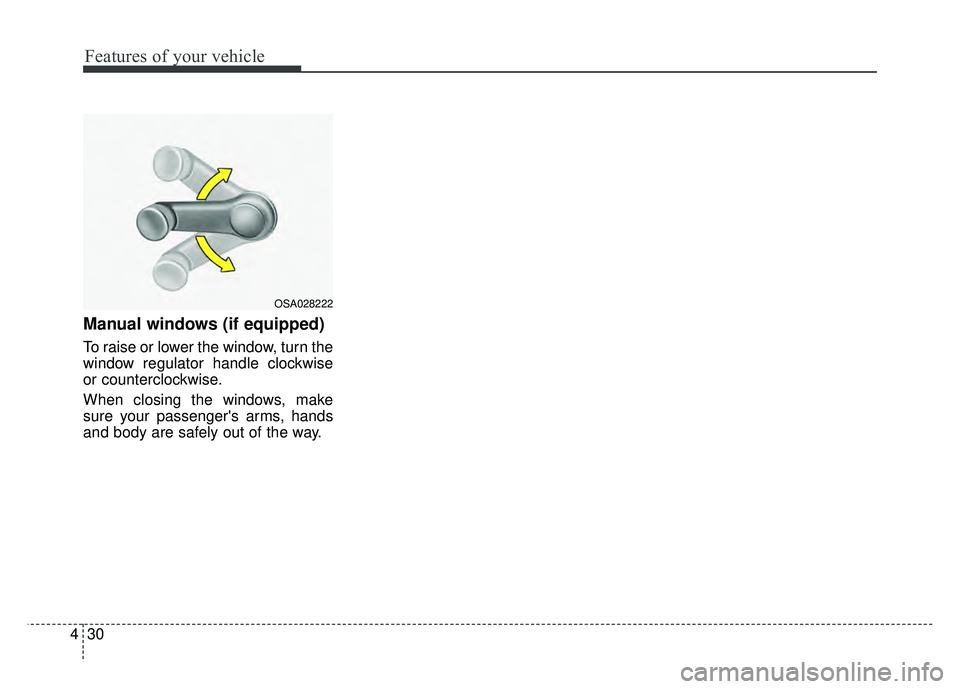
Manual windows (if equipped)
To raise or lower the window, turn the
window regulator handle clockwise
or counterclockwise.
When closing the windows, make
sure your passenger's arms, hands
and body are safely out of the way.
OSA028222
Page 103 of 477

433
Features of your vehicle
Opening the fuel filler lid
The fuel filler lid must be opened
from inside the vehicle by pulling up
the fuel filler lid opener.
If the fuel filler lid does not open
because ice has formed around it,
tap lightly or push on the lid to break
the ice and release the lid. Do not pry
on the lid. If necessary, spray around
the lid with an approved de-icer fluid
(do not use radiator anti-freeze) or
move the vehicle to a warm place
and allow the ice to melt.1.Stop the engine.
2.To open the fuel filler lid, pull the
fuel filler lid opener up.
3.Pull open the fuel filler lid (1).
4.To remove the cap (2), turn the fuel filler cap counterclockwise.
5.Refuel as needed.
Closing the fuel filler lid
1.To install the cap, turn it clockwise until it “clicks” one time. This indi-
cates that the cap is securely one
time tightened.
2.Close the fuel filler lid and push it in lightly and make sure that it is
securely closed.
✽ ✽
NOTICE
Tighten the cap until it clicks one
time, otherwise the fuel cap open
warning indicator light will illu-
minate.
FUEL FILLER LID
WARNING - Refueling
Always remove the fuel cap
carefully and slowly. If the cap
is venting fuel or if you hear a
hissing sound, wait until the
condition stops before com-
pletely removing the cap.
If pressurized fuel sprays out, it
can cover your clothes or skin
and subject you to the risk of
fire and burns.OUB041024OUB041025
Page 192 of 477
Features of your vehicle
122
4
Digital clock and calendar
(if equipped)
Whenever the battery terminals or
related fuses are disconnected, you
must reset the clock and the calen-
dar.
When the ignition switch is in the
ACC or ON position, the clock but-
tons operate as follows:
Setup the clock and calender
With audio off
1.Press the [SETUP/CLOCK] button
(1) until the clock of the display
blinks.
2.Set the clock by turning the knob (2) and press it. With audio on
1.Press the [SETUP/CLOCK] button
(1) until the clock adjust mode dis-
played.
2.Set the clock by turning the knob (2) and press it.
OUB045161N
WARNING - ClockSetting
Distraction
Do not adjust the clock while
driving. Such adjustments may
distract you for too long from the
roadway and lead to a collision.
Page 195 of 477
Features of your vehicle
4125
AUDIO SYSTEM
If you install an aftermarket HID
head lamp, your vehicle’s audio and
electronic device may malfunction.
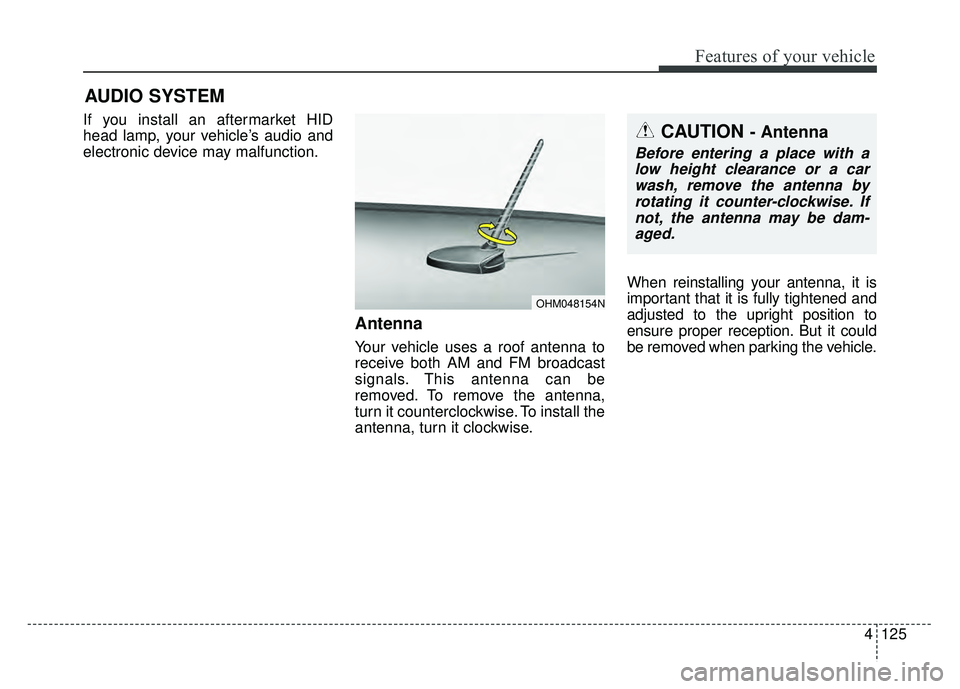
Antenna
Your vehicle uses a roof antenna to
receive both AM and FM broadcast
signals. This antenna can be
removed. To remove the antenna,
turn it counterclockwise. To install the
antenna, turn it clockwise.When reinstalling your antenna, it is
important that it is fully tightened and
adjusted to the upright position to
ensure proper reception. But it could
be removed when parking the vehicle.
CAUTION - Antenna
Before entering a place with a
low height clearance or a carwash, remove the antenna byrotating it counter-clockwise. Ifnot, the antenna may be dam-aged.
OHM048154N
Page 210 of 477

Features of your vehicle
140
4 (7)
Each time the button is shortly
pressed (under 0.8 seconds), it sets
the screen Off
➟Screen On ➟
Screen Off
❈
Audio operation is maintained and
only the screen will be turned Off.
In the screen Off state, press any
key to turn the screen On again.
(8)
Radio Mode
- Shortly press the key : Previews each broadcast for 5 seconds
each. - Press and hold the key (over 0.8
seconds) : Previews the broad-
casts saved in Preset ~
for 5 seconds each.
❈ Press the key again to
continue listening to the current
frequency.
❈ SAT Radio does not support the
Preset scan feature.
CD, USB, My Music mode
- Shortly press the key (under 0.8 seconds) : Previews each song
(file) for 10 seconds each.
❈ Press the key again to
continue listening to the current
song (file).
(9)
Shortly press the key (under 0.8 sec-
onds) : Moves to the Display, Sound,
Clock, Phone, System setting modes
Press and hold the key (over 0.8 sec-
onds) : Move to the Time setting
screen (10)
Displays menus for the current mode.
❈
iPod
®List : Move to parent category
(11)
Radio Mode
®
- SIRIUS®RADIO : Category Search
MP3, CD, USB mode : Folder Search
(12) TUNE knob
Radio mode : Changes frequency by
turning the knob left/right.
CD, USB, iPod
®, My Music mode :
Searches songs (files) by turning the
knob left/right.
❈ When the desired song is dis-
played, press the knob to play the
song.
Moves focus in all selection menus
and selects menus.
CAT
FOLDER
MENU
SETUP/CLOCK
SCAN
SCAN
61
SCAN
DISP
Page 213 of 477
Features of your vehicle
4143
SETUP
Display Settings
Press the key Select
[Display] through TUNE knob or key Select menu through
TUNE knob
Mode Pop up
[Mode Pop up] Changes /
selection mode
or key to display the mode
change pop up screen.
Media Display
When playing an MP3 file, select the
desired display info from ‘Folder/File’
or ‘Album/Artist/Song’.
MEDIA
RADIO
OffOn
1 RPT
SETUP/CLOCK
Page 214 of 477
Features of your vehicle
144
4
SOUND SETTINGS
Press the key Select
[Sound] through TUNE knob or key Select menu through
TUNE knob
Sound Settings
This menu allows you to set the
‘Bass, Middle, Treble’ and the Sound
Fader and Balance.
Select [Sound Settings] Select
menu through
TUNE knobTu r n
TUNE knobleft/right to set
Bass, Middle, Treble : Selects the sound tone.
Fader, Balance : Moves the sound fader and balance.
Default : Restores default settings.
❈ Back : While adjusting values,
pressing the TUNE knob will
restore the parent menu.
Speed Dependent Volume
Control
This feature is used to automatically
control the volume level according to
the speed of the vehicle.
Select [Speed Dependent Vol.] Set
[Off/On] of
TUNEknob
Voice Recognition Volume
(if equipped)
Adjusts voice recognition volume.
Select [Voice Recognition Vol.] Set
volume of
TUNEknob
2 RDM
SETUP/CLOCK

![KIA RIO HATCHBACK 2016 Owners Manual Features of your vehicle
4143
SETUP
Display Settings
Press the key Select
[Display] through TUNE knob or key Select menu through
TUNE knob
Mode Pop up
[Mode Pop up] Changes /
selection mode
or ke](/manual-img/2/57984/w960_57984-212.png "KIA RIO HATCHBACK 2016 Owners Manual Features of your vehicle
4143
SETUP
Display Settings
Press the key Select
[Display] through TUNE knob or key Select menu through
TUNE knob
Mode Pop up
[Mode Pop up] Changes /
selection mode
or ke")
![KIA RIO HATCHBACK 2016 Owners Manual Features of your vehicle
144
4
SOUND SETTINGS
Press the key Select
[Sound] through TUNE knob or key Select menu through
TUNE knob
Sound Settings
This menu allows you to set the
‘Bass, Middle, Tre](/manual-img/2/57984/w960_57984-213.png "KIA RIO HATCHBACK 2016 Owners Manual Features of your vehicle
144
4
SOUND SETTINGS
Press the key Select
[Sound] through TUNE knob or key Select menu through
TUNE knob
Sound Settings
This menu allows you to set the
‘Bass, Middle, Tre")