Page 388 of 477
Maintenance
38
7
Turn the engine off and wait until it
cools down. Use care when remov-
ing the radiator cap. Wrap a thick
towel around it, and turn it counter-
clockwise slowly to the first stop.
Step back while the pressure is
released from the cooling system.
When you are sure all the pressure
has been released, press down on
the cap, using a thick towel, and con-
tinue turning counterclockwise to
remove it.
Changing the coolant
Have the coolant changed by an
authorized Kia dealer according to
the Maintenance Schedule at the
beginning of this section.
Put a thick cloth or fabric around the
radiator cap before refilling the
coolant in order to prevent the
coolant from overflowing into engine
parts such as the alternator.CAUTION- Removing
radiator cap
Never attempt to
remove the radiator cap while the engineis operating or hot.Doing so might leadto cooling system andengine damage.
Page 400 of 477

Maintenance
50
7
Battery recharging
Your vehicle has a maintenance-free,
calcium-based battery.
If the battery becomes discharged
in a short time (because, for exam-
ple, the headlights or interior lights
were left on while the vehicle was
not in use), recharge it by slow
charging (trickle) for 10 hours.
If the battery gradually discharges because of high electric load while
the vehicle is being used, recharge
it at no more than 20-30A for two
hours. When recharging the battery,
observe the following precautions:
The battery must be removed from
the vehicle and placed in an area
with good ventilation.
Watch the battery during charging, and stop or reduce the charging
rate if the battery cells begin
gassing (boiling) violently or if the
temperature of the electrolyte of
any cell exceeds 120°F (49°C).
Wear eye protection when check- ing the battery during charging.
Disconnect the battery charger in the following order.
1. Turn off the battery charger main switch.
2. Unhook the negative clamp from the negative battery terminal.
3. Unhook the positive clamp from the positive battery terminal.
Before performing maintenance or recharging the battery, turn off all
accessories and stop the engine.
The negative battery cable must be removed first and installed last
when the battery is disconnected.
Reset items
Items should be reset after the bat-
tery has been discharged or the bat-
tery has been disconnected.
Auto down window (See section 4)
Sunroof (See section 4)
Trip computer (See section 4)
Climate control system (See section 4)
Clock (See section 4)
Audio (See section 4)
Page 417 of 477

767
Maintenance
If you do not have a spare, use afuse of the same rating from a circuityou may not need for operating thevehicle, such as the cigar lighterfuse.
If the headlights or other electrical
components do not work and the
fuses are OK, check the fuse block in
the engine compartment. If a fuse is
blown, it must be replaced.
Memory fuse
Your vehicle is equipped with the
memory fuse to prevent battery dis-
charge if your vehicle is parked with-
out being operated for prolonged
periods. Use the following proce-
dures before parking the vehicle for
prolonged periods.
1. Turn off the engine.
2. Turn off the headlights and tail lights.
3. Open the driver’s side panel cover and pull up the memory fuse. If the memory fuse is pulled up from
the fuse panel, the warning chime,
audio, clock and interior lamps, etc.,
will not operate. Some items must be
reset after replacement. Refer to
“Battery” in this section.
Even though the memory fuse is
pulled up, the battery can still be dis-
charged by operation of the head-
lights or other electrical devices.
OUB071021
Page 422 of 477

Maintenance
72
7
Instrument panel fuse panel
Fuse Name Fuse rating Circuit Protected
POWER OUTLET 15A Power Outlet
C/LIGHTER 20A Cigarette Lighter
ACC 10AFront Map Lamp, Power Outside Mirror Switch, BCM,
Low DC-DC Convertor, Smart Key Control Module, Audio,
A/V & Navigation Head Unit, Digital Clock
A/BAG IND 10A Instrument Cluster
A/BAG 10ASBR PAB Indicator, SRS Control Module
Passenger Weight Classification Sensor
MODULE 2 10A BCM
MDPS 10A EPS Control Module
WIPER RR 15A Multifunction Switch, Rear Wiper Relay, Rear Wiper Motor
HTD STRG 15A Steering Wheel Heater
FOG LAMP RR 10A -
FOG LAMP FRT 15A Front Fog Lamp Relay
MODULE 1 10A ATM Shift Lever Switch, Door Warning Switch
STOP LAMP 15AData Link Connector, Smart Key Control Module, Stop Lamp Switch
Stop Lamp Relay, PCB Fuse & Relay Box (HAC Relay)
CLUSTER 10AAudio, BCM, ATM Shift Lever ILL., Crash Pad Switch
Instrument Cluster, Tire Pressure Monitoring Module
IG1 1 10AMultipurpose Check Connector, Driver CCS Seat Warmer Module
Passenger Seat Warmer Module
With ISG : Crash Pad Switch, Low DC-DC Convertor
ABS 10ACrash Pad Switch, ESC Module
PCB Fuse & Relay Box (HAC Relay)
B/UP LAMP 10A Back-Up Lamp Switch
Page 423 of 477

773
Maintenance
Fuse Name Fuse ratingCircuit Protected
IG1 2 10AVehicle Speed Sensor, Stop Lamp Switch, Inverter
A/C Control Module
HAZARD 15A Hazard Switch, BCM
PDM 1 25A Smart Key Control Module
SUNROOF 15A Sunroof Motor
PDM 2 10AImmobilizer Module, Start/Stop Button Switch,
Smart Key Control Module
ECU 15ASmart Key Control Module, Immobilizer Module,
ECM/PCM, Transaxle Range Switch
IG2 10ABCM, Smart Key Control Module, Driver CCS Seat Warmer Module
Cluster Ionizer, Rain Sensor, A/C Control Module, Sunroof Motor
PCB Fuse & Relay Box (Blower Relay, Head Lamp (HI) Relay,
Fuel Pump #1 Relay)
WIPER FRT 25AMultifunction Switch, Front Wiper Motor
PCB Fuse & Relay Box (Rain Sensor Relay, Front Wiper Relay)
DOOR LOCK 20ADoor Lock/Unlock Relay, Tail Gate Unlock Relay,
Two Turn Unlock Relay
SAFETY POWER
WINDOW 25A Driver Safety Power Window Module
S/HEATER 15ASeat Warmer Switch, Driver CCS Seat Warmer Module,
Passenger Seat Warmer Module
FOLD'G MIRR 10A Power Outside Mirror Switch
ROOM LAMP 10ABCM, Door Warning Switch, Tire Pressure Monitoring Module
Instrument Cluster, Digital Clock, A/C Control Module
Luggage Lamp
Page 429 of 477
779
Maintenance
Always handle them carefully, and
avoid scratches and abrasions. If the
bulbs are lit, avoid contact with liq-
uids. Never touch the glass with bare
hands. Residual oil may cause the
bulb to overheat and burst when lit. A
bulb should be operated only when
installed in a headlight.
If a bulb becomes damaged or
cracked, replace it immediately and
carefully dispose of it.
Wear eye protection when changing
a bulb. Allow the bulb to cool down
before handling it.1.Turn off the engine and open the
hood. If you can reach the bulb
without removing the headlight
assembly, continue to step 4.
2.Remove the front bumper upper cover.
3.Remove the headlight assembly from the body of the vehicle.
4.Disconnect the power connector(s) from the back of the headlight
assembly.
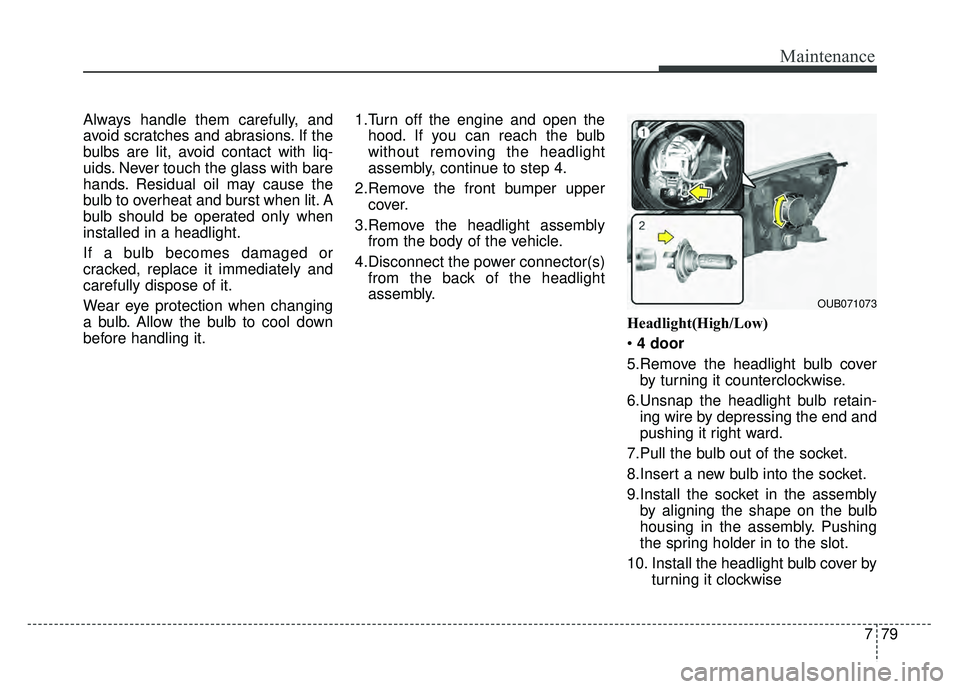
Headlight(High/Low)
4 door
5.Remove the headlight bulb cover by turning it counterclockwise.
6.Unsnap the headlight bulb retain- ing wire by depressing the end and
pushing it right ward.
7.Pull the bulb out of the socket.
8.Insert a new bulb into the socket.
9.Install the socket in the assembly by aligning the shape on the bulb
housing in the assembly. Pushing
the spring holder in to the slot.
10. Install the headlight bulb cover by turning it clockwise
OUB071073
Page 430 of 477
Maintenance
80
7
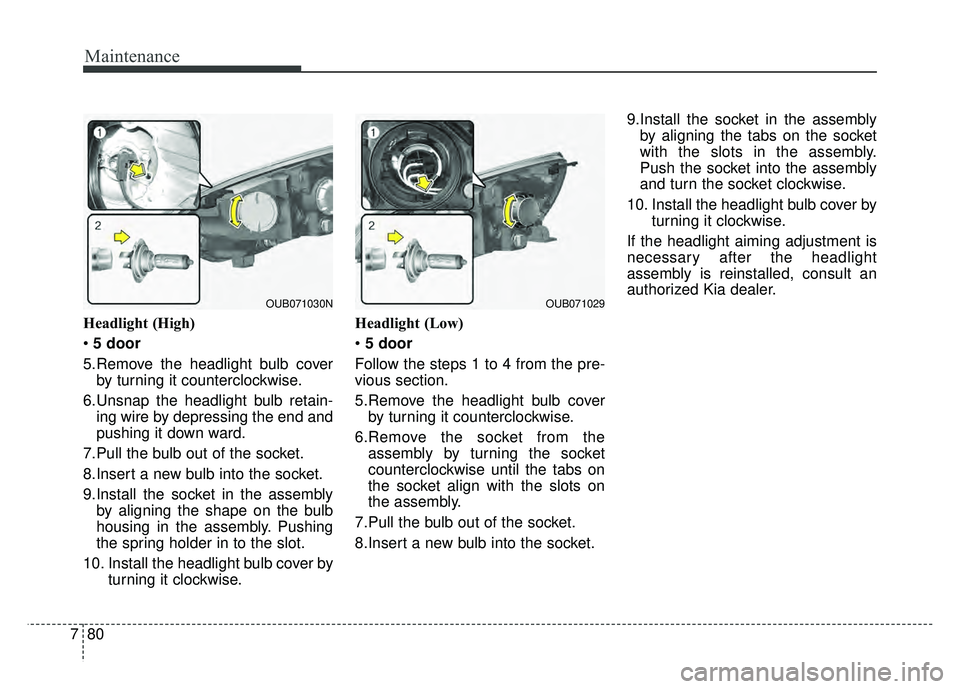
Headlight (High)
5 door
5.Remove the headlight bulb cover by turning it counterclockwise.
6.Unsnap the headlight bulb retain- ing wire by depressing the end and
pushing it down ward.
7.Pull the bulb out of the socket.
8.Insert a new bulb into the socket.
9.Install the socket in the assembly by aligning the shape on the bulb
housing in the assembly. Pushing
the spring holder in to the slot.
10. Install the headlight bulb cover by turning it clockwise. Headlight (Low)
5 door
Follow the steps 1 to 4 from the pre-
vious section.
5.Remove the headlight bulb cover by turning it counterclockwise.
6.Remove the socket from the assembly by turning the socket
counterclockwise until the tabs on
the socket align with the slots on
the assembly.
7.Pull the bulb out of the socket.
8.Insert a new bulb into the socket. 9.Install the socket in the assembly
by aligning the tabs on the socket
with the slots in the assembly.
Push the socket into the assembly
and turn the socket clockwise.
10. Install the headlight bulb cover by turning it clockwise.
If the headlight aiming adjustment is
necessary after the headlight
assembly is reinstalled, consult an
authorized Kia dealer.
OUB071030NOUB071029
Page 431 of 477
781
Maintenance
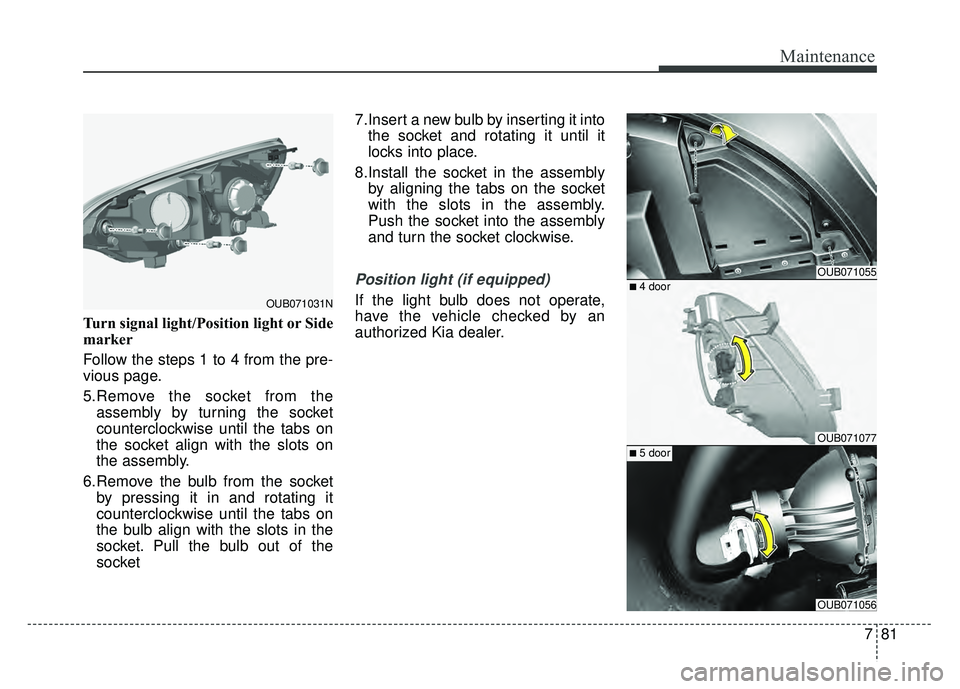
Turn signal light/Position light or Side
marker
Follow the steps 1 to 4 from the pre-
vious page.
5.Remove the socket from theassembly by turning the socket
counterclockwise until the tabs on
the socket align with the slots on
the assembly.
6.Remove the bulb from the socket by pressing it in and rotating it
counterclockwise until the tabs on
the bulb align with the slots in the
socket. Pull the bulb out of the
socket 7.Insert a new bulb by inserting it into
the socket and rotating it until it
locks into place.
8.Install the socket in the assembly by aligning the tabs on the socket
with the slots in the assembly.
Push the socket into the assembly
and turn the socket clockwise.
Position light (if equipped)
If the light bulb does not operate,
have the vehicle checked by an
authorized Kia dealer.OUB071031N
OUB071055
OUB071077
OUB071056
■ 4 door
■ 5 door