Features of your vehicle
1604Language
This menu is used to set the display and
voice recognition language.
Select [Language] Set through TUNE knob ❈
The system will reboot after the lan-
guage is changed.
❈ Language support by region SETUP
Type A-3, Type A-4
(for Colombia model)
Display Settings
Press the key Select [Display]
through TUNE knob or key
Select menu through TUNE knob
Mode Pop up
[Mode Pop up] Changes / selection mode
or
key to display the mode
change pop up screen.
Media Display
When playing an MP3 file, select the
desired display info from ‘Folder/File’ or
‘Album/Artist/Song’.
MEDIA
RADIO
OffOn
1
RPT
SETUP
CLOCK
Page 252 of 488
177
Features of your vehicle
4
SYSTEM SETTINGS
Press the key Select [System]
Memory Information
Displays currently used memory and
total system memory.
Select [Memory Information] OK
The currently used memory is displayed on the left side while the total system
memory is displayed on the right side.
RADIO (for RDS model) ❈
RADIO may differ depending on the
selected audio.
Changing RADIO mode SEEK
Press the key
Shortly pressing the key (under 0.8 seconds): Changes the frequency.
Pressing and holding the key (over 0.8 seconds): Automatically searches for
the next frequency. Preset SEEK Press
the ~ key
seconds): Plays the frequency saved in
the corresponding key.
seconds): Pressing and holding thedesired key from ~ will
save the currently playing broadcast to
the selected key and sound a BEEP.
SCAN
Press the key
seconds): The broadcast frequency
increases and previews each broadcast
for 5 seconds each. After scanning all
frequencies, returns and plays the cur-
rent broadcast frequency.
TA
SCAN
61
61
SEEK
TRACK
SETUP
CLOCK
Page 253 of 488
Features of your vehicle
1784Selecting through manual search
Turn the TUNE knob left/right to adjust
the frequency.
Traffic Announcement (TA)
Shortly pressing the key (under
0.8 seconds): Set / TA Traffic
Announcement) mode. MENU
Within key are the A.Store (Auto
Store) and Info functions.
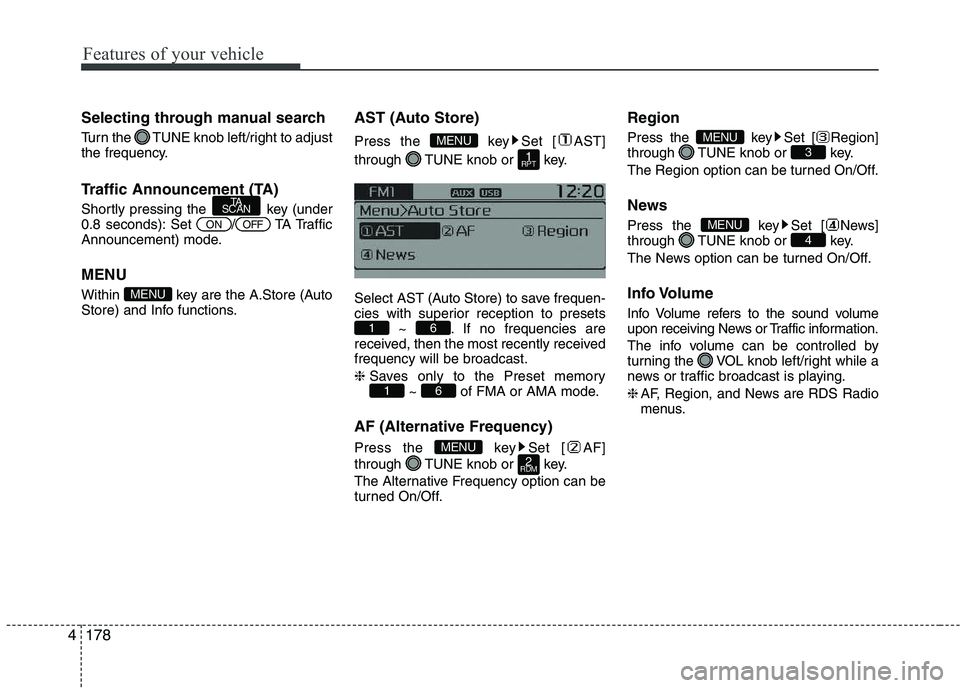
AST (Auto Store)
Press the key Set [ AST]
through TUNE knob or key.
Select AST (Auto Store) to save frequen-
cies with superior reception to presets
~ . If no frequencies are
received, then the most recently receivedfrequency will be broadcast. ❈ Saves only to the Preset memory
~ of FMA or AMA mode.
AF (Alternative Frequency)
Press the key Set [ AF]
through TUNE knob or key.
The Alternative Frequency option can be
turned On/Off. Region
Press the key Set [ Region]
through TUNE knob or key.
The Region option can be turned On/Off.
News
Press the key Set [ News]
through TUNE knob or key.
The News option can be turned On/Off.
Info Volume
Info Volume refers to the sound volume
upon receiving News or Traffic information.
The info volume can be controlled by
turning the VOL knob left/right while a
news or traffic broadcast is playing. ❈
AF, Region, and News are RDS Radio
menus.
4MENU
3MENU
2
RDMMENU
61
61
1
RPT
MENU
MENU
OFFON
TA
SCAN
Page 254 of 488
179
Features of your vehicle
4
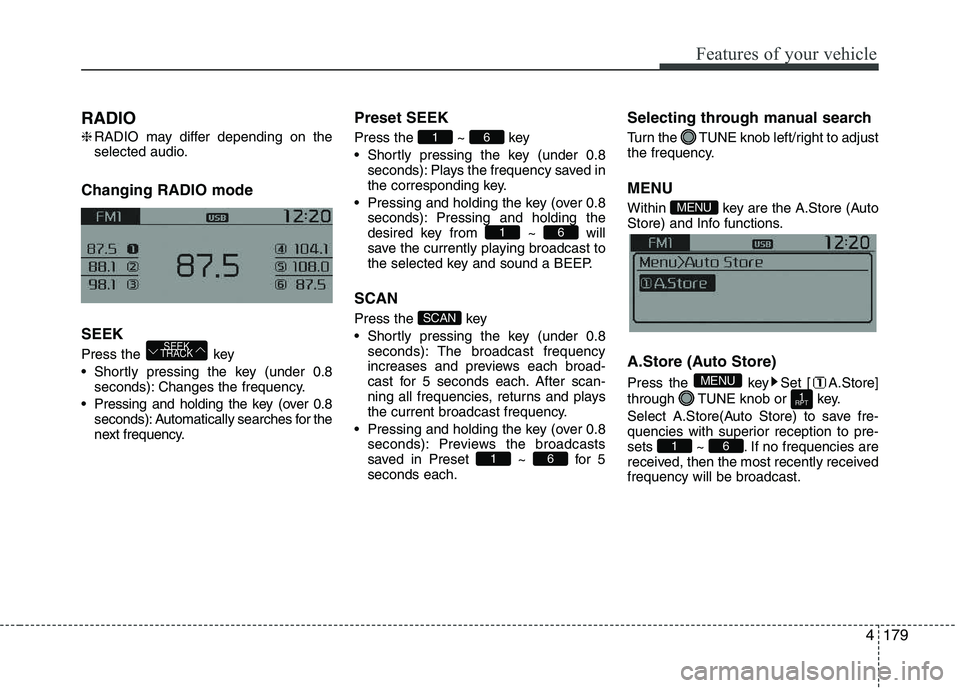
RADIO ❈
RADIO may differ depending on the
selected audio.
Changing RADIO mode SEEK
Press the key
Shortly pressing the key (under 0.8 seconds): Changes the frequency.
Pressing and holding the key (over 0.8 seconds): Automatically searches for the
next frequency. Preset SEEK Press
the ~ key
Shortly pressing the key (under 0.8 seconds): Plays the frequency saved in
the corresponding key.
Pressing and holding the key (over 0.8 seconds): Pressing and holding thedesired key from ~ will
save the currently playing broadcast to
the selected key and sound a BEEP.
SCAN
Press the key
Shortly pressing the key (under 0.8 seconds): The broadcast frequency
increases and previews each broad-
cast for 5 seconds each. After scan-
ning all frequencies, returns and plays
the current broadcast frequency.
Pressing and holding the key (over 0.8 seconds): Previews the broadcasts
saved in Preset ~ for 5seconds each. Selecting through manual search
Turn the TUNE knob left/right to adjust
the frequency. MENU
Within key are the A.Store (Auto
Store) and Info functions.
A.Store (Auto Store)
Press the key Set [ A.Store]
through TUNE knob or key.
Select A.Store(Auto Store) to save fre-
quencies with superior reception to pre-
sets ~ . If no frequencies are
received, then the most recently receivedfrequency will be broadcast.
61
1
RPT
MENU
MENU
61
SCAN
61
61
SEEK
TRACK
Page 255 of 488
Features of your vehicle
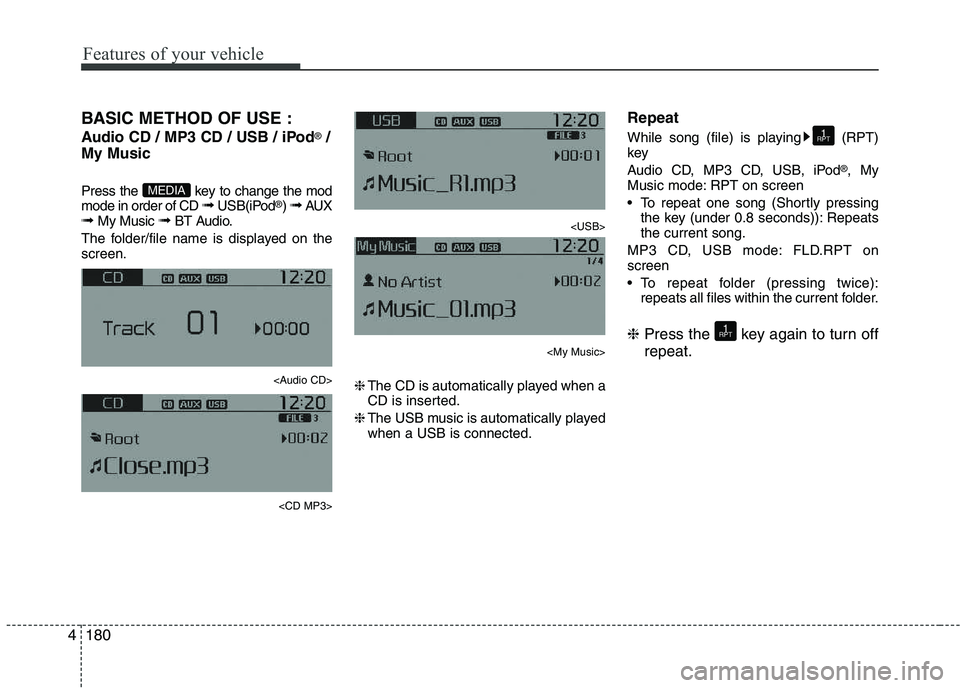
1804BASIC METHOD OF USE :
Audio CD / MP3 CD / USB / iPod
®
/
My Music
Press the key to change the mod mode in order of CD ➟ USB(iPod ®
) ➟ AUX
➟ My Music ➟ BT Audio.
The folder/file name is displayed on thescreen.
Page 256 of 488
181
Features of your vehicle
4
Random
While song (file) is playing (RDM) key
Audio CD, My Music mode: RDM on screen
Random (Shortly pressing the key):
Plays all songs in random order.
MP3 CD, USB mode: FLD.RDM on screen
Folder Random (Shortly pressing the key): Plays all files within the current
folder in random order.
MP3 CD, USB mode: ALL RDM onscreen
Plays all files in random order.
iPod ®
mode: RDM on screen
Random (Shortly pressing the key): Plays all files in random order.
❈ Press the key again to turn off ran- dom. Changing Song/File
While song (file) is playing key
Plays the cur-
rent song from the beginning.
❈ If the key is pressed again
within 1 second, the previous song is
played.
Pressing and holding the key (over 0.8 seconds): Rewinds the song.
While song (file) is playingkey
Shortly pressing the key : Plays the next song.
Pressing and holding the key (over 0.8 seconds): Fast forwards the song. Scan (for RDS model)
Pressing and holding the key
(over 0.8 seconds) : Scans all songs
for 10 seconds starting from the nextsong.
❈ Pressing and holding the key
again to turn off.
Scan
Shortly pressing the the key : Scans all songs from the next song for 10 seconds each.
❈ Press the key again to turn
off.
❈ The SCAN function is not supported in
iPod ®
mode.
SCAN
SCAN
TA
SCAN
TA
SCAN
SEEK
TRACK
SEEK
TRACK
SEEK
TRACK
2
RDM
2
RDM
Page 264 of 488
189
Features of your vehicle
4
PHONE (IF EQUIPPED)
Before using the
Bluetooth®Wireless
Technology phone features
In order to use
Bluetooth®Wireless
Technology phone, you must first pair and connect the
Bluetooth®Wireless
Technology mobile phone.
If the mobile phone is not paired or connected, it is not possible to enter
Phone mode. Once a phone is pairedor connected, the guidance screen will
be displayed.
If Priority is set upon vehicle ignition (IGN/ACC ON), the
Bluetooth®
Wireless Technology phone will be
automatically connected. Even if you
are outside, the
Bluetooth®Wireless
Technology phone will be automatical-
ly connected once you are in the vicin-
ity of the vehicle. If you do not wantautomatic
Bluetooth®Wireless
Technology phone connection, set the
Bluetooth®Wireless Technology power
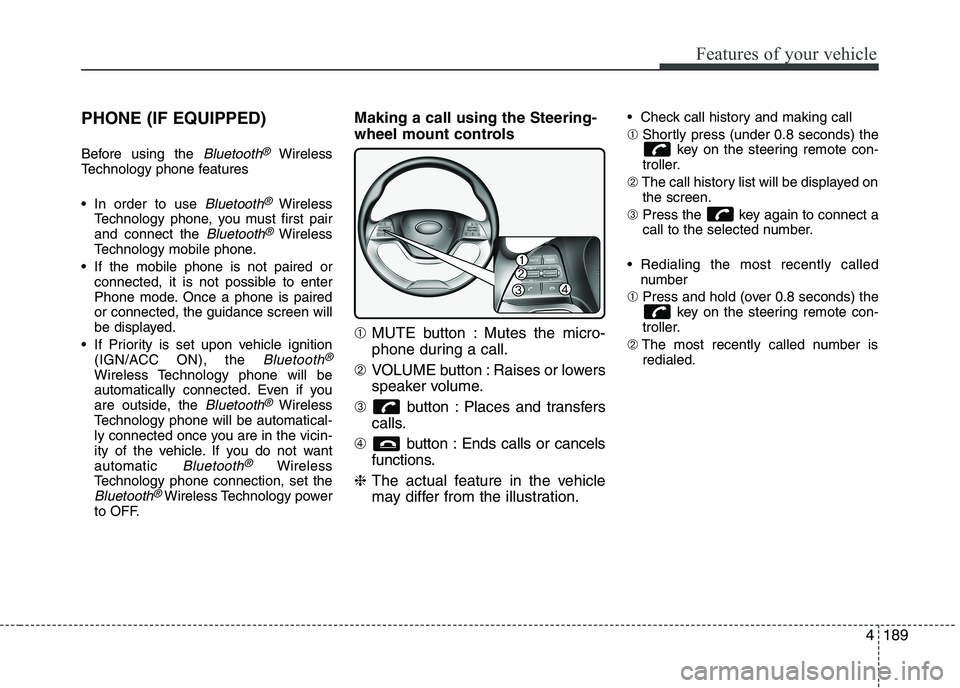
to OFF. Making a call using the Steering-
wheel mount controls ➀
MUTE button : Mutes the micro-
phone during a call.
➁ VOLUME button : Raises or lowers
speaker volume.
➂ button : Places and transfers
calls.
➃ button : Ends calls or cancels
functions.
❈ The actual feature in the vehicle
may differ from the illustration. Check call history and making call ➀
Shortly press (under 0.8 seconds) the
key on the steering remote con-
troller.
➁ The call history list will be displayed on
the screen.
➂ Press the key again to connect a
call to the selected number.
Redialing the most recently called number
➀ Press and hold (over 0.8 seconds) the
key on the steering remote con-
troller.
➁ The most recently called number is
redialed.
Page 265 of 488
Features of your vehicle
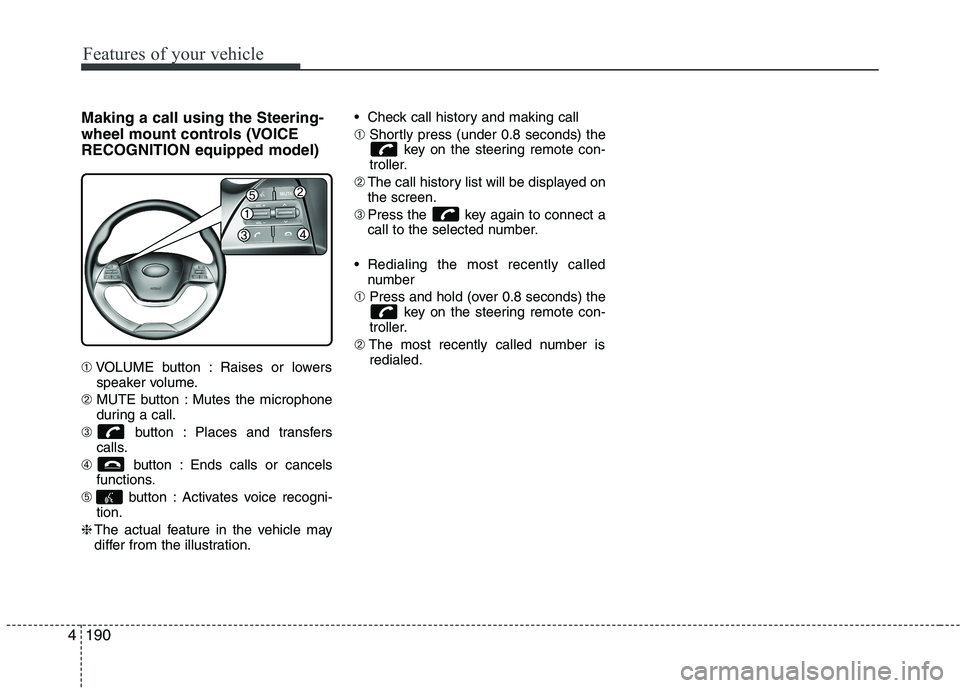
1904Making a call using the Steering-
wheel mount controls (VOICERECOGNITION equipped model) ➀
VOLUME button : Raises or lowers
speaker volume.
➁ MUTE button : Mutes the microphone
during a call.
➂ button : Places and transfers
calls.
➃ button : Ends calls or cancels
functions.
➄ button : Activates voice recogni-
tion.
❈ The actual feature in the vehicle may
differ from the illustration. Check call history and making call ➀
Shortly press (under 0.8 seconds) the
key on the steering remote con-
troller.
➁ The call history list will be displayed on
the screen.
➂ Press the key again to connect a
call to the selected number.
Redialing the most recently called number
➀ Press and hold (over 0.8 seconds) the
key on the steering remote con-
troller.
➁ The most recently called number is
redialed.
![KIA PICANTO 2016 Owners Manual Features of your vehicle
1604Language
This menu is used to set the display and
voice recognition language.
Select [Language] Set through TUNE knob ❈
The system will reboot after the lan-
guage i](/manual-img/2/40383/w960_40383-234.png "KIA PICANTO 2016 Owners Manual Features of your vehicle
1604Language
This menu is used to set the display and
voice recognition language.
Select [Language] Set through TUNE knob ❈
The system will reboot after the lan-
guage i")
![KIA PICANTO 2016 Owners Manual 177
Features of your vehicle
4
SYSTEM SETTINGS
Press the key Select [System]
Memory Information
Displays currently used memory and
total system memory.
Select [Memory Information] OK
The curren](/manual-img/2/40383/w960_40383-251.png "KIA PICANTO 2016 Owners Manual 177
Features of your vehicle
4
SYSTEM SETTINGS
Press the key Select [System]
Memory Information
Displays currently used memory and
total system memory.
Select [Memory Information] OK
The curren")