Page 160 of 466
485
Features of your vehicle
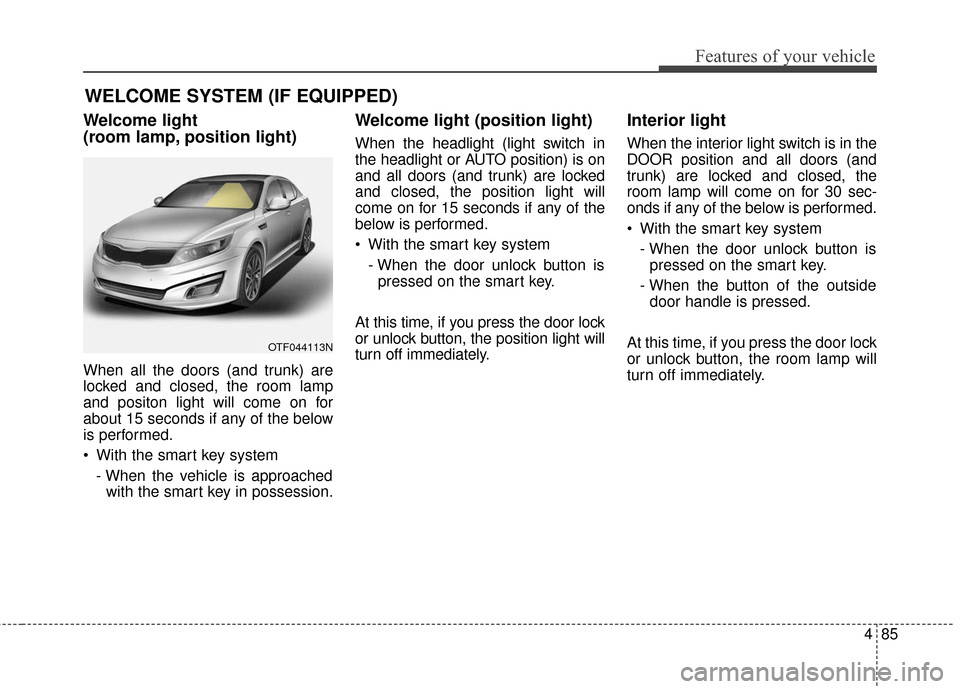
Welcome light
(room lamp, position light)
When all the doors (and trunk) are
locked and closed, the room lamp
and positon light will come on for
about 15 seconds if any of the below
is performed.
With the smart key system- When the vehicle is approachedwith the smart key in possession.
Welcome light (position light)
When the headlight (light switch in
the headlight or AUTO position) is on
and all doors (and trunk) are locked
and closed, the position light will
come on for 15 seconds if any of the
below is performed.
With the smart key system
- When the door unlock button ispressed on the smart key.
At this time, if you press the door lock
or unlock button, the position light will
turn off immediately.
Interior light
When the interior light switch is in the
DOOR position and all doors (and
trunk) are locked and closed, the
room lamp will come on for 30 sec-
onds if any of the below is performed.
With the smart key system - When the door unlock button ispressed on the smart key.
- When the button of the outside door handle is pressed.
At this time, if you press the door lock
or unlock button, the room lamp will
turn off immediately.
WELCOME SYSTEM (IF EQUIPPED)
OTF044113N
Page 172 of 466
497
Features of your vehicle
■
■Ty p e B
DOOR :
In the DOOR position, the map lamp
and the room lamp come on when any
door is opened regardless of the igni-
tion switch position. When doors are
unlocked by the transmitter (or smart
key), the map lamp and the room lamp
come on for approximately 30 sec-
onds as long as any door is not open.
The map lamp and the room lamp go
out gradually after approximately 30
seconds if the door is closed.
However, if the ignition switch is ON
or all doors are locked, the map lamp
and the room lamp will turn off imme-
diately. If a door is opened with the
ignition switch in the ACC or LOCK
position, the map lamp and the room
lamp stay on for about 20 minutes.
However, if a door is opened with the
ignition switch in the ON position, the
map lamp and the room lamp stay on
continuously. OFF : The lights turn off even if a
door is opened.
ON : The room lamp stays on at all times.Trunk room lamp (if equipped)
The trunk room lamp comes on
when the trunk is opened.
The trunk light comes on only with
the trunk lid open. To prevent battery
discharge, close the trunk lid secure-
ly after accessing the trunk.
OTFH044110
Page 259 of 466
53
Driving your vehicle
Be sure the exhaust system
does not leak.
The exhaust system should be
checked whenever the vehicle is
raised to change the oil or for any
other purpose. If you hear a change
in the sound of the exhaust or if you
drive over something that strikes the
underneath side of the vehicle, have
the exhaust system checked as soon
as possible by an authorized Kia
dealer.
WARNING - Engineexhaust
Do not inhale exhaust fumes or
leave your engine running in an
enclosed area for a prolonged
time.
Exhaust fumes contain carbon
monoxide, a colorless, odorless
gas that can cause uncon-
sciousness and death by
asphyxiation.
WARNING - Open trunk
Do not drive with the trunk
open.
Poisonous exhaust gases can
enter the passenger compart-
ment. If you must drive with the
trunk open proceed as follows:
1. Close all windows.
2. Open side vents.
3. Set the air intake control at "Fresh", the air flow control at
"Floor" or "Face" and the fan
at the highest speed.
Page 297 of 466

541
Driving your vehicle
❈If your vehicle's left or right side
bumper is blinded by barrier or
vehicles, the system sensing abili-
ty may be deteriorated.
✽ ✽
NOTICE
• The system may not work proper-
ly if the bumper has been replaced
or if a repair work has been done
near the sensor.
• The detection area differs accord- ing to the roads width. If the road
is narrow the system may detect
other vehicles in the next lane.
• On the contrary, if the road is very wide the system may not detect
other vehicles.
• The system may turn off due to strong electromagnetic waves.
Non-operating condition
Driver's Attention
The driver must be cautious in the
below situations for the system may
not assist the driver and may not
work properly.
- Curved roads, tollgates, etc.
- The surrounding of the sensor is
polluted with rain, snow, mud, etc
- The rear bumper near the sensor is covered or hidden with a foreign
matter such as a sticker, bumper
guard, bicycle stand etc.
- The rear bumper is damaged or the sensor is out of place.
- The height of the vehicle shows much change such as when the
trunk is loaded with heavy objects,
abnormal tire pressure etc.
- Due to bad weather such as heavy rain or snow.
WARNING
The Blind Spot Detection
System with Lane Change
Assist and Rear Cross Traffic
Alert is not a substitute for
proper and safe lane changing
procedures. Always drive safely
and use caution when changing
lanes. The Blind Spot Detection
System may not detect every
object alongside the vehicle.
Page 337 of 466
What to do in an emergency
24
6
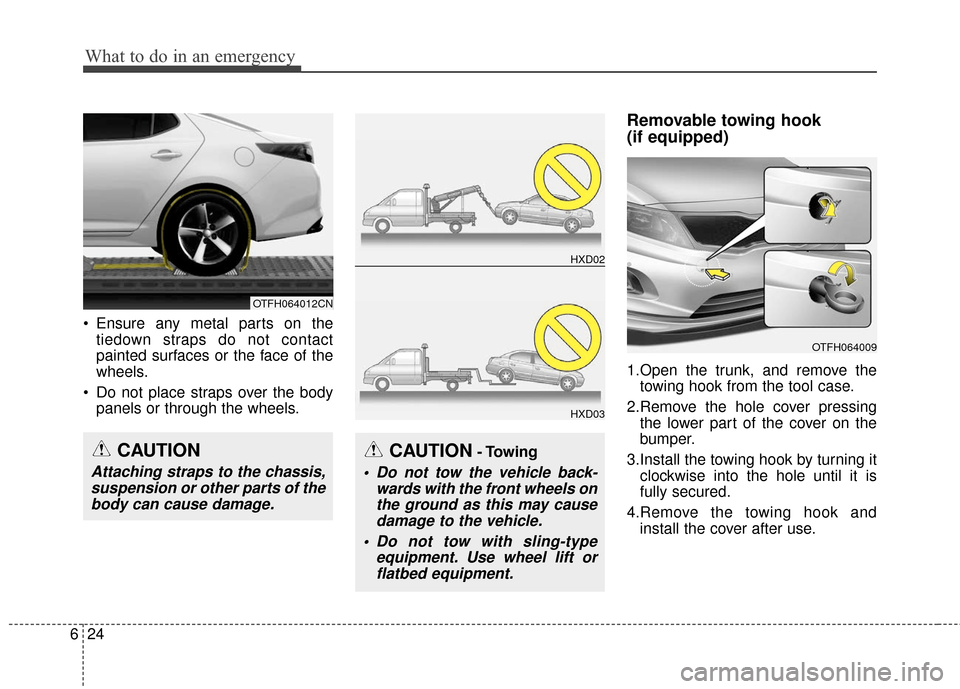
Ensure any metal parts on the
tiedown straps do not contact
painted surfaces or the face of the
wheels.
Do not place straps over the body panels or through the wheels.
Removable towing hook
(if equipped)
1.Open the trunk, and remove thetowing hook from the tool case.
2.Remove the hole cover pressing the lower part of the cover on the
bumper.
3.Install the towing hook by turning it clockwise into the hole until it is
fully secured.
4.Remove the towing hook and install the cover after use.
CAUTION- Towing
Do not tow the vehicle back- wards with the front wheels onthe ground as this may causedamage to the vehicle.
Do not tow with sling-type equipment. Use wheel lift orflatbed equipment.
HXD02
HXD03
OTFH064009
CAUTION
Attaching straps to the chassis,suspension or other parts of thebody can cause damage.
OTFH064012CN
Page 403 of 466
763
Maintenance
Inner Fuse panel
Description Fuse RatingProtected Component
MULTIMEDIA 15A AUDIO_UVO, AUDIO (PA30A,B), NAVI_3.0, NAVI_4.0, TMU
PDM 1 25A Smart Key Control Module (With Smart Key)
SPARE 10A -
PDM2 10A SMK UNIT, BUTTON START SW
P/SEAT(PASS) 20A Passenger Seat Manual Switch AMP 30A AMP
P/SEAT(DRV) 30A Driver IMS Module, Driver Seat Manual Switch, Driver Lumbar Support Switch (2WAY) MEMORY 2 7.5A PIC_RF_RECEIVER
TRUNK 10A Trunk Lid Relay, Trunk Room Lamp
MODULE 7 10A SPORT_MODE_SW, RR POWER WINDOW SW
DR LOCK 20A Door Lock/Unlock Relay, Turn Signal Lamp Sound Relay
S/HEATER(RR) 20A Rear Seat Warmer Relay LH/RH
P/WDW(RH) 25APassenger Safety Power Window Module (LHD), Rear Safety Power Window Module RH, Power
Window RH Relay
P/WDW(LH) 25ADriver Safety Power Window Module (LHD), Rear Safety Power, Window Module LH, Power Window LH
Relay
MODULE 2 10A BCM, Panorama Sunroof, Rain Sensor
Page 416 of 466
Maintenance
76
7
If the light (LED) does not operate,
have the vehicle checked by an
authorized Kia dealer.Rear turn signal light
1.Turn off the engine.
2.Open the trunk.
3.Open the service cover. 4.Remove the socket from the
assembly by turning the socket
counterclockwise until the tabs on
the socket align with the slots on
the assembly.
5.Remove the bulb from the socket by pressing it in and rotating it
counterclockwise until the tabs on
the bulb align with the slots in the
socket. Pull the bulb out of the
socket.
6.Insert a new bulb by inserting it into the socket and rotating it until it
locks into place.
7.Install the socket in the assembly by aligning the tabs on the socket
with the slots in the assembly.
Push the socket into the assembly
and turn the socket clockwise.
8.Install the service cover by pulling it into the service hole.
OTF070031
OTFH074032N
Page 417 of 466
777
Maintenance
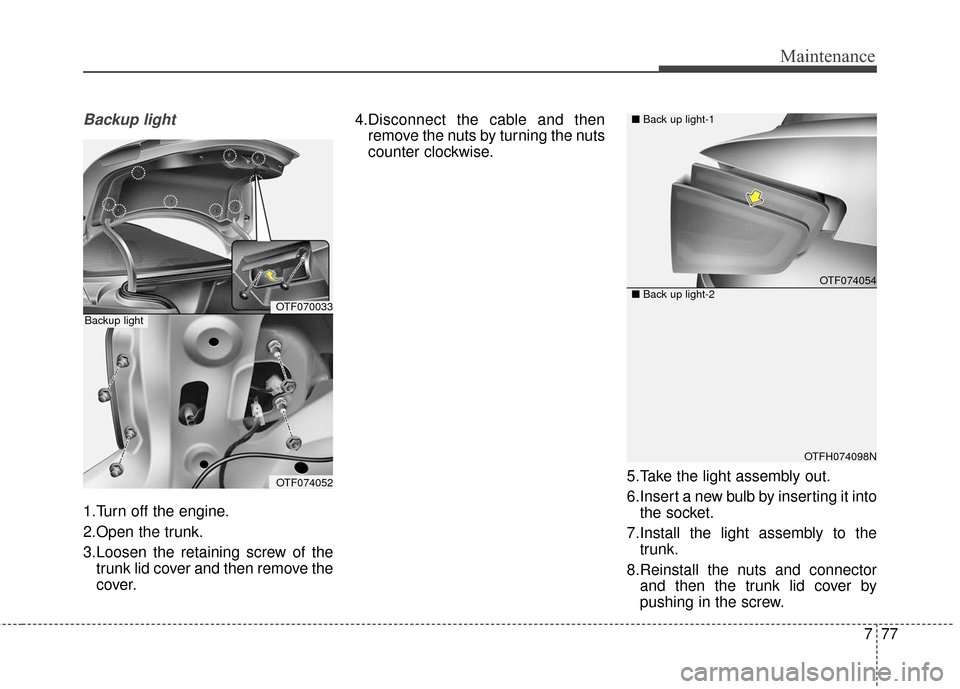
Backup light
1.Turn off the engine.
2.Open the trunk.
3.Loosen the retaining screw of thetrunk lid cover and then remove the
cover. 4.Disconnect the cable and then
remove the nuts by turning the nuts
counter clockwise.
5.Take the light assembly out.
6.Insert a new bulb by inserting it intothe socket.
7.Install the light assembly to the trunk.
8.Reinstall the nuts and connector and then the trunk lid cover by
pushing in the screw.
OTF070033
OTF074052
Backup light
OTF074054
OTFH074098N
■
Back up light-1
■ Back up light-2