Page 294 of 466
Driving your vehicle
38
5
If a vehicle is detected within the
boundary of the system, a warning
light will illuminate on the outside
rearview mirror.
If the detected vehicle is not in
detecting range, the warning will turn
off according to driving conditions. The second stage alarm will activate
when:
1.The first stage alert is on
2.The turn signal is on to change a
lane
When the second stage alert is acti-
vated, a warning light will blink on the
outside rearview mirror and a alarm
will sound.
If you move the turn signal switch to
the original position, the second
stage alert will be deactivated.
Detecting sensor
The sensors are located inside of the
rear bumper.
Always keep the rear bumper clean
for the system to work properly.
OTF054107
1st stage
OTF054108
2nd stage
OTFH054109
Page 296 of 466

Driving your vehicle
40
5
Operating conditions
Select RCTA (Rear Cross Traffic
Alert) in "User Settings" under
"Driving Assist" on the instrument
cluster. The system will turn on and
standby to activate.
Select RCTA again, to turn the sys- tem off.
If the vehicle is turned off and on again, the RCTA system will return
to the state right before the vehicle
was turned off. Always turn the
RCTA system off when not in use. The system operates when the
vehicle speed is below 10 km/h
(6.2 mph) with the shift lever in R
(Reverse).
The RCTA (Rear Cross Traffic Alert) detecting range is 0.5m ~
20m based on the side direction. If
the approaching vehicle speed is
4 km/h (2.5 mph) ~ 36 km/h (22
mph) within sensing range, it is
detected. However, the system
sensing range is different base on
conditions. Always pay attention to
the surrounding.
Warning type
If the vehicle detected by sensorsapproaches your vehicle, the warn-
ing chime will sound and the warn-
ing light will blink on the outside
rearview mirror.
If the detected vehicle is out of the sensing range of your vehicle,
move the vehicle away from the
detected object slowly; the warning
will be cancelled.
The system may not operate prop- erly due to other factors or circum-
stances. Always pay attention to
your surrounding.
OTF054112N1OVI053132
Page 298 of 466

Driving your vehicle
42
5
- A fixed object is near such as a
guardrail, etc.
- A lot of amount of metal sub- stances are near the vehicles such
as a construction area.
- A big vehicle is near such as a bus or truck.
- A motorcycle or bicycle is near.
- A flat trailer like vehicle is near.
- If the vehicle has started at the same time as the vehicle next to it
and has accelerated.
- When the other vehicle passes by very fast.
- When changing lanes.
- When going down or up a steep road where the height of the lane is
different.
- When the other vehicle drives at the rear very nearby or drives very close.
- When a trailer or carrier is installed. - When the temperature of rear
bumper is high.
- When the sensors are covered by the vehicle, wall and pillar of park-
ing lot.
- When your vehicle moves back, if the detected vehicle also moves
back.
- If there is small things like shopping cart and baby carriage.
- If there is a vehicle with decreased ride height (lowered).
- When the vehicle is close to anoth- er vehicle.
Outside rearview mirror may not
alert the driver when:
- The outside rearview mirror hous- ing is severely polluted
- The window is severely polluted
- The windows are severely tinted.
This device complies with
Industry Canada Standard
RSS-210.
Operation is subject to the following
two conditions:
1.This device may not cause harmful interference, and
2.This device must accept any inter- ference received, including inter-
ference that may cause undesired
operation.
Page 303 of 466
547
Driving your vehicle
Adjust your mirrors to reduce theglare from other driver's head-
lights.
Keep your headlights clean and properly aimed on vehicles not
equipped with the automatic head-
light aiming feature. Dirty or
improperly aimed headlights will
make it much more difficult to see
at night.
Avoid staring directly at the head- lights of oncoming vehicles. You
could be temporarily blinded, and it
will take several seconds for your
eyes to readjust to the darkness.Driving in the rain
Rain and wet roads can make driving
dangerous, especially if you’re not
prepared for the slick pavement.
Here are a few things to consider
when driving in the rain:
A heavy rainfall will make it harderto see and will increase the dis-
tance needed to stop your vehicle,
so slow down.
Keep your windshield wiping equipment in good shape. Replace
your windshield wiper blades when
they show signs of streaking or
missing areas on the windshield. If your tires are not in good condi-
tion, making a quick stop on wet
pavement can cause a skid and
possibly lead to an accident. Be
sure your tires are in good shape.
Turn on your headlights to make it easier for others to see you.
Driving too fast through large pud- dles can affect your brakes. If you
must go through puddles, try to
drive through them slowly.
If you believe you may have gotten your brakes wet, apply them lightly
while driving until normal braking
operation returns.
Driving in flooded areas
Avoid driving through flooded areas
unless you are sure the water is no
higher than the bottom of the wheel
hub. Drive through any water slowly.
Allow adequate stopping distance
because brake performance may be
affected.
After driving through water, dry the
brakes by gently applying them sev-
eral times while the vehicle is moving
slowly.
1JBB3303
Page 404 of 466

Maintenance
64
7
Description Fuse Rating Protected Component
BRAKE SWITCH 10A Smart Key Control Module, Start Stop Button Switch, Stop Lamp Switch
MEMORY 1 10ASEAT EXTN (IMS), DR_TRIM_EXTN (FOLD’G), CLUSTER, A/CON, ECM, AUTO FOLDING RLY,
TPMS, POWER OUTLET, A_L_PHOTO_SNSR, MUT
SUNROOF 20A Panorama Sunroof
S/HEATER(FRT)
SEAT VERNT(FRT) 20A SEAT_EXTN (HEAT/VENT)
SPARE 10A -
A/BAG IND 10A Instrument Cluster
MODULE 3 10A Sport Mode Switch
MODULE 4 10ADriver/Passenger CCS Control Module (With CCS), Driver/Passenger Seat Warmer Module (W/O
CCS), Front Seat Warmer & CCS Switch, Oil Pump Inverter, Tire Pressure Monitoring Module
A/BAG 15A A/BAG UNIT IG1 , WCS_PASS IG1
INTERIOR LAMP 10A Driver/Passenger Smart Key Outside Handle (With Smart Key), Driver/Passenger Door Lamp, A/C
Control Module, RF Receiver (With Smart Key), Driver IMS Module, BCM, Data Link Connector,
Driver/Passenger Door Scuff Lamp, Power Outside Mirror Switch, Lamp Auto Cut Relay, Instrument
Cluster
CLUSTER 10A CLUSTER (IGN1)
MDPS 7.5ACrash Pad Switch, EPS Control Module (With MDPS), ATM Lever Indicator, EPB Switch, EPB Control
Module
PDM 3 7.5A Smart Key Control Module (With Smart Key)
Page 405 of 466
765
Maintenance
Description Fuse RatingProtected Component
EPB10AEPB
HEV ECU20AHCU UNIT IG1
IG 125AE/R BOX IG1
BMS 10A BMS UNIT B+
POWER OUTLET 20A Front Power Outlet
MODULE 1 10AAuto Head Lamp Leveling Device Module (Auto HLLD), Head Lamp Leveling Device Switch (Manual
HLLD), Head Lamp Leveling Device Actuator LH/RH, BCM, Front Smart Parking Assist Sensor Module,
Instrument Cluster, Electro Chromic Mirror, A/C Control Module, Driver IMS Module, Rear Parking
Assist Buzzer, Lane Keeping Assist Module
START 7.5A B/ALARM RLY
HTD STRG 15A Steering Wheel Heater
MODULE 5 7.5ASmart Key Control Module (With Smart Key), Rear Seat, Warmer Relay LH/RH, E/R Fuse & Relay Box
(RLY.2), Diesel Box (Fuel Filter Relay)
A/CON 7.5A A/C Control Module, E/R Fuse & Relay Box (RLY.14)
SPARE 15A -
WIPER 25A E/R BOX WIPER RLY
C/LIGHTER 20A Cigarette Lighter
MODULE 6 7.5A PANORAMA SUNROOF (IG2), IONIZER, DSL_BOX, RR_SEAT_WARMER
HTD MIRR 10A Driver/Passenger Power Outside Mirror
Page 409 of 466
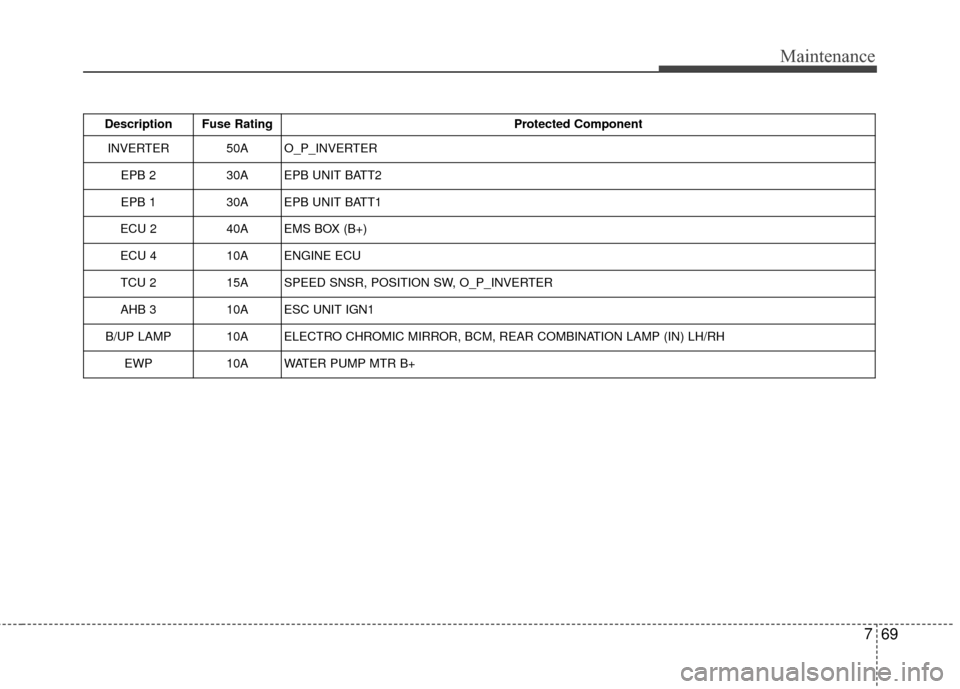
769
Maintenance
Description Fuse RatingProtected Component
INVERTER 50A O_P_INVERTER
EPB 2 30A EPB UNIT BATT2
EPB 1 30A EPB UNIT BATT1
ECU 2 40A EMS BOX (B+)
ECU 4 10A ENGINE ECU
TCU 2 15A SPEED SNSR, POSITION SW, O_P_INVERTER
AHB 3 10A ESC UNIT IGN1
B/UP LAMP10AELECTRO CHROMIC MIRROR, BCM, REAR COMBINATION LAMP (IN) LH/RH
EWP10AWATER PUMP MTR B+
Page 421 of 466
781
Maintenance
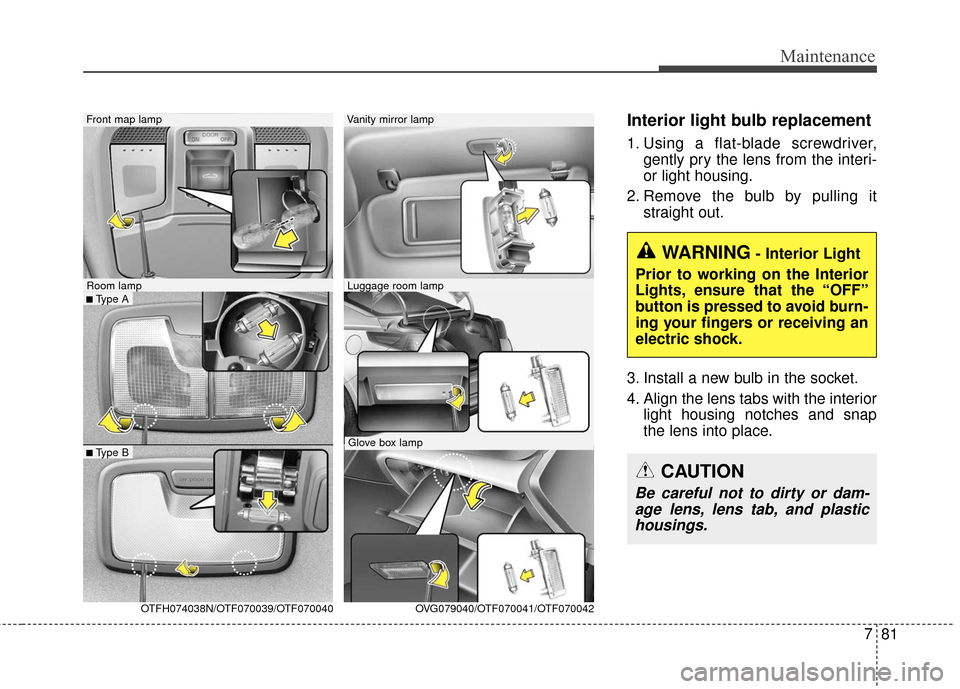
Interior light bulb replacement
1. Using a flat-blade screwdriver,gently pry the lens from the interi-
or light housing.
2. Remove the bulb by pulling it straight out.
3. Install a new bulb in the socket.
4. Align the lens tabs with the interior light housing notches and snap
the lens into place.
WARNING- Interior Light
Prior to working on the Interior
Lights, ensure that the “OFF”
button is pressed to avoid burn-
ing your fingers or receiving an
electric shock.
CAUTION
Be careful not to dirty or dam- age lens, lens tab, and plastichousings.
■Type A
Front map lamp
OTFH074038N/OTF070039/OTF070040
Room lamp
■Type B
Vanity mirror lamp
Luggage room lamp
Glove box lamp OVG079040/OTF070041/OTF070042