Page 145 of 466
Features of your vehicle
70
4
Elapsed Time (3)
The elapsed time is the total driv-
ing time since the last elapsed time
reset.
- Time range (hh:mm): 00:00 ~ 99:59
To reset the elapsed time, press the [OK] button (select/reset) on
the steering wheel for more than 1
second when the elapsed time is
displayed.
✽ ✽ NOTICE
Even if the vehicle is not in motion,
the elapsed time keeps going while
the engine is running.
One time driving information
mode
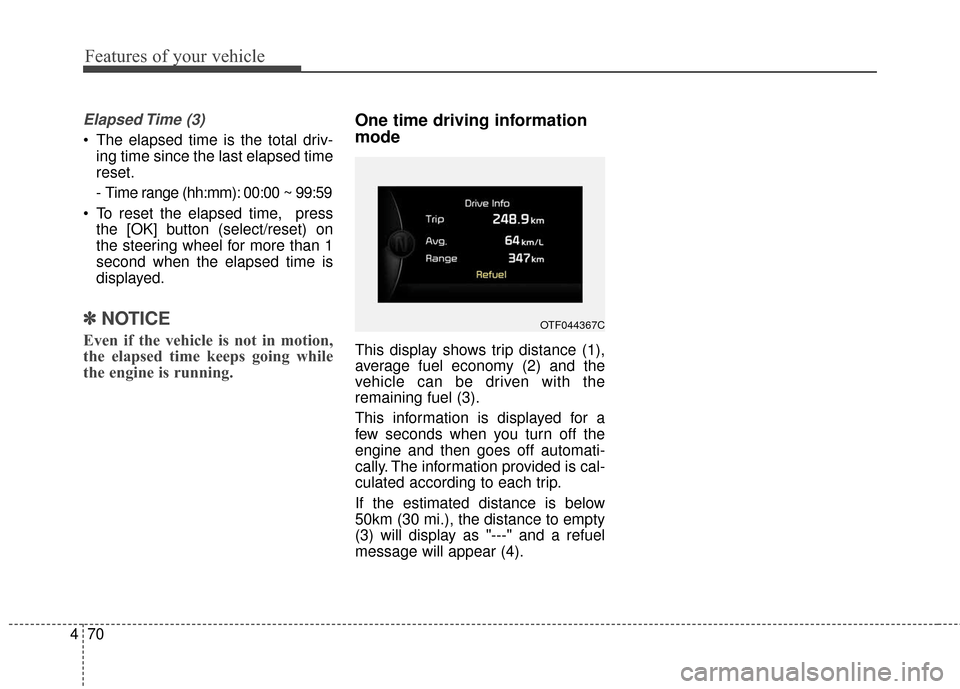
This display shows trip distance (1),
average fuel economy (2) and the
vehicle can be driven with the
remaining fuel (3).
This information is displayed for a
few seconds when you turn off the
engine and then goes off automati-
cally. The information provided is cal-
culated according to each trip.
If the estimated distance is below
50km (30 mi.), the distance to empty
(3) will display as "---" and a refuel
message will appear (4).
OTF044367C
Page 181 of 466
Features of your vehicle
106
4
Adjusting the driver and passenger
side temperature equally
1. Press the DUAL button again to
deactivate DUAL mode. The pas-
senger side temperature will be
set to the same temperature as
the driver side temperature.
2. Operate the driver side tempera- ture control switch. The driver and
passenger side temperature will
be adjusted equally. Temperature conversion
You can switch the temperature
mode between Fahrenheit and
Centigrade as follows:
While pressing the OFF, press the
AUTO button for 3 seconds or more.
The display will change from
Fahrenheit to Centigrade, or from
Centigrade to Fahrenheit.
The temperature unit (from °C to °F
or from °F to °C) can be changed by
using the “User Settings” mode of the
LCD display.
If the battery has been discharged or
disconnected, the temperature mode
display will reset to Fahrenheit.
WARNING- Reduced
Visibility
Continuous use of the climate
control system in the recirculat-
ed air position may allow
humidity to increase inside the
vehicle which may fog the glass
and obscure visibility.
WARNING- Recirculated Air
Continue using the climate con-
trol system in the recirculated
air position can cause drowsi-
ness or sleepiness, and loss of
vehicle control. Set the air
intake control to the outside
(fresh) air position as much as
possible while driving.
WARNING- Sleeping with AC on
Do not sleep in a vehicle with
the air conditioning or heating
system on as this may cause
serious harm or death due to a
drop in the oxygen level and/or
body temperature.
Page 190 of 466
4115
Features of your vehicle
The indicator light in the air intake
control button will blink 3 times with
0.5 second of interval. It indicates that
the defogging logic is canceled or
returned to the programmed status.
If the battery has been discharged or
disconnected, it resets to the defog
logic status.Auto defogging system (if equipped)
Auto defogging reduces the probabil-
ity of fogging up the inside of the
windshield by automatically sensing
the moisture inside the windshield.
The auto defogging system operates
when the heater or air conditioning is
on. This indicator illuminates
when the auto defogging
system senses the mois-
ture inside the windshield
and operates.
If more moisture is in the vehicle,
higher steps operate as follows. For
example, if auto defogging does not
defog inside the windshield at step 1
Outside air position, it tries to defog
again at step 2 Blowing air toward
the windshield.
Step 1 : Operating the air conditioning
Step 2 : Outside air position
Step 3 :Blowing air toward the wind-
shield
Step 4 : Increasing air flow toward the windshield
OTF044178N
Page 191 of 466

Features of your vehicle
116
4
If your vehicle is equipped with the
auto defogging system, it is automati-
cally activated when the conditions
are met. However, if you would like to
cancel the auto defogging system,
press the front defroster button 4
times within 2 seconds while pressing
the AUTO button. To use the system,
repeat the above procedure again.
- When cancelled : The indicator in
the front defroster button will blink 3
times (interval of 1 seconds) to noti-
fy you that the system is cancelled.
- When activated : The indicator in the front defroster button will blink 6
times (interval of 0.5 seconds) to
notify you that the system is set.
If the battery has been disconnected
or discharged, it resets to the auto
defogging status.✽ ✽ NOTICE
If the A/C off or recirculated air
position is manually selected while
the auto defogging system is on, the
auto defogging indicator will blink 3
times to give notice that manual
operation is canceled.
CAUTION
Do not remove the sensor cover
located on the upper end of thedriver side windshield glass.Damage to the system partscould occur and may not be cov-ered by your vehicle warranty.
Page 197 of 466
Features of your vehicle
122
4
Digital clock
Whenever the battery terminals or
related fuses are disconnected, you
must reset the time.
When the ignition switch is in the
ACC or ON position, the clock but-
tons operate as follows:
Pressing the 'H" button will
advance the time display by one
hour.
Pressing the "M" button will
advance the time display by one
minute.
To change the 12 hour format to
the 24 hour format, press the "H"
and "M" button at the same time for
more than 5 seconds.
For example, if the time is 10:15
p.m., the display will change to
22:15.
Clothes hanger (if equipped)
To use the hanger, pull down the
upper portion of the hanger.
OTFH044356
CAUTION- Hanging
clothing
Do not hang heavy clothes,since those may damage thehook.
OUN026348
WARNING- Clock Setting
Distraction
Do not adjust the clock while
driving. Such adjustments may
distract you for too long from the
roadway and lead to a collision.
Page 200 of 466
4125
Features of your vehicle
Steering wheel audio controls
(if equipped)
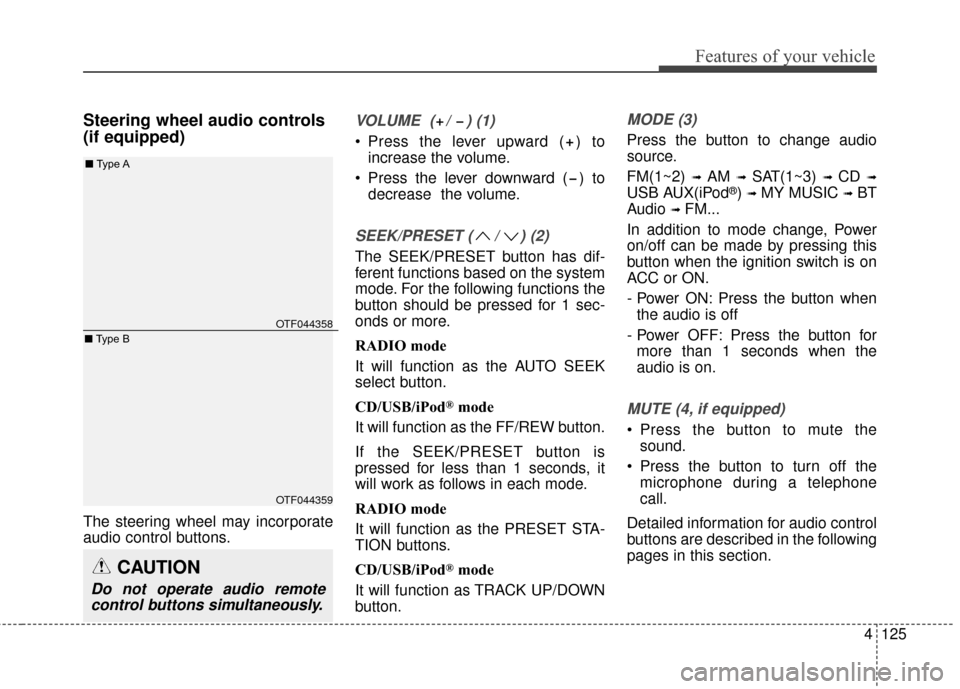
The steering wheel may incorporate
audio control buttons.
VOLUME ( / ) (1)
Press the lever upward ( ) toincrease the volume.
Press the lever downward ( ) to decrease the volume.
SEEK/PRESET ( / ) (2)
The SEEK/PRESET button has dif-
ferent functions based on the system
mode. For the following functions the
button should be pressed for 1 sec-
onds or more.
RADIO mode
It will function as the AUTO SEEK
select button.
CD/USB/iPod
®mode
It will function as the FF/REW button.
If the SEEK/PRESET button is
pressed for less than 1 seconds, it
will work as follows in each mode.
RADIO mode
It will function as the PRESET STA-
TION buttons.
CD/USB/iPod
®mode
It will function as TRACK UP/DOWN
button.
MODE (3)
Press the button to change audio
source.
FM(1~2)
➟ AM ➟ SAT(1~3) ➟ CD ➟
USB AUX(iPod®) ➟ MY MUSIC ➟ BT
Audio
➟ FM...
In addition to mode change, Power
on/off can be made by pressing this
button when the ignition switch is on
ACC or ON.
- Power ON: Press the button when the audio is off
- Power OFF: Press the button for more than 1 seconds when the
audio is on.
MUTE (4, if equipped)
Press the button to mute the sound.
Press the button to turn off the microphone during a telephone
call.
Detailed information for audio control
buttons are described in the following
pages in this section.
CAUTION
Do not operate audio remote control buttons simultaneously.
OTF044358
OTF044359
■ Type A
■ Type B
Page 209 of 466

Features of your vehicle
134
4
USING iPod®DEVICE
iPod®is a registered trademark of
Apple Inc.
iPhone
® is a registered grademark
of Apple inc.
Some iPod
®models may not
support communication protocol
and files may not properly play.
Supported iPod
®models:
- iPhone
®3GS/4
- iPod
®touch 1st~4th generation
- iPod
®nano 1st~6th generation
- iPod
®classic
The order of search or playback of songs in the iPod
®can be dif-
ferent from the order searched in
the audio system.
If the iPod
®is disabled due to its
own malfunction, reset the
iPod
®. (Reset: Refer to iPod®
manual)
An iPod
®may not operate nor-
mally on low battery.
(Continued)(Continued)
Some iPod
®devices, such as the
iPhone®, can be connected
through the
Bluetooth®Wireless
Technology interface. The device
must have audio
Bluetooth®
Wireless Technology capability
(such as for stereo headphone
Bluetooth®Wireless Technology).
The device can play, but it will not
be controlled by the audio system.
To use iPod
®features within the
audio, use the cable provided
upon purchasing an iPod
®device.
Skipping or improper operation may occur depending on the
characteristics of your iPod
®/
iPhone®device.
If your iPhone
®is connected to
both the
Bluetooth®Wireless
Technology and USB, the sound
may not be properly played. In
your iPhone
®, select the Dock
connector or
Bluetooth®Wireless
Technology to change the sound
output (source).
(Continued)(Continued)
When connecting iPod
®with the
iPod®Power Cable, insert the
connector to the multimedia
socket completely. If not inserted
completely, communications
between iPod
®and audio may
be interrupted.
When adjusting the sound effects of the iPod
®and the
audio system, the sound effects
of both devices will overlap and
might reduce or distort the qual-
ity of the sound.
Deactivate (turn off) the equaliz- er function of an iPod
®when
adjusting the audio system’s vol-
ume, and turn off the equalizer
of the audio system when using
the equalizer of an iPod
®.
When not using iPod
®with car
audio, detach the iPod®cable
from iPod®. Otherwise, iPod®
may remain in accessory mode,
and may not work properly.
Page 215 of 466
Features of your vehicle
140
4
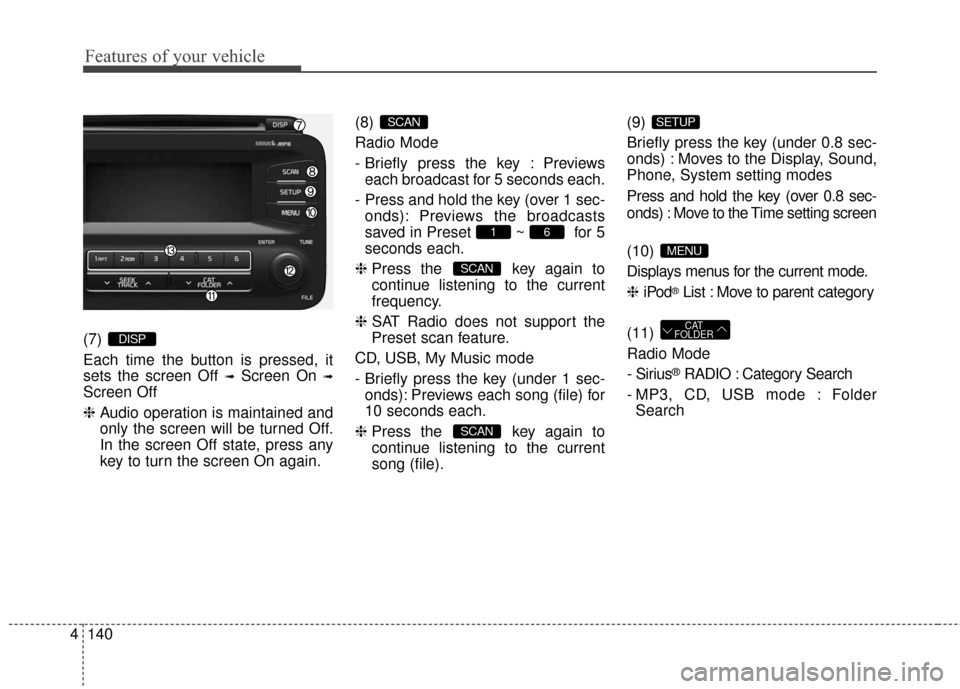
(7)
Each time the button is pressed, it
sets the screen Off
➟Screen On ➟
Screen Off
❈ Audio operation is maintained and
only the screen will be turned Off.
In the screen Off state, press any
key to turn the screen On again. (8)
Radio Mode
- Briefly press the key : Previews
each broadcast for 5 seconds each.
- Press and hold the key (over 1 sec- onds): Previews the broadcasts
saved in Preset ~ for 5
seconds each.
❈ Press the key again to
continue listening to the current
frequency.
❈ SAT Radio does not support the
Preset scan feature.
CD, USB, My Music mode
- Briefly press the key (under 1 sec- onds): Previews each song (file) for
10 seconds each.
❈ Press the key again to
continue listening to the current
song (file). (9)
Briefly press the key (under 0.8 sec-
onds) : Moves to the Display, Sound,
Phone, System setting modes
Press and hold the key (over 0.8 sec-
onds) : Move to the Time setting screen
(10)
Displays menus for the current mode.
❈
iPod
®List : Move to parent category
(11)
Radio Mode
- Sirius
®RADIO : Category Search
- MP3, CD, USB mode : Folder Search
CAT
FOLDER
MENU
SETUP
SCAN
SCAN
61
SCAN
DISP