Page 209 of 688
LaneSense Indicator Light — If Equipped
Yellow Telltale
LightWhat It Means
LaneSense Indicator Light — If Equipped
The LaneSense system provides the driver with visual and steering torque warnings when
the vehicle starts to drift out of its lane unintentionally without the use of a turn signal.
•When the LaneSense system senses a lane drift situation, the LaneSense indicator
changes from solid green to solid yellow.
•When the LaneSense system senses the lane has been approached and is in a lane
departure situation, the LaneSense indicator changes from solid white/green to flashing
yellow.
Refer to “LaneSense - If Equipped�in “Understanding The Features Of Your Vehicle” for further
information.
5
GETTING TO KNOW YOUR INSTRUMENT CLUSTER 207
Page 211 of 688
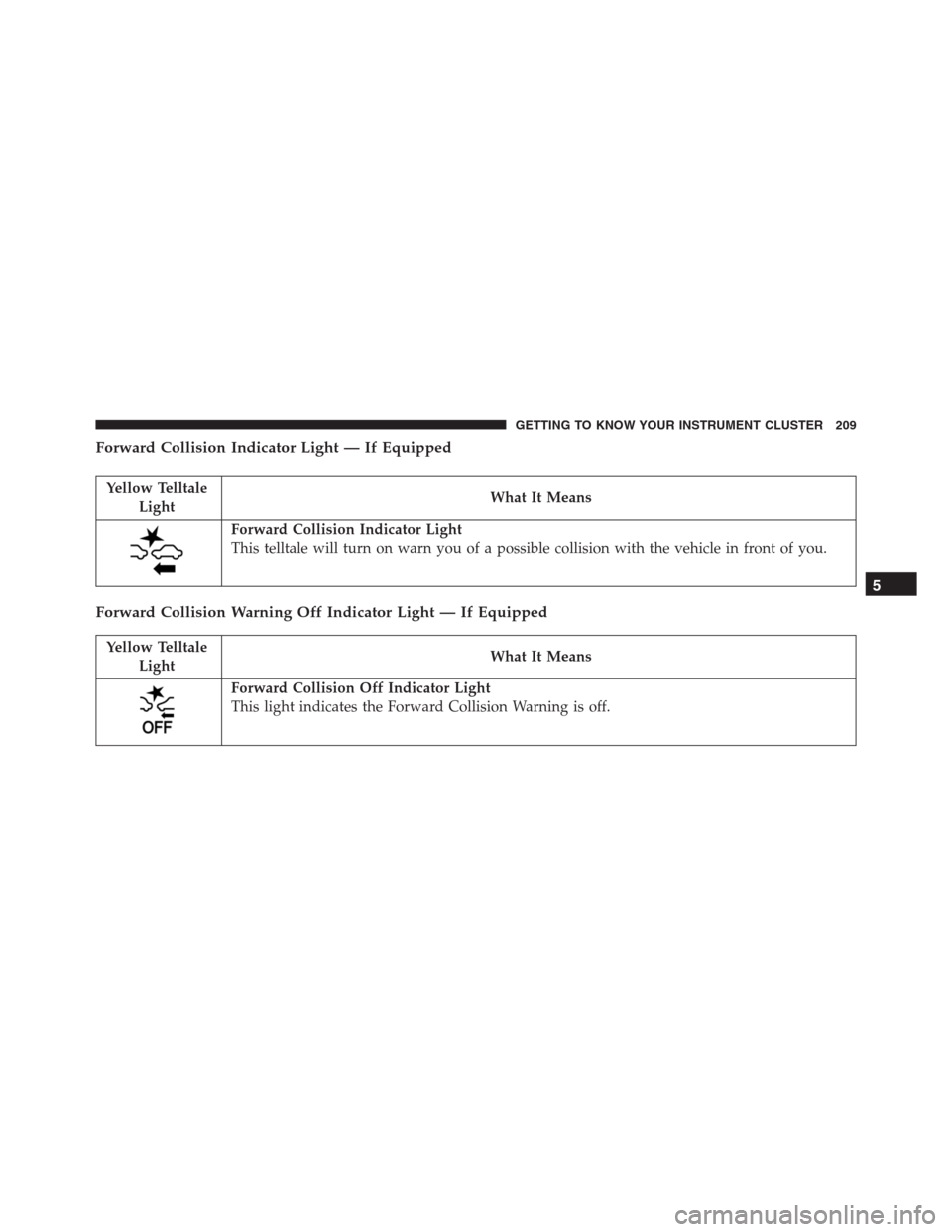
Forward Collision Indicator Light — If Equipped
Yellow Telltale
LightWhat It Means
Forward Collision Indicator Light
This telltale will turn on warn you of a possible collision with the vehicle in front of you.
Forward Collision Warning Off Indicator Light — If Equipped
Yellow Telltale
LightWhat It Means
Forward Collision Off Indicator Light
This light indicates the Forward Collision Warning is off.
5
GETTING TO KNOW YOUR INSTRUMENT CLUSTER 209
Page 218 of 688

WARNING!
•ONLY an authorized service technician should con-
nect equipment to the OBD II connection port in
order to diagnose or service your vehicle.
•If unauthorized equipment is connected to the
OBD II connection port, such as a driver-behavior
tracking device, it may:
•Be possible that vehicle systems, including
safety related systems, could be impaired or a
loss of vehicle control could occur that may result
in an accident involving serious injury or death.
•Access, or allow others to access, information
stored in your vehicle systems, including per-
sonal information.For further information, refer to “Privacy Practices” and
“Uconnect CyberSecurity” in “ All About Uconnect Ac-
cess” in your Owner ’s Manual Radio Supplement and
“Cybersecurity” in “Multimedia” in your Owner ’s
Manual on the DVD.
ELECTRONIC VEHICLE INFORMATION CENTER
(EVIC) / DRIVER INFORMATION DISPLAY (DID)
EVIC/DID Description
The vehicle can be equipped with multifunctional dis-
play (EVIC), or a reconfigurable multifunctional display
(DID), which offers useful information to the driver.
With the ignition in the STOP/OFF position (and the key
removed, for vehicles with mechanical key), opening/
closing of a door will activate the display for viewing,
and display the total miles or kilometers in the odometer.
216 GETTING TO KNOW YOUR INSTRUMENT CLUSTER
Page 222 of 688
•Zone (2 & 3)
– Ignition Button Info (Centered)
•Zone (4)
– Speed Warning Title
•Zone (5)
– Text (Centered)
– Side Distance Warning
– Park Sense: Front & Rear
•Zone (6)
– Odometer Digits (Left)
– Odometer Unit (Right)
– Side Distance Warning
– Park Sense: Front & Rear
•Zone (7)
– Red Telltales (Centered)•Zone (8)
– Amber Telltales (Centered)
•Zone (9)
– PRND (Centered)
– Soft Telltale (Centered)
•Zone (10)
– Hill Decent Control Telltale (Centered)
•Zone (11–12)
– Telltales (Centered)
•Zone (13)
– Forward Collision Telltale (Centered)
•Zone (14)
– Soft Telltale (Centered)
– Cruise Control ICON (Centered)
•Zone (15)
– Cruise Control Value (Centered)
220 GETTING TO KNOW YOUR INSTRUMENT CLUSTER
Page 231 of 688
Vehicles Equipped With Multifunctional Display
Reconfigurable:
Menu items�Display�(you can select
only the items�See Phone�and�See Navigation,��Secu-
rity,�and�Safety & Assistance�(only�Volume Alerts�is
selectable) are present.
All other entries are displayed and selected on the
display of the Uconnect system.
“Display”
By selecting the�Display,�you can access the following
settings:
•Language: allows you to select the language in which
to display the information/warnings.
•Phone Repetition:allows you to view, on the instru-
ment cluster display, the information relating to Phone
mode displayed on the display of the Uconnect sys-
tem.•NAV Turn By Turn:allows you to view, on the
instrument cluster display, information relating to the
navigation mode.
�Units Of Measure�
By selecting the item�Units of measure,�you can select
the unit of measure to use for displaying various magni-
tudes.
Possible options are:
•US
•Metric
•Custom
5
GETTING TO KNOW YOUR INSTRUMENT CLUSTER 229
Page 232 of 688

�Clock & Data�
By selecting the item,�Clock & Data�you can adjust the
clock.
Possible options are:
•Set Time: adjust hours/minutes
•Set Format: adjust the time format�12h�(12 hours) or
�24h�(24 hours)
•Set Date: adjust day/month/year
Security
By selecting the item “Security,” you can make the
following adjustments:
•Speed Warning:
Set the vehicle speed limit (km/h or mph), which the
driver is notified through a visual and acoustic signaling
(display of a message and a symbol on the display).When the speed warning is set, the icon should remain
visualized for the same duration time of the pop up. If
the driver exceeded the speed set the icon should remain
for however long the vehicle is over the set speed.
Driver may also turn the Speed Warning “OFF” should
you choose not to use this feature.
•Seat Belt Reminder:
This function is only viewable when the Seat Belt Re-
minder (SBR) system is active.
•Hill Start Assist:
Activation/Deactivation of the Hill Start Assist system.
�Safety & Assistance�
By selecting the item�Safety & Assistance,�you can make
the following adjustments:
•FCW: a selection of operating modes of the system
Forward Collision Warning Plus
230 GETTING TO KNOW YOUR INSTRUMENT CLUSTER
Page 233 of 688
•FCW Sensitivity: a selection of the�readiness�of
intervention of the Forward Collision Warning Plus
system, based on the distance to the obstacle
•ParkSense: a selection of the type of information
provided by ParkSense
•Rear Parks. Vol.: selection of the volume of acoustic
signals provided by ParkSense
•ParkSense Vol.: a selection of the volume of acoustic
signals provided by ParkSense
•Front Parks. Vol.: selection of the volume of the beeps
provided by ParkSense
•Side Dist. Warn. Vol. (If equipped) : a selection of the
volume of the beeps of SideSense system
•Side Dist. Warn. (if Equipped) : Select the type of
reporting provided by SideSense system•Auto Wipers: enabling/disabling the automatic opera-
tion of wipers in the event of rain
•LaneSense Warn.: a selection of the�readiness�of
intervention of LaneSense
•LaneSense Force: selection of the force to be applied to
the steering wheel to put the car in the roadway
through the system of electrical drive, in case of
operation of the system LaneSense
•Buzzer Volume
•Maintenance Brakes (If Equipped): activation of the
procedure to carry out braking system maintenance
•Auto Park Brake (If Equipped): enable/disable auto-
insertion of the Electric Parking Brake
5
GETTING TO KNOW YOUR INSTRUMENT CLUSTER 231
Page 241 of 688

BRAKE SYSTEM
Your vehicle is equipped with dual hydraulic
brake systems. If either of the two hydraulic
systems loses normal capability, the remaining
system will still function. However, there will
be some loss of overall braking effectiveness. This will be
evident by increased pedal travel during application and
greater pedal force required to slow or stop the vehicle. In
addition, if the malfunction is caused by a leak in the
hydraulic system, the “Brake Warning Light” will turn on
as the brake fluid level drops in the master cylinder.
In the event power assist is lost for any reason (i.e.,
repeated brake applications with the engine OFF) the
brakes will still function. However, the effort required to
brake the vehicle will be much greater than that required
with the power system operating.
WARNING!
•Riding the brakes can lead to brake failure and
possibly a collision. Driving with your foot resting
or riding on the brake pedal can result in abnor-
mally high brake temperatures, excessive lining
wear, and possible brake damage. You would not
have your full braking capacity in an emergency.
•Driving a vehicle with the “Brake Warning Light”
on is dangerous. A significant decrease in braking
performance or vehicle stability during braking
may occur. It will take you longer to stop the
vehicle or will make your vehicle harder to control.
You could have a collision. Have the vehicle
checked immediately.
6
SAFETY 239