Page 460 of 688
4. Remove the bulb from the bulb socket by pulling the
bulb straight out.5. Insert the new bulb, making sure that it is locked into
place
6. Reinstall the socket in to the transparent lens assembly.
7. Reinstall the cover on the outside rear view mirror,
making sure it is locked into place.
Rear Tail Lamps
Contain the following:
•Position lights
•Stop lights
•Direction indicator
•REVERSE lights
Bulb And Socket Assembly
1 — Bulb
2 — Bulb Socket 458 IN CASE OF EMERGENCY
Page 467 of 688
6. Install the front courtesy light making sure that it is
properly locked.
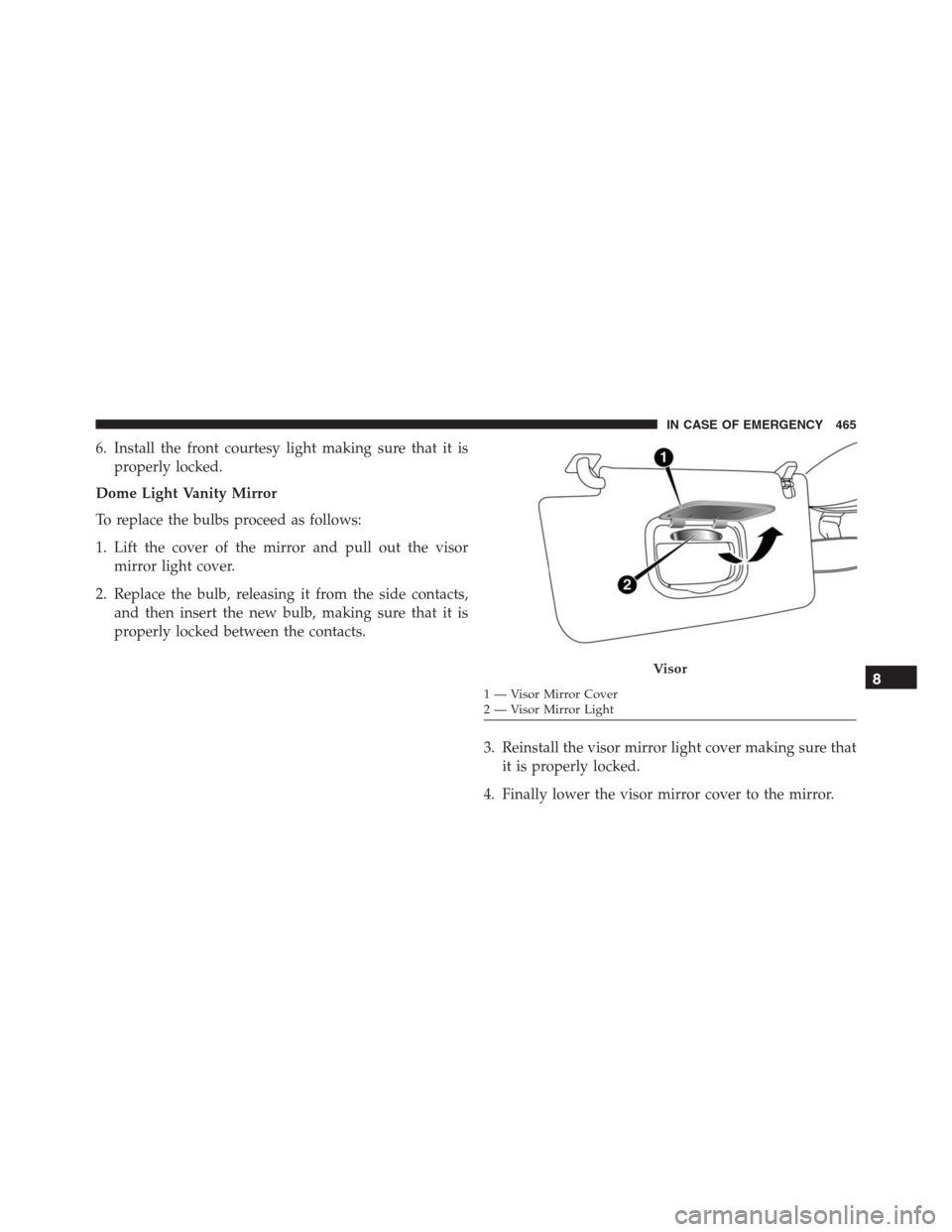
Dome Light Vanity Mirror
To replace the bulbs proceed as follows:
1. Lift the cover of the mirror and pull out the visor
mirror light cover.
2. Replace the bulb, releasing it from the side contacts,
and then insert the new bulb, making sure that it is
properly locked between the contacts.
3. Reinstall the visor mirror light cover making sure that
it is properly locked.
4. Finally lower the visor mirror cover to the mirror.
Visor
1 — Visor Mirror Cover
2 — Visor Mirror Light8
IN CASE OF EMERGENCY 465
Page 478 of 688
CavityMaxi Fuse Cartridge Fuse Micro Fuse Description
F21 – – 15 Amp Blue Fuel Pump
F22 – – 20 Amp Yellow Power Control Module Engine
F23 – – 30 Amp Green Heated Windshield – If Equipped
F24 – – 15 Amp Blue Electronic Unit Supply Automatic
Transmission
F30 – –
20 Amp Yellow
(Customer Installed)12V Rear Cargo Outlet Constant Bat-
tery Powered
F83 – 40 Amp Green – Air Conditioning Fan
F84 – – 30 Amp Green Power Supply All Wheel Drive
F87 – – 5 Amp Tan Shift Lever Automatic Transmission
F88 – – 7.5 Amp Brown Heated Outside Mirrors
F89 – – 30 Amp Green Heated Rear Window
F90 – – 5 Amp Tan IBS Sensor (Battery State Of Charge)
Body Computer Fuse Center
The controller is located at the left side of the steering
column at the bottom of the instrument panel.For the fuse replacement see your authorized dealer.
476 IN CASE OF EMERGENCY
Page 480 of 688
Cavity Mini Fuse Description
F31 7.5 Amp Brown Flashes/Electrical Movement Front
Seats/Fan Air Conditioning
F33 20 Amp Yellow Power Window Front (Driver Side)
F34 20 Amp Yellow Power Window Front (Passenger Side)
F36 15 Amp Blue Supply Uconnect System, Air Condi-
tioning, Alarm, Power Folding Outside
Mirrors, USB Port
F37 10 Amp Red System Power Forward Collision Warn-
ing Plus, All Wheel Drive (AWD), IPC
F38 20 Amp Yellow Central Locking
F42 7.5 Amp Brown Power Under Lock and Key
F43 20 Amp Yellow Bi-directional Pump Washer
F47 20 Amp Yellow Power Rear Window (Driver Side)
F48 20 Amp Yellow Power Rear Window (Passenger Side)
478 IN CASE OF EMERGENCY
Page 481 of 688
Cavity Mini Fuse Description
F49 7.5 Amp Brown Supply ParkSense, Spot Lights Front
Dome, Mirror, Electric Motor Retract-
able Roof, Heated Front Seats, Stabi-
lizer Battery, ESC System, ESL
F50 7.5 Amp Brown Supply Air Bag
F51 7.5 Amp Brown Alarm Power, Front Courtesy Light,
Air Conditioning Compressor, Brake
Pedal Switch (NC), Plaque Automatic
Transmission, Compass, Rear Camera,
Leveling Headlights, Air Conditioning
F53 7.5 Amp Brown Supply IPC/Starter Device/System
Keyless Enter-N-Go
F94 15 Amp Blue Power Socket
8
IN CASE OF EMERGENCY 479
Page 565 of 688

CAUTION!
Do not use Alcohol and Alcohol-based and/or Keton
based cleaning products to clean leather seats, as
damage to the seat may result.
Cleaning Headlights
Your vehicle has plastic headlights that are lighter and
less susceptible to stone breakage than glass headlights.
Plastic is not as scratch resistant as glass and therefore
different lens cleaning procedures must be followed.
To minimize the possibility of scratching the lenses and
reducing light output, avoid wiping with a dry cloth. To
remove road dirt, wash with a mild soap solution fol-
lowed by rinsing.
Do not use abrasive cleaning components, solvents, steel
wool or other aggressive material to clean the lenses.
Glass Surfaces
All glass surfaces should be cleaned on a regular basis
with MOPAR Glass Cleaner, or any commercial
household-type glass cleaner. Never use an abrasive type
cleaner. Use caution when cleaning the inside rear win-
dow equipped with electric defrosters or windows
equipped with radio antennas. Do not use scrapers or
other sharp instrument that may scratch the elements.
When cleaning the rear view mirror, spray cleaner on the
towel or cloth that you are using. Do not spray cleaner
directly on the mirror.
Instrument Panel Cover
The instrument panel cover has a low glare surface which
minimizes reflections on the windshield. Do not use
protectants or other products which may cause undesir-
able reflections. Use soap and warm water to restore the
low glare surface.9
MAINTAINING AND CARING FOR YOUR VEHICLE 563
Page 616 of 688

•LaneSense Warning — If Equipped
When this feature is selected, it sets the distance at which
the steering wheel will provide feedback for potential
lane departures. The LDW sensitivity can be set to
provide either an “early,” “medium,” or “late” warning
zone start point.
For further information, refer to “LaneSense Warning
(LDW)” in “Starting and Operating.”
•LaneSense Strength — If Equipped
When this feature is selected, it sets the strength of the
steering wheel feedback for potential lane departures.
The amount of directional torque the steering system can
apply to the steering wheel to correct for vehicle lane
departure can be set at “Low,” “Medium” or “High.”
For further information, refer to “Lane Departure Warn-
ing (LDW)” in “Starting and Operating.”•Blind Spot Alert — If Equipped
When this feature is selected, the Blind Spot Alert feature
can be set to Off, Lights or Lights and Chime. The Blind
Spot Alert feature can be activated in Lights mode. When
this mode is selected, the Blind Spot Monitor (BSM)
system is activated and will only show a visual alert in
the outside mirrors. When Lights & Chime mode is
activated, the Blind Spot Monitor (BSM) will show a
visual alert in the outside mirrors as well as an audible
alert when the turn signal is on. When Off is selected, the
Blind Spot Monitor (BSM) system is deactivated. To
change the Blind Spot Alert status, press the “Off,”
“Lights” or “Lights & Chime” button on the touchscreen.
Then press the back arrow button on the touchscreen.
NOTE:If your vehicle has experienced any damage in
the area where the sensor is located, even if the fascia is
not damaged, the sensor may have become misaligned.
Take your vehicle to an authorized dealer to verify sensor
alignment. A sensor that is misaligned will result in the
BSM not operating to specification.
614 MULTIMEDIA
Page 632 of 688

•ParkSense — If Equipped
The ParkSense system will scan for objects behind the
vehicle when the transmission shift lever/gear selector is
in REVERSE and the vehicle speed is less than 11 mph (18
km/h). It will provide an alert (audible and/or visual) to
indicate the proximity to other objects. The system can be
enabled with Sound Only, or Sound and Display. To
change the ParkSense status, press and release the “Off,”
“Sound Only,” or “Sound & Display” button. Refer to
“ParkSense” in “Starting And Operating” for system
function and operating information.
Refer to “ParkSense Rear Park Assist” in “Starting And
Operating” for system function and operating informa-
tion.
•Front ParkSense Volume — If Equipped
Front Park Assist chime volume settings can be selected
from the EVIC or Uconnect System (if equipped). Thechime volume settings include “LOW,” “MEDIUM,” and
“HIGH.” The factory default volume setting is MEDIUM.
•Blind Spot Alert — If Equipped
When this feature is selected, the Blind Spot Alert feature
can be set to Off, Lights or Lights and Chime. The Blind
Spot Alert feature can be activated in Lights mode. When
this mode is selected, the Blind Spot Monitor (BSM)
system is activated and will only show a visual alert in
the outside mirrors. When Lights & Chime mode is
activated, the Blind Spot Monitor (BSM) will show a
visual alert in the outside mirrors as well as an audible
alert when the turn signal is on. When Off is selected, the
Blind Spot Monitor (BSM) system is deactivated. To
change the Blind Spot Alert status, press the “Blind Spot
Alert” button and select from “Off,” “Lights” or “Lights
& Chimes.”
630 MULTIMEDIA