Page 98 of 688

System Not Available
In the case of the system being temporary unavailable:
•BSM Mirror Warning Lights are turned on continu-
ously.
•A instrument cluster message will display“Blind Spot
Monitoring Temporary Unavailable.”
In the case of the system being completely unavailable:
•A chime will turn on.
•A instrument cluster message will display“Blind Spot
Monitoring Unavailable - Service Required.”
NOTE:Vehicle must be taken to the nearest authorized
dealer for service.General Information
This vehicle has systems that operate on radio frequency
that comply with Part 15 of the Federal Communications
Commission (FCC) rules and with Industry Canada
Standards RSS- GEN/210/220/310.
Operation is subject to the following two conditions:
1. The device may not cause harmful interference.
2. The device must accept any interference received,
including interference that may cause undesired op-
eration of the device.
Changes or modifications to any of these systems by
other than an authorized service facility could void
authorization to use this equipment.
96 GETTING TO KNOW YOUR VEHICLE
Page 118 of 688

AUTO-Up Feature With Auto-Reverse Protection — If
Equipped
Lift and hold the window switch for half a second,
release, and the window will go up automatically.
To stop the window from going all the way up during the
AUTO operation, push down on the switch briefly.
To partially close the window, lift the window switch and
release it when you want the window to stop.
NOTE:
•If the window runs into any obstacle during auto-
closure, it will reverse direction and then go back
down. Remove the obstacle and use the window
switch again to close the window.•Any impact due to rough road conditions may trigger
the auto-reverse function unexpectedly during auto-
closure. If this happens, pull the switch lightly and
hold to close the window manually.
WARNING!
There is no Auto-Reverse protection when the win-
dow is almost closed. Be sure to clear all objects from
the window before closing.
Reset Auto-Up
Should the Auto Up feature stop working, the window
probably needs to be reset. To reset Auto Up:
1. Pull the window switch up to close the window
completely and continue to hold the switch up for an
additional two seconds after the window is closed.
116 GETTING TO KNOW YOUR VEHICLE
Page 169 of 688

CAUTION!
Do not connect devices with power higher than 180
Watts (15 Amps) to the socket. Do not damage the
socket by using unsuitable adaptors. If the 180 Watt
(15 Amp) power rating is exceeded the fuse protect-
ing the system will need to be replaced.
WARNING!
To avoid serious injury or death:
•Only devices designed for use in this type of outlet
should be inserted into any 12 Volt outlet.
•Do not touch with wet hands.
•Close the lid when not in use and while driving the
vehicle.
•If this outlet is mishandled, it may cause an electric
shock and failure.
CAUTION!
•Many accessories that can be plugged in draw
power from the vehicle’s battery, even when not in
use (i.e., cellular phones, etc.). Eventually, if
plugged in long enough, the vehicle’s battery will
discharge sufficiently to degrade battery life and/or
prevent the engine from starting.
•Accessories that draw higher power (i.e., coolers,
vacuum cleaners, lights, etc.) will degrade the bat-
tery even more quickly. Only use these intermit-
tently and with greater caution.
•After the use of high power draw accessories, or
long periods of the vehicle not being started (with
accessories still plugged in), the vehicle must be
driven a sufficient length of time to allow the
generator to recharge the vehicle’s battery.
4
GETTING TO KNOW YOUR VEHICLE 167
Page 171 of 688
Inverter it will automatically reset. To avoid overloading
the circuit, check the power ratings on electrical devices
prior to using the Power Inverter.
WARNING!
To avoid serious injury or death:
•Do not insert any objects into the receptacles.
•Do not touch with wet hands.
•Close the lid when not in use.
•If this outlet is mishandled, it may cause an electric
shock and failure.
Cigar Lighter — Optional
NOTE:Cigar lighters can be purchased at an authorized
dealer through MOPAR parts. To ensure proper cigar
lighter operation, a MOPAR knob and element must be
used.The cigar lighter is located on the center console. Push
lighter inward to heat.
After a few seconds, the lighter automatically returns to
its initial position and is ready to be used.Cigar Lighter
4
GETTING TO KNOW YOUR VEHICLE 169
Page 172 of 688
WARNING!
When the cigar lighter is in use it becomes very hot.
To avoid serious injury, handle the cigar lighter with
care. Always check that the cigar lighter has turned
off.
CAUTION!
Do not connect devices with power higher than 180
Watts (15 Amps) to the socket. Do not damage the
socket by using unsuitable adaptors. If the 180 Watt
(15 Amp) power rating is exceeded the fuse protect-
ing the system will need to be replaced.
Ashtray — Optional
NOTE:Ashtrays can be purchased at an authorized
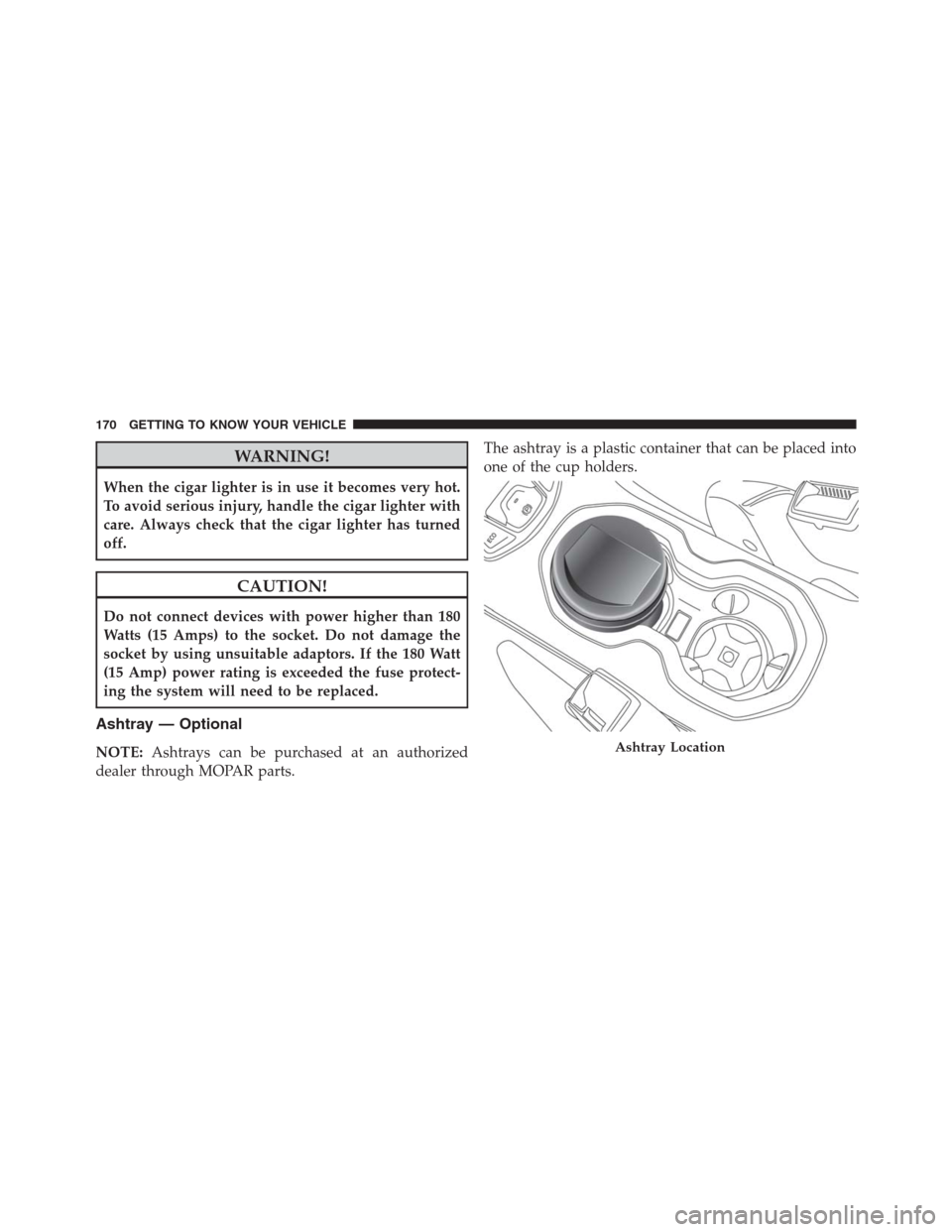
dealer through MOPAR parts.The ashtray is a plastic container that can be placed into
one of the cup holders.Ashtray Location
170 GETTING TO KNOW YOUR VEHICLE
Page 179 of 688
GETTING TO KNOW YOUR INSTRUMENT CLUSTER
CONTENTS
�INSTRUMENT CLUSTER.................179
▫Instrument Cluster With Multi-Functional
Display (EVIC).......................179
▫Instrument Cluster With Reconfigurable
Multi-Functional Display (DID)............180
▫Speedometer (EVIC)....................181
▫Speedometer (DID)....................182
▫Odometer...........................183
▫Tachometer..........................183
▫Fuel Gauge..........................183▫Engine Coolant Temperature Gauge.........184
�WARNING AND INDICATOR LIGHTS.......185
▫Red Telltale Indicator Lights..............186
▫Yellow Telltale Indicator Lights............198
▫Green Telltale Indicator Lights............211
▫Blue Telltale Indicator Light..............213
▫White Telltale Indicator Light.............214
�ONBOARD DIAGNOSTIC SYSTEM (OBD II) . . .215
▫Onboard Diagnostic System (OBD II)
Cybersecurity........................215
5
Page 181 of 688
INSTRUMENT CLUSTER
Instrument Cluster With Multi-Functional Display (EVIC)
Electronic Vehicle Information Center (EVIC) Cluster
A — Tachometer
B — Digital Indicator Engine Coolant Temperature Warning Light
With Maximum Temperature
C — Multi-functional DisplayD — Digital Indicator Fuel Level Indicator With The Reserve (the
triangle symbol pointing toward the right indicates where the
fuel filler door is located)
E — Speedometer (speed indicator)
5
GETTING TO KNOW YOUR INSTRUMENT CLUSTER 179
Page 187 of 688

WARNING!
A hot engine cooling system is dangerous. You or
others could be badly burned by steam or boiling
coolant. You may want to call an authorized dealer
for service if your vehicle overheats. If you decide to
look under the hood yourself, see “Maintaining And
Caring For Your Vehicle.” Follow the warnings under
the “Cooling System Pressure Cap” paragraph.
WARNING AND INDICATOR LIGHTS
IMPORTANT:The warning / indicator light switches on
in the instrument panel together with a dedicated mes-
sage and/or acoustic signal when applicable. These
indications are indicative and precautionary and as such
must not be considered as exhaustive and/or alternative
to the information contained in the Owner Manual,
which you are advised to read carefully in all cases.
Always refer to the information in this chapter in the
event of a failure indication.
All active telltales will display first if applicable. The
system check menu may appear different based upon
equipment options and current vehicle status. Some
telltales are optional and may not appear.
5
GETTING TO KNOW YOUR INSTRUMENT CLUSTER 185