Page 569 of 688
TIRE SAFETY INFORMATION
Tire MarkingsNOTE:
•P (Passenger) — Metric tire sizing is based on U.S.
design standards. P-Metric tires have the letter “P”
molded into the sidewall preceding the size designa-
tion. Example: P215/65R15 95H.
•European — Metric tire sizing is based on European
design standards. Tires designed to this standard have
the tire size molded into the sidewall beginning with
the section width. The letter�P�is absent from this tire
size designation. Example: 215/65R15 96H.
•LT (Light Truck) — Metric tire sizing is based on U.S.
design standards. The size designation for LT-Metric
tires is the same as for P-Metric tires except for the
letters “LT” that are molded into the sidewall preced-
ing the size designation. Example: LT235/85R16.
1 — U.S. DOT Safety Standards
Code (TIN)4 — Maximum Load
2 — Size Designation 5 — Maximum Pressure
3 — Service Description 6 — Treadwear, Traction and
Temperature Grades9
MAINTAINING AND CARING FOR YOUR VEHICLE 567
Page 571 of 688
EXAMPLE:
R= Construction code
–�R�means radial construction, or
–�D�means diagonal or bias construction
15, 16, 18= Rim diameter in inches (in)
Service Description:
95= Load Index
– A numerical code associated with the maximum load a tire can carry
H= Speed Symbol
– A symbol indicating the range of speeds at which a tire can carry a load corresponding to
its load index under certain operating conditions
– The maximum speed corresponding to the speed symbol should only be achieved under
specified operating conditions (i.e., tire pressure, vehicle loading, road conditions, and
posted speed limits)
9
MAINTAINING AND CARING FOR YOUR VEHICLE 569
Page 584 of 688
Radial Ply Tires
WARNING!
Combining radial ply tires with other types of tires
on your vehicle will cause your vehicle to handle
poorly. The instability could cause a collision. Al-
ways use radial ply tires in sets of four. Never
combine them with other types of tires.
Tire Repair
If your tire becomes damaged, it may be repaired if it
meets the following criteria:
•The tire has not been driven on when flat.
•The damage is only on the tread section of your tire
(sidewall damage is not repairable).
•The puncture is no greater thana¼ofaninch (6 mm).Consult an authorized tire dealer for tire repairs and
additional information.
Damaged Run Flat tires, or Run Flat tires that have
experienced a loss of pressure should be replaced imme-
diately with another Run Flat tire of identical size and
service description (Load Index and Speed Symbol).
Tire Types
All Season Tires — If Equipped
All Season tires provide traction for all seasons (Spring,
Summer, Fall and Winter). Traction levels may vary
between different all season tires. All season tires can be
identified by the M+S, M&S, M/S or MS designation on
the tire sidewall. Use all season tires only in sets of four;
failure to do so may adversely affect the safety and
handling of your vehicle.
582 MAINTAINING AND CARING FOR YOUR VEHICLE
Page 587 of 688
Spare Tires — If Equipped
NOTE:For vehicles equipped with Tire Service Kit
instead of a spare tire, please refer to “Tire Service Kit” in
“In Case Of Emergency” for further information.
CAUTION!
Because of the reduced ground clearance, do not take
your vehicle through an automatic car wash with a
compact or limited-use temporary spare installed.
Damage to the vehicle may result.
Tire Spinning
When stuck in mud, sand, snow, or ice conditions, do not
spin your vehicle’s wheels above 30 mph (48 km/h) or
for longer than 30 seconds continuously without stop-
ping.
Refer to “Freeing A Stuck Vehicle” in “In Case Of
Emergency” for further information.
WARNING!
Fast spinning tires can be dangerous. Forces gener-
ated by excessive wheel speeds may cause tire dam-
age or failure. A tire could explode and injure some-
one. Do not spin your vehicle’s wheels faster than
30 mph (48 km/h) for more than 30 seconds continu-
ously when you are stuck, and do not let anyone near
a spinning wheel, no matter what the speed.
9
MAINTAINING AND CARING FOR YOUR VEHICLE 585
Page 588 of 688
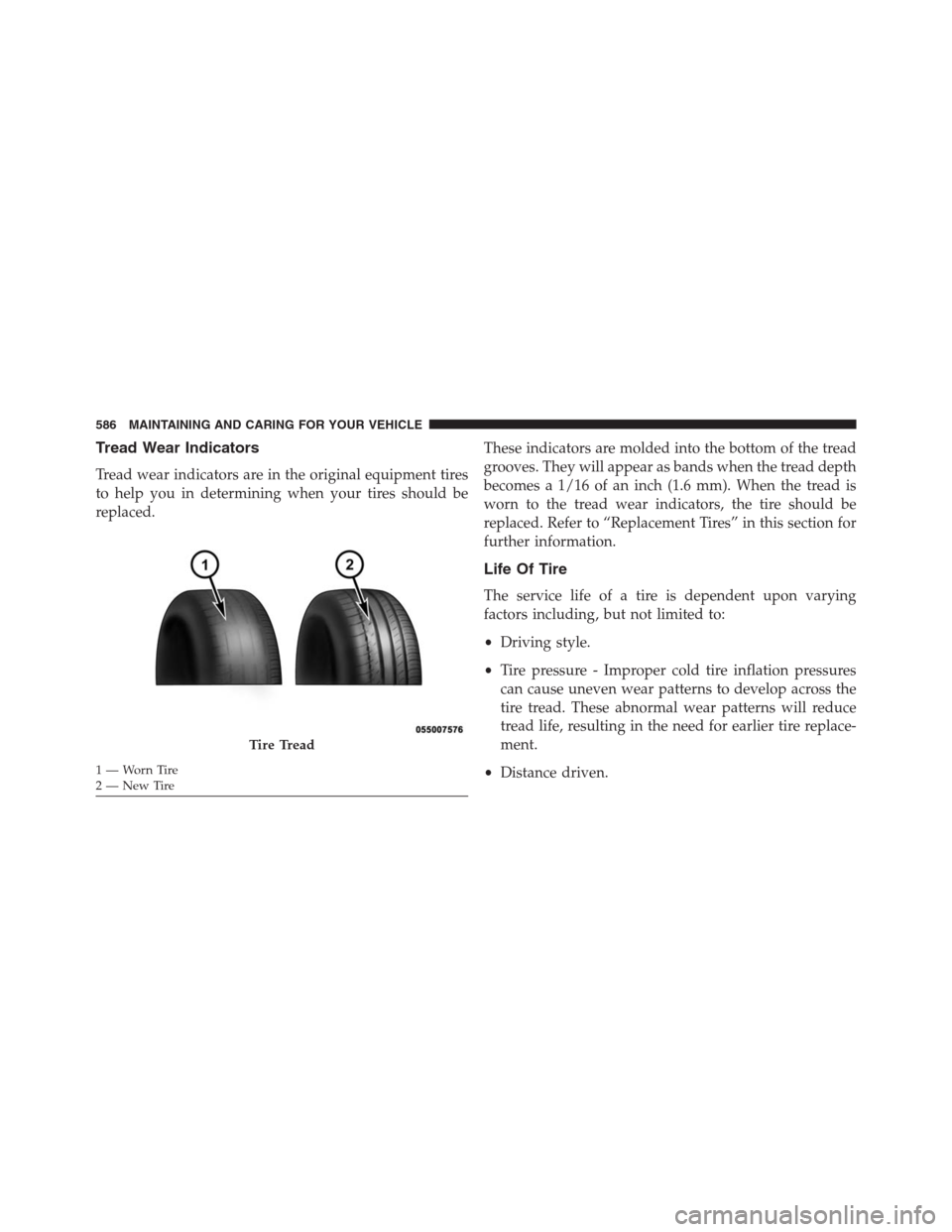
Tread Wear Indicators
Tread wear indicators are in the original equipment tires
to help you in determining when your tires should be
replaced.These indicators are molded into the bottom of the tread
grooves. They will appear as bands when the tread depth
becomes a 1/16 of an inch (1.6 mm). When the tread is
worn to the tread wear indicators, the tire should be
replaced. Refer to “Replacement Tires” in this section for
further information.
Life Of Tire
The service life of a tire is dependent upon varying
factors including, but not limited to:
•Driving style.
•Tire pressure - Improper cold tire inflation pressures
can cause uneven wear patterns to develop across the
tire tread. These abnormal wear patterns will reduce
tread life, resulting in the need for earlier tire replace-
ment.
•Distance driven.
Tire Tread
1—WornTire
2—NewTire 586 MAINTAINING AND CARING FOR YOUR VEHICLE
Page 617 of 688

•Electric Park Brake Service Mode
This feature provides a means for a technician or vehicle
owner to utilize a vehicle integrated, menu driven sys-
tem, to command the electric park brake retraction, to
service the rear foundation brakes (brake pads, calipers,
rotors, etc.).
For further information, refer to “Electric Park Brake
(EPD)” in “Starting and Operating.”
Lights
After pressing the “Lights” button on the touchscreen the
following settings will be available.
•Headlight Sensitivity
When this feature is selected, it allows the Headlight
Sensitivity to be adjusted according to three levels:
Level 1 = minimum sensitivity
Level 2 = medium sensitivityLevel 3 = maximum sensitivity
NOTE:The greater the sensitivity set, the less the exter-
nal light variation required to turn on the lights (e.g. with
a setting on level 3 at sunset the headlights turn on earlier
than in levels 1 and 2). To change the Headlight Sensi-
tivity setting, press the “1,” “2” or “3” button on the
touchscreen to select your desired Headlight Sensitivity
level.
•Headlight Off Delay
When this feature is selected, it allows the adjustment of
the amount of time the headlights remain on after the
engine is shut off. To change the Headlights Off Delay
setting, press the Headlights Off Delay button on the
touchscreen, and choose either 0 sec, 30 sec, 60 sec or 90
seconds. The selected button will highlight indicating
that the setting has been selected.
11
MULTIMEDIA 615
Page 625 of 688
•Subscription Information
New vehicle purchasers or lessees will receive a free
limited time subscription to SiriusXM Satellite Radio
with your radio. Following the expiration of the free
services, it will be necessary to access the information on
the Subscription Information screen to re-subscribe.
Press the “Subscription Info” button on the touchscreen
to access the Subscription Information screen.
Write down the SIRIUS ID numbers for your receiver. To
reactivate your service, either call the number listed on
the screen or visit the provider online.
NOTE:SiriusXM Travel Link is a separate subscription
and is available for U.S. residents only.Restore Settings
After pressing the “Restore Settings” button on the
touchscreen the following settings will be available:
•Restore Settings
When this feature is selected it will reset all settings to
their default settings. To restore the settings to their
default setting, press the Restore Settings button. A
pop-up will appear asking�Are you sure you want to
reset your settings to default?” select “Yes” to restore, or
“Cancel” to exit. Once the settings are restored, a pop up
appears stating�settings reset to default.�
11
MULTIMEDIA 623
Page 634 of 688

•Brakes
This feature provides a means for a technician or vehicle
owner to utilize a vehicle integrated, menu driven sys-
tem, to command the electric park brake retraction, to
service the rear foundation brakes (brake pads, calipers,
rotors, etc.). For further information, refer to “Service
Mode (Unlocking rear brake pads)” in “Maintaining And
Caring For Your Vehicle.”
•Auto Park Brake
This feature provides a means for a technician or vehicle
owner to enable/disable auto insertion of the Electric
Park Brake. For further information, refer to “Auto Park
Brake” in “Starting And Operating.”•Rain Sensing Auto Wipers
When this feature is selected, the system will automati-
cally activate the windshield wipers if it senses moisture
on the windshield. To make your selection, press the
“Rain Sensing” button on the touchscreen, and select
“On” or “Off.” Press the back arrow button on the
touchscreen to return to the previous menu.
•Electric Park Brake Service Mode
This feature provides a means for a technician or vehicle
owner to utilize a vehicle integrated, menu driven sys-
tem, to command the electric park brake retraction, to
service the rear foundation brakes (brake pads, calipers,
rotors, etc.).
For further information, refer to “Electric Parking Brake
(EPD)” in “Starting and Operating.”
632 MULTIMEDIA