Page 212 of 587

CAUTION!
Failure to follow these cautions can cause damage to
the heating elements:
•Use care when washing the inside of the rear
window. Do not use abrasive window cleaners on
the interior surface of the window. Use a soft cloth
and a mild washing solution, wiping parallel to the
heating elements. Labels can be peeled off after
soaking with warm water.
• Do not use scrapers, sharp instruments, or abrasive
window cleaners on the interior surface of the
window.
• Keep all objects a safe distance from the window.
ROOF LUGGAGE RACK — IF EQUIPPED
The crossbars and siderails are designed to carry the
cargo on vehicles equipped with a luggage rack. The load
must not exceed 150 lbs (68 kg), and should be uniformly
distributed over the luggage rack crossbars.
NOTE: If not equipped with crossbars, your authorized
dealer can order and install MOPAR crossbars built
specifically for this roof rack system.
Distribute cargo weight evenly on the luggage rack
crossbars. The luggage rack does not increase the total
load carrying capacity of the vehicle. Be sure the total
load of cargo inside the vehicle plus that on the external
rack does not exceed the maximum vehicle load capacity.
210 UNDERSTANDING THE FEATURES OF YOUR VEHICLE
Page 213 of 587

The crossbars must also be secured in one of the seven
detent positions marked with an arrow on the siderails to
prevent movement. To move the crossbars, loosen the
thumb screws located at the upper edge of each crossbar
approximately eight turns, then move the crossbar to the
desired position, keeping the crossbars perpendicular to
the luggage rack side rails. Once the crossbar is in one of
the seven detent positions, retighten the thumb screws to
lock the crossbar into position.
NOTE:
•To help control wind noise when the crossbars are not
in use, place the front crossbar in the first detent from
the front of the vehicle and the rear crossbar in the
second detent from the rear of the vehicle.
• If the rear crossbar (or any metallic object) is placed
over the satellite radio antenna (if equipped), you may
experience interruption of satellite radio reception. For improved satellite radio reception, place the rear cross-
bar in the second detent from the rear of the vehicle
when not in use.
CAUTION!
•
To prevent damage to the roof of your vehicle, DO
NOT carry any loads on the luggage rack without
crossbars installed. The load should be secured and
placed on top of the crossbars, not directly on the
roof. If it is necessary to place the load on the roof,
place a blanket or some other protection between
the load and the roof surface.
• To avoid damage to the luggage rack and vehicle,
do not exceed the maximum luggage rack load
capacity of 150 lb (68 kg). Always distribute heavy
loads as evenly as possible and secure the load
appropriately.
(Continued)
3
UNDERSTANDING THE FEATURES OF YOUR VEHICLE 211
Page 214 of 587
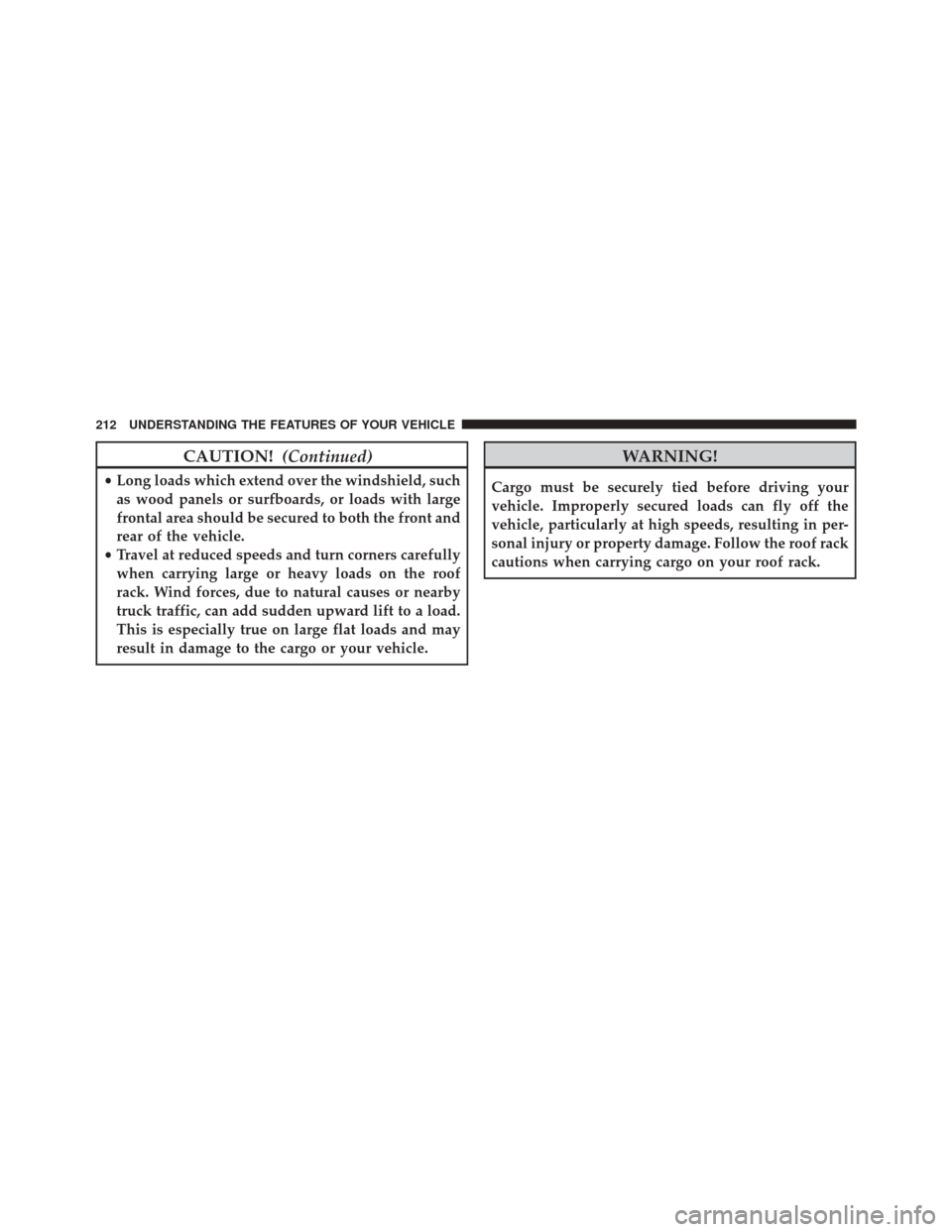
CAUTION!(Continued)
•Long loads which extend over the windshield, such
as wood panels or surfboards, or loads with large
frontal area should be secured to both the front and
rear of the vehicle.
• Travel at reduced speeds and turn corners carefully
when carrying large or heavy loads on the roof
rack. Wind forces, due to natural causes or nearby
truck traffic, can add sudden upward lift to a load.
This is especially true on large flat loads and may
result in damage to the cargo or your vehicle.
WARNING!
Cargo must be securely tied before driving your
vehicle. Improperly secured loads can fly off the
vehicle, particularly at high speeds, resulting in per-
sonal injury or property damage. Follow the roof rack
cautions when carrying cargo on your roof rack.
212 UNDERSTANDING THE FEATURES OF YOUR VEHICLE
Page 258 of 587

Headlamp Off Delay
When this feature is selected the driver can choose to
have the headlights remain on for 0, 30, 60, or 90 seconds
when exiting the vehicle. Push and hold the RIGHT
button when in this display until 0, 30, 60, or 90 appears
to make your selection.
Headlamps with Wipers (Available with Auto
Headlights Only)
When on is selected, and the headlight switch is in the
AUTO position, the headlights will turn on approxi-
mately 10 seconds after the wipers are turned on. If the
headlights were turned on by this feature, they will also
turn off when the wipers are turned off. To make your
selection, push and release the RIGHT button until “ON”
or “OFF” appears.NOTE:
Turning the headlights on during the daytime
causes the instrument panel lights to dim. To increase the
brightness, refer to “Lights” in “Understanding The
Features Of Your Vehicle.”
Key Off Power Delay
When this feature is selected the power window
switches, radio, Uconnect phone, power sunroof, and
power outlets will remain active for up to 10 minutes
after the ignition switch has been turned OFF. Opening
either front vehicle door will cancel this feature. Push and
hold the RIGHT button when in this display until “OFF,”
“45 sec.”, “5 min.”, or “10 min.” appears to make your
selection.
Illuminated Approach
When this feature is selected, the headlights will activate
and remain on for up to 90 seconds when the doors are
unlocked using the RKE transmitter. Push and hold the
256 UNDERSTANDING YOUR INSTRUMENT PANEL
Page 279 of 587

To access the ESN/SID, refer to the following steps:
ESN/SID Access
With the ignition switch in the ON/RUN or ACC posi-
tion and the radio on, push the SETUP button and scroll
using the TUNE/SCROLL control knob until Sirius ID is
selected. Push the TUNE/SCROLL control knob and the
Sirius ID number will display. The Sirius ID number
display will time out in two minutes. Push any button on
the radio to exit this screen.
Selecting Uconnect (Satellite) Mode
Push the SAT button until�SAT�appears in the display. A
CD may remain in the radio while in the Satellite radio
mode.
Satellite Antenna
To ensure optimum reception, do not place items on the
roof around the rooftop antenna location. Metal objects
placed within the line of sight of the antenna will cause decreased performance. Larger luggage items such as
bikes should be placed as far rearward as possible, within
the loading design of the rack. Do not place items directly
on or above the antenna.
Reception Quality
Satellite reception may be interrupted due to one of the
following reasons:
•
The vehicle is parked in an underground parking
structure or under a physical obstacle.
• Dense tree coverage may interrupt reception in the
form of short audio mutes.
• Driving under wide bridges or along tall buildings can
cause intermittent reception.
• Placing objects over or too close to the antenna can
cause signal blockage.4
UNDERSTANDING YOUR INSTRUMENT PANEL 277
Page 305 of 587

1. The Electronic Serial Number/Sirius IdentificationNumber (ESN/SID).
2. Your Vehicle Identification Number.
To access the ESN/SID, refer to the following steps:
ESN/SID Access
With the ignition switch in the ON/RUN or ACC posi-
tion and the radio on, push the SETUP button and scroll
using the TUNE/SCROLL control knob until Sirius ID is
selected. Push the TUNE/SCROLL control knob and the
Sirius ID number will display. The Sirius ID number
display will time out in two minutes. Push any button on
the radio to exit this screen.
Selecting Uconnect (Satellite) Mode
Push the SAT button until �SAT�appears in the display. A
CD may remain in the radio while in the Satellite radio
mode.
Satellite Antenna
To ensure optimum reception, do not place items on the
roof around the rooftop antenna location. Metal objects
placed within the line of sight of the antenna will cause
decreased performance. Larger luggage items such as
bikes should be placed as far rearward as possible, within
the loading design of the rack. Do not place items directly
on or above the antenna.
Reception Quality
Satellite reception may be interrupted due to one of the
following reasons:
• The vehicle is parked in an underground parking
structure or under a physical obstacle.
• Dense tree coverage may interrupt reception in the
form of short audio mutes.
4
UNDERSTANDING YOUR INSTRUMENT PANEL 303
Page 533 of 587
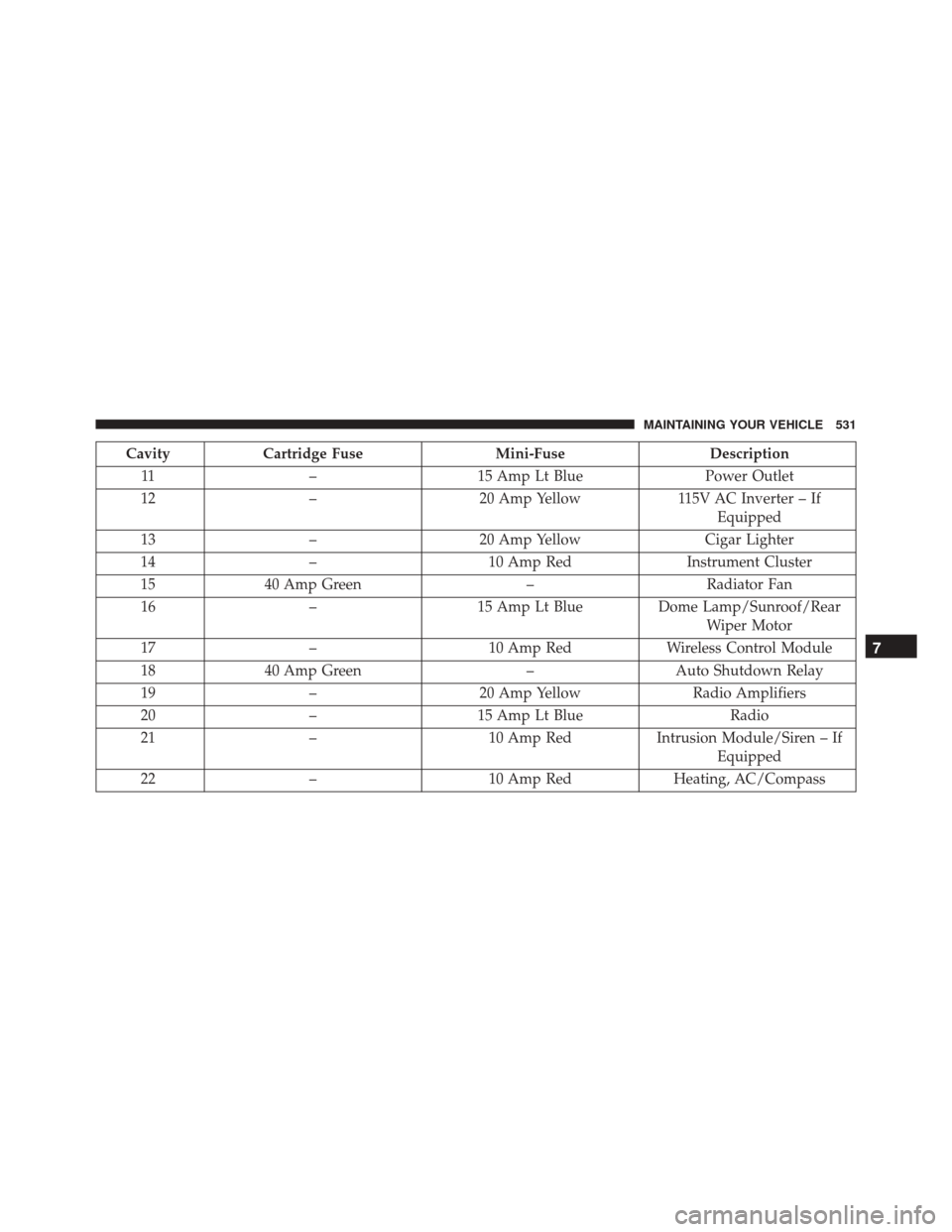
CavityCartridge Fuse Mini-FuseDescription
11 – 15 Amp Lt Blue Power Outlet
12 – 20 Amp Yellow 115V AC Inverter – If
Equipped
13 – 20 Amp Yellow Cigar Lighter
14 – 10 Amp Red Instrument Cluster
15 40 Amp Green –Radiator Fan
16 –15 Amp Lt Blue Dome Lamp/Sunroof/Rear
Wiper Motor
17 – 10 Amp RedWireless Control Module
18 40 Amp Green –Auto Shutdown Relay
19 – 20 Amp Yellow Radio Amplifiers
20 –15 Amp Lt Blue Radio
21 – 10 Amp RedIntrusion Module/Siren – If
Equipped
22 – 10 Amp Red Heating, AC/Compass
7
MAINTAINING YOUR VEHICLE 531
Page 534 of 587
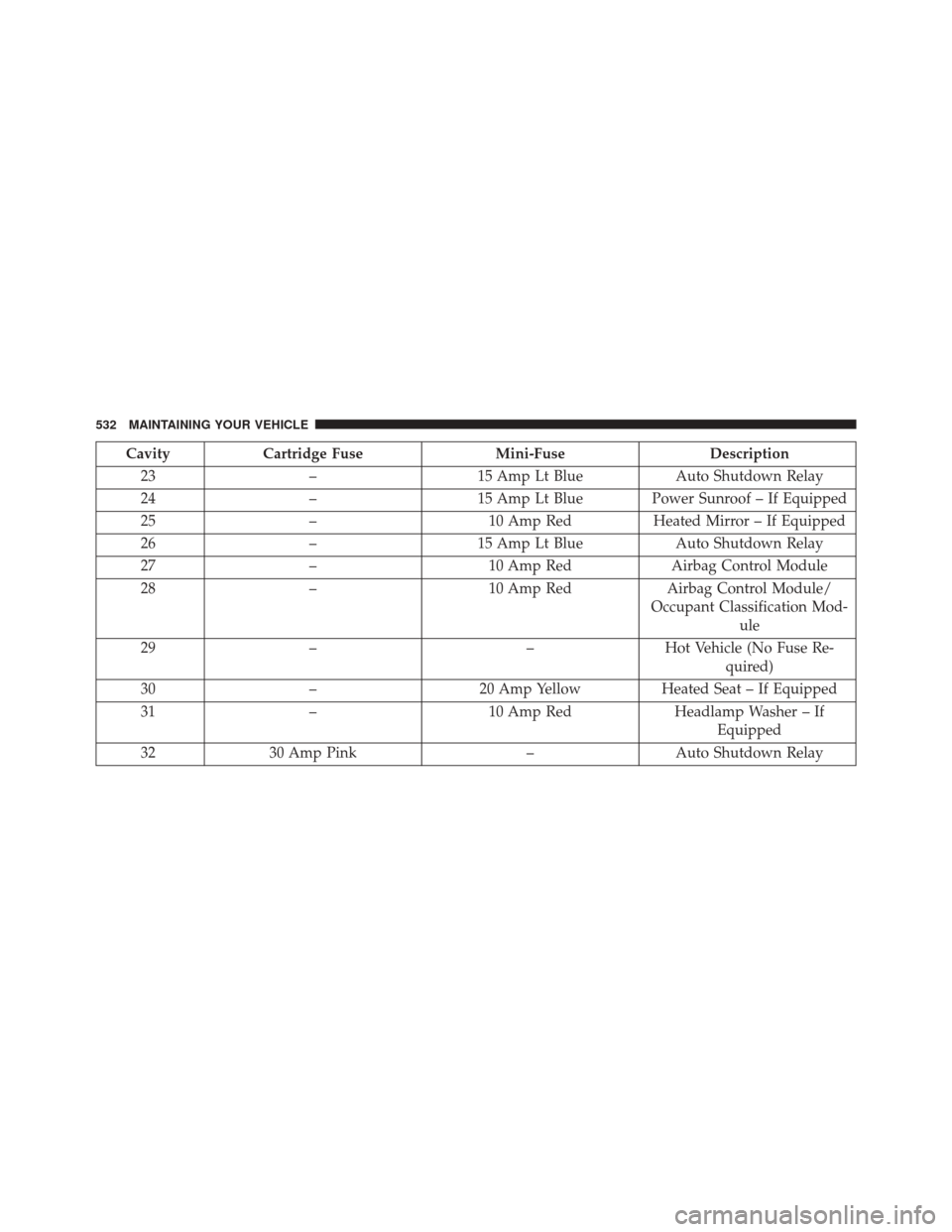
CavityCartridge Fuse Mini-FuseDescription
23 –15 Amp Lt Blue Auto Shutdown Relay
24 –15 Amp Lt Blue Power Sunroof – If Equipped
25 – 10 Amp RedHeated Mirror – If Equipped
26 –15 Amp Lt Blue Auto Shutdown Relay
27 – 10 Amp Red Airbag Control Module
28 – 10 Amp RedAirbag Control Module/
Occupant Classification Mod- ule
29 – –Hot Vehicle (No Fuse Re-
quired)
30 – 20 Amp Yellow Heated Seat – If Equipped
31 – 10 Amp Red Headlamp Washer – If
Equipped
32 30 Amp Pink –Auto Shutdown Relay
532 MAINTAINING YOUR VEHICLE