Page 330 of 723
head unit. When the shift up indicator is shown on the
display, the PSI is advising the driver to engage a higher
gear.
NOTE:The PSI is configured and turned on or off in the
head unit “Shift Light: Set Up” page.
The PSI indicator in the cluster information display
remains illuminated until the driver changes gear, or the
driving conditions return to a situation where changing
gear is not required, corresponding to the configured
RPMs in the head unit.
NOTE: Refer to “Uconnect Settings” in “Understanding
Your Instrument Panel” for further information on en-
abling, disabling, and configuring the Performance Shift
Indicator.
DID Messages
Includes the following, but not limited to:
• Front Seatbelts Unbuckled •
Driver Seat Belt Unbuckled
• Passenger Seat Belt Unbuckled
• Traction Control Off
• Washer Fluid Low
• Oil Pressure Low
• Oil Change Due
• Fuel Low
• Service Anti-lock Brake System
• Service Electronic Throttle Control
• Service Power Steering
• Cruise Off
• Cruise Ready
• ACC Override
328 UNDERSTANDING YOUR INSTRUMENT PANEL
Page 352 of 723
NOTE:To make changes to the �Display Brightness with
Headlights ON� setting, the headlights must be on and
the interior dimmer switch must not be in the �party�or
�parade� positions.
• Display Brightness With Headlights OFF
When in this display, you may select the brightness with
the headlights off. Adjust the brightness with the “+” and
“–” setting buttons on the touchscreen or by selecting any
point on the scale between the “+” and “–” buttons on the
touchscreen.
NOTE: To make changes to the �Display Brightness with
Headlights OFF� setting, the headlights must be off and
the interior dimmer switch must not be in the �party�or
�parade� positions. •
Set Theme
This feature will allow you to choose a background
theme for the display screen. The theme will change the
background color, highlight color, and button color of the
display screen.
• Set Language
When in this display, you may select one of multiple
languages (English/Français/Español) for all display no-
menclature, including the trip functions and the naviga-
tion system (if equipped). Press the “Set Language”
button on the touchscreen, then select the desired lan-
guage button on the touchscreen.
• Touchscreen Beep
When in this display, you may turn on or shut off the
sound heard when button on the touchscreen is pressed.
350 UNDERSTANDING YOUR INSTRUMENT PANEL
Page 354 of 723

•Temperature
Select from: “°C,” or “°F.”
• Power
Select from: “HP” (US), “HP” (UK), and “kW.”
• Torque
Select from: “lb-ft” or “Nm.”
Voice
After pressing the “Voice” button on the touchscreen the
following settings will be available:
• Voice Response Length
When in this display, you may change the Voice Re-
sponse Length settings. To change the Voice Response
Length, press the “Brief” or “Detailed” button on the
touchscreen until a check-mark appears next to the
setting, showing that setting has been selected. •
Show Command List
When in this display, you may choose to Always, With
Help, or Never display the Teleprompter with possible
options while in a voice session. To change the Show
Command List settings, press the “Always,” “With
Help,” or “Never” button on the touchscreen until a
check-mark appears next to the setting, showing that
setting has been selected.
Clock
After pressing the “Clock” button on the touchscreen the
following settings will be available:
• Sync Time With GPS
This feature will allow the radio to sync time with a GPS
signal. To change the Sync Time setting, press the “Sync
time with GPS” button on the touchscreen until a check-
mark appears next to the setting, showing that setting has
been selected.
352 UNDERSTANDING YOUR INSTRUMENT PANEL
Page 447 of 723
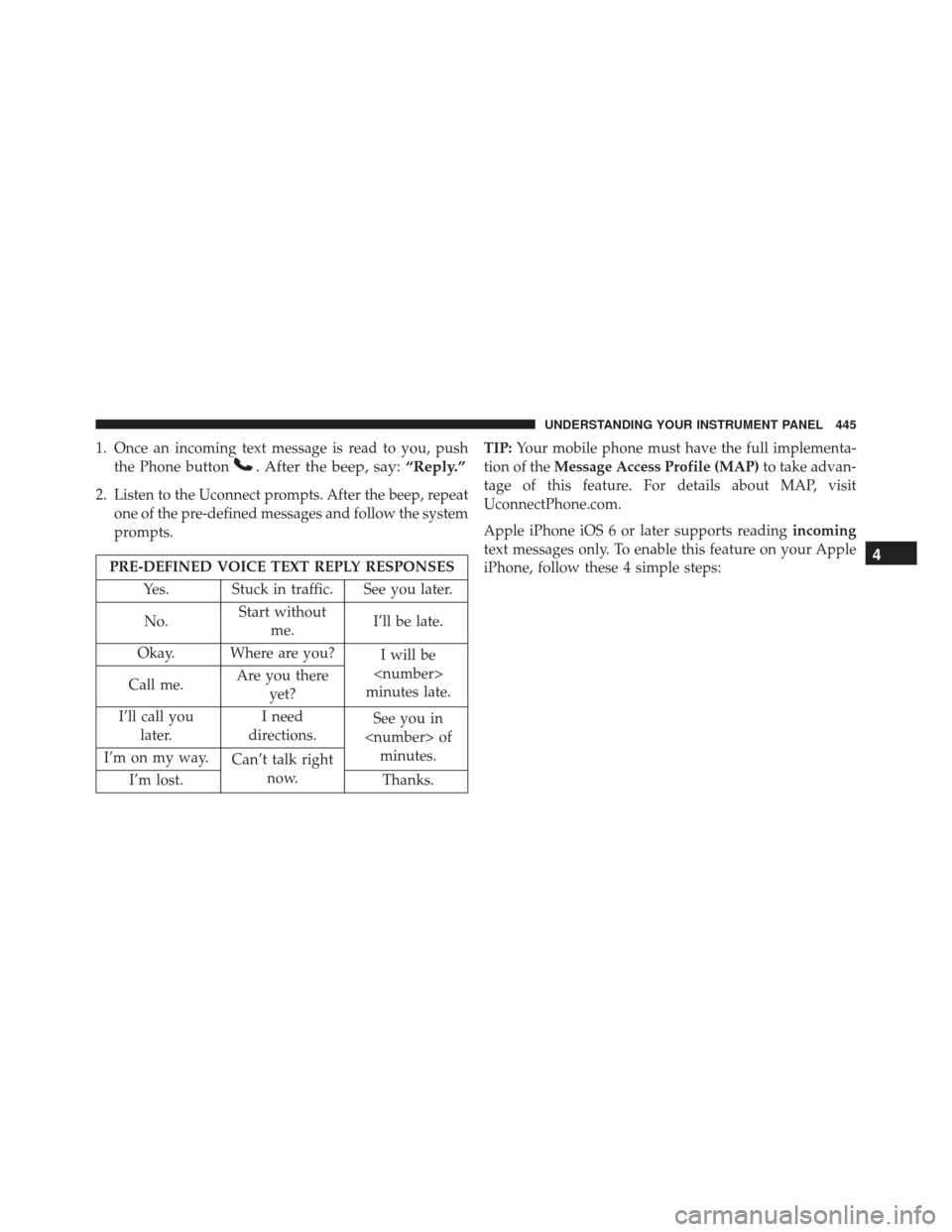
1. Once an incoming text message is read to you, pushthe Phone button
. After the beep, say: “Reply.”
2. Listen to the Uconnect prompts. After the beep, repeat
one of the pre-defined messages and follow the system
prompts.
PRE-DEFINED VOICE TEXT REPLY RESPONSES
Yes. Stuck in traffic. See you later.
No. Start without
me. I’ll be late.
Okay. Where are you? I will be
minutes late.
Call me. Are you there
yet?
I’ll call you later. I need
directions. See you in
of minutes.
I’m on my way. Can’t talk right
now.
I’m lost. Thanks.TIP:
Your mobile phone must have the full implementa-
tion of the Message Access Profile (MAP) to take advan-
tage of this feature. For details about MAP, visit
UconnectPhone.com.
Apple iPhone iOS 6 or later supports reading incoming
text messages only. To enable this feature on your Apple
iPhone, follow these 4 simple steps:4
UNDERSTANDING YOUR INSTRUMENT PANEL 445
Page 459 of 723
NOTE:
•The transmitter has been tested and it complies with
FCC and IC rules. Changes or modifications not ex-
pressly approved by the party responsible for compli-
ance could void the user ’s authority to operate the
device.
• The term IC before the certification/registration num-
ber only signifies that Industry Canada technical speci-
fications were met.Additional Information
© 2015 FCA US LLC. All rights reserved. Mopar and
Uconnect are registered trademarks and Mopar Owner
Connect is a trademark of FCA US LLC. Android is a
trademark of Google Inc. SiriusXM and all related marks
and logos are trademarks of SiriusXM Radio Inc. Yelp,
Yelp logo, Yelp burst and related marks are registered
trademarks of Yelp.
For Uconnect system support, call: 1-877-855-8400 (24
hours a day 7 days a week) or visit DriveUconnect.com.
Uconnect Access services support, call: 1-855-792-4241
Please have your Uconnect Security PIN ready when you
call.
4
UNDERSTANDING YOUR INSTRUMENT PANEL 457
Page 475 of 723
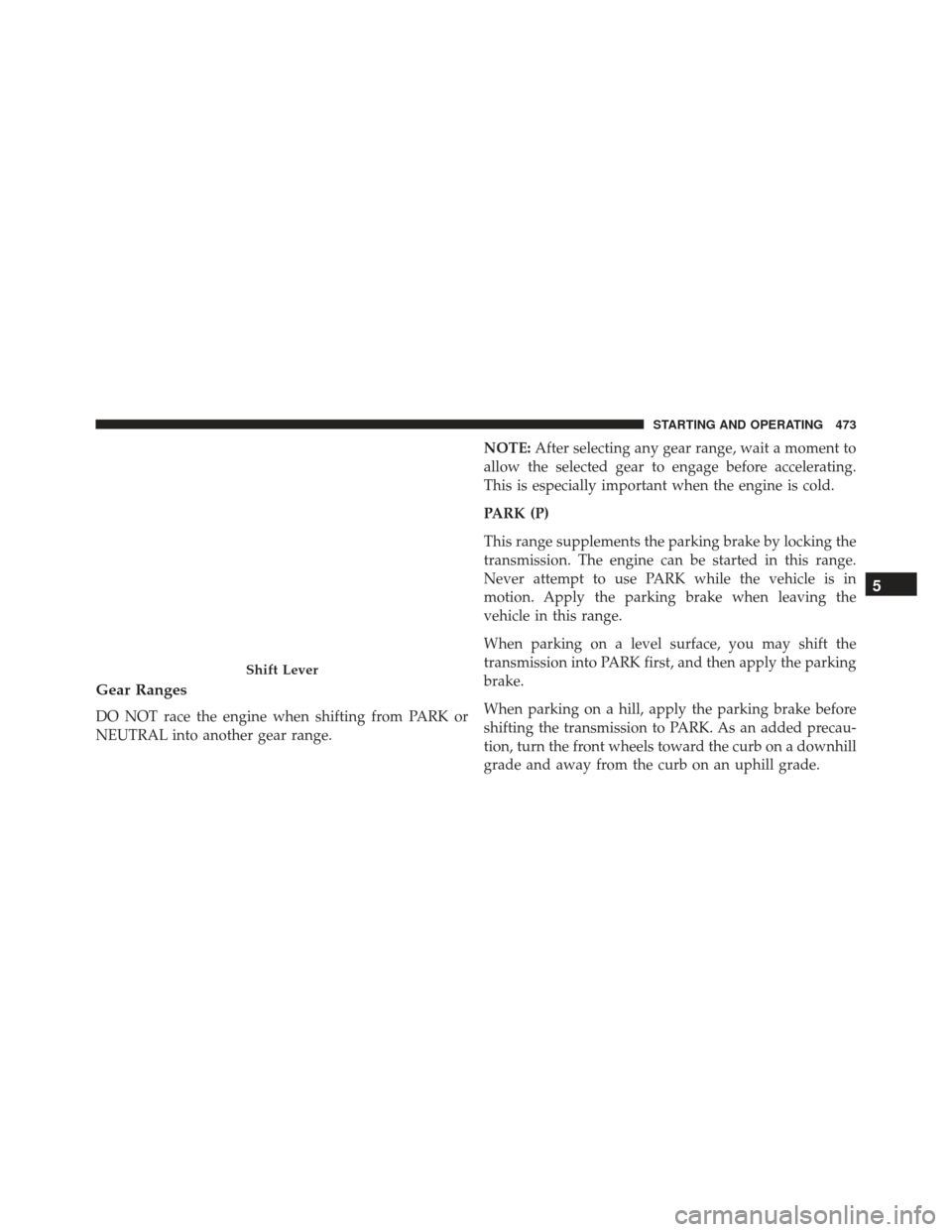
Gear Ranges
DO NOT race the engine when shifting from PARK or
NEUTRAL into another gear range.NOTE:
After selecting any gear range, wait a moment to
allow the selected gear to engage before accelerating.
This is especially important when the engine is cold.
PARK (P)
This range supplements the parking brake by locking the
transmission. The engine can be started in this range.
Never attempt to use PARK while the vehicle is in
motion. Apply the parking brake when leaving the
vehicle in this range.
When parking on a level surface, you may shift the
transmission into PARK first, and then apply the parking
brake.
When parking on a hill, apply the parking brake before
shifting the transmission to PARK. As an added precau-
tion, turn the front wheels toward the curb on a downhill
grade and away from the curb on an uphill grade.
Shift Lever
5
STARTING AND OPERATING 473
Page 478 of 723
•With brake pedal released, verify that the gear selector
will not move out of PARK.
NOTE: If the gear selector cannot be moved to the
PARK, REVERSE, or NEUTRAL position (when pushed
forward) it is probably in the AutoStick (+/-) position
(beside the DRIVE position). In AutoStick mode, the
transmission gear (1, 2, 3, etc.) is displayed in the
instrument cluster. Move the gear selector to the right
(into the DRIVE [D] position) for access to PARK, RE-
VERSE, and NEUTRAL.
REVERSE (R)
This range is for moving the vehicle backward. Shift into
REVERSE only after the vehicle has come to a complete
stop.
NEUTRAL (N)
Use this range when the vehicle is standing for prolonged
periods with the engine running. Apply the parking brake and shift the transmission into PARK if you must
leave the vehicle.
WARNING!
Do not coast in NEUTRAL and never turn off the
ignition to coast down a hill. These are unsafe
practices that limit your response to changing traffic
or road conditions. You might lose control of the
vehicle and have a collision.
CAUTION!
Towing the vehicle, coasting, or driving for any other
reason with the transmission in NEUTRAL can cause
severe transmission damage. Refer to “Recreational
Towing” in “Starting And Operating” and “Towing A
Disabled Vehicle” in “What To Do In Emergencies”
for further information.
476 STARTING AND OPERATING
Page 498 of 723
CAUTION!(Continued)
standing water that is deeper than the bottom of
the tire rims mounted on the vehicle.
• Determine the condition of the road or the path
that is under water and if there are any obstacles in
the way before driving through the standing water.
• Do not exceed 5 mph (8 km/h) when driving
through standing water. This will minimize wave
effects.
• Driving through standing water may cause damage
to your vehicle’s drivetrain components. Always
inspect your vehicle’s fluids (i.e., engine oil, trans-
mission, axle, etc.) for signs of contamination (i.e.,
fluid that is milky or foamy in appearance) after
driving through standing water. Do not continue to
operate the vehicle if any fluid appears contami-
nated, as this may result in further damage. Such
(Continued)
CAUTION! (Continued)
damage is not covered by the New Vehicle Limited
Warranty.
• Getting water inside your vehicle’s engine can
cause it to lock up and stall out, and cause serious
internal damage to the engine. Such damage is not
covered by the New Vehicle Limited Warranty.
ELECTRIC POWER STEERING
The electric power steering system will give you good
vehicle response and increased ease of maneuverability
in tight spaces. The system will vary its assist to provide
light efforts while parking and good feel while driving. If
the electric steering system experiences a fault that
prevents it from providing assist, you will still have the
ability to steer the vehicle manually.
496 STARTING AND OPERATING