Page 13 of 117
UNDERSTANDING YOUR INSTRUMENT PANEL
CONTENTS
�INSTRUMENT CLUSTER .................12
� WARNING AND INDICATOR LIGHTS ........14
▫ Yellow Telltale Indicator Lights .............15
� DRIVER INFORMATION DISPLAY (DID) ......18
▫ DID Displays .........................20
▫ Engine Oil Life Reset ...................21 ▫
Fuel Filter Life Reset ....................22
▫ Diesel Particulate Filter (DPF) Messages ......23
▫
Diesel Exhaust Fluid (DEF) Warning Messages . . .26
▫ Diesel Exhaust Fluid (DEF) Fault Warning
Messages ............................27
3
Page 15 of 117

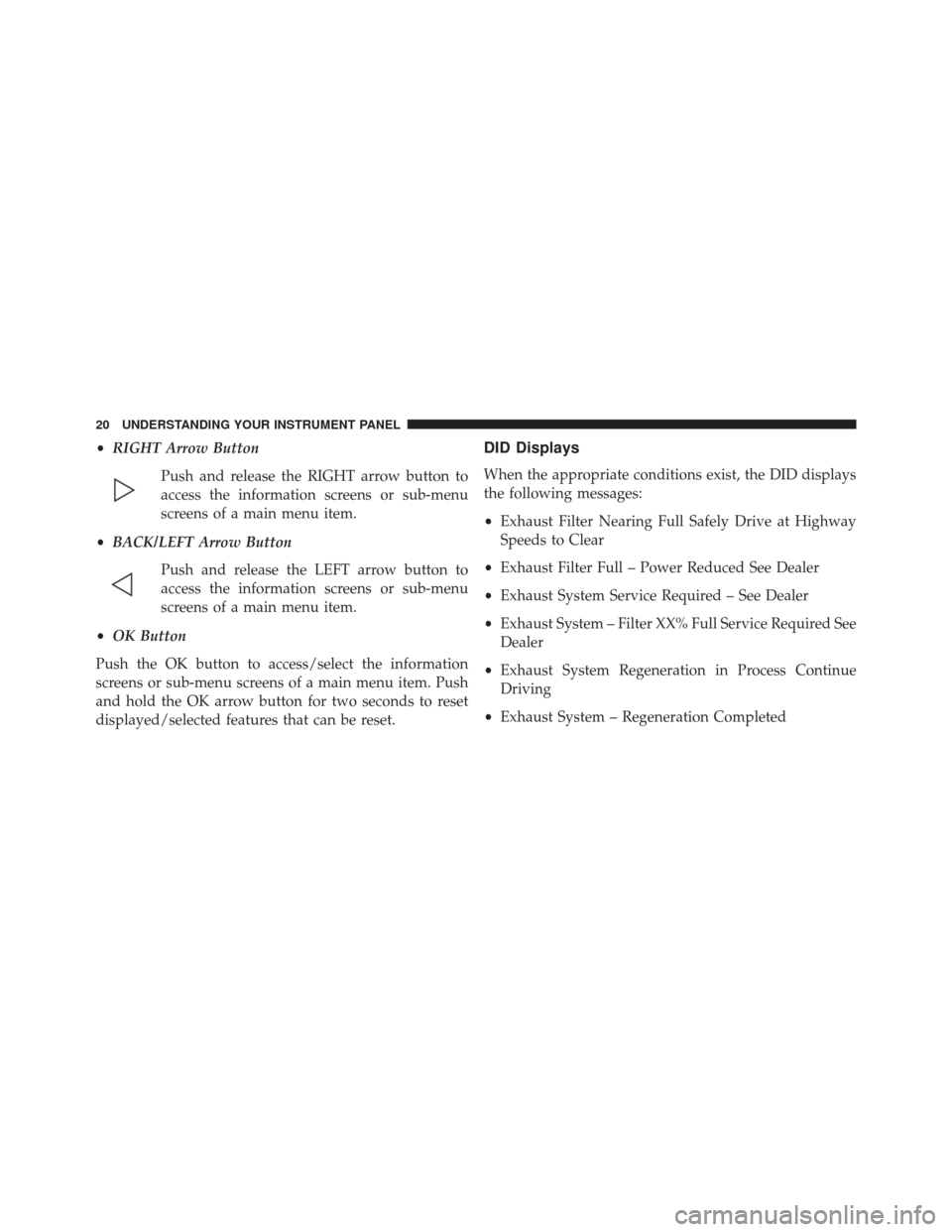
1. Tachometer•Indicates the engine speed in revolutions per minute
(RPM x 1000).
2. Driver Information Display (DID) •The Driver Information Display (DID) features a
driver-interactive display. Refer to “Driver Informa-
tion Display (DID)” in “Understanding Your Instru-
ment Panel” for further information.
3. Speedometer •Indicates vehicle speed
4. Temperature Gauge •The temperature gauge shows engine coolant tem-
perature. Any reading within the normal range indi-
cates that the engine cooling system is operating
satisfactorily. •
The gauge pointer will likely indicate a higher tem-
perature when driving in hot weather or up moun-
tain grades. It should not be allowed to exceed the
upper limits of the normal operating range.
CAUTION!
Driving with a hot engine cooling system could
damage your vehicle. If the temperature gauge reads
“H” pull over and stop the vehicle. Idle the vehicle
with the air conditioner turned off until the pointer
drops back into the normal range. If the pointer
remains on the “H”, turn the engine off immediately
and call an authorized dealer for service.
3
UNDERSTANDING YOUR INSTRUMENT PANEL 13
Page 20 of 117
DRIVER INFORMATION DISPLAY (DID)
The Driver Information Display (DID) features a driver-
interactive display that is located in the instrument
cluster.The DID Menu items consists of the following:
•
Main Gauge
• Vehicle Info
• Terrain — If Equipped
• Driver Assist
• Fuel Economy
• Trip
• Stop/Start — If Equipped
• Audio
• Stored Messages
• Screen Setup
• Speed Warning — If Equipped
Driver Information Display (DID) Location
18 UNDERSTANDING YOUR INSTRUMENT PANEL
Page 22 of 117
•RIGHT Arrow Button
Push and release the RIGHT arrow button to
access the information screens or sub-menu
screens of a main menu item.
• BACK/LEFT Arrow Button
Push and release the LEFT arrow button to
access the information screens or sub-menu
screens of a main menu item.
• OK Button
Push the OK button to access/select the information
screens or sub-menu screens of a main menu item. Push
and hold the OK arrow button for two seconds to reset
displayed/selected features that can be reset.DID Displays
When the appropriate conditions exist, the DID displays
the following messages:
• Exhaust Filter Nearing Full Safely Drive at Highway
Speeds to Clear
• Exhaust Filter Full – Power Reduced See Dealer
• Exhaust System Service Required – See Dealer
• Exhaust System – Filter XX% Full Service Required See
Dealer
• Exhaust System Regeneration in Process Continue
Driving
• Exhaust System – Regeneration Completed
20 UNDERSTANDING YOUR INSTRUMENT PANEL
Page 23 of 117
•Engine Will Not Restart in XXXX mi DEF Low Refill
Soon
• Engine Will Not Restart in XXXX mi Refill DEF
• Engine Will Not Start Refill DEF
• Service DEF System See Dealer
• Incorrect DEF Detected See Dealer
• Engine Will Not Restart in XXX mi Service DEF See
Dealer
• Engine Will Not Restart Service DEF System See
Dealer
• Engine Will Not Start Service DEF System See DealerEngine Oil Life Reset
Oil Change Required
Your vehicle is equipped with an engine oil change
indicator system. The “Oil Change Required” message
will display in the DID for five seconds after a single
chime has sounded, to indicate the next scheduled oil
change interval. The engine oil change indicator system
is duty cycle based, which means the engine oil change
interval may fluctuate, dependent upon your personal
driving style.
Unless reset, this message will continue to display each
time you cycle the ignition to the ON/RUN position. To
turn off the message temporarily, push and release the
OK button. To reset the oil change indicator system (after
performing the scheduled maintenance), refer to the
following procedure.
3
UNDERSTANDING YOUR INSTRUMENT PANEL 21
Page 24 of 117
Oil Change Reset Procedure
1. Without pushing the brake pedal, push and release theENGINE START/STOP button and place the ignition
to the ON/RUN position (do not start the engine).
2. Fully push the accelerator pedal, slowly, three times within 10 seconds.
3. Without pushing the brake pedal, push and release the ENGINE START/STOP button once to return the
ignition to the OFF/LOCK position.
NOTE: If the indicator message illuminates when you
start the vehicle, the oil change indicator system did not
reset. If necessary, repeat this procedure. Secondary Method For Oil Change Reset
1. Without depressing the brake pedal, push and release
the ENGINE START/STOP button and place the igni-
tion to the ON/RUN position (do not start the engine).
2.
Navigate to �Oil Life�submenu in �Vehicle Info� on DID.
3. Push and Hold the OKbutton until the gauge resets to
100%
Fuel Filter Life Reset
The cluster will display the “Fuel System Service Re-
quired – See Dealer” or “Service Fuel Filter” message
when the fuel filter maintenance life is less than 5%. To
verify if this is a fuel filter change event, go to the “Fuel
Filter Life” screen in the “Vehicle Info” menu. When this
message appears, dealers should replace the fuel filters.
NOTE: Use the steering wheel DID controls for the
following procedure(s)
22 UNDERSTANDING YOUR INSTRUMENT PANEL
Page 26 of 117
Your vehicle has the ability to alert you to additional
maintenance required on your vehicle or engine. Refer to
the following messages that may be displayed on your
Driver Information Display (DID):
•Exhaust Filter Nearing Full Safely Drive at Highway
Speeds to Clear — This message will be displayed on
the Driver Information Display (DID) if the exhaust
particulate filter reaches 80% of its maximum storage
capacity. Under conditions of exclusive short duration
and low speed driving cycles, your diesel engine and
exhaust after-treatment system may never reach the
conditions required to cleanse the filter to remove the
trapped PM. If this occurs, the “Exhaust Filter XX%
Full Safely Drive at Highway Speeds to Remedy”
message will be displayed in the DID. If this message
is displayed, you will hear one chime to assist in
alerting you of this condition. By simply driving your vehicle at highway speeds for up to 20 minutes, you
can remedy the condition in the particulate filter
system and allow your diesel engine and exhaust
after-treatment system to cleanse the filter to remove
the trapped PM and restore the system to normal
operating condition.
• Exhaust System Regeneration in Process Continue
Driving — This message indicates that the Diesel
Particulate Filter (DPF) is self-cleaning. Maintain your
current driving condition until regeneration is com-
pleted.
• Exhaust System — Regeneration Completed — This
message indicates that the Diesel Particulate Filter
(DPF) self-cleaning is completed. If this message is
displayed, you will hear one chime to assist in alerting
you of this condition.
24 UNDERSTANDING YOUR INSTRUMENT PANEL
Page 27 of 117
•Exhaust System Service Required - See Dealer —
This messages indicates regeneration has been disabled
due to a system malfunction. At this point the engine
Powertrain Control Module (PCM) will register a fault
code, the instrument panel will display a MIL light.
CAUTION!
See your authorized dealer, as damage to the exhaust
system could occur soon with continued operation.
• Exhaust Filter Full — Power Reduced See Dealer —
This message indicates the PCM has derated the
engine to limit the likelihood of permanent damage to
the after-treatment system. If this condition is not
corrected and a dealer service is not performed, exten-
sive exhaust after-treatment damage can occur. To
correct this condition it will be necessary to have your
vehicle serviced by your local authorized dealer. NOTE:
Failing to follow the oil change indicator, chang-
ing your oil and resetting the oil change indicator by
0 miles remaining will prevent the diesel exhaust filter
from performing it’s cleaning routine. This will shortly
result in a Malfunction Indicator Light (MIL) and re-
duced engine power. Only an authorized dealer will be
able to correct this condition.CAUTION!
See your authorized dealer, as damage to the exhaust
system could occur soon with continued operation.
3
UNDERSTANDING YOUR INSTRUMENT PANEL 25