Page 388 of 607

●Excessive noise will interfere with the
warning chime sound, and the chime
may not be heard.
The LDP system may or may not operate
properly under the following conditions:
● On roads where there are multiple par-
allel lane markers; lane markers that
are faded or not painted clearly; yellow
painted lane markers; non-standard
lane markers; or lane markers covered
with water, dirt, snow, etc.
● On roads where discontinued lane
markers are still detectable.
● On roads where there are sharp curves.
● On roads where there are sharply con-
trasting objects, such as shadows,
snow, water, wheel ruts, seams or lines
remaining after road repairs. (The LDP
system could detect these items as lane
markers.)
● On roads where the traveling lane
merges or separates.
● When the vehicle’s traveling direction
does not align with the lane marker. ●
When traveling close to the vehicle in
front of you, which obstructs the lane
camera unit detection range.
● When rain, snow or dirt adheres to the
windshield in front of the lane camera
unit.
● When the headlights are not bright due
to dirt on the lens or if the aiming is not
adjusted properly.
● When strong light enters the lane cam-
era unit. (For example, the light directly
shines on the front of the vehicle at
sunrise or sunset.)
● When a sudden change in brightness
occurs. (For example, when the vehicle
enters or exits a tunnel or under a
bridge.)
While the LDP system is operating, you may hear a
sound of brake operation. This is normal and indi-
cates that the LDP system is operating properly.
SYSTEM TEMPORARILY
UNAVAILABLE
Condition A:
The warning and assist functions of the LDP
system are not designed to work under the fol-
lowing conditions:
● When you operate the lane change signal
and change the traveling lanes in the direc-
tion of the signal. (The LDP system will be
deactivated for approximately 2 seconds af-
ter the lane change signal is turned off.)
● When the vehicle speed lowers to less than
approximately 45 mph (70 km/h).
After the above conditions have finished and the
necessary operating conditions are satisfied, the
warning and assist functions will resume.
Condition B:
The assist function of the LDP system is not
designed to work under the following conditions
(warning is still functional): ● When the brake pedal is depressed.
● When the steering wheel is turned as far as
necessary for the vehicle to change lanes.
● When the vehicle is accelerated during LDP
system operation.
Starting and driving5-35
Page 392 of 607

1. Side BSW/RCTA Indicator Light
2. BSW/RCTA Indicator
BSW SYSTEM OPERATION
The BSW system operates above approximately
20 mph (32 km/h).
If the radar sensors detect a vehicle in the detec-
tion zone, the side BSW/RCTA indicator light (1)
illuminates. If the turn signal is then activated, the
system chimes (twice) and the side BSW/RCTA
indicator light flashes. The BSW indicator light
continues to flash until the detected vehicle
leaves the detection zone.
The side BSW/RCTA indicator light illuminates
for a few seconds when the ignition switch is
placed in the ON position.
The brightness of the side BSW/RCTA indicator
light is adjusted automatically depending on the
brightness of the ambient light.
If a vehicle comes into the detection zone after
the driver activates the turn signal, then only the
side BSW/RCTA indicator light flashes and no
chime sounds. For additional information, refer to
“BSW driving situations” in this section.
The BSW system automatically turns on every
time the engine is started, as long as it is acti-
vated using the settings menu on the vehicle
information display.
LSD2609
Starting and driving5-39
Page 395 of 607

Illustration 2:If the driver activates the turn
signal when another vehicle is in the detection
zone, then the system chimes (twice) and the
side indicator light flashes.
NOTE:
● The radar sensors may not detect vehicles
which are approaching rapidly from behind.
● If the driver activates the turn signal before a
vehicle enters the detection zone, the side
indicator light will flash but no chime will
sound when the other vehicle is detected.Overtaking another vehicle
Illustration 3: The side indicator light illumi-
nates if you overtake a vehicle and that vehicle
stays in the detection zone for approximately
2 seconds. Illustration 4:
If the driver activates the turn
signal while another vehicle is in the detection
zone, then the system chimes (twice) and the
side indicator light flashes.
NOTE:
● When overtaking several vehicles in a row,
the vehicles after the first vehicle may not be
detected if they are traveling close together.
● The radar sensors may not detect slower
moving vehicles if they are passed quickly.
Illustration 2 – Approaching from behind
LSD2300
Illustration 3 – Overtaking another vehicle
LSD2302
Illustration 4 – Overtaking another vehicle
LSD2303
5-42Starting and driving
Page 396 of 607
●If the driver activates the turn signal before a
vehicle enters the detection zone, the side
indicator light will flash but no chime will
sound when the other vehicle is detected.
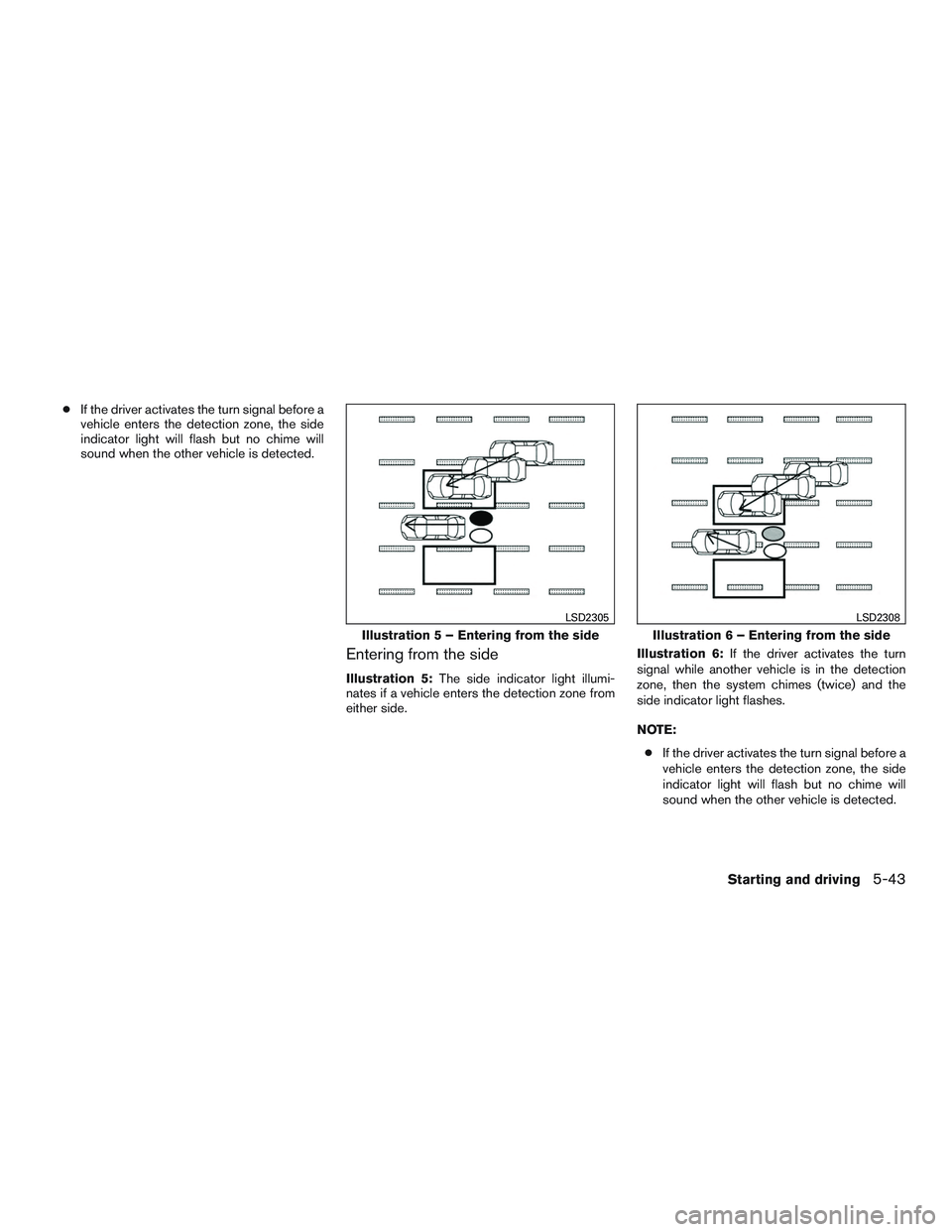
Entering from the side
Illustration 5: The side indicator light illumi-
nates if a vehicle enters the detection zone from
either side. Illustration 6:
If the driver activates the turn
signal while another vehicle is in the detection
zone, then the system chimes (twice) and the
side indicator light flashes.
NOTE:
● If the driver activates the turn signal before a
vehicle enters the detection zone, the side
indicator light will flash but no chime will
sound when the other vehicle is detected.
Illustration 5 – Entering from the side
LSD2305
Illustration 6 – Entering from the side
LSD2308
Starting and driving5-43
Page 401 of 607

BSI SYSTEM OPERATION
If the radar sensors detect vehicles in the detec-
tion zone, the BSW indicator light located near
the outside mirrors illuminates. If your vehicle is
approaching a lane marker, the system chimes a
sound (three times) and the BSW indicator light
flashes. Then the system applies the brakes on
one side of the vehicle for a moment to help return
the vehicle back to the center of the lane. BSI
operates regardless of turn signal usage.
NOTE:
Warning and brake control will only be ac-
tivated if the BSW indicator light is already
illuminated when your vehicle approaches
a lane marker. If another vehicle comes into
the detection zone after your vehicle has
crossed a lane marker, no warning or brake
control will be activated. For additional in-
formation, refer to “BSI driving situations”
in this section. The BSI system is typically
activated earlier than the Lane Departure
Prevention (LDP) system when your vehicle
is approaching a lane marker.
LSD2588
5-48Starting and driving
Page 405 of 607
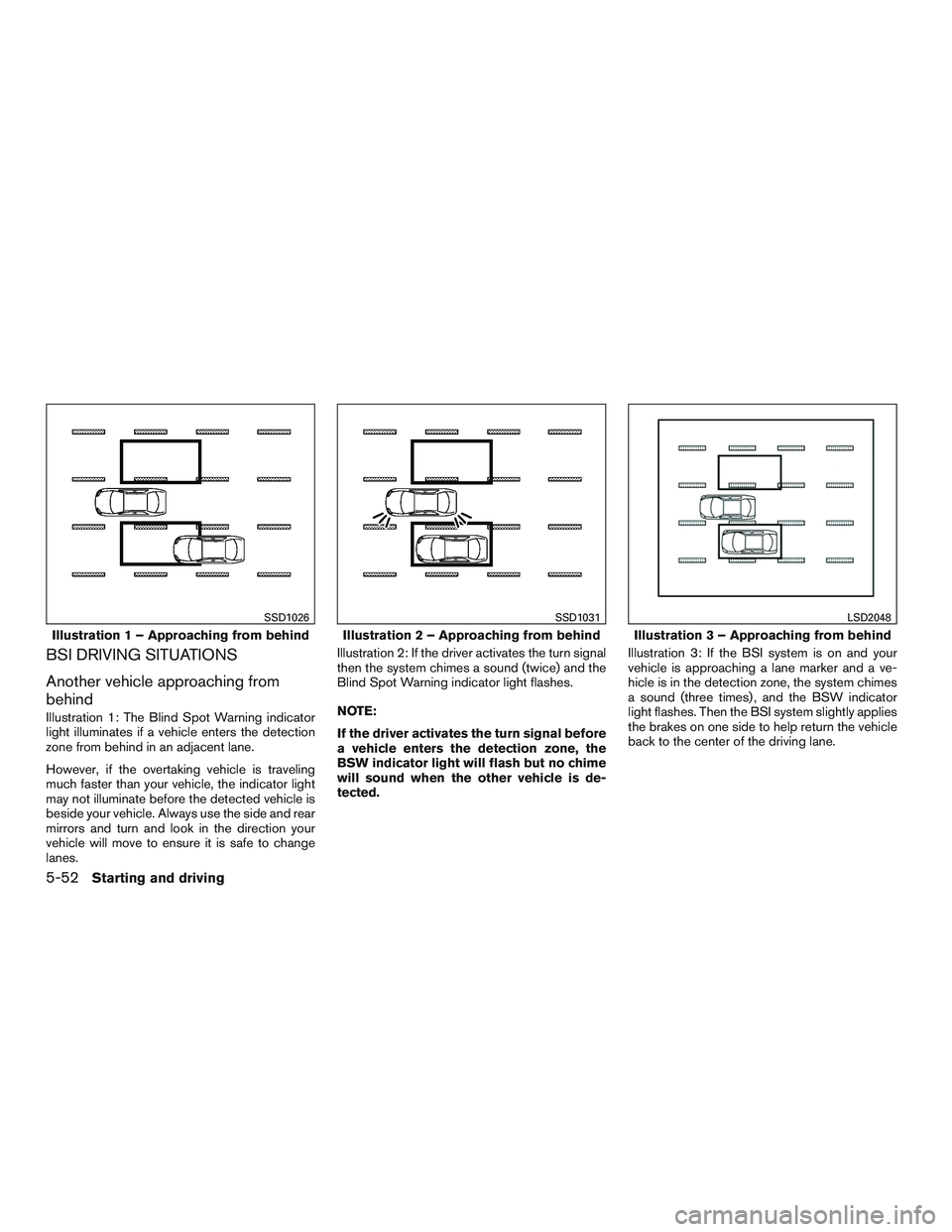
BSI DRIVING SITUATIONS
Another vehicle approaching from
behind
Illustration 1: The Blind Spot Warning indicator
light illuminates if a vehicle enters the detection
zone from behind in an adjacent lane.
However, if the overtaking vehicle is traveling
much faster than your vehicle, the indicator light
may not illuminate before the detected vehicle is
beside your vehicle. Always use the side and rear
mirrors and turn and look in the direction your
vehicle will move to ensure it is safe to change
lanes.Illustration 2: If the driver activates the turn signal
then the system chimes a sound (twice) and the
Blind Spot Warning indicator light flashes.
NOTE:
If the driver activates the turn signal before
a vehicle enters the detection zone, the
BSW indicator light will flash but no chime
will sound when the other vehicle is de-
tected.
Illustration 3: If the BSI system is on and your
vehicle is approaching a lane marker and a ve-
hicle is in the detection zone, the system chimes
a sound (three times) , and the BSW indicator
light flashes. Then the BSI system slightly applies
the brakes on one side to help return the vehicle
back to the center of the driving lane.
Illustration 1 – Approaching from behind
SSD1026
Illustration 2 – Approaching from behind
SSD1031
Illustration 3 – Approaching from behind
LSD2048
5-52Starting and driving
Page 406 of 607
NOTE:
Illustration 4: If you accelerate from a stop
with a vehicle in the detection zone, the
other vehicle may not be detected.Overtaking another vehicle
Illustration 5: The BSW indicator light illuminates
if you overtake a vehicle and that vehicle stays in
the detection zone for approximately 3 seconds.
The radar sensors may not detect slower moving
vehicles if they are passed quickly.Illustration 6: If the driver activates the turn signal
while another vehicle is in the detection zone,
then the system chimes a sound (twice) and the
BSW indicator light flashes.
Illustration 4 – Accelerate from a stop
SSD1032
Illustration 5 – Overtaking another vehicle
SSD1033
Illustration 6 – Overtaking another vehicle
SSD1034
Starting and driving5-53
Page 408 of 607

Entering from the side
Illustration 9: The BSW indicator light illuminates
if a vehicle enters the detection zone from either
side.
NOTE:
The radar sensors may not detect a vehicle
which is traveling at about the same speed
as your vehicle when it enters the detection
zone.Illustration 10: If the driver activates the turn
signal while another vehicle is in the detection
zone, then the BSW indicator light flashes and a
chime will sound twice.
NOTE:
If the driver activates the turn signal before
a vehicle enters the detection zone, the
BSW indicator light will flash but no chime
will sound when another vehicle is de-
tected.Illustration 11: If the BSI system is on and your
vehicle approaches the lane marker while another
vehicle is in the detection zone, the BSW indica-
tor light flashes and a chime will sound three
times. Then, the BSI system slightly applies the
brakes on the appropriate side to help return the
vehicle back to the center of the driving lane.
Illustration 9 – Entering from the side
LSD2050
Illustration 10 – Entering from the side
SSD1038
Illustration 11 – Entering from the side
SSD1094
Starting and driving5-55