Page 130 of 642

3-32
Convenient features of your vehicle
Programming HomeLink®
Please note the following:
When programming a garage door
opener, it is advised to park the
vehicle outside of the garage.
It is recommended that a new bat- tery be placed in the hand-held
transmitter of the device being pro-
grammed to HomeLink
®for quicker
training and accurate transmission
of the radio-frequency signal.
Some vehicles may require the ignition switch to be placed in the
ACC (or "Accessories") position for
programming and/or operation ofHomeLink
®.
In the event that there are still pro- gramming difficulties or questions
after following the programming
steps listed below, contactHomeLink
®at: www.homelink.com
or by calling 1-800-355-3515.
Programming
To train most devices, follow these
instructions:
1. For first-time programming, press and hold the two outside buttons ( ,), HomeLink
®Channel 1
and Channel 3, until the indicatorlight begins to flash (after 10 sec-
onds). Release both buttons. Do
not hold the buttons for longer
than 20 seconds.
ODH044413N
Flashing
Before programming HomeLink®
to a garage door opener or gate
operator, make sure people and
objects are out of the way of the
device to prevent potential harm
or damage. Do not use theHomeLink
®with any garage door
opener that lacks the safety stop
and reverse features required by
U.S. federal safety standards (this
includes any garage door opener
model manufactured before April
1, 1982). A garage door that can-not detect an object - signaling
the door to stop and reverse -
does not meet current U.S. feder-
al safety standards. Using a
garage door opener without
these features increases the risk
of serious injury or death.
WARNING
Page 131 of 642

3-33
Convenient features of your vehicle
3
2. Position the end of your hand-heldtransmitter 1-3 inches (2-8 cm)
away from the HomeLink
®button
you wish to program while keeping
the indicator light in view.
3. Simultaneously press and hold both the HomeLink
®and hand-
held transmitter buttons until theHomeLink
®indicator light changes
from a slow to a rapid blinking
light. Now you may release boththe HomeLink
®and hand-held
transmitter buttons.
Information
Some devices may require you to
replace this Programming step 3 with
procedures noted in the "Gate
Operator/Canadian Programming"
chapter. If the HomeLink ®
indicator
light does not change to a rapidly
blinking light after performing these
steps, contact HomeLink ®
at
www.homelink.com. 4. Firmly press, hold for 5 seconds and
release the programmedHomeLink®button up to two sepa-
rate times to activate the door. If the
door does not activate, press and
hold the just-trained HomeLink
®but-
ton and observe the indicator light.
stantly, programming is complete
and your device should activatewhen the HomeLink
®button is
pressed and released.
for 2 seconds and then turns to a
constant light, continue with
"Programming" steps 5-7 to com-
plete the programming of a rolling
code equipped device (most com-
monly a garage door opener).
5. At the garage door opener receiv- er (motor-head unit) in the garage,
locate the "learn" or "smart" but-
ton. This can usually be foundwhere the hanging antenna wire isattached to the motor-head unit.
i
ODH044414N
Flashing
Page 132 of 642

3-34
Convenient features of your vehicle
6. Firmly press and release the"learn" or "smart" button. (The
name and color of the button vary
by manufacturer). There are 30seconds to initiate step 7.
7. Return to the vehicle and firmly press, hold for 2 seconds and
release the programmedHomeLink
®button. Repeat the
"press/hold/release" sequence a
second time, and, depending on the
brand of the garage door opener (or
other rolling code equipped device),repeat this sequence a third time to
complete the programming
process.
HomeLink
®should now activate your
rolling code equipped device.
Gate operator & Canadian program-
ming
During programming, your handheld
transmitter may automatically stop
transmitting. Continue to press the
Integrated HomeLink
®Wireless
Control System button (note steps 2
through 3 in the Programming portion
of this document) while you press
and re-press ("cycle") your handheld
transmitter every two seconds untilthe frequency signal has been
learned. The indicator light will flash
slowly and then rapidly after several
seconds upon successful training.
Operating HomeLink®
To operate, simply press and release
the programmed HomeLink®button.
Activation will now occur for the
trained device (i.e. garage door
opener, gate operator, security sys-
tem, entry door lock, home/office
lighting, etc.). For convenience, the
hand-held transmitter of the device
may also be used at any time.
Reprogramming a single HomeLink®
button
To program a device to HomeLink®
using a HomeLink®button previously
trained, follow these steps:
1.Press and hold the desired HomeLink
®button. DO NOT
release the button.
2.The indicator light will begin to flash after 20 seconds. Without releasing the HomeLink
®button, proceed
with "Programming" step 2.
For questions or comments, contactHomeLink
®at www.homelink.comor
1-800-355-3515.
Page 133 of 642

3-35
Convenient features of your vehicle
3
Erasing HomeLink®buttons
Individual buttons cannot be erased.
However, to erase all three pro-
grammed buttons:
1. Press and hold the two outerHomeLink
®buttons until the indi-
cator light begins to flash after 10
seconds.
2. Release both buttons. Do not hold for longer than 20 seconds.
The Integrated HomeLink
®Wireless
Control System is now in the training
(learn) mode and can be pro-
grammed at any time following the
appropriate steps in the
Programming chapters above. NVS
®is a registered trademark and
Z-Nav™ is a trademark of the Gentex
Corporation, Zeeland, Michigan.HomeLink
®is a registered trademark
owned by Johnson Controls,
Incorporated, Milwaukee, Wisconsin.
FCC ID: NZLTLMHL4
IC: 4112A-TLMHL4
Information
This device complies with Part 15 of
the FCC Rules.
Operation is subject to the following
three conditions:
1. This device may not cause harmful interference.
2. This device must accept any inter- ference received, including interfer-
ence that may cause undesired
operation.
3. The transceiver has been tested and complies with FCC and Industry
Canada rules. Changes or modifica-
tions not expressly approved by the
party responsible for compliance
could void the user ’s authority to
operate the device.
Side View Mirrors
Be sure to adjust mirror angles
before driving.
Your vehicle is equipped with both
left-hand and right-hand side view
mirrors. The mirrors can be adjusted
remotely with the remote switch. The
side view mirrors can be folded to
prevent damage during an automatic
car wash or when passing through a
narrow street.
The right hand side view is convex. Objects seen in the mirror are closer
than they appear.
i
OTL045018
Page 135 of 642
3-37
Convenient features of your vehicle
3
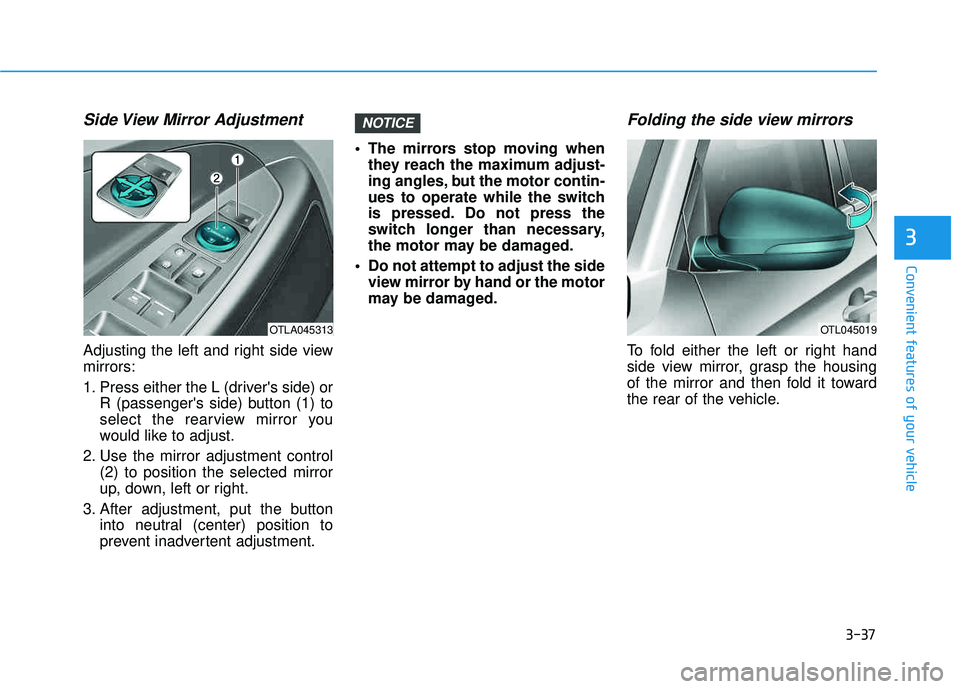
Side View Mirror Adjustment
Adjusting the left and right side view mirrors:
1. Press either the L (driver's side) orR (passenger's side) button (1) to
select the rearview mirror you
would like to adjust.
2. Use the mirror adjustment control (2) to position the selected mirror
up, down, left or right.
3. After adjustment, put the button into neutral (center) position to
prevent inadvertent adjustment. The mirrors stop moving when
they reach the maximum adjust-
ing angles, but the motor contin-
ues to operate while the switch
is pressed. Do not press the
switch longer than necessary,
the motor may be damaged.
Do not attempt to adjust the side view mirror by hand or the motor
may be damaged.
Folding the side view mirrors
To fold either the left or right hand
side view mirror, grasp the housing
of the mirror and then fold it toward
the rear of the vehicle.
NOTICE
OTLA045313OTL045019
Page 149 of 642
3-51
Convenient features of your vehicle
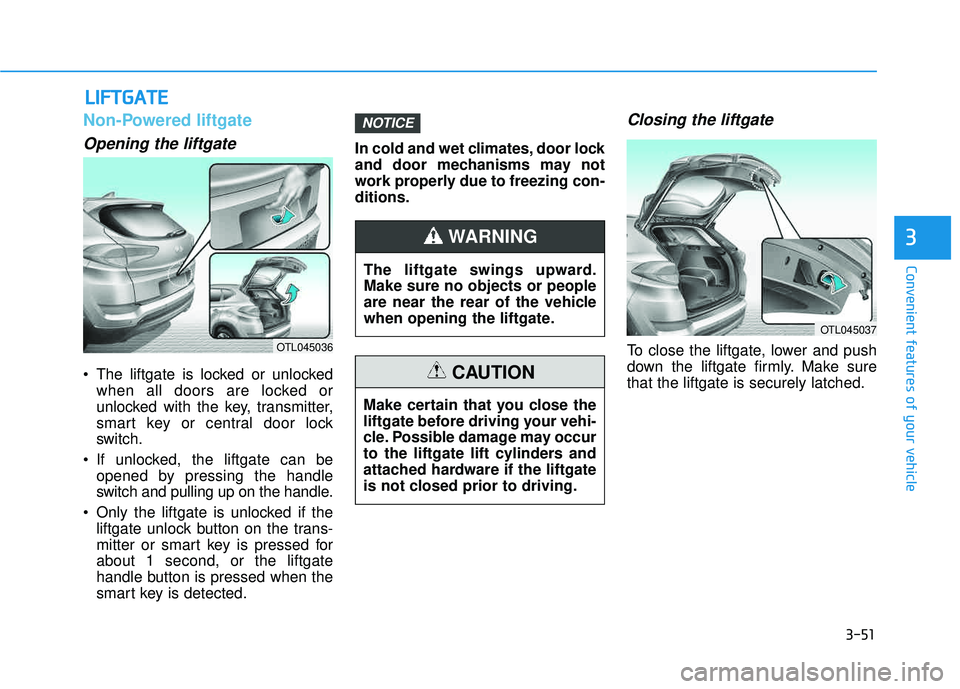
Non-Powered liftgate
Opening the liftgate
The liftgate is locked or unlockedwhen all doors are locked or
unlocked with the key, transmitter,
smart key or central door lock
switch.
If unlocked, the liftgate can be opened by pressing the handle
switch and pulling up on the handle.
Only the liftgate is unlocked if the liftgate unlock button on the trans-
mitter or smart key is pressed forabout 1 second, or the liftgate
handle button is pressed when the
smart key is detected. In cold and wet climates, door lock
and door mechanisms may not
work properly due to freezing con-ditions.
Closing the liftgate
To close the liftgate, lower and push
down the liftgate firmly. Make surethat the liftgate is securely latched.
NOTICE
LL
IIFF TT GG AATTEE
3
OTL045036
The liftgate swings upward. Make sure no objects or people
are near the rear of the vehicle
when opening the liftgate.
WARNING
Make certain that you close the
liftgate before driving your vehi-
cle. Possible damage may occur
to the liftgate lift cylinders and
attached hardware if the liftgate
is not closed prior to driving.
CAUTION
OTL045037
Page 150 of 642

3-52
Emergency liftgate safetyrelease
Your vehicle is equipped with the
emergency liftgate safety release
lever located on the bottom of the lift-
gate. To unlock and open the liftgate
manually from inside the luggage
compartment, perform the followingsteps:
1. Remove the cover.
2. Push the release lever to the right.
3. Push up the liftgate.
Power liftgate (if equipped)
Power liftgate button
When the ignition switch is in the ON
position and the shift lever is in Park
(P), the power liftgate can be opened
by using the console button on thedash.
Before using the power liftgate, make
sure the power liftgate option isselected in the User Setting Modes
in the cluster LCD display.
For more details, refer to "LCD
Display" in this chapter.
Convenient features of your vehicle
OTL045038
For emergencies, be fully
aware of the location of the
emergency liftgate safety
release lever in this vehicle
and how to open the liftgate if
you are accidentally locked in
the luggage compartment.
No one should be allowed to
occupy the luggage compart-
ment of the vehicle at any time.
The luggage compartment is a
very dangerous location in the
event of a crash.
Use the release lever for
emergencies only. Use
extreme caution, especially
while the vehicle is in motion.
WARNING
OTL045039
Page 152 of 642
3-54
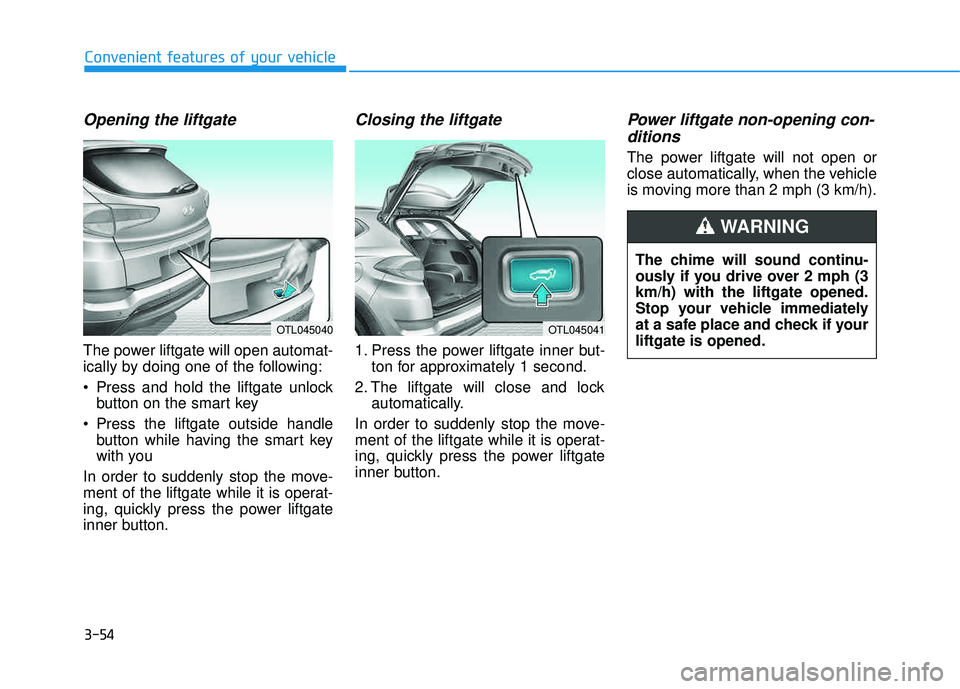
Opening the liftgate
The power liftgate will open automat-
ically by doing one of the following:
Press and hold the liftgate unlockbutton on the smart key
Press the liftgate outside handle button while having the smart key
with you
In order to suddenly stop the move-
ment of the liftgate while it is operat-
ing, quickly press the power liftgate
inner button.
Closing the liftgate
1. Press the power liftgate inner but- ton for approximately 1 second.
2. The liftgate will close and lock automatically.
In order to suddenly stop the move-
ment of the liftgate while it is operat-
ing, quickly press the power liftgate
inner button.
Power liftgate non-opening con- ditions
The power liftgate will not open or
close automatically, when the vehicle
is moving more than 2 mph (3 km/h).
Convenient features of your vehicle
OTL045040OTL045041
The chime will sound continu-
ously if you drive over 2 mph (3km/h) with the liftgate opened.
Stop your vehicle immediately
at a safe place and check if yourliftgate is opened.
WARNING