Page 139 of 642
3-41
Convenient features of your vehicle
3
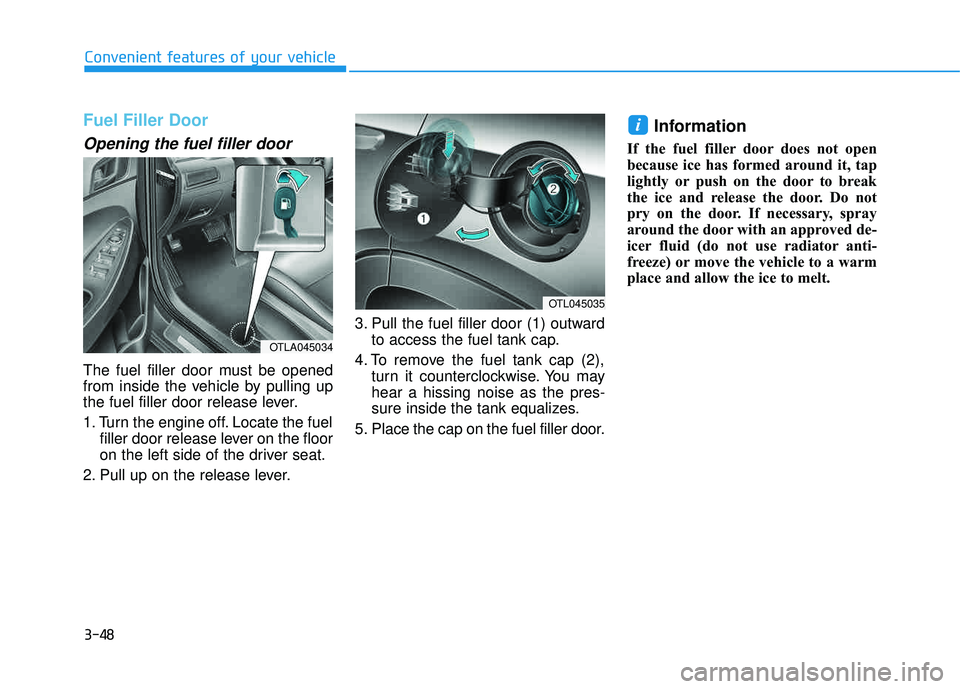
Power window lock switch
The driver can disable the power
window switches on the rear passen-
ger doors by pressing the power win-
dow lock switch.
When the power window lock switch is pressed:
The rear passenger control will notbe able to operate the rear pas-
senger power window
Note that the front passenger con- trol is still able to operate the front
passenger window, and that the
driver master control can still oper-
ate all the power windows. To prevent possible damage to
the power window system, do
not open or close two windows
or more at the same time. This
will also ensure the longevity of
the fuse.
Never try to operate the main switch on the driver’s door and
the individual door window
switch in opposite directions at
the same time. If this is done, the
window will stop and cannot be
opened or closed.
NOTICE
OTLA045025
Do not allow children to play
with the power windows. Keep
the driver’s door power window
lock switch in the LOCK posi-
tion. Serious injury or death can
result from unintentional win-
dow operation by a child.
WARNING
Page 146 of 642
3-48
Convenient features of your vehicle
Fuel Filler Door
Opening the fuel filler door
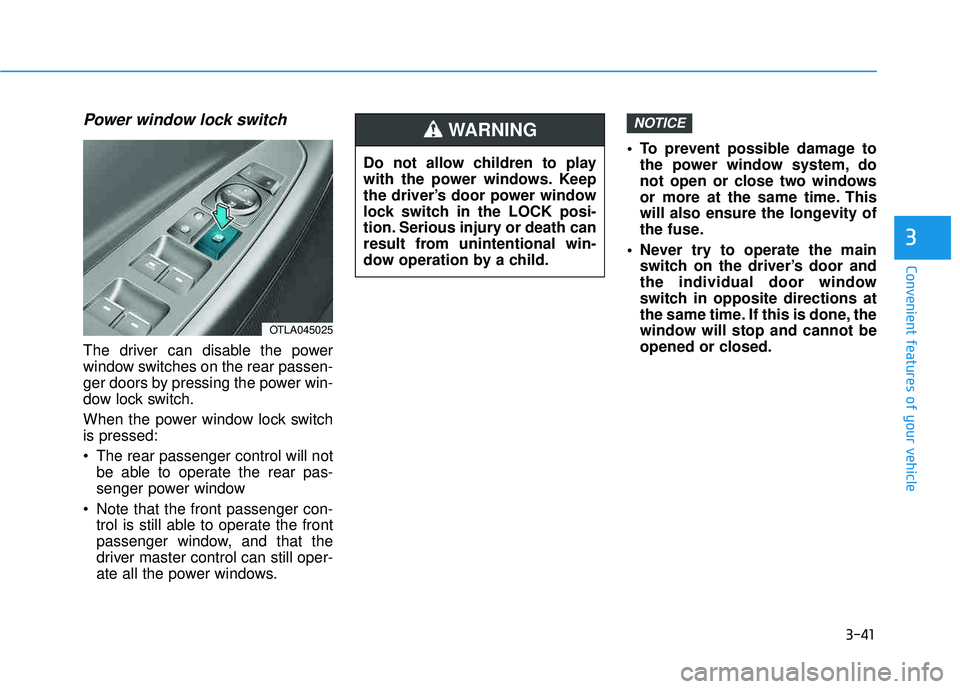
The fuel filler door must be opened
from inside the vehicle by pulling up
the fuel filler door release lever.
1. Turn the engine off. Locate the fuelfiller door release lever on the floor
on the left side of the driver seat.
2. Pull up on the release lever. 3. Pull the fuel filler door (1) outward
to access the fuel tank cap.
4. To remove the fuel tank cap (2), turn it counterclockwise. You mayhear a hissing noise as the pres-
sure inside the tank equalizes.
5. Place the cap on the fuel filler door.
Information
If the fuel filler door does not open
because ice has formed around it, tap
lightly or push on the door to break
the ice and release the door. Do not
pry on the door. If necessary, spray
around the door with an approved de-
icer fluid (do not use radiator anti-
freeze) or move the vehicle to a warm
place and allow the ice to melt.
i
OTL045035
OTLA045034
Page 147 of 642
3-49
Convenient features of your vehicle
3
Closing the fuel filler door
1. To install the fuel tank cap, turn itclockwise until it "clicks" one time.
2. Close the fuel filler door until it is latched securely. (Continued)Do not get back into a vehicle
once you have begun refuel-
ing. You can generate a build-
up of static electricity by
touching, rubbing or sliding
against any item or fabric
capable of producing static
electricity. Static electricity
discharge can ignite fuel
vapors causing a fire. If you
must re-enter the vehicle, you
should once again eliminate
potentially dangerous static
electricity discharge by touch-
ing a metal part of the vehicle,
away from the fuel filler neck,nozzle or other gasoline
source, with your bare hand.
When using an approved
portable fuel container, besure to place the container on
the ground prior to refueling.
Static electricity discharge
from the container can ignite
fuel vapors causing a fire.
(Continued)
Gasoline is highly flammable
and explosive. Failure to follow
these guidelines may result in
SERIOUS INJURY or DEATH:
Read and follow all warnings posted at the gas station.
Before refueling, note the
location of the Emergency
Gasoline Shut-Off, if available,at the gas station.
Before touching the fuel noz-
zle, you should eliminate the
potential build-up of static
electricity by touching a metal
part of the vehicle, a safe dis-
tance away from the fuel filler
neck, nozzle, or other gas
source, with your bare hand.
Do not use cellular phones
while refueling. Electric cur-
rent and/or electronic interfer-
ence from cellular phones can
potentially ignite fuel vapors
and cause a fire.(Continued)
WARNING
Page 149 of 642
3-51
Convenient features of your vehicle
Non-Powered liftgate
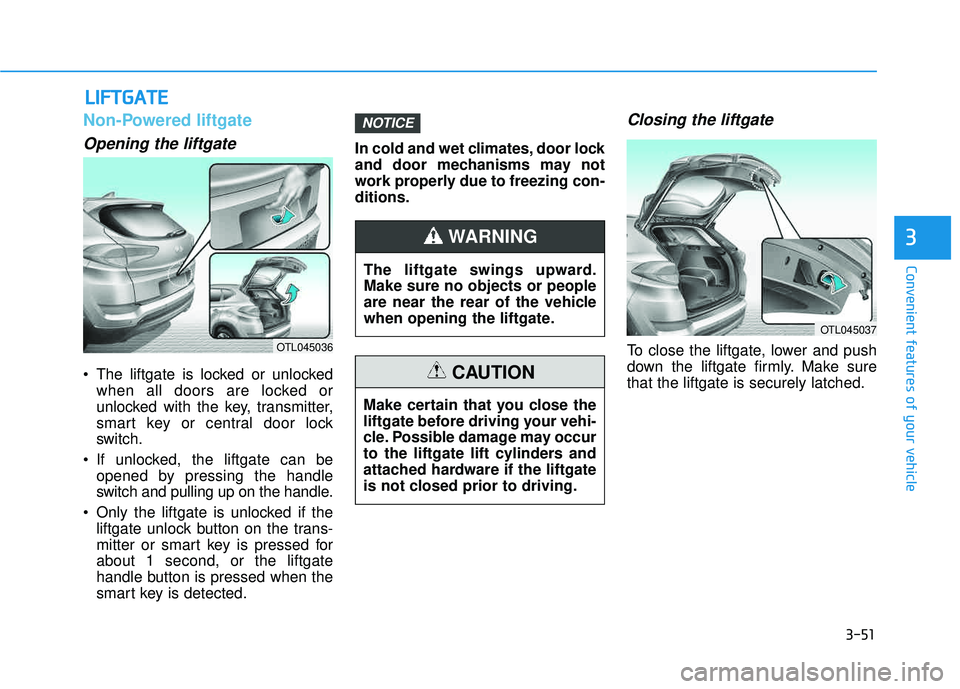
Opening the liftgate
The liftgate is locked or unlockedwhen all doors are locked or
unlocked with the key, transmitter,
smart key or central door lock
switch.
If unlocked, the liftgate can be opened by pressing the handle
switch and pulling up on the handle.
Only the liftgate is unlocked if the liftgate unlock button on the trans-
mitter or smart key is pressed forabout 1 second, or the liftgate
handle button is pressed when the
smart key is detected. In cold and wet climates, door lock
and door mechanisms may not
work properly due to freezing con-ditions.
Closing the liftgate
To close the liftgate, lower and push
down the liftgate firmly. Make surethat the liftgate is securely latched.
NOTICE
LL
IIFF TT GG AATTEE
3
OTL045036
The liftgate swings upward. Make sure no objects or people
are near the rear of the vehicle
when opening the liftgate.
WARNING
Make certain that you close the
liftgate before driving your vehi-
cle. Possible damage may occur
to the liftgate lift cylinders and
attached hardware if the liftgate
is not closed prior to driving.
CAUTION
OTL045037
Page 157 of 642
3-59
Convenient features of your vehicle
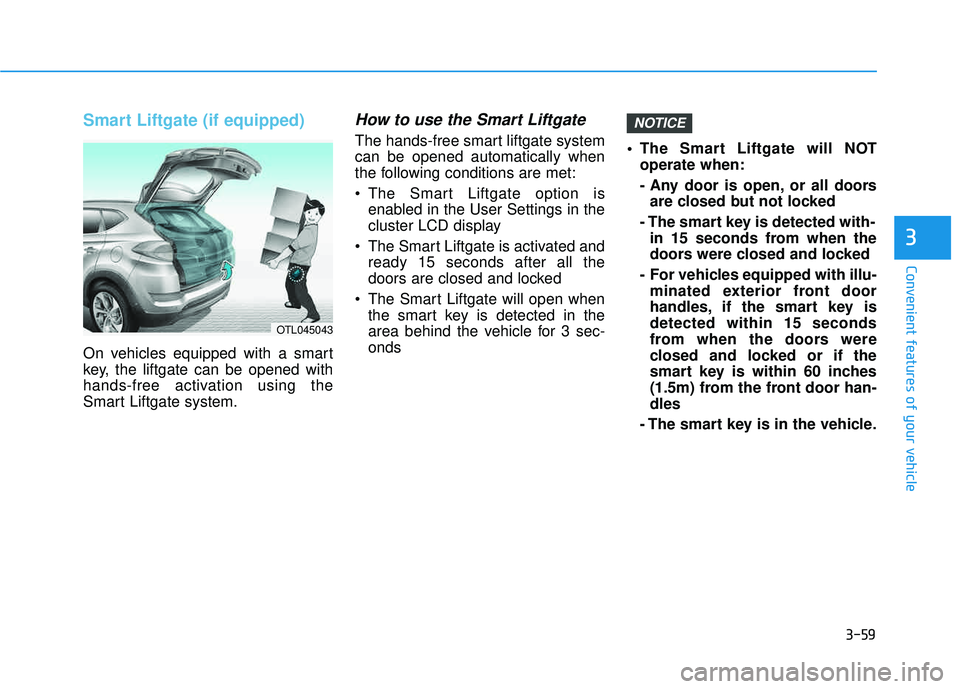
Smart Liftgate (if equipped)
On vehicles equipped with a smart
key, the liftgate can be opened with
hands-free activation using the
Smart Liftgate system.
How to use the Smart Liftgate
The hands-free smart liftgate systemcan be opened automatically when
the following conditions are met:
The Smart Liftgate option isenabled in the User Settings in the
cluster LCD display
The Smart Liftgate is activated and ready 15 seconds after all the
doors are closed and locked
The Smart Liftgate will open when the smart key is detected in the
area behind the vehicle for 3 sec-onds The Smart Liftgate will NOT
operate when:
- Any door is open, or all doorsare closed but not locked
- The smart key is detected with- in 15 seconds from when the
doors were closed and locked
- For vehicles equipped with illu- minated exterior front door
handles, if the smart key isdetected within 15 seconds
from when the doors were
closed and locked or if the
smart key is within 60 inches
(1.5m) from the front door han-dles
- The smart key is in the vehicle.
NOTICE
3
OTL045043
Page 159 of 642
3-61
Convenient features of your vehicle
3. Automatic opening
After the hazard warning lights blink
and the chime sounds 2 times, the
power liftgate will open.
How to deactivate the SmartLiftgate function using thesmart key
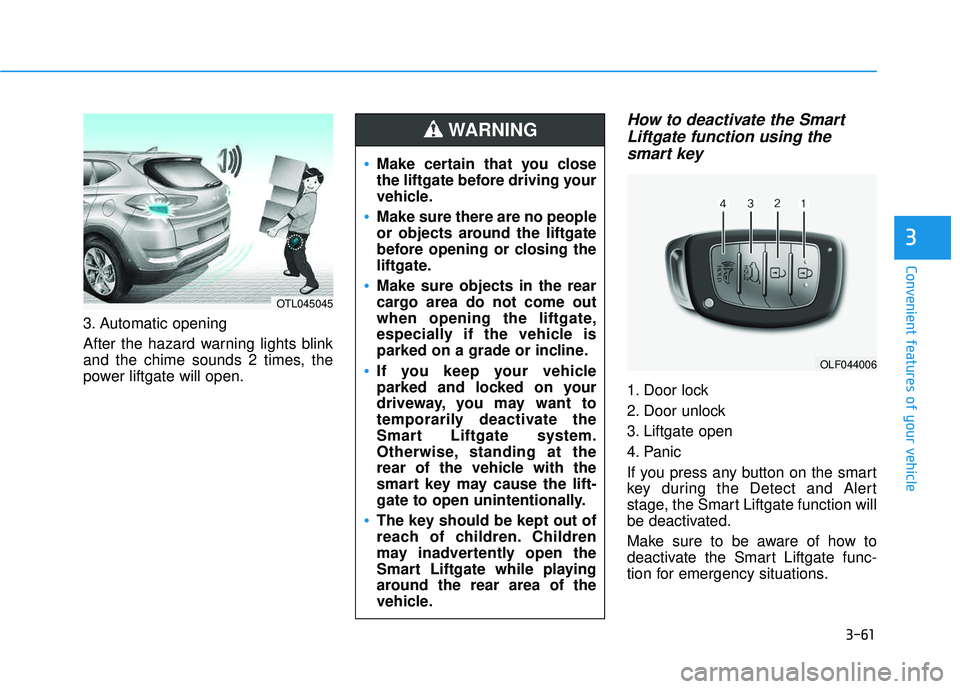
1. Door lock
2. Door unlock
3. Liftgate open
4. Panic
If you press any button on the smart
key during the Detect and Alert
stage, the Smart Liftgate function will
be deactivated.
Make sure to be aware of how to
deactivate the Smart Liftgate func-
tion for emergency situations.
3
OLF044006
Make certain that you close
the liftgate before driving your
vehicle.
Make sure there are no people
or objects around the liftgate
before opening or closing the
liftgate.
Make sure objects in the rear
cargo area do not come out
when opening the liftgate,
especially if the vehicle is
parked on a grade or incline.
If you keep your vehicle
parked and locked on your
driveway, you may want to
temporarily deactivate the
Smart Liftgate system.
Otherwise, standing at the
rear of the vehicle with the
smart key may cause the lift-
gate to open unintentionally.
The key should be kept out of
reach of children. Children
may inadvertently open the
Smart Liftgate while playing
around the rear area of the
vehicle.
WARNING
OTL045045
Page 160 of 642
3-62
If you press the door unlock but-ton (2), the Smart Liftgate func-
tion will be deactivated tem-
porarily. But, if you do not open
any door for 30 seconds, the
Smart Liftgate function will be
activated again.
If you press the liftgate open button (3) for more than 1 sec-
ond, the liftgate opens.
The Smart Liftgate function will still be activated if you press the
door lock button (1) or liftgate
open button (3) on the smart key
as long as the Smart Liftgate is
not already in the Detect and
Alert stage.
In case you have deactivated the Smart Liftgate function by
pressing the smart key button
and opened a door, the Smart
Liftgate function can be activat-
ed again by closing and locking
all doors.
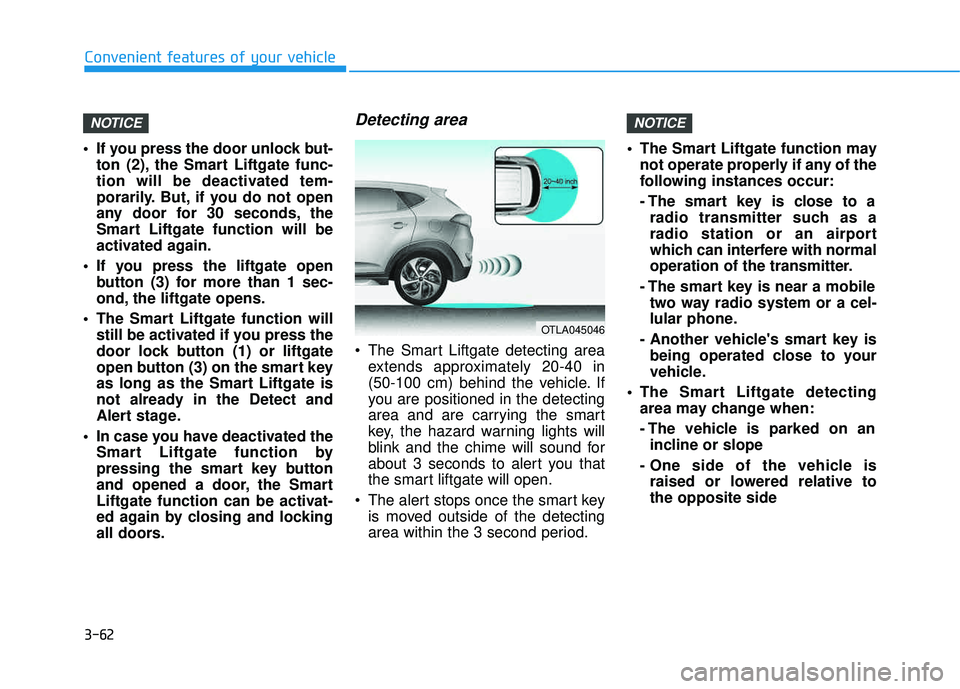
Detecting area
The Smart Liftgate detecting areaextends approximately 20-40 in
(50-100 cm) behind the vehicle. If
you are positioned in the detecting
area and are carrying the smart
key, the hazard warning lights will
blink and the chime will sound for
about 3 seconds to alert you that
the smart liftgate will open.
The alert stops once the smart key is moved outside of the detecting
area within the 3 second period. The Smart Liftgate function may
not operate properly if any of the
following instances occur:
- The smart key is close to aradio transmitter such as a
radio station or an airport
which can interfere with normal
operation of the transmitter.
- The smart key is near a mobile two way radio system or a cel-
lular phone.
- Another vehicle's smart key is being operated close to your
vehicle.
The Smart Liftgate detecting area may change when:
- The vehicle is parked on anincline or slope
- One side of the vehicle is raised or lowered relative to the opposite side
NOTICENOTICE
Convenient features of your vehicle
OTLA045046
Page 174 of 642
3-76
Convenient features of your vehicle
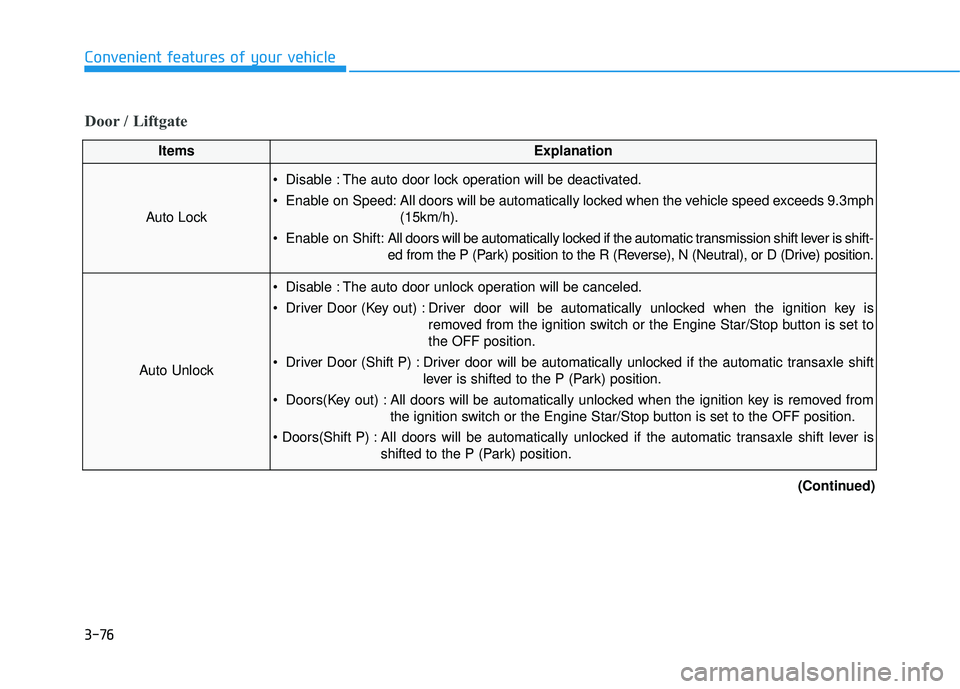
Door / Liftgate
ItemsExplanation
Auto Lock
Disable : The auto door lock operation will be deactivated.
Enable on Speed: All doors will be automatically locked when the vehicle speed exceeds 9.3mph(15km/h).
Enable on Shift: All doors will be automatically locked if the automatic transmission shift lever is shift-
ed from the P (Park) position to the R (Reverse), N (Neutral), or D (Drive) position.
Auto Unlock
Disable : The auto door unlock operation will be canceled.
Driver Door (Key out) : Driver door will be automatically unlocked when the ignition key is
removed from the ignition switch or the Engine Star/Stop button is set to the OFF position.
Driver Door (Shift P) : Driver door will be automatically unlocked if the automatic transaxle shift lever is shifted to the P (Park) position.
Doors(Key out) : All doors will be automatically unlocked when the ignition key is removed from the ignition switch or the Engine Star/Stop button is set to the OFF position.
All doors will be automatically unlocked if the automatic transaxle shift lever is shifted to the P (Park) position.
(Continued)