Page 288 of 308
76
Emergency
Search emergency facilities.
Press the
NAVI head unit key. ▶
Select the
Destination tab. ▶
Select
the
Emergency
Check the current location informa-
tion and select the desired item in
the sub-menu(ex. Police Station).
Select the desired destination
among the searched items.
Address Book
Search the destination with the
address book.
Press the
NAVI head unit key. ▶
Select the
Destination tab. ▶
Select
the
Address book
Select the desired group.
Save in the Favorite Places, then
route can be set easily by using
3 buttons such as
Go Home and
Office on the button of the menu.
Navigation
)@-'��.:@(���<64"@/>�23(�JOEE����� .:@(���<64"@/>�23(�JOEE����� ������������� ß
y��������� ������������
Page 290 of 308
78
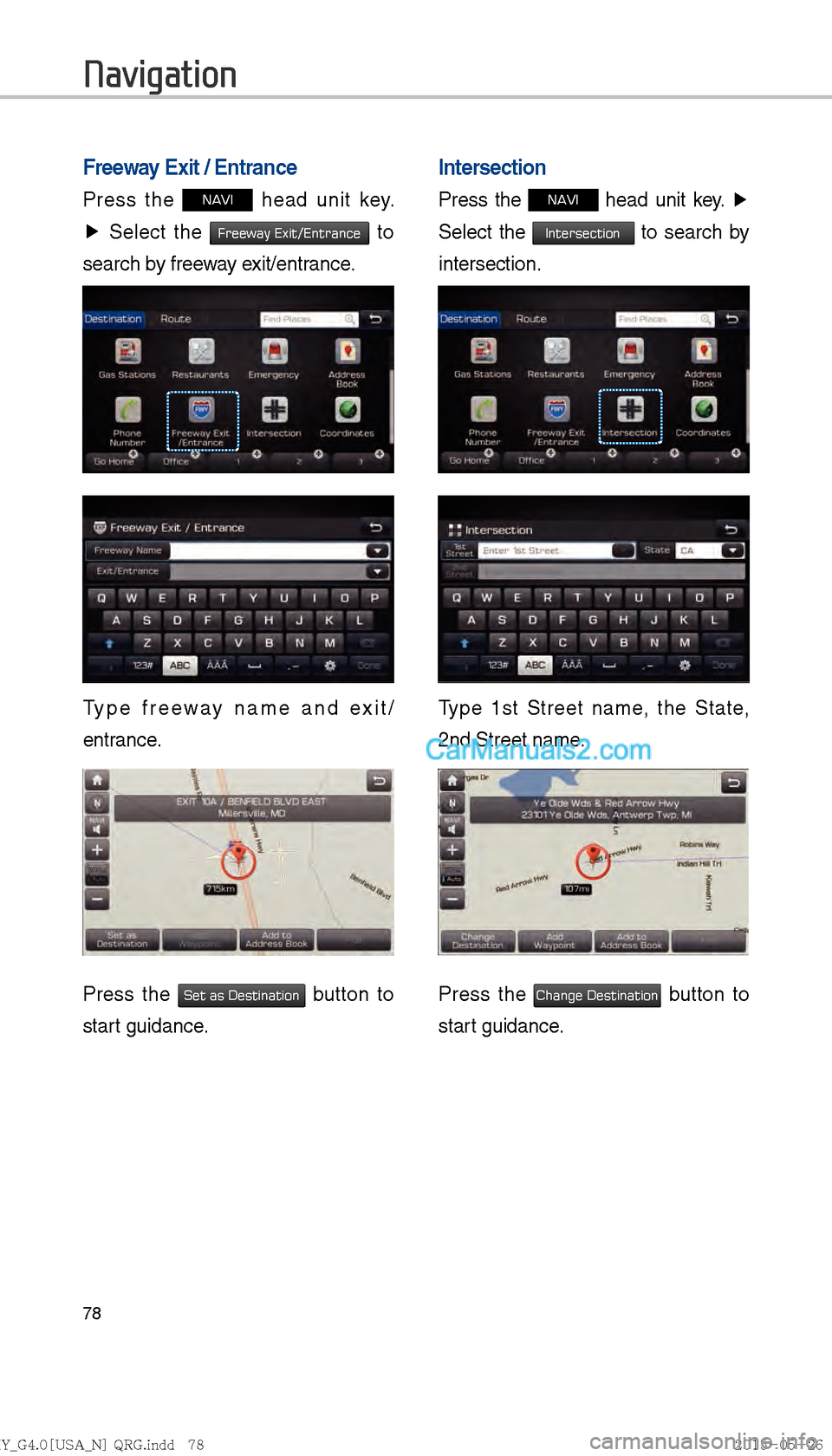
Freeway Exit / Entrance
Press the NAVI head unit key.
▶ Select the
Freeway Exit/Entrance to
search by freeway exit/entrance.
Type freeway name and exit/
entrance.
Press the Set as Destination button to
start guidance.
Intersection
Press the NAVI head unit key. ▶
Select the
Intersection to search by
intersection.
Type 1st Street name, the State,
2nd Street name.
Press the Change Destination button to
start guidance.
Navigation
)@-'��.:@(���<64"@/>�23(�JOEE����� .:@(���<64"@/>�23(�JOEE����� ������������� ß
y��������� ������������
Page 292 of 308
80
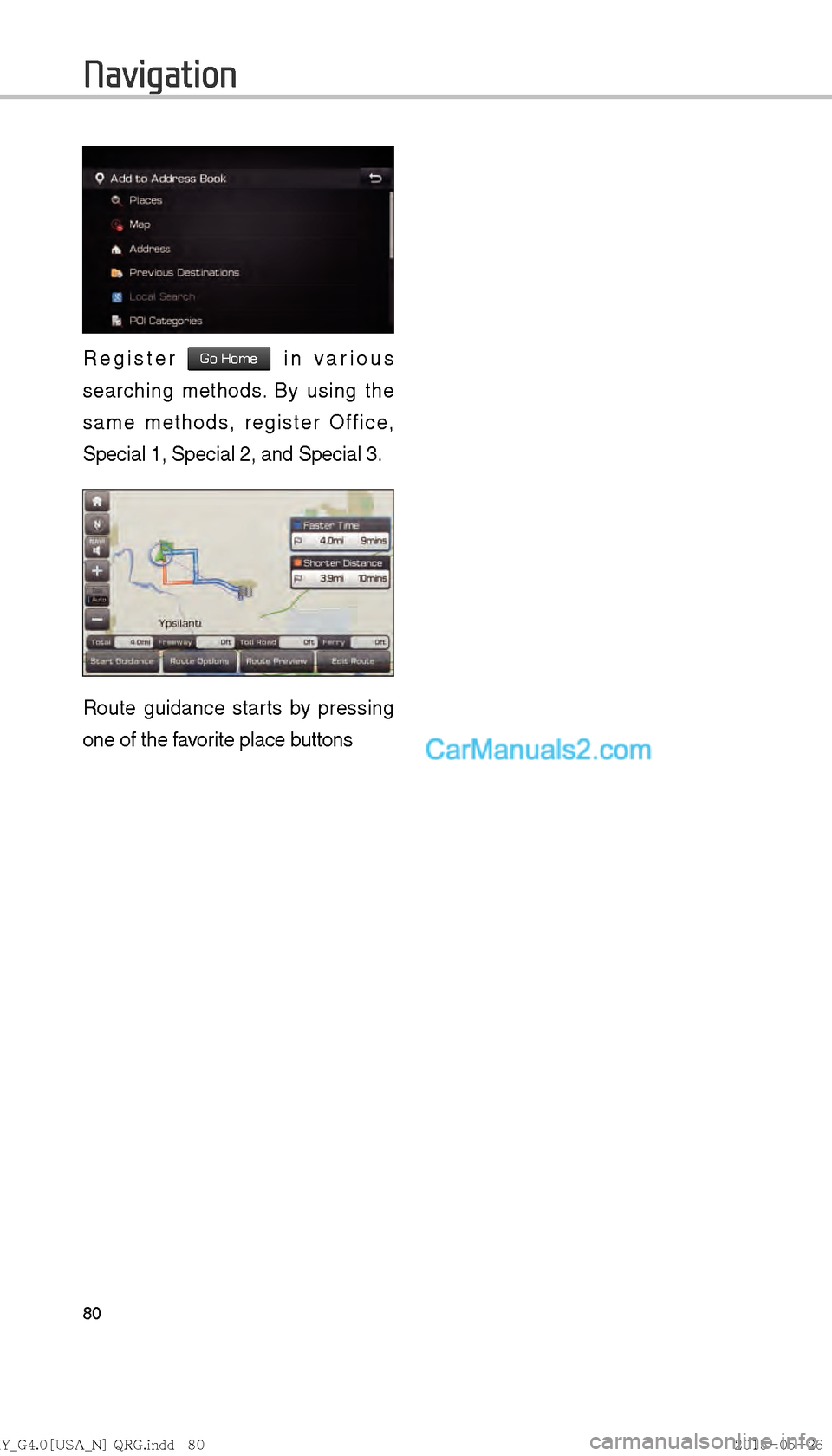
Register Go Home in various
searching methods. By using the
same methods, register Office,
Special 1, Special 2, and Special 3.
Route guidance starts by pressing
one of the favorite place buttons
Navigation
)@-'��.:@(���<64"@/>�23(�JOEE����� .:@(���<64"@/>�23(�JOEE����� ������������� ß
y��������� ������������
Page 293 of 308

81
Route Setting
After searching the destination, pos-
sible to set a route.
While the destination is set, the
buttons
Change Destination and
Add Waypoint appear. Press each
button to change a destination or
add a waypoint.
Destination Setting(Change)
After searching the destination,
press the
Set as Destination button to
set the location as a destination and
search a route.
All Routes
When the alternative routes option
is enabled in navigation setting, two
routing options are displayed based
on faster time and shorter distance.
!Ÿ
Faster Time : Select time-optimized
route, being the fastest roads.
!Ÿ
Shorter Distance : Select short dis-
tance, irrespective of how fast or slow
progress will be calculated.
Name Description
Display total distance, travel
time. Select the desired
route.
Start the guidance with the
route.
Change the route option.
Preview turn-by-turn list.
Edit the route.
Display total distance of the
route
Display length of freeway on
the route
Display length of toll road on
the route
Display length of Ferry route
on the route
)@-'��.:@(���<64"@/>�23(�JOEE����� .:@(���<64"@/>�23(�JOEE����� ������������� ß
y��������� ������������
Page 294 of 308
82
The route will be calculated using
the option “Faster Time” by default.
Alternative routes can be suggested
if necessary,
SETUP head unit
key. ▶
Navigation
Icon ▶
Route ▶
Alternative : ON
Route Guidance
Get the detailed information on route
guidance.
Route Guidance Screen
Remaining time : Display the time
remaining by destination.
Arrival Time : Display the estimated
time of arrival.
Navigation
)@-'��.:@(���<64"@/>�23(�JOEE����� .:@(���<64"@/>�23(�JOEE����� ������������� ß
y��������� ������������
Page 296 of 308
84
Display Route Information
Press the NAVI head unit key.
▶ Press the
Route tab. ▶
Select
Route Info .
Press the Route Info icon.
Check the information on the map.
Select the desired item to see the
map information.
Avoiding road
Click the Avoid Street button to avoid
the street or road.
Check the desired item and press
the
Done button to finish.
Route Overview
Check the information on route
including the distance, estimated
time, toll fees, etc.
Press the
NAVI head unit key. ▶
Press the
Route tab. ▶
Select
Route Overview .
Press the Route Overview icon.
Name Description
Change the search option.
Preview turn-by-turn list.
Provide information on sur-
rounding facilities.
Navigation
)@-'��.:@(���<64"@/>�23(�JOEE�����
.:@(���<64"@/>�23(�JOEE����� ������������� ß
y��������� ������������
Page 298 of 308
86
Add a waypoint through various
searching methods.
Route Options
Press the NAVI head unit key. ▶
Press the
Route tab. ▶
Select
Route Options .
Press the Route Options icon.
Choose between faster time or
shorter distance.
Route options such as ferry route,
traffic information, HOV, and avoid-
ing highway can be set by pressing
Detailed Route Setting button.
Avoid Stre et
Search new route by avoiding the
selected street(s).
Press the
NAVI head unit key. ▶
Press the
Route tab. ▶
Select
Avoid Street .
Press the Avoid Street icon.
Press the Done button to plan new
route after selecting the street(s) that
you want to avoid.
Navigation
)@-'��.:@(���<64"@/>�23(�JOEE����� .:@(���<64"@/>�23(�JOEE����� ������������� ß
y��������� ������������
Page 299 of 308
87
Navigation Settings
General
Change general settings.
Press the GPS Information to display
the detail GPS satellites information
Name Description
Change the unit of mile, km .
Press the
On, Off but-
ton to change the previous
destination view setting
when starting the naviga-
tion.
Check the GPS informa-
tion.
Press the Default Settings
button to initialize.
Name Description
Active when current posi-
tion is being calculated
Display current speed of
the vehicle
Display current position of
the vehicle
Display current elevation
of the vehicle
Display time
Display date
)@-'��.:@(���<64"@/>�23(�JOEE����� .:@(���<64"@/>�23(�JOEE����� ������������� ß
y��������� ������������