Page 234 of 308

22
USB Music
USB Music
FeaturesDescription
Mode
Displays current operating mode
File IndexShows the current file/total files within the USB
Repeat/
Shuffle/Scan From Repeat/Shuffle/Scan, displays the current operating function
Play Time
Displays the current play time/total play time
Song InfoDisplays the information of the current track
!Ÿ
When a track in the file tab on the list screen is selected :
Displays folder, file, title, artist, album info
!Ÿ
When a track in the other tabs on the list screen is selected :
Displays artist, title, album info
List Moves to the list screen
Previous
File If button is pressed (less than 0.8 seconds) : Moves to the previous file
or pla
y the current file from the beginning (Depends on the pla
y time)
!Ÿ
If pla
y time is less than 3 seconds, moves to previous file
!Ÿ
If play time is over than 3 seconds, play the current file from the
beginning
If button is pressed (over than 0.8 seconds) it rewinds the track
Play/Pause Plays/pauses the current file
Next File
!Ÿ
If button is pressed (less than 0.8 seconds) : Moves to the next file
!Ÿ
If button is pressed (over than 0.8 seconds) : It fast-forwards the track
Repeat Repeats the current file
!Ÿ
If select the song in the file tab on the list screen : Press the Repeat button to switch between repeating one song ,
repeating folder , and turning repeat off
!Ÿ
If select the song in the other tabs (Playlist, Artist, Song, Album,
Genre) on the list screen : Press the
Repeat button to switch
between repeating one song and turning repeat off
Back Button Converts to basic mode screen
Menu
!Ÿ
Add to Playlist : Add the current track to the Playlist Playlist is
placed on the left tab in the list
!Ÿ
Save to My Music : You can save the current track to My Music.
You can play saved track from My Music without USB. Access
to My Music in the Media mode.
)@-'��.:@(���<64"@/>�23(�JOEE����� .:@(���<64"@/>�23(�JOEE����� ������������� ß
y��������� ������������
Page 236 of 308
24
USB Image
USB Image
FeaturesDescription
Mode
Displays current operating mode
Folder/File
Name Displays folder name where image is located
File Index
Shows the current file/total files within the USB
Slideshow Images as slideshow in 5, 10, 20, 30 second intervals
Rotate Rotate image in clockwise direction
InfoShows the file name, resolution and file type of current image
Adjust Image
Size Enlarge/reduce (zoom-in/zoom-out) image size
List
Moves to the list screen
Previous/
Next image Swipe image left or right to see Previous/ Next image
)@-'��.:@(���<64"@/>�23(�JOEE�����
.:@(���<64"@/>�23(�JOEE����� ������������� ß
y���������
������������
Page 237 of 308
25
iPod
iPod
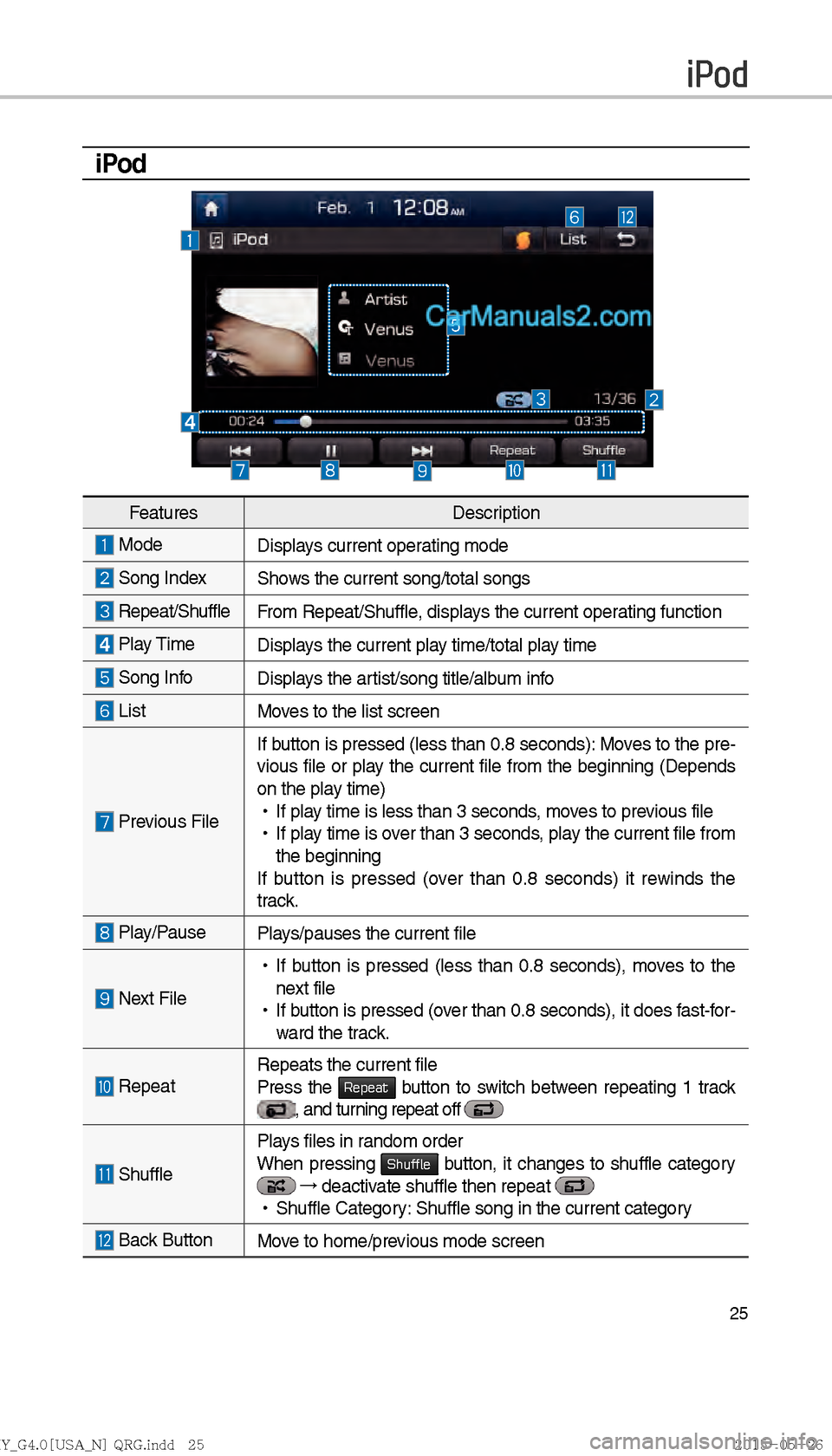
FeaturesDescription
Mode
Displays current operating mode
Song IndexShows the current song/total songs
Repeat/ShuffleFrom Repeat/Shuffle, displays the current operating function
Play Time Displays the current play time/total play time
Song InfoDisplays the artist/song title/album info
ListMoves to the list screen
Previous FileIf button is pressed (less than 0.8 seconds): Moves to the pre-
vious file or play the current file from the beginning (Depends
on the pla y time)
!Ÿ
If pla
y time is less than 3 seconds, moves to previous file
!Ÿ
If play time is over than 3 seconds, play the current file from
the beginning
If button is pressed (over than 0.8 seconds) it rewinds the
tr ac
k.
Play/Pause
Plays/pauses the current file
Next File
!Ÿ
If button is pressed (less than 0.8 seconds), moves to the
next file
!Ÿ
If button is pressed (over than 0.8 seconds), it does fast-for-
ward the trac
k.
Repeat Repeats the current file
Press the Repeat button to switch between repeating 1 track , and turning repeat off
ShufflePlays files in random order
When pressing Shuffle button, it changes to shuffle category
→
deactivate shuffle then repeat
!Ÿ
Shuffle Category: Shuffle song in the current category
Back Button Move to home/previous mode screen
)@-'��.:@(���<64"@/>�23(�JOEE�����.:@(���<64"@/>�23(�JOEE����� ������������� ß
y��������� ������������
Page 240 of 308
28
Bluetooth Audio Mode
i Information
Artist info and Title may not be supported by mobile phone
Bluetooth Audio
Features Description
Mode
Displays current operating mode
Phone Name Displays name of connected phone
Artist InfoName of current artist
TitleName of current song
Previous
File
!Ÿ
If play time is less than 3 seconds, moves to the previous file
!Ÿ
If play time is over than 3 seconds, plays the current file from
the beginning
This function may differ depending on the model of mobile-
phone
Play/Pause Plays/Pauses Bluetooth Audio
Next FileMoves to the next file
ConnectionsMoves to the Bluetooth Settings screen. You can pair a new
device or change/delete paired device(s)
SoundHound
Runs the SoundHound feature.
For more detailed feature, please refer to SoundHound section in Info part.
SEEK/TRACK
Plays the previous/next file
TUNE �TUNE is not supported.
)@-'��.:@(���<64"@/>�23(�JOEE����� .:@(���<64"@/>�23(�JOEE����� ������������� ß
y��������� ������������
Page 241 of 308

29
My Music
FeaturesDescription
Mode
Displays current operating mode
File IndexShows the current file/total files
Repeat/
Shuffle/Scan From Repeat/Shuffle/Scan, displays the current operating function
Play Time
Displays the current play time/total play time
Song InfoDisplays the information about the current track
!Ÿ
When a track in the file tab on the list screen is selected :
Displays file, artist, title, album info
!Ÿ
When a track in the other tab on the list screen is selected :
Displays artist, title, album info
List Moves to the list screen
Previous FileIf button is pressed
(less than 0.8 seconds): Moves to the previ-
ous file or play the current file from the beginning (Depends on
the pla
y time)
!Ÿ
If play time is less than 3 seconds, moves to previous file
!Ÿ
If play time is over than 3 seconds, play the current file from the
beginning
If button is pressed (over than 0.8 seconds) it rewinds the track
Play/Pause Plays/pauses the current file
Next File
!Ÿ
If button is pressed (less than 0.8 seconds): Moves to the next file
!Ÿ
If button is pressed (over than 0.8 seconds) it will fast-forward
the file
Repeat Repeats the current file
!Ÿ
If select the song in the file tab on the list screen : Press the Repeat button to switch between repeating one song and
turning repeat off.
!Ÿ
If select the song in the other tabs (Playlist, Artist, Song, Album,
Genre) on the list screen : Press the
Repeat button to switch
between repeating one song and turning repeat off
SoundHound Runs the SoundHound feature.
For more detailed feature, please refer to SoundHound section in
Info part.
)@-'��.:@(���<64"@/>�23(�JOEE�����
.:@(���<64"@/>�23(�JOEE����� ������������� ß
y��������� ������������
Page 250 of 308
38
Skipping Prompt
Messages
When you hear the prompt mes-
sage, the voice recognition icon on
the steering wheel remote control
to skip the message and go directly
to listening mode to say your com-
mand.
This results in faster operation when
y
ou feel the message is too long or
you already know the command to
use.
Quick Run of
Voice Recognition
(Manual Mode)
Usually, you are supposed to say
a command to execute the desired
operation after the voice guidance.
However, it takes a little time to wait
for the voice guidance. If you would
like to activate the desired operation
more quickly, you can just touch the
commands displayed on the screen.
This feature is useful when you feel
the voice guidance is too long or
voice commands do not work as you
desired.
Voice Recognition
)@-'��.:@(���<64"@/>�23(�JOEE����� .:@(���<64"@/>�23(�JOEE����� ������������� ß
y��������� ������������
Page 256 of 308
44
Radio Commands
CommandOperation
"J Radio Plays the most recent radio channels from FM, AM, and
SiriusXM™.
"J FM Plays FM radio.
"J FM
<87.5~107.9> Tunes to FM according to what you say.
e.g.) FM 87.5: FM eighty seven point five
"J SiriusXM Plays SiriusXM radio.
"J SiriusXM
Channel
<0~999> Tunes to SiriusXM™ Channel accord-
ing to what you say.
e.g.) SiriusXM Channel 23: SiriusXM Channel twenty three
"J AM Plays AM radio.
"J AM
<530~1710> Tunes to AM according to what you say.
e.g.) AM 530: AM five thirty
!¹ Preset <1~18> Tunes to your preset stations (1 to 18).
!¹ Channel
<0~999> In SiriusXM™ Radio mode, turns on the
Number> that you say.
Voice Recognition
)@-'��.:@(���<64"@/>�23(�JOEE�����
.:@(���<64"@/>�23(�JOEE����� ������������� ß
y��������� ������������
Page 260 of 308

48
Siri Eyes Free
How to start Siri
If you want to use Siri, you have
to connect your iOS device to
Multimedia system through
Bluetooth.
(Please check whether your iOS
device supports Siri and turning Siri
On)
Then you can use Siri while pressing
and holding
key on the
steering wheel.
How to use Siri
When you access the Siri screen
while pressing and holding
key on the steering wheel, you can
press
Speak button and then you
can speak what you want. Please
see the Multimedia system only sup-
ports “Phone” related functions.
Other functions will be performed in
your iOS device. If you press voice
key quickly, Siri would re-start. If you
hold down voice key, Siri would be
terminated and the screen would go
back to the previous screen. Eyes-
Free mode would be activated auto-
matically while you are driving. When
shifting gears into P or putting the
Parking break on, Eyes-Free mode
would be deactivated automatically.
i Information
Functions and feedbacks from voice
commands via Siri are ex
ecuted in
iOS device. If iOS version changed,
functions and feedbacks can be
changed according to iOS device.
Voice Recognition
)@-'��.:@(���<64"@/>�23(�JOEE����� .:@(���<64"@/>�23(�JOEE����� ������������� ß
y��������� ������������


