Page 75 of 308

Bluetooth Phone I 3-9
03
Call History
Select PHONE key in the head unit ▶
and then
Call History .
Name Description
All
Lists the all call history.
DialedLists the calls that you
made.
Received Lists the calls that you
have received.
Missed Lists the calls you
missed.
Call HistoryDisplays all of your call
history. Select from the
list to dial the number.
InformationDisplays the details
of your call history
information.
DownloadDownloads the call his-
tory information from
your mobile phone.
CallDials the selected
number in your Call
History Information.
Contacts InfoGoes to the Contact
Information screen if
the number has been
stored.
i Information
In some mobile phones, call records may not
be added to your Call History
.
Calls from restricted ID's are not added to
your Call Histor y Inf
ormation.
Up to 50 calls can be added in each Dialed
Calls/Received Calls/Missed Calls list.
The dur ations of each dialed/receiv
ed call are
not display ed in y
our car's Call History list.
While the call history download is in progress,
the status bar displays an icon (
).
If the call history download is turned off with
the Bluetooth device , the call histor
y download
will fail.
Some devices require a device authentication
for do
wnloading y
our call history. If download
fails, check if the Bluetooth settings or display
status are normal.
Some devices do not support call history
downloading.
Chec
k if your Bluetooth device
supports downloading. For details regarding
Bluetooth-supported devices and their
functional compatibility, visit https://www.
hyundaiusa.com/bluetooth
)@-'��.:@(���<64"@/>�1BSU��JOEE������ )@-'��.:@(���<64"@/>�1BSU��JOEE������ �������������
Page 76 of 308

3-10 I Bluetooth
Contacts
Select PHONE key in the head unit ▶
and
then
Contacts
i Information
Up to 5000 phone numbers can be
downloaded from a single, paired Bluetooth
device.
You cannot edit or delete downloaded phone
numbers from y
our car
.
Contacts can be viewed only when the
Bluetooth device is connected.
Ev en if the Bluetooth de
vice is disconnected,
the downloaded data will remain.
(Note that deleting a paired phone will also
delete all downloaded Contacts and Call
History data)
Downloaded phone numbers may be lost
depending on the condition of the head unit.
K eep y
our important data in a safe place.
Contacts from both the SIM card and your
mobile phone are do wnloaded at the same
time b
y default.
The status bar displays a (
) while
downloading contacts.
The download will not be available if the
contacts download function is tur ned off on
your Bluetooth device.
Name Description
Contacts ListThe list of Contacts.
Select from the list to
dial the number.
Information
Displays contact infor-
mation.
Download Downloads contacts
from your mobile phone.
Search by
Name Searches Contacts
for the name that you
enter.
Search by
Number Searches Contacts for
the number that you
enter.
Add to
Favorites Adds a phone number
to Favorites.
)@-'��.:@(���<64"@/>�1BSU��JOEE������� )@-'��.:@(���<64"@/>�1BSU��JOEE�������
�������������
Page 83 of 308

Getting Started with Blue Link I 4-5
04
Blue Link® Safety and
Security Service
Auto Crash Noti cation
Provides immediate assistance when an
accident occurs and an airbag is deployed.
In this event, an ACN signal, contain-
ing customer and location information,
will automatically be transmitted to the
response center. Upon receipt of the sig-
nal, a response specialist will attempt to
establish voice communications with the
vehicle occupants and forward any perti-
nent information to Blue Link emergency
services.
SOS
Customers request emergency Blue
Link emergence services by pressing
the dedicated
SOS key in the vehicle.
This action transmits vehicle information
and location to specially trained response
specialists, who assist in coordinating the
dispatch of appropriate emergency assis-
tance to the customer.
The response specialist remains on the
line with the customer until advised assis-
tance has arrived.
Stolen Vehicle Recovery
In the event a customer’s vehicle is
reported stolen (and a stolen vehicle
report has been filed with the appropriate
police department), the response center
can provide assistance to the police in an
attempt to recover the vehicle.
Vehicle Slowdown
Used with Stolen Vehicle Recovery, this
enables law enforcement to gradually
reduce the engine power of the vehicle,
thus slowing it down to safe levels. A warn-
ing shall be transmitted to the driver prior
to the slowdown procedure.
Vehicle Immobilization
Used with Stolen Vehicle Recovery, this
enables law enforcement to send a signal
to the vehicle which immobilizes the engine
management system, thus preventing
startup. This capability is only valid when
the ignition is off, but can be saved for later
immobilization if the vehicle is on or in
motion at the time of signal transmission.
)@-'��.:@(���<64"@/>�1BSU��JOEE������ )@-'��.:@(���<64"@/>�1BSU��JOEE������ �������������
Page 88 of 308
5-2 I Navigation
Navigation
Basic Features
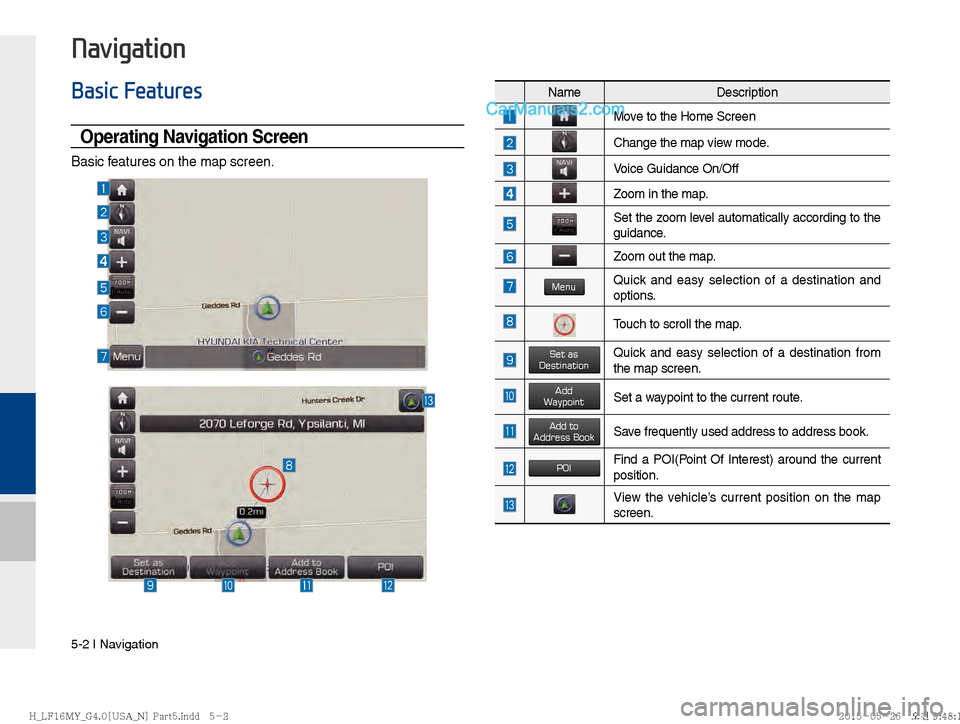
Operating Navigation Screen
Basic features on the map screen.
NameDescription
Move to the Home Screen
Change the map view mode.
Voice Guidance On/Off
Zoom in the map.
Set the zoom level automatically according to the
guidance.
Zoom out the map.
MenuQuick and easy selection of a destination and
options.
Touch to scroll the map.
Set as DestinationQuick and easy selection of a destination from
the map screen.
Add WaypointSet a waypoint to the current route.
Add toAddress BookSave frequently used address to address book.
POIFind a POI(Point Of Interest) around the current
position.
View the vehicle’s current position on the map
screen.
)@-'��.:@(���<64"@/>�1BSU��JOEE������ )@-'��.:@(���<64"@/>�1BSU��JOEE������ �������������
Page 89 of 308
Basic Features I 5-3
05
Changing Map View
Touch the compass arrow icon to toggle
between a map oriented to the North, or
oriented parallel to the vehicle’s heading.
Voice Guidance Volume On/Off
Press the NAVI sound button to turn the
volume on and off.
Zoom In /Zoom Out
Zoom the map view screen in and out.
Zoom In and Zoom Out
Press
+ or - to set the zoom level
)@-'��.:@(���<64"@/>�1BSU��JOEE������ )@-'��.:@(���<64"@/>�1BSU��JOEE������ �������������
Page 92 of 308
5-6 I Navigation
Nearby POIs
Display nearby POIs on the map.
View Nearby POIs
Select the Menu on the bottom of the left
screen ▶
Select the
POI button.
Press ON, OFF button to set whether to
show nearby POIs or not.
When categories are selected, they will
appear on the map. (ex. Gas Station) The lists of nearby gas station are dis-
played.
Display in order of distance and name.
Name
Description
Set the volume to mute.
Turn the volume down
Turn the volume up
Slide to set the volume
)@-'��.:@(���<64"@/>�1BSU��JOEE������ )@-'��.:@(���<64"@/>�1BSU��JOEE������ �������������
Page 99 of 308
Basic Features I 5-13
05
Press Details for further information.
Add to Address Book
Press the button on the left bottom of the
screen. ▶
Select the
Add to Address Book
To store the location on the current map to
the address book.
Name Description
Change the name.
Press the On, Off button to
display on the map.
Enter the phone number.
Possible to register Symbol
Change the stored Folder
Designate to the Favorite item.
When the favorite is designated,
press the button on the bottom
of the Destination menu and
request the route guide immedi-
ately.
Press the On, Off button to
set the sound notification.
Save the setting.
)@-'��.:@(���<64"@/>�1BSU��JOEE������� )@-'��.:@(���<64"@/>�1BSU��JOEE������� �������������
Page 107 of 308
Search I 5-21
05
Select the desired group.
Save in the Favorite Places, then route
can be set easily by using 3 buttons such
as
Go Home and Office on the button
of the menu.
Name Description
Select the desired destination
from the searched items.
Edit the item.
Register a new Address.
Delete the desired item.
Phone Number
Press the NAVI head unit key. ▶
Select
the
Phone Number to search POI by phone
number.
Search destination by phone number.
Type phone number to search. To search
for a list of numbers, press
Done when
results are narrowed and the
Done but-
ton is activated.
)@-'��.:@(���<64"@/>�1BSU��JOEE������� )@-'��.:@(���<64"@/>�1BSU��JOEE������� �������������