Page 274 of 550
4 189
Features of your vehicle
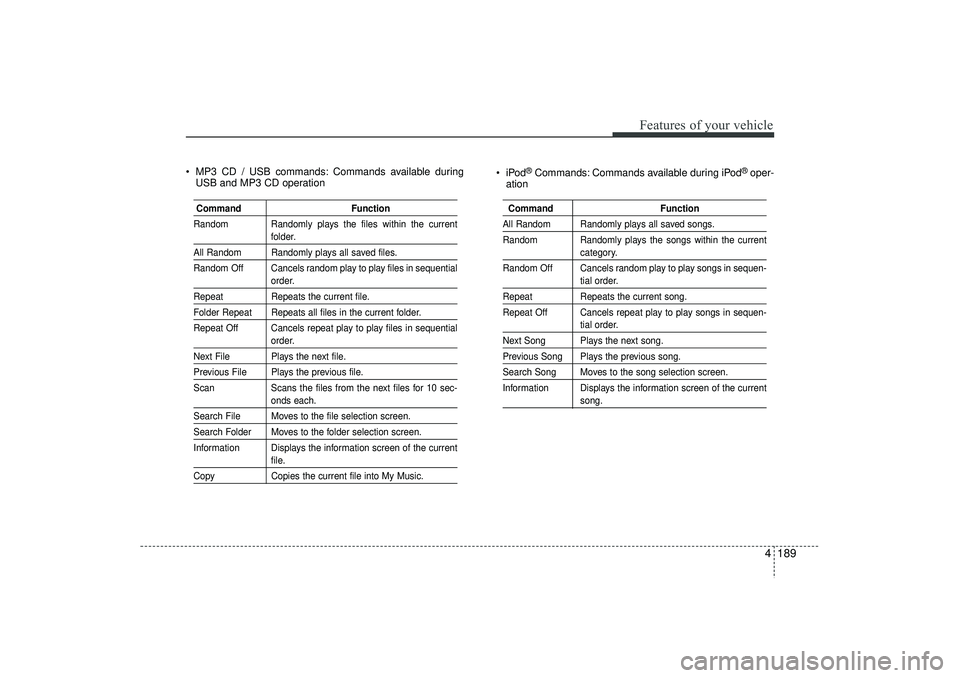
MP3 CD / USB commands: Commands available duringUSB and MP3 CD operation iPod
®Commands: Commands available during iPod
®oper-
ation
Command Function
Random Randomly plays the files within the current
folder.
All Random Randomly plays all saved files.
Random Off Cancels random play to play files in sequential
order.
Repeat Repeats the current file.Folder Repeat Repeats all files in the current folder.
Repeat Off Cancels repeat play to play files in sequential
order.
Next File Plays the next file.Previous File Plays the previous file.
ScanScans the files from the next files for 10 sec-
onds each.
Search File Moves to the file selection screen.Search Folder Moves to the folder selection screen.
Information Displays the information screen of the current
file.
Copy Copies the current file into My Music.
Command FunctionAll Random Randomly plays all saved songs.
Random Randomly plays the songs within the current
category.
Random Off Cancels random play to play songs in sequen-tial order.
Repeat Repeats the current song.
Repeat Off Cancels repeat play to play songs in sequen-
tial order.
Next Song Plays the next song.Previous Song Plays the previous song.Search Song Moves to the song selection screen.
Information Displays the information screen of the current
song.
EL(FL) UK 4B AUDIO.QXP 3/13/2015 4:19 PM Page 189
Page 275 of 550
Features of your vehicle190
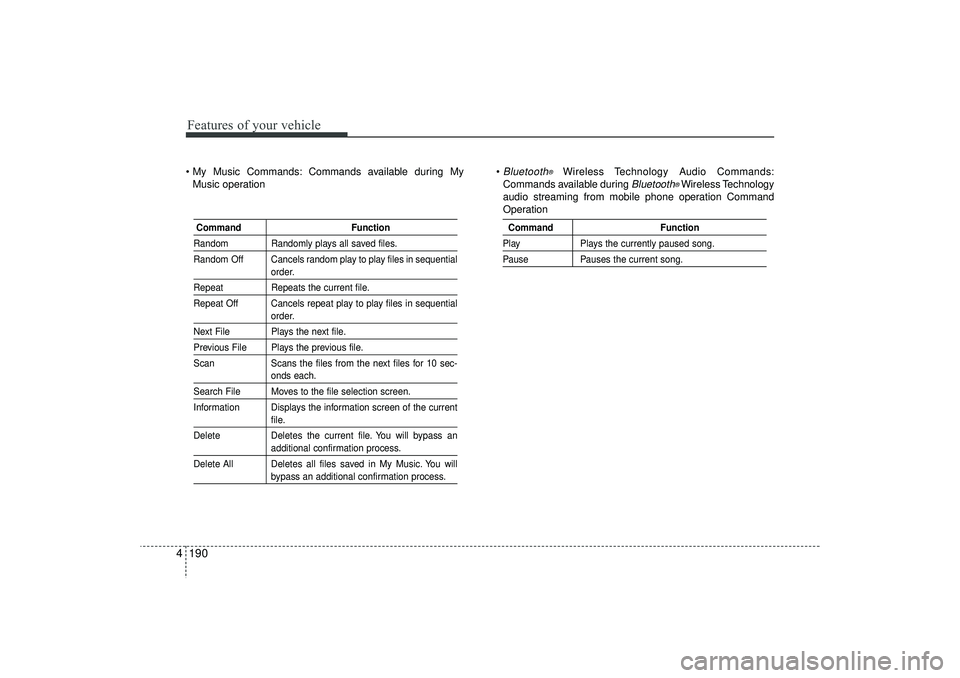
4 My Music Commands: Commands available during My
Music operation
Bluetooth
®
Wireless Technology Audio Commands:
Commands available during
Bluetooth
®Wireless Technology
audio streaming from mobile phone operation Command
Operation
Command FunctionRandom Randomly plays all saved files.
Random Off Cancels random play to play files in sequential
order.
RepeatRepeats the current file.
Repeat Off Cancels repeat play to play files in sequential
order.
Next File Plays the next file.Previous File Plays the previous file.
Scan Scans the files from the next files for 10 sec-
onds each.
Search File Moves to the file selection screen.
Information Displays the information screen of the current
file.
Delete Deletes the current file. You will bypass anadditional confirmation process.
Delete All Deletes all files saved in My Music. You willbypass an additional confirmation process.
Command FunctionPlayPlays the currently paused song.PausePauses the current song.
EL(FL) UK 4B AUDIO.QXP 3/13/2015 4:19 PM Page 190
Page 276 of 550
4 191
Features of your vehicle
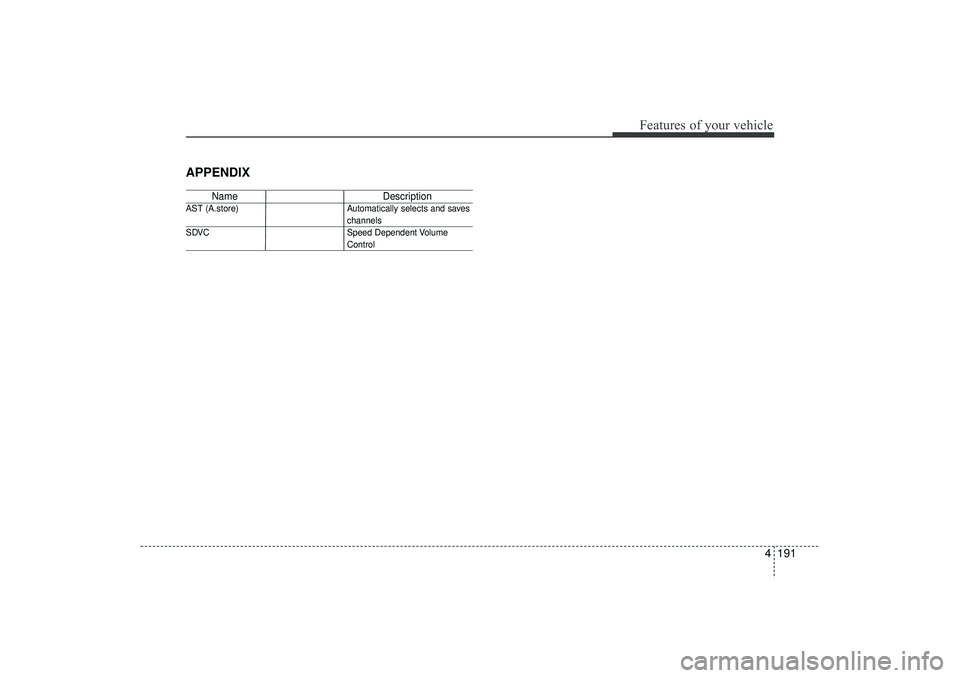
APPENDIX
NameDescription
AST (A.store) Automatically selects and saves
channels
SDVC Speed Dependent VolumeControl
EL(FL) UK 4B AUDIO.QXP 3/13/2015 4:19 PM Page 191
Page 277 of 550
Features of your vehicle192
4
■
■
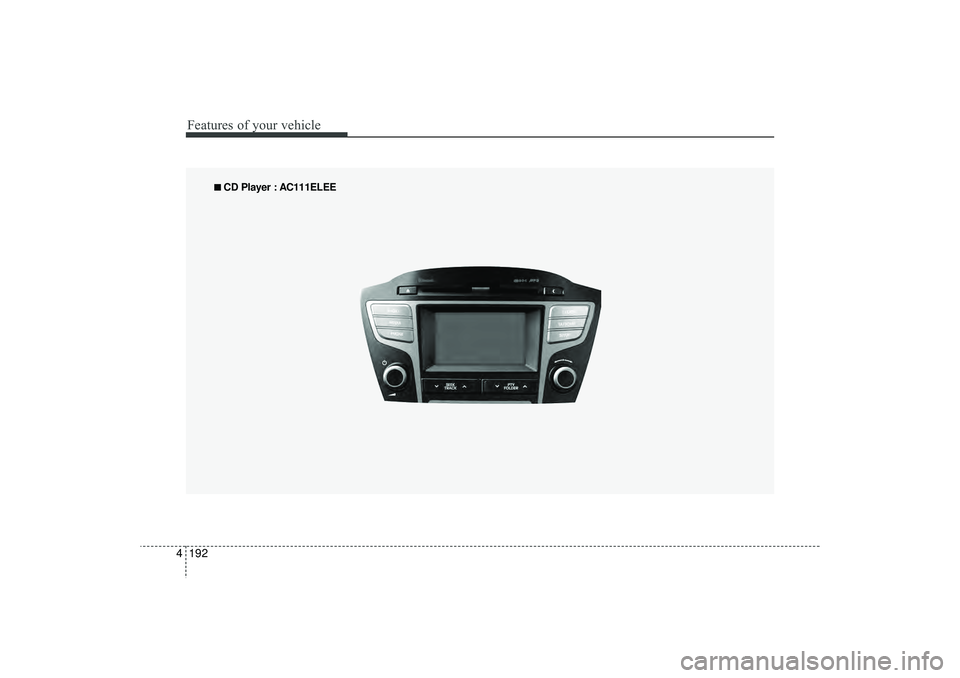
CD Player : AC111ELEE
EL(FL) UK 4B AUDIO.QXP 3/13/2015 4:19 PM Page 192
Page 278 of 550
4 193
Features of your vehicle
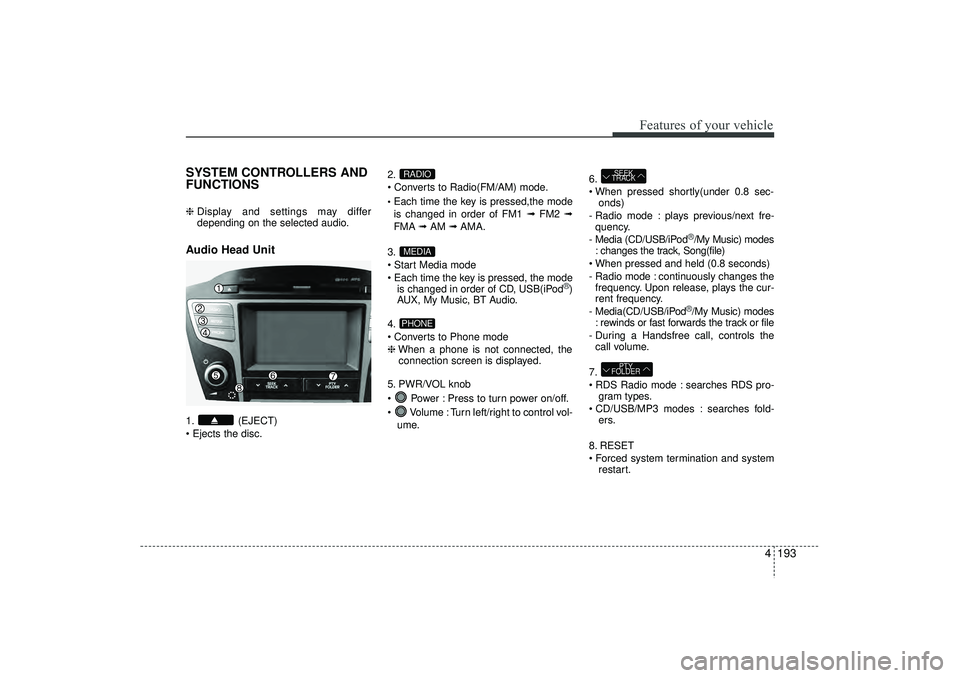
SYSTEM CONTROLLERS AND
FUNCTIONS ❈ Display and settings may differ
depending on the selected audio.Audio Head Unit 1. (EJECT)
Ejects the disc. 2.
Converts to Radio(FM/AM) mode.
Each time the key is pressed,the mode
is changed in order of FM1 ➟
FM2 ➟
FMA ➟AM ➟AMA.
3.
Start Media mode
Each time the key is pressed, the mode is changed in order of CD, USB(iPod
®)
AUX, My Music, BT Audio.
4.
Converts to Phone mode
❈ When a phone is not connected, the
connection screen is displayed.
5. PWR/VOL knob
Power : Press to turn power on/off.
Volume : Turn left/right to control vol- ume. 6.
When pressed shortly(under 0.8 sec-
onds)
- Radio mode : plays previous/next fre- quency.
- Media (CD/USB/iPod
®/My Music) modes
: changes the track, Song(file)
When pressed and held (0.8 seconds)
- Radio mode : continuously changes the frequency. Upon release, plays the cur-
rent frequency.
- Media(CD/USB/iPod®/My Music) modes
: rewinds or fast forwards the track or file
- During a Handsfree call, controls the call volume.
7.
RDS Radio mode : searches RDS pro- gram types.
CD/USB/MP3 modes : searches fold- ers.
8. RESET
Forced system termination and system restart.
PTY
FOLDERSEEK
TRACK
PHONEMEDIARADIO
EL(FL) UK 4B AUDIO.QXP 3/13/2015 4:19 PM Page 193
Page 279 of 550
Features of your vehicle194
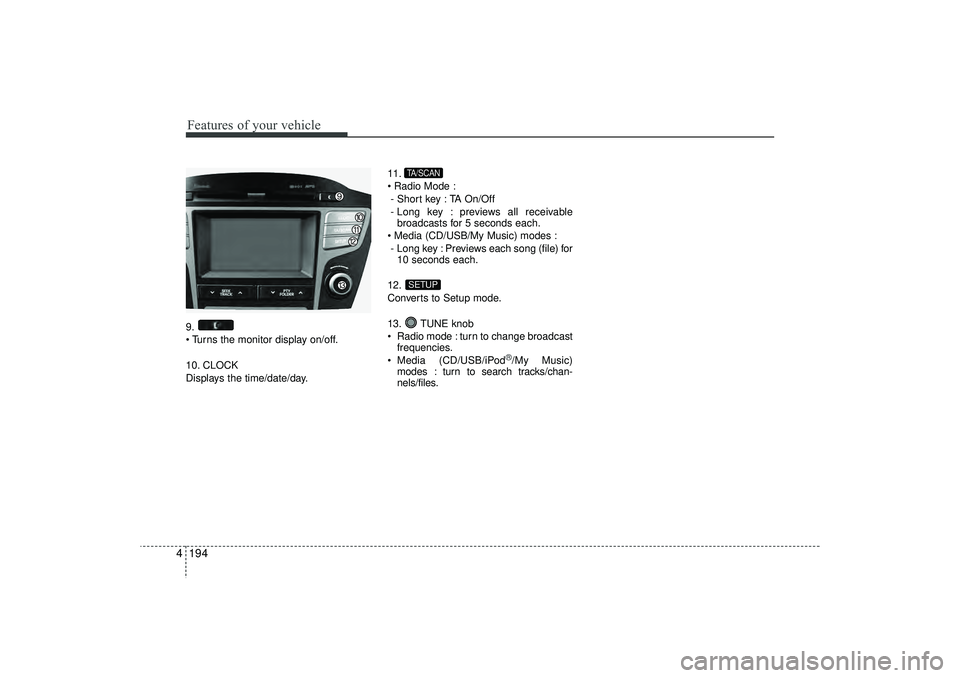
49.
Turns the monitor display on/off.
10. CLOCK
Displays the time/date/day. 11.
Radio Mode :
- Short key : TA On/Off
- Long key : previews all receivable broadcasts for 5 seconds each.
Media (CD/USB/My Music) modes : - Long key : Previews each song (file) for 10 seconds each.
12.
Converts to Setup mode.
13. TUNE knob
Radio mode : turn to change broadcast frequencies.
Media (CD/USB/iPod
®/My Music)
modes : turn to search tracks/chan-
nels/files.
SETUPTA/SCAN
EL(FL) UK 4B AUDIO.QXP 3/13/2015 4:19 PM Page 194
Page 280 of 550
4 195
Features of your vehicle
Radio Mode Basic Mode Screen1. Mode Display
Displays currently operating mode2. Frequency
Displays the current frequency
3. Preset
Displays current preset number [1] ~ [6]
4. Preset Display
Displays saved presets
5. Autostore
Automatically saves frequencies with
superior reception to Preset buttons
6. RDS Menu
Displays the RDS Menu
7. RDS Info
Displays RDS broadcast information
Switching to Radio ModePressing the key will change the
operating mode in order of FM1➟FM2
➟FMA
➟AM
➟AMA.
If [Pop-up Mode] is turned on within [Display], then pressing the
key will display the Radio Pop-
up Mode screen.
Turn the TUNE knob to move the
focus. Press the knob to select.
RADIOSETUP
RADIO
EL(FL) UK 4B AUDIO.QXP 3/13/2015 4:19 PM Page 195
Page 281 of 550
Features of your vehicle196
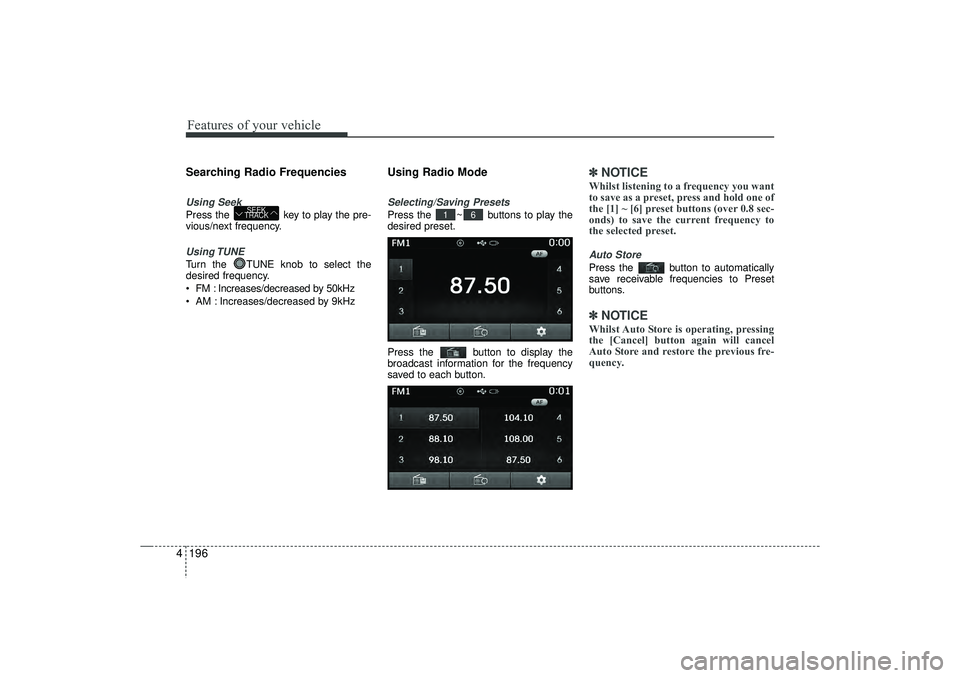
4Searching Radio FrequenciesUsing SeekPress the key to play the pre-
vious/next frequency.Using TUNETurn the TUNE knob to select the
desired frequency.
FM : Increases/decreased by 50kHz
AM : Increases/decreased by 9kHz
Using Radio ModeSelecting/Saving PresetsPress the ~ buttons to play the
desired preset.
Press the button to display the
broadcast information for the frequency
saved to each button.
✽ ✽
NOTICE Whilst listening to a frequency you want
to save as a preset, press and hold one of
the [1] ~ [6] preset buttons (over 0.8 sec-
onds) to save the current frequency to
the selected preset.Auto StorePress the button to automatically
save receivable frequencies to Preset
buttons.✽ ✽NOTICE Whilst Auto Store is operating, pressing
the [Cancel] button again will cancel
Auto Store and restore the previous fre-
quency.
6
1
SEEK
TRACK
EL(FL) UK 4B AUDIO.QXP 3/13/2015 4:19 PM Page 196
![HYUNDAI IX35 2016 Owners Manual 4 195
Features of your vehicle
Radio Mode Basic Mode Screen1. Mode Display
Displays currently operating mode2. Frequency
Displays the current frequency
3. Preset
Displays current preset number [1] ~ [](/manual-img/35/56235/w960_56235-279.png "HYUNDAI IX35 2016 Owners Manual 4 195
Features of your vehicle
Radio Mode Basic Mode Screen1. Mode Display
Displays currently operating mode2. Frequency
Displays the current frequency
3. Preset
Displays current preset number [1] ~ [")