2016 HYUNDAI IX35 wheel
[x] Cancel search: wheelPage 231 of 550
Features of your vehicle146
4Audio remote control
(if equipped) The steering wheel audio remote control
button is installed to promote safe driv-
ing.
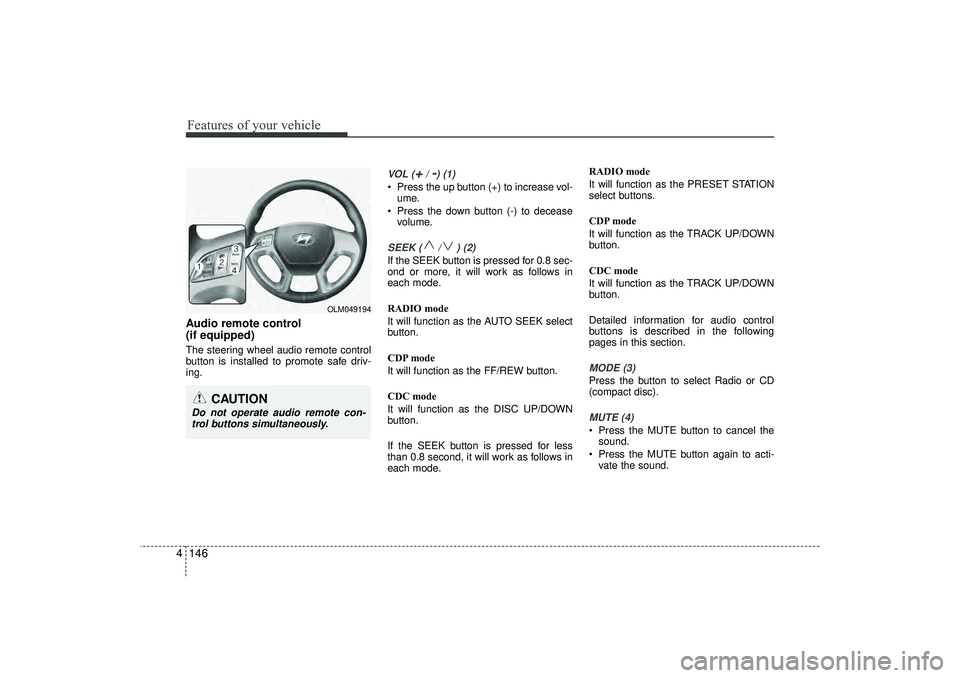
VOL (
+/ -) (1)
• Press the up button (+) to increase vol-
ume.
Press the down button (-) to decease volume.SEEK ( / ) (2)If the SEEK button is pressed for 0.8 sec-
ond or more, it will work as follows in
each mode.
RADIO mode
It will function as the AUTO SEEK select
button.
CDP mode
It will function as the FF/REW button.
CDC mode
It will function as the DISC UP/DOWN
button.
If the SEEK button is pressed for less
than 0.8 second, it will work as follows in
each mode. RADIO mode
It will function as the PRESET STATION
select buttons.
CDP mode
It will function as the TRACK UP/DOWN
button.
CDC mode
It will function as the TRACK UP/DOWN
button.
Detailed information for audio control
buttons is described in the following
pages in this section.
MODE (3)Press the button to select Radio or CD
(compact disc).MUTE (4) Press the MUTE button to cancel the
sound.
Press the MUTE button again to acti- vate the sound.
CAUTION
Do not operate audio remote con-trol buttons simultaneously.
OLM049194
EL(FL) UK 4B AUDIO.QXP 3/13/2015 4:19 PM Page 146
Page 264 of 550
4 179
Features of your vehicle
PHONE (if equipped)Before using the
Bluetooth
®Wireless
Technology
phone features
In order to use
Bluetooth
®
Wireless
Technology
phone, you must first pair
and connect the
Bluetooth
®
Wireless
Technology
mobile phone.
If the mobile phone is not paired or con- nected, it is not possible to enter Phone
mode. Once a phone is paired or con-
nected, the guidance screen will be dis-
played.
If Priority is set upon vehicle ignition (IGN/ACC ON), the
Bluetooth
®Wireless
Technology
phone will be automatically
connected. Even if you are outside, the
Bluetooth
®Wireless Technology
phone will
be automatically connected once you are
in the vicinity of the vehicle. If you do not
want automatic
Bluetooth
®
Wireless
Technology
phone connection, set the
Bluetooth
®Wireless Technology
power to
OFF.
Making a call using the Steering
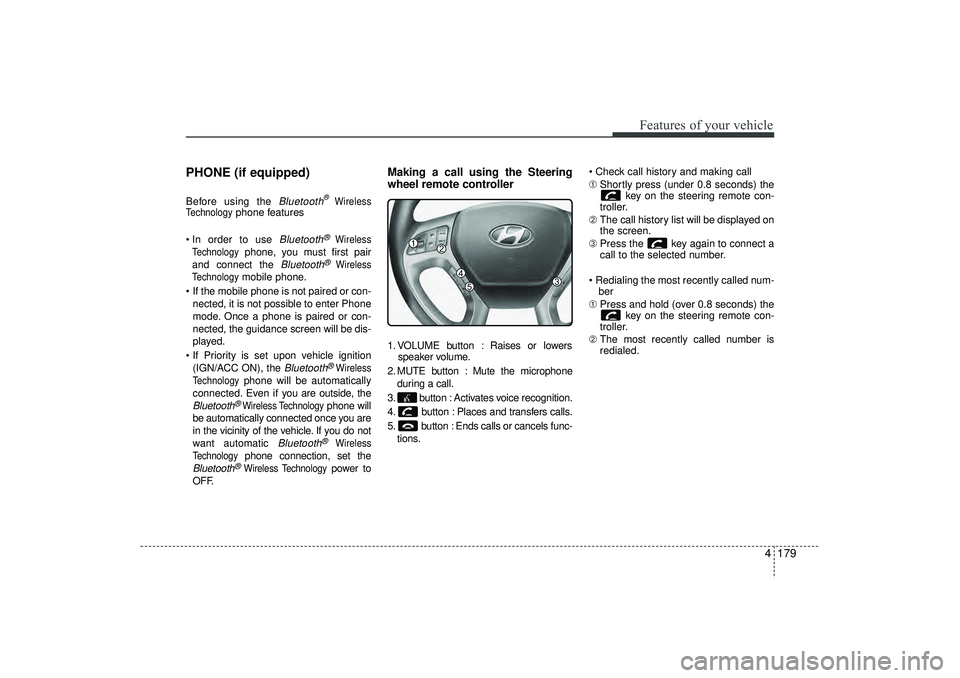
wheel remote controller1. VOLUME button : Raises or lowers speaker volume.
2. MUTE button : Mute the microphone during a call.
3. button : Activates voice recognition.
4. button : Places and transfers calls.
5. button : Ends calls or cancels func- tions. Check call history and making call
➀
Shortly press (under 0.8 seconds) the
key on the steering remote con-
troller.
➁ The call history list will be displayed on
the screen.
\b Press the key again to connect a
call to the selected number.
Redialing the most recently called num- ber
➀ Press and hold (over 0.8 seconds) the
key on the steering remote con-
troller.
➁ The most recently called number is
redialed.
EL(FL) UK 4B AUDIO.QXP 3/13/2015 4:19 PM Page 179
Page 269 of 550
Features of your vehicle184
4VOICE COMMAND
(if equipped)Starting Voice Command To start voice command, shortly press
the key on the steering wheel
remote controller.
If voice command is in [Normal Mode], then the system will say “Please say a
command. Beep”
❈ If voice command is in [Expert Mode],
then the system will only say a “Beep-”
❈ Setting Voice command [Normal
Mode]/[Expert Mode]:
Press the key Select
[System] through the TUNE knob or
key Select [Voice Command
Mode] through the TUNE knob Set
[Normal Mode]/[Expert Mode]
Say the voice command.✽ ✽ NOTICEFor proper voice recognition, say the
voice command after the guidance mes-
sage and the “Beep” sound.
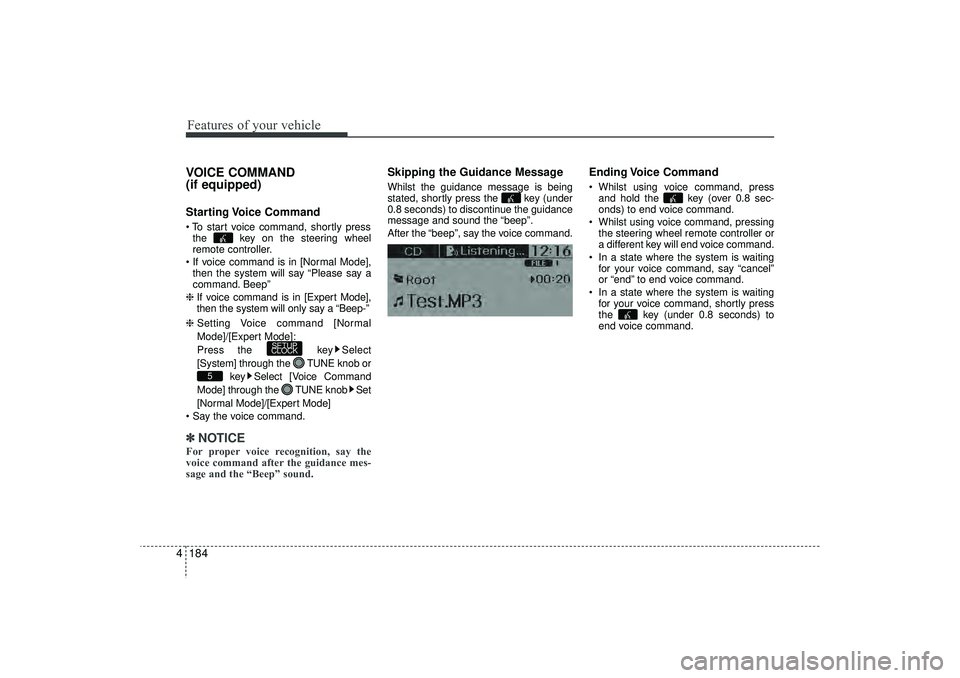
Skipping the Guidance MessageWhilst the guidance message is being
stated, shortly press the key (under
0.8 seconds) to discontinue the guidance
message and sound the “beep”.
After the “beep”, say the voice command.
Ending Voice Command Whilst using voice command, press
and hold the key (over 0.8 sec-
onds) to end voice command.
Whilst using voice command, pressing the steering wheel remote controller or
a different key will end voice command.
In a state where the system is waiting for your voice command, say “cancel”
or “end” to end voice command.
In a state where the system is waiting for your voice command, shortly press
the key (under 0.8 seconds) to
end voice command.
5
SETUP
CLOCK
EL(FL) UK 4B AUDIO.QXP 3/13/2015 4:19 PM Page 184
Page 320 of 550
4 235
Features of your vehicle
✽
✽NOTICE If Bluetooth
®
Wireless Technology
devices are paired but none are current-
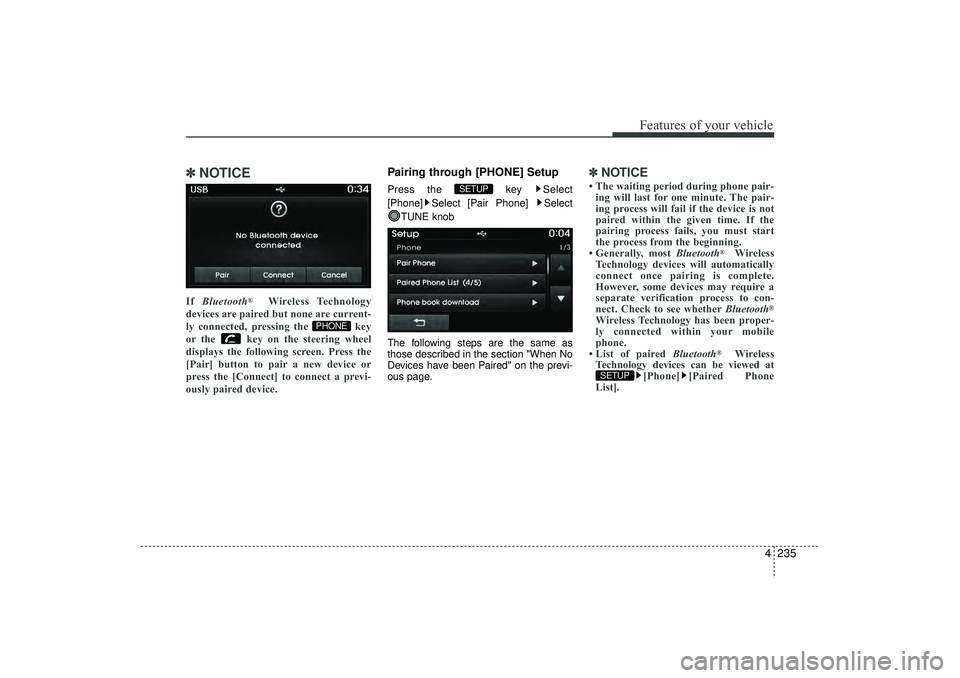
ly connected, pressing the key
or the key on the steering wheel
displays the following screen. Press the
[Pair] button to pair a new device or
press the [Connect] to connect a previ-
ously paired device.
Pairing through [PHONE] SetupPress the key Select
[Phone] Select [Pair Phone] Select TUNE knob
The following steps are the same as
those described in the section "When No
Devices have been Paired" on the previ-
ous page.
✽ ✽ NOTICE • The waiting period during phone pair-
ing will last for one minute. The pair-
ing process will fail if the device is not
paired within the given time. If the
pairing process fails, you must start
the process from the beginning.
• Generally, most Bluetooth
®
Wireless
Technology devices will automatically
connect once pairing is complete.
However, some devices may require a
separate verification process to con-
nect. Check to see whether Bluetooth
®
Wireless Technology has been proper-
ly connected within your mobile
phone.
• List of paired Bluetooth
®
Wireless
Technology devices can be viewed at [Phone] [Paired Phone
List].
SETUP
SETUP
PHONE
EL(FL) UK 4B AUDIO.QXP 3/13/2015 4:19 PM Page 235
Page 329 of 550

Features of your vehicle244
4VOICE RECOGNITIONUsing Voice RecognitionStarting Voice RecognitionShortly press the key on the steering
wheel remote controller Say a command If voice recognition is in [Normal Mode],
then the system will say “Please say a
command. Beep~”
If voice recognition is in [Expert Mode],
then the system will only say a “Beep~”
To change the Normal Mode/Expert Mode setting, go to [System] [Prompt Feedback] / [Voice Recognition
System].
✽ ✽ NOTICE For proper recognition, say the com-
mand after the voice instruction and
beep tone.Contact List Best Practices
1) Do not store single-name entries (e.g.,
“Bob”, “Mom”, “Kim”, etc.). Instead,
always use full names (including first
and last names) for all contacts (e.g.,
use “Jacob Stevenson” instead of
“Dad”).
2) Do not use abbreviations (i.e., use “Lieutenant” instead of “Lt.” or
“Sergeant” instead of “Sgt.”).
3) Do not use acronyms (i.e., use “County Finance Department” instead
of “CFD”).
4) Do not use special characters (e.g., “@”, “hyphen -“, “asterisk *”, amper-
sand &”). 5) If a name is not recognized from the
contact list, change it to a more
descriptive name (e.g., use “Grandpa
Joseph” instead of “Pa Joe”).
Skipping Prompt MessagesWhilst prompt message is being stated
Shortly press the key on the steer-
ing wheel remote controller
The prompt message is immediately
ended and the beep tone will sound.
After the “beep”, say the voice command.Re-starting Voice RecognitionWhilst system waits for a command
Shortly press the key on the steer-
ing wheel remote controller
The command wait state is immediately
ended and the beep ton will sound. After
the “beep”, say the voice command.
SETUP
EL(FL) UK 4B AUDIO.QXP 3/13/2015 4:19 PM Page 244
Page 330 of 550
4 245
Features of your vehicle
ENDING VOICE RECOGNITIONWhilst Voice Recognition is operating
Press and hold the key on the steer-
ing wheel remote controller ✽ ✽NOTICE • Whilst using voice command, pressing
a steering wheel remote control or a
different key will end voice command.
• When the system is waiting for a voice command, say “cancel” or “end” to
end voice command.
• When the system is waiting for a voice command, press and hold the key
on the steering wheel remote con-
troller to end voice command.
EL(FL) UK 4B AUDIO.QXP 3/13/2015 4:19 PM Page 245
Page 349 of 550
Driving your vehicle
5
Before driving . . . . . . . . . . . . . . . . . . . . . . . . . . . . . . 5-4• Before entering vehicle . . . . . . . . . . . . . . . . . . . . . . . . . 5-4
• Necessary inspections . . . . . . . . . . . . . . . . . . . . . . . . . 5-4
• Before starting . . . . . . . . . . . . . . . . . . . . . . . . . . . . . . . 5-4Key positions . . . . . . . . . . . . . . . . . . . . . . . . . . . . . . . 5-5• Illuminated ignition switch . . . . . . . . . . . . . . . . . . . . . 5-5
• Ignition switch position . . . . . . . . . . . . . . . . . . . . . . . . . 5-6
• Starting the engine . . . . . . . . . . . . . . . . . . . . . . . . . . . . 5-7Engine start/stop button . . . . . . . . . . . . . . . . . . . . . 5-9• Illuminated engine start/stop button . . . . . . . . . . . . . . 5-9
• Engine start/stop button position. . . . . . . . . . . . . . . . . 5-9
• Starting the engine . . . . . . . . . . . . . . . . . . . . . . . . . . . 5-12ISG (Idle Stop and Go) system . . . . . . . . . . . . . . 5-15• Auto stop . . . . . . . . . . . . . . . . . . . . . . . . . . . . . . . . . . . 5-\
15
• Auto start . . . . . . . . . . . . . . . . . . . . . . . . . . . . . . . . . . . 5-\
16
• Condition of ISG system operation . . . . . . . . . . . . . . 5-17
• ISG system deactivation . . . . . . . . . . . . . . . . . . . . . . . 5-17
• ISG system malfunction . . . . . . . . . . . . . . . . . . . . . . . 5-18Manual transaxle . . . . . . . . . . . . . . . . . . . . . . . . . . 5-19• Manual transaxle operation . . . . . . . . . . . . . . . . . . . . 5-19
• Good driving practices . . . . . . . . . . . . . . . . . . . . . . . . 5-21Automatic transaxle . . . . . . . . . . . . . . . . . . . . . . . 5-22• Automatic transaxle operation. . . . . . . . . . . . . . . . . . 5-23
• Good driving practices . . . . . . . . . . . . . . . . . . . . . . . . 5-27
Four wheel drive (4WD) . . . . . . . . . . . . . . . . . . . . 5-28• Tight corner brake effect . . . . . . . . . . . . . . . . . . . . . . 5-28
• Four Wheel Drive (4WD) transfer mode selection . 5-29
• For safe four-wheel drive operation . . . . . . . . . . . . 5-30
• Reducing the risk of a rollover . . . . . . . . . . . . . . . . . 5-32Brake system . . . . . . . . . . . . . . . . . . . . . . . . . . . . . . 5-35• Power brakes . . . . . . . . . . . . . . . . . . . . . . . . . . . . . . . 5-35
• Parking brake . . . . . . . . . . . . . . . . . . . . . . . . . . . . . . 5-36
• Anti-lock brake system (ABS) . . . . . . . . . . . . . . . . . . 5-38
• Electronic stability control (ESC) . . . . . . . . . . . . . . . 5-41
• Vehicle stability management (VSM) . . . . . . . . . . . . 5-44
• Hill-start assist control (HAC) . . . . . . . . . . . . . . . . . . 5-45
• Downhill brake control (DBC) . . . . . . . . . . . . . . . . . 5-46
• Emergency stop signal (ESS) . . . . . . . . . . . . . . . . . . . 5-47
• Trailer stability assist (TSA) . . . . . . . . . . . . . . . . . . . 5-47
• Good braking practices. . . . . . . . . . . . . . . . . . . . . . . . 5-48Cruise control system . . . . . . . . . . . . . . . . . . . . . . 5-50• To set cruise control speed . . . . . . . . . . . . . . . . . . . . . 5-51
• To increase cruise control set speed. . . . . . . . . . . . . . 5-51
• To decrease the cruising speed . . . . . . . . . . . . . . . . . . 5-52
• To temporarily accelerate with the cruise control on . . . . . . . . . . . . . . . . . . . . . . . . 5-52
• To cancel cruise control, do one of the following . . . 5-52
• To resume cruising speed at more than approximately 25 mph (40 km/h) . . . . . . . . . . . . . . 5-53
EL(FL) UK 5.QXP 12/16/2014 8:08 PM Page 1
Page 353 of 550
55
Driving your vehicle
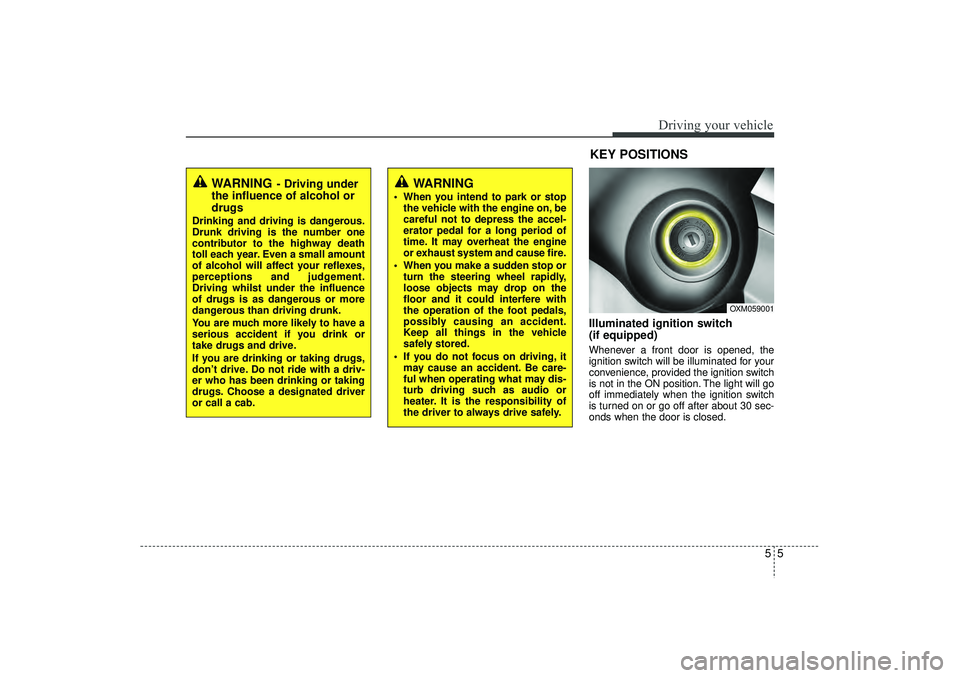
Illuminated ignition switch
(if equipped)Whenever a front door is opened, the
ignition switch will be illuminated for your
convenience, provided the ignition switch
is not in the ON position. The light will go
off immediately when the ignition switch
is turned on or go off after about 30 sec-
onds when the door is closed.
OXM059001
WARNING
- Driving under
the influence of alcohol or
drugs
Drinking and driving is dangerous.
Drunk driving is the number one
contributor to the highway death
toll each year. Even a small amount
of alcohol will affect your reflexes,
perceptions and judgement.
Driving whilst under the influence
of drugs is as dangerous or more
dangerous than driving drunk.
You are much more likely to have a
serious accident if you drink or
take drugs and drive.
If you are drinking or taking drugs,
don’t drive. Do not ride with a driv-
er who has been drinking or taking
drugs. Choose a designated driver
or call a cab.
KEY POSITIONS
WARNING
When you intend to park or stop
the vehicle with the engine on, be
careful not to depress the accel-
erator pedal for a long period of
time. It may overheat the engine
or exhaust system and cause fire.
When you make a sudden stop or turn the steering wheel rapidly,
loose objects may drop on the
floor and it could interfere with
the operation of the foot pedals,
possibly causing an accident.
Keep all things in the vehicle
safely stored.
If you do not focus on driving, it may cause an accident. Be care-
ful when operating what may dis-
turb driving such as audio or
heater. It is the responsibility of
the driver to always drive safely.
EL(FL) UK 5.QXP 12/16/2014 8:08 PM Page 5