2016 HYUNDAI IX35 warning light
[x] Cancel search: warning lightPage 87 of 550

4
LCD display . . . . . . . . . . . . . . . . . . . . . . . . . . . . . . 4-54• LCD Modes . . . . . . . . . . . . . . . . . . . . . . . . . . . . . . . . . 4-54
• Information Mode . . . . . . . . . . . . . . . . . . . . . . . . . . . . 4-55
• User Settings Mode . . . . . . . . . . . . . . . . . . . . . . . . . . . 4-56
• Warning Messages . . . . . . . . . . . . . . . . . . . . . . . . . . . 4-58Trip computer . . . . . . . . . . . . . . . . . . . . . . . . . . . . . 4-64• Overview . . . . . . . . . . . . . . . . . . . . . . . . . . . . . . . . . . . 4-\
64
• Trip Modes . . . . . . . . . . . . . . . . . . . . . . . . . . . . . . . . . . 4-64\
• Trip A/B . . . . . . . . . . . . . . . . . . . . . . . . . . . . . . . . . . . . \
4-65
• Fuel Economy . . . . . . . . . . . . . . . . . . . . . . . . . . . . . . . 4-66
• Warnings and indicators. . . . . . . . . . . . . . . . . . . . . . . 4-68
• Indicator Lights . . . . . . . . . . . . . . . . . . . . . . . . . . . . . . 4-77Parking assist system . . . . . . . . . . . . . . . . . . . . . . 4-81• Rear parking assist system type . . . . . . . . . . . . . . . . 4-81
• Front/Rear parking assist system type . . . . . . . . . . . 4-85Smart parking assist system . . . . . . . . . . . . . . . . 4-87• Operating condition . . . . . . . . . . . . . . . . . . . . . . . . . . 4-88
• Non-operational conditions . . . . . . . . . . . . . . . . . . . . 4-88
• Operation way . . . . . . . . . . . . . . . . . . . . . . . . . . . . . . . 4-91
• System cancellation whilst parking . . . . . . . . . . . . . . 4-95
• Additional introductions . . . . . . . . . . . . . . . . . . . . . . . 4-96
• System malfunction warning . . . . . . . . . . . . . . . . . . . 4-97Rearview camera . . . . . . . . . . . . . . . . . . . . . . . . . . 4-98Hazard warning flasher . . . . . . . . . . . . . . . . . . . . . 4-98
Lighting . . . . . . . . . . . . . . . . . . . . . . . . . . . . . . . . . 4-99
• Battery saver function . . . . . . . . . . . . . . . . . . . . . . . 4-99
• Headlight escort function . . . . . . . . . . . . . . . . . . . . . 4-99
• Headlight welcome function . . . . . . . . . . . . . . . . . . . 4-99
• Lighting control . . . . . . . . . . . . . . . . . . . . . . . . . . . . . 4-100
• High - beam operation . . . . . . . . . . . . . . . . . . . . . . . 4-101
• Turn signals and lane change signals . . . . . . . . . . . 4-102
• Front fog light . . . . . . . . . . . . . . . . . . . . . . . . . . . . . 4-103
• Rear fog light . . . . . . . . . . . . . . . . . . . . . . . . . . . . . . 4-103
• Daytime running light . . . . . . . . . . . . . . . . . . . . . . . 4-104
• Headlight levelling device . . . . . . . . . . . . . . . . . . . . 4-104Wipers and washers . . . . . . . . . . . . . . . . . . . . . . . 4-106• Windscreen wipers . . . . . . . . . . . . . . . . . . . . . . . . . . 4-107
• Windscreen washers . . . . . . . . . . . . . . . . . . . . . . . . 4-108
• Rear window wiper and washer switch . . . . . . . . . 4-109Interior light . . . . . . . . . . . . . . . . . . . . . . . . . . . . . 4-110• Map lamp . . . . . . . . . . . . . . . . . . . . . . . . . . . . . . . . . 4-110
• Room lamp . . . . . . . . . . . . . . . . . . . . . . . . . . . . . . . . 4-111
• Vanity mirror lamp . . . . . . . . . . . . . . . . . . . . . . . . . . 4-111
• Luggage room lamp . . . . . . . . . . . . . . . . . . . . . . . . . 4-111
• Glove box lamp . . . . . . . . . . . . . . . . . . . . . . . . . . . . . 4-112Defroster . . . . . . . . . . . . . . . . . . . . . . . . . . . . . . . . 4-113• Rear window defroster . . . . . . . . . . . . . . . . . . . . . . . 4-113
EL(FL) UK 4A.QXP 2/9/2015 9:02 PM Page 2
Page 92 of 550
47
Features of your vehicle
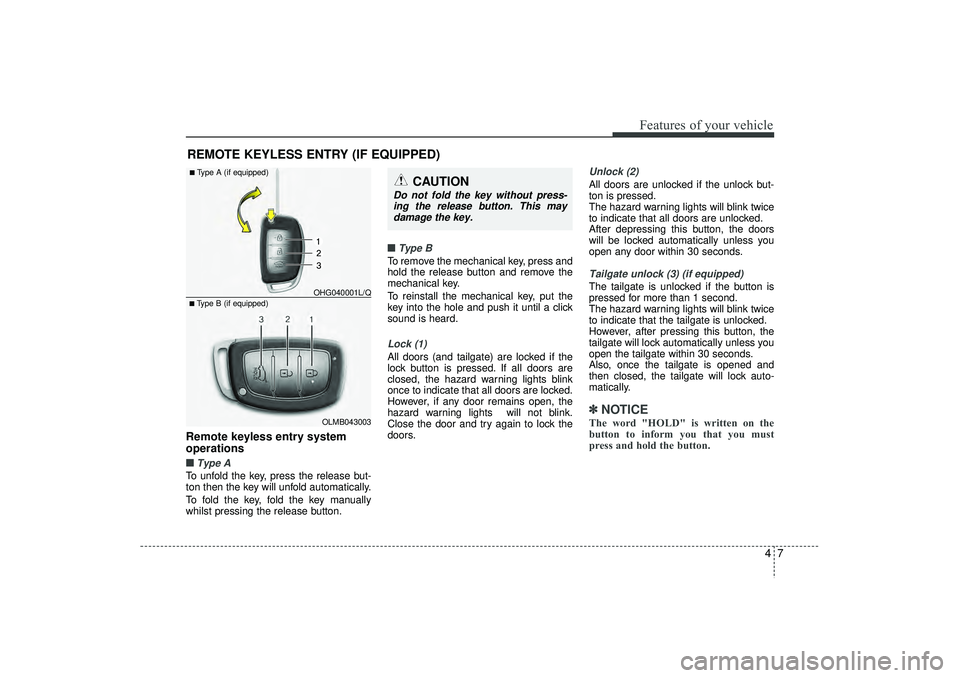
Remote keyless entry system
operations■ ■Type ATo unfold the key, press the release but-
ton then the key will unfold automatically.
To fold the key, fold the key manually
whilst pressing the release button.■ ■
Type BTo remove the mechanical key, press and
hold the release button and remove the
mechanical key.
To reinstall the mechanical key, put the
key into the hole and push it until a click
sound is heard.Lock (1)All doors (and tailgate) are locked if the
lock button is pressed. If all doors are
closed, the hazard warning lights blink
once to indicate that all doors are locked.
However, if any door remains open, the
hazard warning lights will not blink.
Close the door and try again to lock the
doors.
Unlock (2) All doors are unlocked if the unlock but-
ton is pressed.
The hazard warning lights will blink twice
to indicate that all doors are unlocked.
After depressing this button, the doors
will be locked automatically unless you
open any door within 30 seconds.Tailgate unlock (3) (if equipped)The tailgate is unlocked if the button is
pressed for more than 1 second.
The hazard warning lights will blink twice
to indicate that the tailgate is unlocked.
However, after pressing this button, the
tailgate will lock automatically unless you
open the tailgate within 30 seconds.
Also, once the tailgate is opened and
then closed, the tailgate will lock auto-
matically.✽ ✽
NOTICEThe word "HOLD" is written on the
button to inform you that you must
press and hold the button.
REMOTE KEYLESS ENTRY (IF EQUIPPED)
CAUTION
Do not fold the key without press-
ing the release button. This maydamage the key.
OLMB043003
■Type B (if equipped) OHG040001L/Q■Type A (if equipped)
EL(FL) UK 4A.QXP 2/9/2015 9:02 PM Page 7
Page 95 of 550
Features of your vehicle10
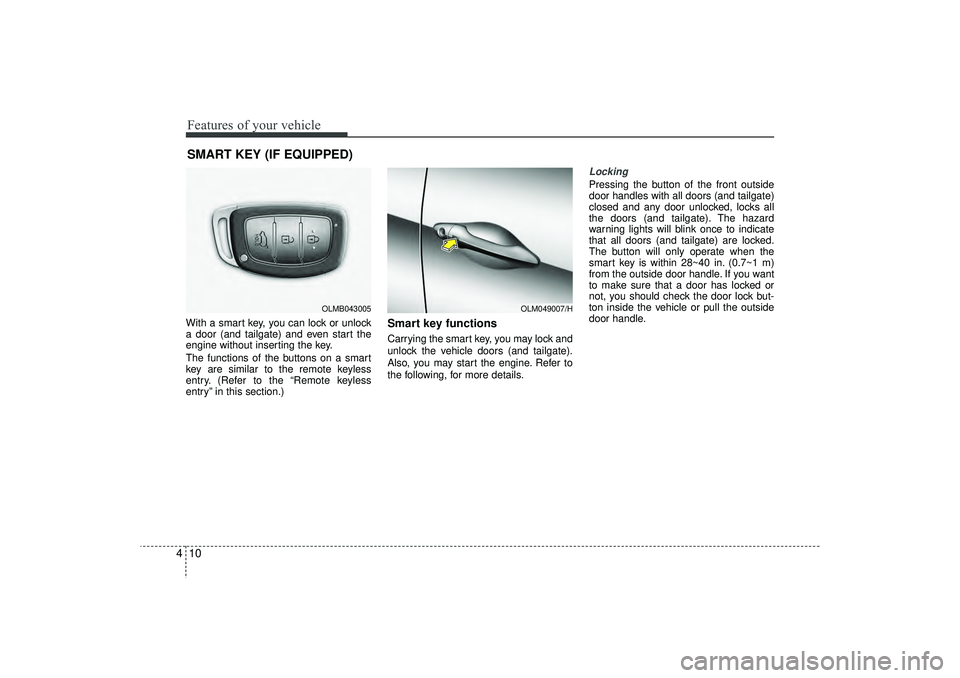
4With a smart key, you can lock or unlock
a door (and tailgate) and even start the
engine without inserting the key.
The functions of the buttons on a smart
key are similar to the remote keyless
entry. (Refer to the “Remote keyless
entry” in this section.)
Smart key functionsCarrying the smart key, you may lock and
unlock the vehicle doors (and tailgate).
Also, you may start the engine. Refer to
the following, for more details.
Locking Pressing the button of the front outside
door handles with all doors (and tailgate)
closed and any door unlocked, locks all
the doors (and tailgate). The hazard
warning lights will blink once to indicate
that all doors (and tailgate) are locked.
The button will only operate when the
smart key is within 28~40 in. (0.7~1 m)
from the outside door handle. If you want
to make sure that a door has locked or
not, you should check the door lock but-
ton inside the vehicle or pull the outside
door handle.
SMART KEY (IF EQUIPPED)
OLM049007/H
OLMB043005
EL(FL) UK 4A.QXP 2/9/2015 9:02 PM Page 10
Page 96 of 550
411
Features of your vehicle
Even though you press the button, the
doors will not lock and the chime sounds
3 seconds if any of the following occurs:
The smart key is in the vehicle.
The engine start/stop button is in theACC or ON position.
Any door except the tailgate is opened.
Unlocking Pressing the button of the front outside
door handles with all doors (and tailgate)
closed and locked, unlocks all the doors
(and tailgate). The hazard warning lights
will blink twice to indicate that all doors
(and tailgate) are unlocked. The button
will only operate when the smart key is
within 28~40 in. (0.7~1 m) from the out-
side door handle.
When the smart key is recognized in the
area of 28~40 in. (0.7~1 m) from the front
outside door handle, other people can
also open a door without possession of
the smart key.
Tailgate unlockingIf you are within 28 ~ 40 in. (0.7 ~ 1 m)
from the outside tailgate handle, with
your smart key in possession, the tail-
gate will unlock and open when you
press the tailgate handle switch.
The hazard warning lights will blink twice
to indicate that the tailgate is unlocked.
Also, once the tailgate is opened and
then closed, the tailgate will lock auto-
matically.Start-upYou can start the engine without inserting
the key. For detailed information refer to
“Starting the engine with a smart key” in
section 5.
EL(FL) UK 4A.QXP 2/9/2015 9:02 PM Page 11
Page 98 of 550

413
Features of your vehicle
This system is designed to provide pro-
tection from unauthorised entry into the
vehicle. This system is operated in three
stages: the first is the "Armed" stage, the
second is the "Theft-alarm" stage, and
the third is the "Disarmed" stage. If trig-
gered, the system provides an audible
alarm with blinking of the hazard warning
lights.
Armed stagePark the vehicle and stop the engine.
Arm the system as described below.
1. Remove the ignition key from the igni-tion switch or turn off the engine.
2. Make sure that all doors (and tailgate) and the engine bonnet are closed and
latched.
3. Lock the doors by depressing the door lock button on the transmitter
(or smart key).
After completion of the steps above,
the hazard warning lights will blink
once to indicate that the system is
armed.
If any door, tailgate remains open, the
hazard warning lights won’t operate
and theft-alarm will not arm. Close
the door and try again to lock the
doors.
Lock the doors by pressing the button of the front outside door handles with
the smart key in your possession.
After completion of the steps above,
the hazard warning lights will blink
once to indicate that the system is
armed. If any door (and tailgate) remains
open, the hazard warning lights won’t
operate and theft-alarm will not arm.
Close the door and try again to lock
the doors.
If engine bonnet remains open, the
hazard warning lights won’t operate
and theft-alarm will not arm. Close
the engine bonnet. The hazard warn-
ing lights blink once and theft-alarm
arms.
Do not arm the system until all pas- sengers have left the vehicle. If the
system is armed whilst a passen-
ger(s) remains in the vehicle, the
alarm may be activated when the
remaining passenger(s) leave the
vehicle. If any door, tailgate or
engine bonnet is opened within 30
seconds after entering the armed
stage, the system is disarmed to
prevent unnecessary alarm.
THEFT-ALARM SYSTEM (IF EQUIPPED)
Armed
stage
Theft-alarm stage
Disarmedstage
EL(FL) UK 4A.QXP 2/9/2015 9:02 PM Page 13
Page 99 of 550
Features of your vehicle14
4Theft-alarm stageThe alarm will be activated if any of the
following occurs whilst the system is
armed.
A front or rear door is opened without
using transmitter (or smart key).
The tailgate is opened without using transmitter (or smart key).
The engine bonnet is opened.
The siren will sound and the hazard
warning lights will blink continuously for
27 seconds, unless the system is dis-
armed. To turn off the system, unlock the
doors with the transmitter. (or smart key)
Disarmed stageThe system will be disarmed when:Transmitter- The door unlock button is pressed.
- The engine is started.
- The ignition switch is in the “ON” posi- tion for 30 seconds or more.Smart key- The door unlock button is pressed.
- The button of the front outside door ispressed whilst carrying the smart key.
- The engine is started.
After the doors are unlocked, the hazard
warning lights will blink twice to indicate
that the system is disarmed.
After pressing the unlock button, if any
door (or tailgate) is not opened within 30
seconds, the system will be rearmed.
✽ ✽ NOTICE
- Immobiliser system
• If the system is not disarmed with the
transmitter, insert the key into the
ignition switch and start the engine.
Then the system will be disarmed.
• If you lose your keys, we recommend that you consult a HYUNDAI autho-
rised repairer.
CAUTION
Do not change, alter or adjust the
theft-alarm system because it couldcause the theft-alarm system to malfunction. We recommend thatthe system be serviced by a HYUNDAI authorised repairer.
Malfunctions caused by improperalterations, adjustments or modifi- cations to the theft-alarm systemare not covered by your vehiclemanufacturer warranty.
EL(FL) UK 4A.QXP 2/9/2015 9:02 PM Page 14
Page 110 of 550
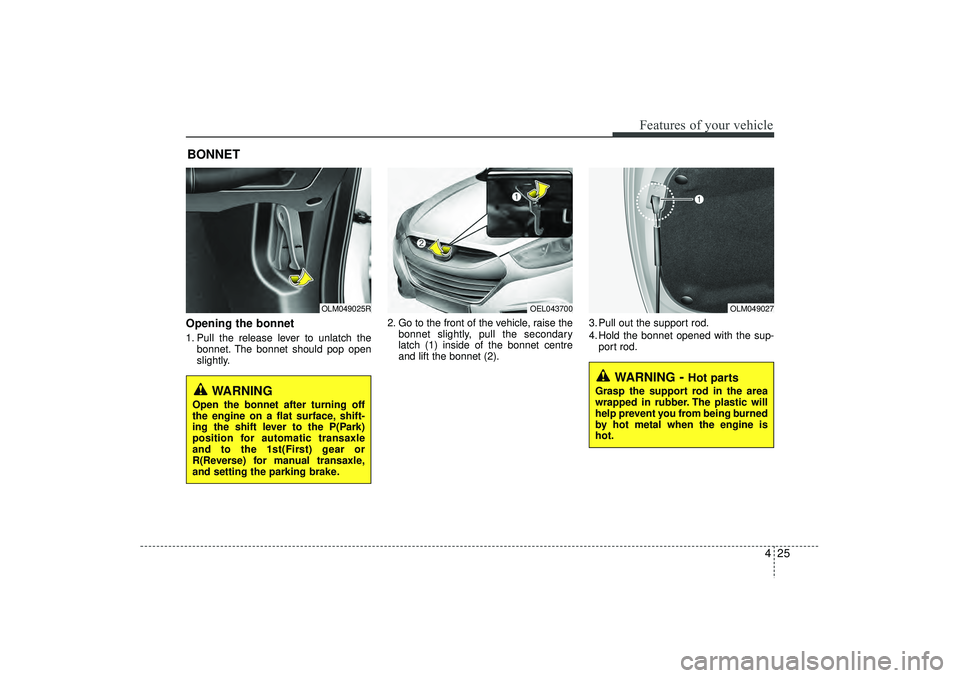
Opening the bonnet 1. Pull the release lever to unlatch thebonnet. The bonnet should pop open
slightly. 2. Go to the front of the vehicle, raise the
bonnet slightly, pull the secondary
latch (1) inside of the bonnet centre
and lift the bonnet (2). 3. Pull out the support rod.
4. Hold the bonnet opened with the sup-
port rod.BONNET
OLM049025R
OLM049027
WARNING
- Hot parts
Grasp the support rod in the area
wrapped in rubber. The plastic will
help prevent you from being burned
by hot metal when the engine is
hot.
WARNING
Open the bonnet after turning off
the engine on a flat surface, shift-
ing the shift lever to the P(Park)
position for automatic transaxle
and to the 1st(First) gear or
R(Reverse) for manual transaxle,
and setting the parking brake.
425
Features of your vehicle
OEL043700
EL(FL) UK 4A.QXP 2/9/2015 9:03 PM Page 25
Page 115 of 550
Features of your vehicle30
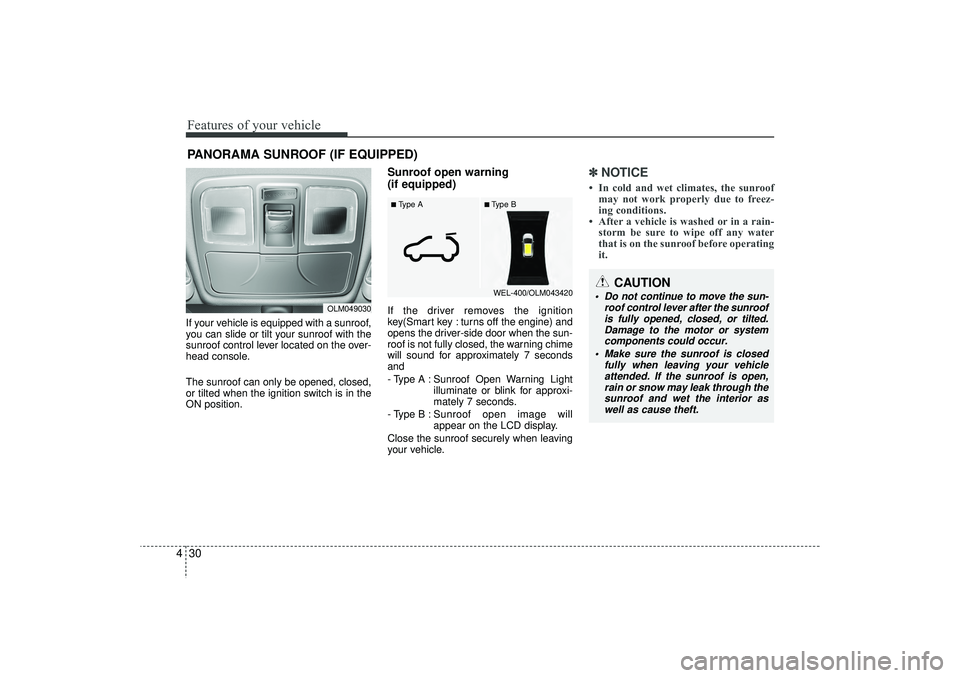
4If your vehicle is equipped with a sunroof,
you can slide or tilt your sunroof with the
sunroof control lever located on the over-
head console.
The sunroof can only be opened, closed,
or tilted when the ignition switch is in the
ON position.
Sunroof open warning
(if equipped)If the driver removes the ignition
key(Smart key : turns off the engine) and
opens the driver-side door when the sun-
roof is not fully closed, the warning chime
will sound for approximately 7 seconds
and
- Type A : Sunroof Open Warning Light
illuminate or blink for approxi-
mately 7 seconds.
- Type B : Sunroof open image will
appear on the LCD display.
Close the sunroof securely when leaving
your vehicle.
✽ ✽ NOTICE• In cold and wet climates, the sunroof
may not work properly due to freez-
ing conditions.
• After a vehicle is washed or in a rain- storm be sure to wipe off any water
that is on the sunroof before operating
it.
PANORAMA SUNROOF (IF EQUIPPED)
OLM049030
CAUTION
Do not continue to move the sun-
roof control lever after the sunroofis fully opened, closed, or tilted.Damage to the motor or system components could occur.
Make sure the sunroof is closed fully when leaving your vehicleattended. If the sunroof is open,rain or snow may leak through the sunroof and wet the interior aswell as cause theft.
■Type B
■Type A
WEL-400/OLM043420
EL(FL) UK 4A.QXP 2/9/2015 9:03 PM Page 30