2016 HYUNDAI IX35 light
[x] Cancel search: lightPage 83 of 550
Safety features of your vehicle64
3SRS CareThe SRS is virtually maintenance-free
and so there are no parts you can safely
service by yourself. If the SRS air bag
warning light does not illuminate, or con-
tinuously remains on, we recommend
that the system be inspected by a
HYUNDAI authorised repairer.
WARNING
Modification to SRS components
or wiring, including the addition
of any kind of badges to the pad
covers or modifications to the
body structure, can adversely
affect SRS performance and lead
to possible injury.
For cleaning the air bag pad cov- ers, use only a soft, dry cloth or
one which has been moistened
with plain water. Solvents or
cleaners could adversely affect
the air bag covers and proper
deployment of the system.
No objects should be placed over or near the air bag modules on
the steering wheel, instrument
panel, and the front passenger's
panel above the glove box,
because any such object could
cause harm if the vehicle is in a
crash severe enough to cause
the air bags to inflate.
If the air bags inflate, we recom- mend that the system be
replaced by a HYUNDAI autho-
rised repairer.
(Continued)
(Continued)
Do not tamper with or disconnectSRS wiring, or other components
of the SRS system. Doing so
could result in injury, due to acci-
dental inflation of the air bags or
by rendering the SRS inopera-
tive.
If components of the air bag sys- tem must be discarded, or if the
vehicle must be scrapped, certain
safety precautions must be
observed. We recommend that
you contact a HYUNDAI autho-
rised repairer for these precau-
tions and necessary information.
Failure to follow these precau-
tions and procedures could
increase the risk of personal
injury.
If your car was flooded and has soaked carpeting or water on
flooring, you shouldn't try to start
the engine; we recommend that
you contact a HYUNDAI autho-
rised repairer.
EL(FL) UK 3.QXP 12/16/2014 8:57 PM Page 64
Page 87 of 550

4
LCD display . . . . . . . . . . . . . . . . . . . . . . . . . . . . . . 4-54• LCD Modes . . . . . . . . . . . . . . . . . . . . . . . . . . . . . . . . . 4-54
• Information Mode . . . . . . . . . . . . . . . . . . . . . . . . . . . . 4-55
• User Settings Mode . . . . . . . . . . . . . . . . . . . . . . . . . . . 4-56
• Warning Messages . . . . . . . . . . . . . . . . . . . . . . . . . . . 4-58Trip computer . . . . . . . . . . . . . . . . . . . . . . . . . . . . . 4-64• Overview . . . . . . . . . . . . . . . . . . . . . . . . . . . . . . . . . . . 4-\
64
• Trip Modes . . . . . . . . . . . . . . . . . . . . . . . . . . . . . . . . . . 4-64\
• Trip A/B . . . . . . . . . . . . . . . . . . . . . . . . . . . . . . . . . . . . \
4-65
• Fuel Economy . . . . . . . . . . . . . . . . . . . . . . . . . . . . . . . 4-66
• Warnings and indicators. . . . . . . . . . . . . . . . . . . . . . . 4-68
• Indicator Lights . . . . . . . . . . . . . . . . . . . . . . . . . . . . . . 4-77Parking assist system . . . . . . . . . . . . . . . . . . . . . . 4-81• Rear parking assist system type . . . . . . . . . . . . . . . . 4-81
• Front/Rear parking assist system type . . . . . . . . . . . 4-85Smart parking assist system . . . . . . . . . . . . . . . . 4-87• Operating condition . . . . . . . . . . . . . . . . . . . . . . . . . . 4-88
• Non-operational conditions . . . . . . . . . . . . . . . . . . . . 4-88
• Operation way . . . . . . . . . . . . . . . . . . . . . . . . . . . . . . . 4-91
• System cancellation whilst parking . . . . . . . . . . . . . . 4-95
• Additional introductions . . . . . . . . . . . . . . . . . . . . . . . 4-96
• System malfunction warning . . . . . . . . . . . . . . . . . . . 4-97Rearview camera . . . . . . . . . . . . . . . . . . . . . . . . . . 4-98Hazard warning flasher . . . . . . . . . . . . . . . . . . . . . 4-98
Lighting . . . . . . . . . . . . . . . . . . . . . . . . . . . . . . . . . 4-99
• Battery saver function . . . . . . . . . . . . . . . . . . . . . . . 4-99
• Headlight escort function . . . . . . . . . . . . . . . . . . . . . 4-99
• Headlight welcome function . . . . . . . . . . . . . . . . . . . 4-99
• Lighting control . . . . . . . . . . . . . . . . . . . . . . . . . . . . . 4-100
• High - beam operation . . . . . . . . . . . . . . . . . . . . . . . 4-101
• Turn signals and lane change signals . . . . . . . . . . . 4-102
• Front fog light . . . . . . . . . . . . . . . . . . . . . . . . . . . . . 4-103
• Rear fog light . . . . . . . . . . . . . . . . . . . . . . . . . . . . . . 4-103
• Daytime running light . . . . . . . . . . . . . . . . . . . . . . . 4-104
• Headlight levelling device . . . . . . . . . . . . . . . . . . . . 4-104Wipers and washers . . . . . . . . . . . . . . . . . . . . . . . 4-106• Windscreen wipers . . . . . . . . . . . . . . . . . . . . . . . . . . 4-107
• Windscreen washers . . . . . . . . . . . . . . . . . . . . . . . . 4-108
• Rear window wiper and washer switch . . . . . . . . . 4-109Interior light . . . . . . . . . . . . . . . . . . . . . . . . . . . . . 4-110• Map lamp . . . . . . . . . . . . . . . . . . . . . . . . . . . . . . . . . 4-110
• Room lamp . . . . . . . . . . . . . . . . . . . . . . . . . . . . . . . . 4-111
• Vanity mirror lamp . . . . . . . . . . . . . . . . . . . . . . . . . . 4-111
• Luggage room lamp . . . . . . . . . . . . . . . . . . . . . . . . . 4-111
• Glove box lamp . . . . . . . . . . . . . . . . . . . . . . . . . . . . . 4-112Defroster . . . . . . . . . . . . . . . . . . . . . . . . . . . . . . . . 4-113• Rear window defroster . . . . . . . . . . . . . . . . . . . . . . . 4-113
EL(FL) UK 4A.QXP 2/9/2015 9:02 PM Page 2
Page 88 of 550
Manual climate control system . . . . . . . . . . . . . 4-115• Heating and air conditioning . . . . . . . . . . . . . . . . . . 4-116
• System operation . . . . . . . . . . . . . . . . . . . . . . . . . . . . 4-120
• Climate control air filter . . . . . . . . . . . . . . . . . . . . . 4-122
• Checking the amount of air conditioner refrigerant and compressor lubricant . . . . . . . . . . . . . . . . . . . 4-123Automatic climate control system . . . . . . . . . . . 4-124• Automatic heating and air conditioning . . . . . . . . . 4-125
• Manual heating and air conditioning . . . . . . . . . . . 4-126Windscreen defrosting and defogging . . . . . . . 4-131• Manual climate control system . . . . . . . . . . . . . . . . 4-131
• Automatic climate control system . . . . . . . . . . . . . . 4-133Storage compartment . . . . . . . . . . . . . . . . . . . . . . 4-134• Centre console storage . . . . . . . . . . . . . . . . . . . . . . . 4-134
• Glove box . . . . . . . . . . . . . . . . . . . . . . . . . . . . . . . . . . 4-13\
4
• Cool box . . . . . . . . . . . . . . . . . . . . . . . . . . . . . . . . . . . 4-\
135
• Sunglass holder . . . . . . . . . . . . . . . . . . . . . . . . . . . . . 4-135Interior features . . . . . . . . . . . . . . . . . . . . . . . . . 4-137• Cigarette lighter . . . . . . . . . . . . . . . . . . . . . . . . . . . . 4-137
• Ashtray . . . . . . . . . . . . . . . . . . . . . . . . . . . . . . . . . . . 4-\
137
• Cup holder . . . . . . . . . . . . . . . . . . . . . . . . . . . . . . . . . 4-138
• Sunvisor . . . . . . . . . . . . . . . . . . . . . . . . . . . . . . . . . . . 4-\
138
• Power outlet . . . . . . . . . . . . . . . . . . . . . . . . . . . . . . . . 4-139
• Digital clock . . . . . . . . . . . . . . . . . . . . . . . . . . . . . . . 4-140
• Aux, USB and iPod
®. . . . . . . . . . . . . . . . . . . . . . . . . 4-140 • Floor mat anchor(s) . . . . . . . . . . . . . . . . . . . . . . . . . 4-141
• Luggage net (holder) . . . . . . . . . . . . . . . . . . . . . . . . 4-141
• Cargo security screen . . . . . . . . . . . . . . . . . . . . . . . 4-142
Exterior features . . . . . . . . . . . . . . . . . . . . . . . . . . 4-144• Roof rack . . . . . . . . . . . . . . . . . . . . . . . . . . . . . . . . . . 4-14\
4Audio system . . . . . . . . . . . . . . . . . . . . . . . . . . . . . 4-145
4
EL(FL) UK 4A.QXP 2/9/2015 9:02 PM Page 3
Page 92 of 550
47
Features of your vehicle
Remote keyless entry system
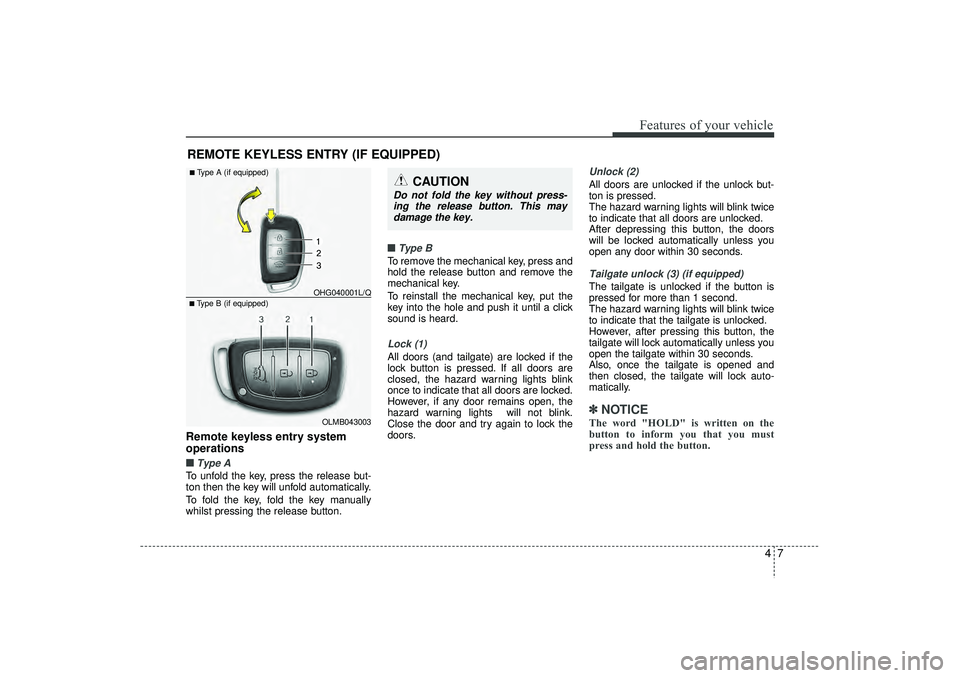
operations■ ■Type ATo unfold the key, press the release but-
ton then the key will unfold automatically.
To fold the key, fold the key manually
whilst pressing the release button.■ ■
Type BTo remove the mechanical key, press and
hold the release button and remove the
mechanical key.
To reinstall the mechanical key, put the
key into the hole and push it until a click
sound is heard.Lock (1)All doors (and tailgate) are locked if the
lock button is pressed. If all doors are
closed, the hazard warning lights blink
once to indicate that all doors are locked.
However, if any door remains open, the
hazard warning lights will not blink.
Close the door and try again to lock the
doors.
Unlock (2) All doors are unlocked if the unlock but-
ton is pressed.
The hazard warning lights will blink twice
to indicate that all doors are unlocked.
After depressing this button, the doors
will be locked automatically unless you
open any door within 30 seconds.Tailgate unlock (3) (if equipped)The tailgate is unlocked if the button is
pressed for more than 1 second.
The hazard warning lights will blink twice
to indicate that the tailgate is unlocked.
However, after pressing this button, the
tailgate will lock automatically unless you
open the tailgate within 30 seconds.
Also, once the tailgate is opened and
then closed, the tailgate will lock auto-
matically.✽ ✽
NOTICEThe word "HOLD" is written on the
button to inform you that you must
press and hold the button.
REMOTE KEYLESS ENTRY (IF EQUIPPED)
CAUTION
Do not fold the key without press-
ing the release button. This maydamage the key.
OLMB043003
■Type B (if equipped) OHG040001L/Q■Type A (if equipped)
EL(FL) UK 4A.QXP 2/9/2015 9:02 PM Page 7
Page 94 of 550
49
Features of your vehicle
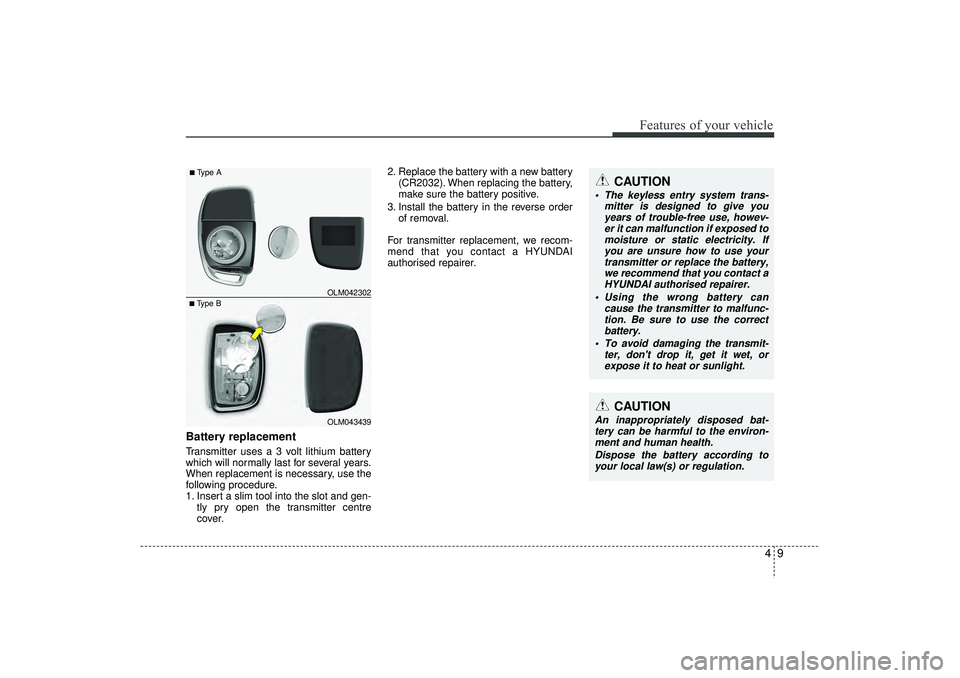
Battery replacementTransmitter uses a 3 volt lithium battery
which will normally last for several years.
When replacement is necessary, use the
following procedure.
1. Insert a slim tool into the slot and gen-tly pry open the transmitter centre
cover. 2. Replace the battery with a new battery
(CR2032). When replacing the battery,
make sure the battery positive.
3. Install the battery in the reverse order of removal.
For transmitter replacement, we recom-
mend that you contact a HYUNDAI
authorised repairer.
CAUTION
The keyless entry system trans- mitter is designed to give youyears of trouble-free use, howev-er it can malfunction if exposed tomoisture or static electricity. If you are unsure how to use yourtransmitter or replace the battery, we recommend that you contact aHYUNDAI authorised repairer.
Using the wrong battery can cause the transmitter to malfunc-tion. Be sure to use the correct battery.
To avoid damaging the transmit- ter, don't drop it, get it wet, orexpose it to heat or sunlight.
CAUTION
An inappropriately disposed bat-tery can be harmful to the environ-ment and human health.
Dispose the battery according toyour local law(s) or regulation.
■Type B OLM042302■Type A
OLM043439
EL(FL) UK 4A.QXP 2/9/2015 9:02 PM Page 9
Page 95 of 550
Features of your vehicle10
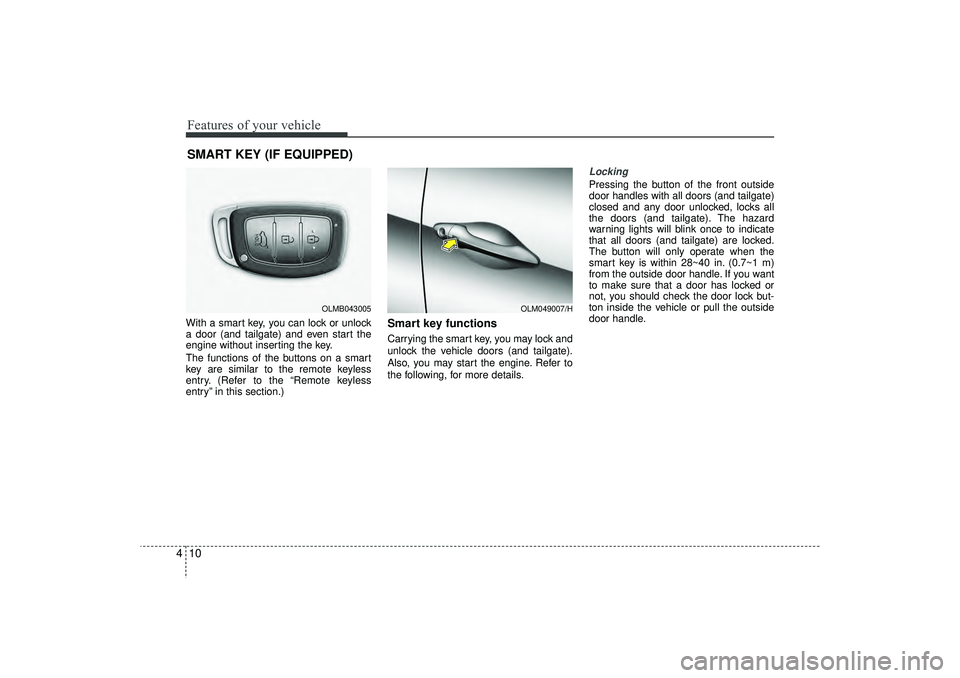
4With a smart key, you can lock or unlock
a door (and tailgate) and even start the
engine without inserting the key.
The functions of the buttons on a smart
key are similar to the remote keyless
entry. (Refer to the “Remote keyless
entry” in this section.)
Smart key functionsCarrying the smart key, you may lock and
unlock the vehicle doors (and tailgate).
Also, you may start the engine. Refer to
the following, for more details.
Locking Pressing the button of the front outside
door handles with all doors (and tailgate)
closed and any door unlocked, locks all
the doors (and tailgate). The hazard
warning lights will blink once to indicate
that all doors (and tailgate) are locked.
The button will only operate when the
smart key is within 28~40 in. (0.7~1 m)
from the outside door handle. If you want
to make sure that a door has locked or
not, you should check the door lock but-
ton inside the vehicle or pull the outside
door handle.
SMART KEY (IF EQUIPPED)
OLM049007/H
OLMB043005
EL(FL) UK 4A.QXP 2/9/2015 9:02 PM Page 10
Page 96 of 550
411
Features of your vehicle
Even though you press the button, the
doors will not lock and the chime sounds
3 seconds if any of the following occurs:
The smart key is in the vehicle.
The engine start/stop button is in theACC or ON position.
Any door except the tailgate is opened.
Unlocking Pressing the button of the front outside
door handles with all doors (and tailgate)
closed and locked, unlocks all the doors
(and tailgate). The hazard warning lights
will blink twice to indicate that all doors
(and tailgate) are unlocked. The button
will only operate when the smart key is
within 28~40 in. (0.7~1 m) from the out-
side door handle.
When the smart key is recognized in the
area of 28~40 in. (0.7~1 m) from the front
outside door handle, other people can
also open a door without possession of
the smart key.
Tailgate unlockingIf you are within 28 ~ 40 in. (0.7 ~ 1 m)
from the outside tailgate handle, with
your smart key in possession, the tail-
gate will unlock and open when you
press the tailgate handle switch.
The hazard warning lights will blink twice
to indicate that the tailgate is unlocked.
Also, once the tailgate is opened and
then closed, the tailgate will lock auto-
matically.Start-upYou can start the engine without inserting
the key. For detailed information refer to
“Starting the engine with a smart key” in
section 5.
EL(FL) UK 4A.QXP 2/9/2015 9:02 PM Page 11
Page 98 of 550

413
Features of your vehicle
This system is designed to provide pro-
tection from unauthorised entry into the
vehicle. This system is operated in three
stages: the first is the "Armed" stage, the
second is the "Theft-alarm" stage, and
the third is the "Disarmed" stage. If trig-
gered, the system provides an audible
alarm with blinking of the hazard warning
lights.
Armed stagePark the vehicle and stop the engine.
Arm the system as described below.
1. Remove the ignition key from the igni-tion switch or turn off the engine.
2. Make sure that all doors (and tailgate) and the engine bonnet are closed and
latched.
3. Lock the doors by depressing the door lock button on the transmitter
(or smart key).
After completion of the steps above,
the hazard warning lights will blink
once to indicate that the system is
armed.
If any door, tailgate remains open, the
hazard warning lights won’t operate
and theft-alarm will not arm. Close
the door and try again to lock the
doors.
Lock the doors by pressing the button of the front outside door handles with
the smart key in your possession.
After completion of the steps above,
the hazard warning lights will blink
once to indicate that the system is
armed. If any door (and tailgate) remains
open, the hazard warning lights won’t
operate and theft-alarm will not arm.
Close the door and try again to lock
the doors.
If engine bonnet remains open, the
hazard warning lights won’t operate
and theft-alarm will not arm. Close
the engine bonnet. The hazard warn-
ing lights blink once and theft-alarm
arms.
Do not arm the system until all pas- sengers have left the vehicle. If the
system is armed whilst a passen-
ger(s) remains in the vehicle, the
alarm may be activated when the
remaining passenger(s) leave the
vehicle. If any door, tailgate or
engine bonnet is opened within 30
seconds after entering the armed
stage, the system is disarmed to
prevent unnecessary alarm.
THEFT-ALARM SYSTEM (IF EQUIPPED)
Armed
stage
Theft-alarm stage
Disarmedstage
EL(FL) UK 4A.QXP 2/9/2015 9:02 PM Page 13