Page 288 of 550
4 203
Features of your vehicle
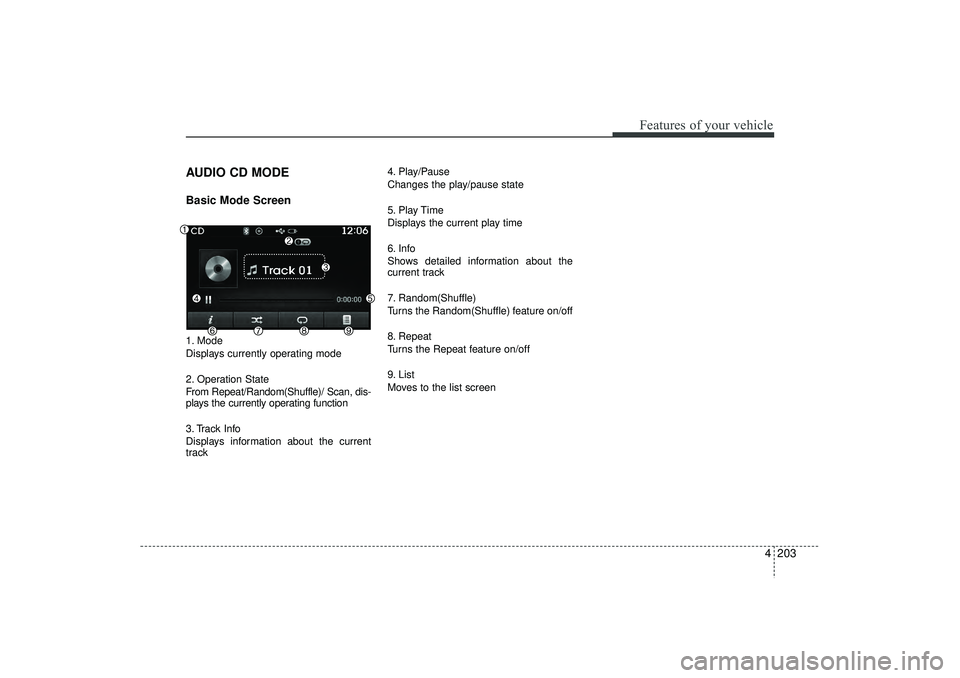
AUDIO CD MODEBasic Mode Screen1. Mode
Displays currently operating mode
2. Operation State
From Repeat/Random(Shuffle)/ Scan, dis-
plays the currently operating function
3. Track Info
Displays information about the current
track4. Play/Pause
Changes the play/pause state
5. Play Time
Displays the current play time
6. Info
Shows detailed information about the
current track
7. Random(Shuffle)
Turns the Random(Shuffle) feature on/off
8. Repeat
Turns the Repeat feature on/off
9. List
Moves to the list screen
EL(FL) UK 4B AUDIO.QXP 3/13/2015 4:19 PM Page 203
Page 292 of 550
4 207
Features of your vehicle
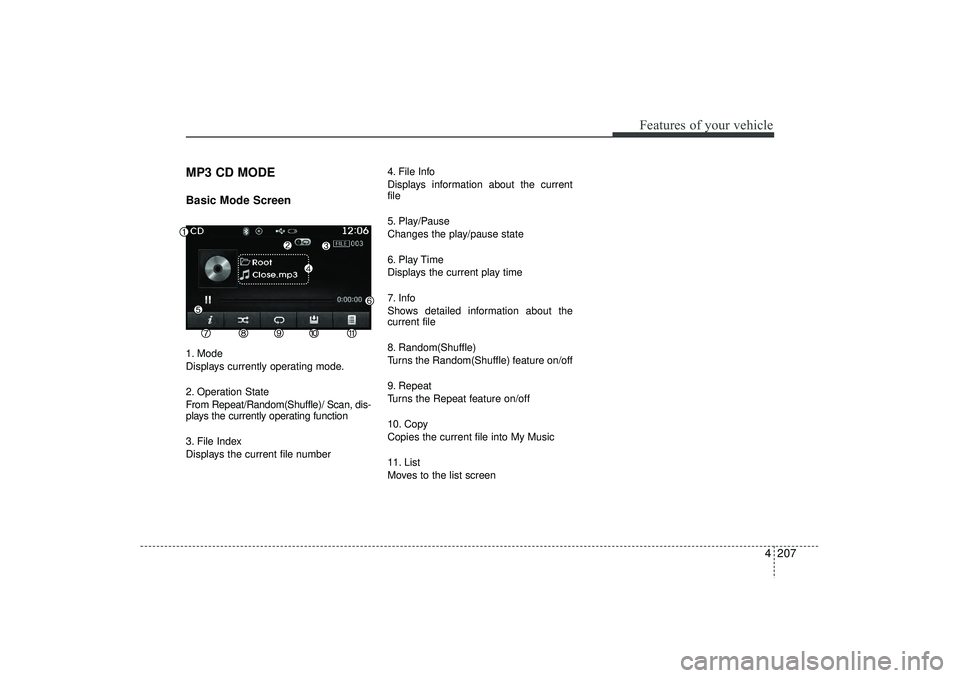
MP3 CD MODEBasic Mode Screen1. Mode
Displays currently operating mode.
2. Operation State
From Repeat/Random(Shuffle)/ Scan, dis-
plays the currently operating function
3. File Index
Displays the current file number4. File Info
Displays information about the current
file
5. Play/Pause
Changes the play/pause state
6. Play Time
Displays the current play time
7. Info
Shows detailed information about the
current file
8. Random(Shuffle)
Turns the Random(Shuffle) feature on/off
9. Repeat
Turns the Repeat feature on/off
10. Copy
Copies the current file into My Music
11. List
Moves to the list screen
EL(FL) UK 4B AUDIO.QXP 3/13/2015 4:19 PM Page 207
Page 295 of 550
Features of your vehicle210
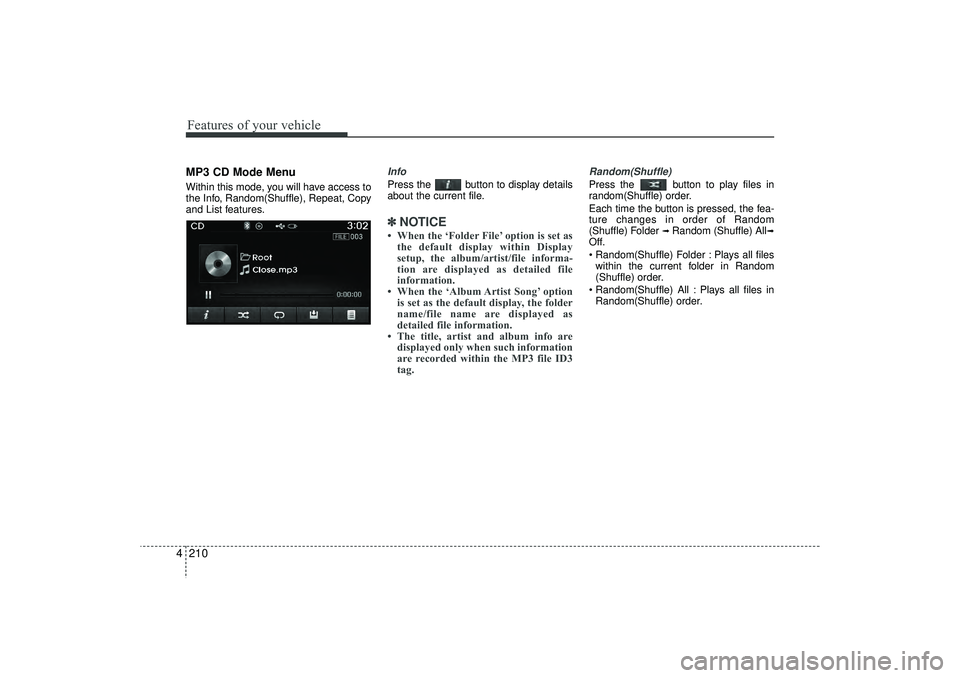
4MP3 CD Mode MenuWithin this mode, you will have access to
the Info, Random(Shuffle), Repeat, Copy
and List features.
InfoPress the button to display details
about the current file.✽ ✽
NOTICE • When the ‘Folder File’ option is set as
the default display within Display
setup, the album/artist/file informa-
tion are displayed as detailed file
information.
• When the ‘Album Artist Song’ option is set as the default display, the folder
name/file name are displayed as
detailed file information.
• The title, artist and album info are displayed only when such information
are recorded within the MP3 file ID3
tag.
Random(Shuffle)Press the button to play files in
random(Shuffle) order.
Each time the button is pressed, the fea-
ture changes in order of Random
(Shuffle) Folder
➟ Random (Shuffle) All
➟
Off.
Random(Shuffle) Folder : Plays all files
within the current folder in Random
(Shuffle) order.
Random(Shuffle) All : Plays all files in Random(Shuffle) order.
EL(FL) UK 4B AUDIO.QXP 3/13/2015 4:19 PM Page 210
Page 296 of 550
4 211
Features of your vehicle
RepeatPress the button to repeat the cur-
rent file or folder.
Each time the button is pressed, the fea-
ture changes in order of Repeat
➟Repeat
Folder
➟Off.
Repeat: Repeats the current file.
Repeat Folder: Repeats all files within the current Folder.
Copying FilesPress the button to copy the cur-
rent file into My Music.✽ ✽ NOTICE Selecting another feature during copy-
ing will display a pop-up asking whether
you wish to cancel copying. To cancel,
select 'Yes’.
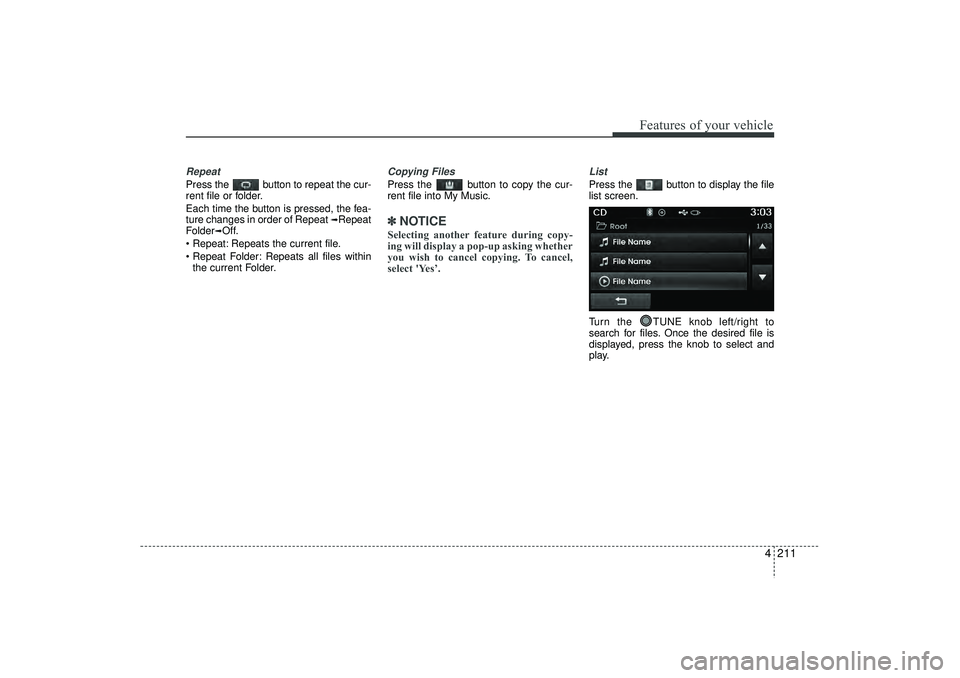
ListPress the button to display the file
list screen.
Turn the TUNE knob left/right to
search for files. Once the desired file is
displayed, press the knob to select and
play.
EL(FL) UK 4B AUDIO.QXP 3/13/2015 4:19 PM Page 211
Page 299 of 550
Features of your vehicle214
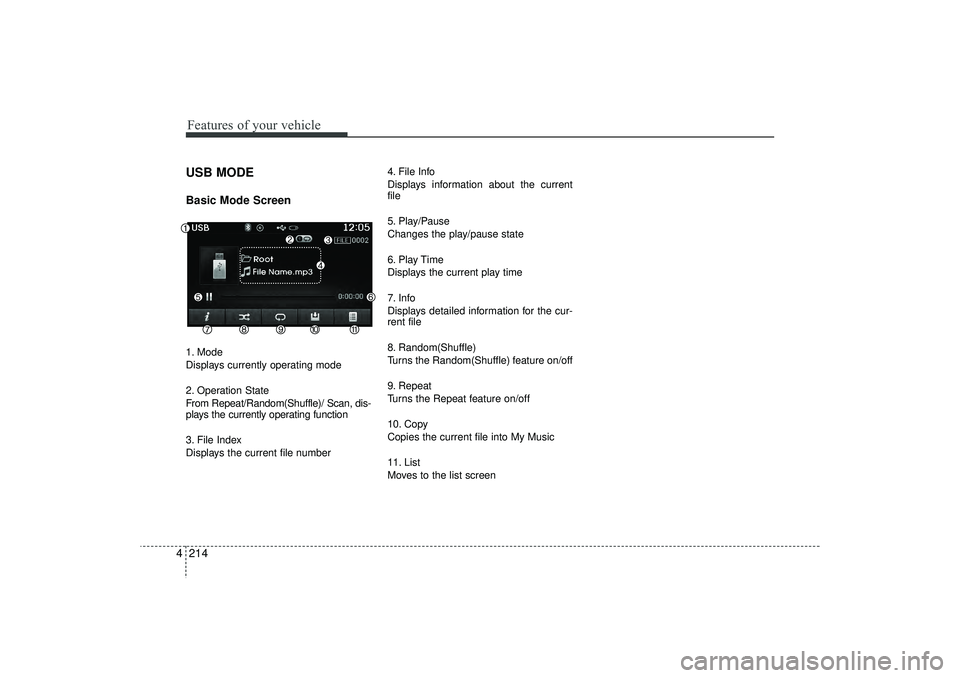
4USB MODE Basic Mode Screen1. Mode
Displays currently operating mode
2. Operation State
From Repeat/Random(Shuffle)/ Scan, dis-
plays the currently operating function
3. File Index
Displays the current file number 4. File Info
Displays information about the current
file
5. Play/Pause
Changes the play/pause state
6. Play Time
Displays the current play time
7. Info
Displays detailed information for the cur-
rent file
8. Random(Shuffle)
Turns the Random(Shuffle) feature on/off
9. Repeat
Turns the Repeat feature on/off
10. Copy
Copies the current file into My Music
11. List
Moves to the list screen
EL(FL) UK 4B AUDIO.QXP 3/13/2015 4:19 PM Page 214
Page 302 of 550
4 217
Features of your vehicle
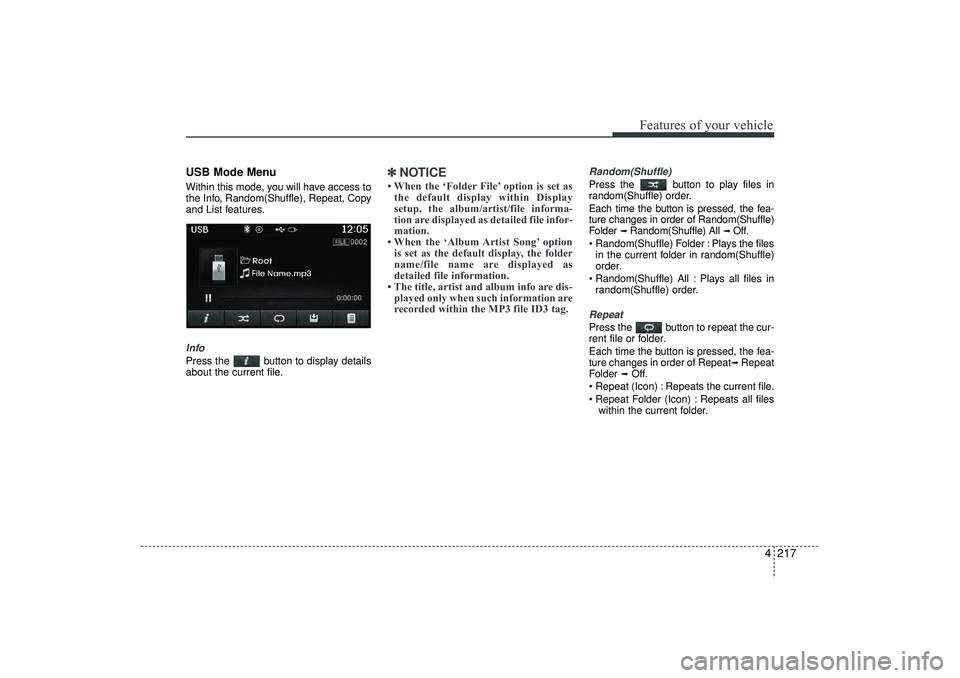
USB Mode MenuWithin this mode, you will have access to
the Info, Random(Shuffle), Repeat, Copy
and List features.InfoPress the button to display details
about the current file.
✽ ✽NOTICE • When the ‘Folder File’ option is set as
the default display within Display
setup, the album/artist/file informa-
tion are displayed as detailed file infor-
mation.
• When the ‘Album Artist Song’ option is set as the default display, the folder
name/file name are displayed as
detailed file information.
• The title, artist and album info are dis- played only when such information are
recorded within the MP3 file ID3 tag.
Random(Shuffle)Press the button to play files in
random(Shuffle) order.
Each time the button is pressed, the fea-
ture changes in order of Random(Shuffle)
Folder
➟ Random(Shuffle) All
➟ Off.
Random(Shuffle) Folder : Plays the files in the current folder in random(Shuffle)
order.
Random(Shuffle) All : Plays all files in random(Shuffle) order.
RepeatPress the button to repeat the cur-
rent file or folder.
Each time the button is pressed, the fea-
ture changes in order of Repeat
➟Repeat
Folder
➟Off.
Repeat (Icon) : Repeats the current file.
Repeat Folder (Icon) : Repeats all files within the current folder.
EL(FL) UK 4B AUDIO.QXP 3/13/2015 4:19 PM Page 217
Page 305 of 550
Features of your vehicle220
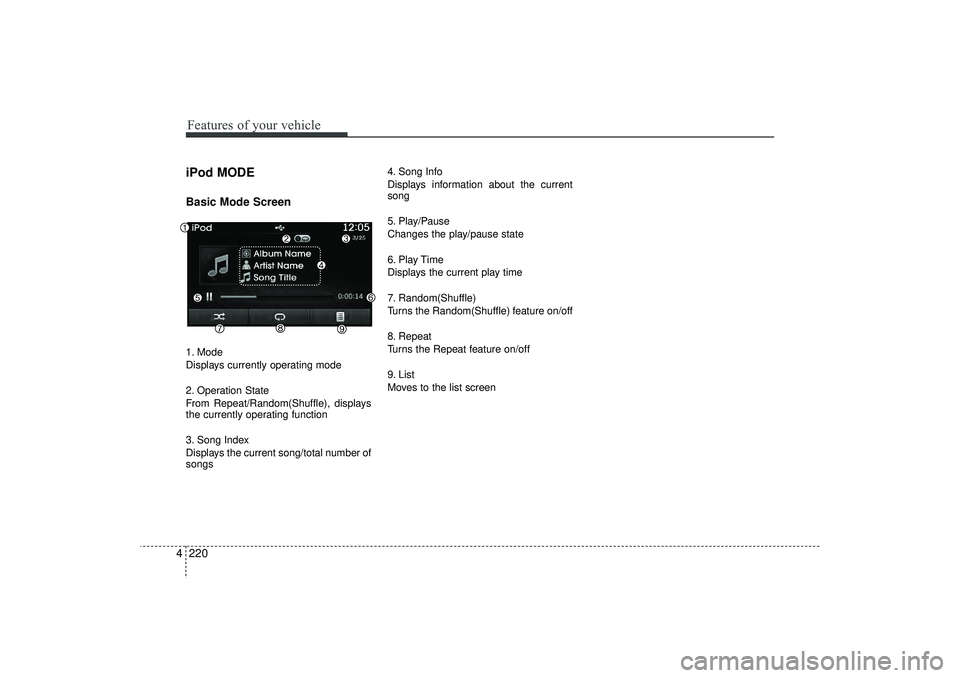
4iPod MODEBasic Mode Screen1. Mode
Displays currently operating mode
2. Operation State
From Repeat/Random(Shuffle), displays
the currently operating function
3. Song Index
Displays the current song/total number of
songs 4. Song Info
Displays information about the current
song
5. Play/Pause
Changes the play/pause state
6. Play Time
Displays the current play time
7. Random(Shuffle)
Turns the Random(Shuffle) feature on/off
8. Repeat
Turns the Repeat feature on/off
9. List
Moves to the list screen
EL(FL) UK 4B AUDIO.QXP 3/13/2015 4:19 PM Page 220
Page 310 of 550
4 225
Features of your vehicle
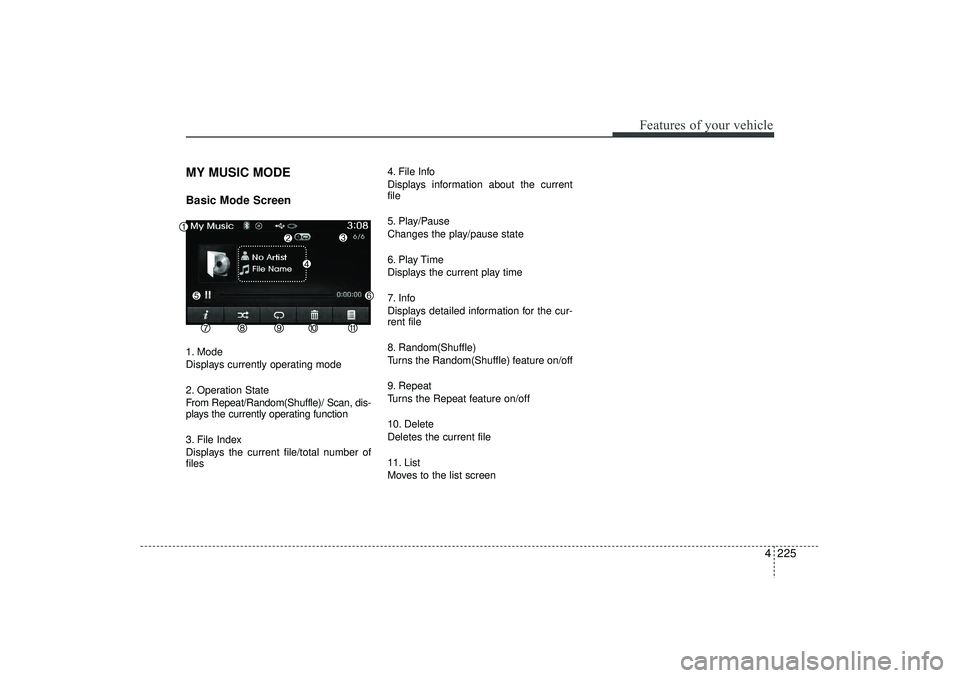
MY MUSIC MODEBasic Mode Screen1. Mode
Displays currently operating mode
2. Operation State
From Repeat/Random(Shuffle)/ Scan, dis-
plays the currently operating function
3. File Index
Displays the current file/total number of
files4. File Info
Displays information about the current
file
5. Play/Pause
Changes the play/pause state
6. Play Time
Displays the current play time
7. Info
Displays detailed information for the cur-
rent file
8. Random(Shuffle)
Turns the Random(Shuffle) feature on/off
9. Repeat
Turns the Repeat feature on/off
10. Delete
Deletes the current file
11. List
Moves to the list screen
EL(FL) UK 4B AUDIO.QXP 3/13/2015 4:19 PM Page 225