2016 HYUNDAI I800 steering
[x] Cancel search: steeringPage 184 of 419

Features of your vehicle
110 4
Power outlet (if equipped)
The power outlet is designed to provide
power for mobile telephones or other
devices designed to operate with vehicle
electrical systems. The devices should
draw less than 10 amps with the engine
running.
Digital clock (if equipped)
Whenever the battery terminals or relat-
ed fuses are disconnected, you must
reset the time.
When the ignition switch is in the ACC or
ON position, the clock buttons operate as
follows:
OTQ047116R
WARNING
Do not put a finger or a foreign ele-
ment (pin, etc.) into a power outlet
and do not touch with a wet hand.
You may get an electric shock.
OTQ047119
WARNING
Do not adjust the clock whilst driv-
ing. You may lose your steering
control and cause an accident that
results in severe personal injury or
death.
CAUTION
• Use the power outlet only when
the engine is running and remove
the accessory plug after use.
Using the accessory plug for pro-
longed periods of time with the
engine off could cause the bat-
tery to discharge.
• Only use 12V electric accessories
which are less than 10A in elec-
tric capacity.
• Adjust the air-conditioner or
heater to the lowest operating
level when using the power outlet.
• Close the cover when not in use.
• Some electronic devices can
cause electronic interference
when plugged into a vehicle’s
power outlet. These devices may
cause excessive audio static and
malfunctions in other electronic
systems or devices used in your
vehicle.
procarmanuals.com
Page 188 of 419

Features of your vehicle
114 4
Steering wheel audio control
(if equipped)
The steering wheel audio remote control
button is installed to promote safe driv-
ing.
VOLUME (VOL +/-) (1)
• Press the lever upward (+) to increase
the volume.
• Press the lever downward (-) to
decrease the volume.
SEEK/PRESET ( / ) (2)
The SEEK/PRESET button has different
functions based on the system mode. For
the following functions the button should
be pressed for 0.8 seconds or more.
RADIO mode
It will function as the AUTO SEEK select
button.
CD/USB mode
It will function as the FF/REW button.If the SEEK/PRESET button is pressed
for less than 0.8 second, it will work as
follows in each mode.
RADIO mode
It will function as the PRESET STATION
buttons.
CD/USB / i Pod mode
It will function as TRACK UP/DOWN but-
ton.
MODE (3)
Press the button to change audio source.
FM (1~2)
➟ AM ➟ CD ➟ USB/AUX ➟FM...
MUTE (4)
Press the button to mute the sound.
Detailed information for audio control
buttons are described in the following
pages in this section.
OTQ045124
CAUTION
Do not operate audio remote con-
trol buttons simultaneously.
procarmanuals.com
Page 234 of 419
Features of your vehicle
160 4
PHONE (If equipped)
Before using the Bluetooth®Wireless
Technology phone features
• In order to use
Bluetooth®Wireless
Technology phone, you must first pair
and connect the
Bluetooth®Wireless
Technology mobile phone.
• If the mobile phone is not paired or con-
nected, it is not possible to enter Phone
mode. Once a phone is paired or con-
nected, the guidance screen will be dis-
played.
• If Priority is set upon vehicle ignition
(IGN/ACC ON), the
Bluetooth®Wireless
Technology phone will be automatically
connected. Even if you are outside, the
Bluetooth®Wireless Technology phone
will be automatically connected once
you are in the vicinity of the vehicle. If
you do not want automatic
Bluetooth®
Wireless Technology phone connec-
tion, set the Bluetooth®Wireless
Technology power to OFF.
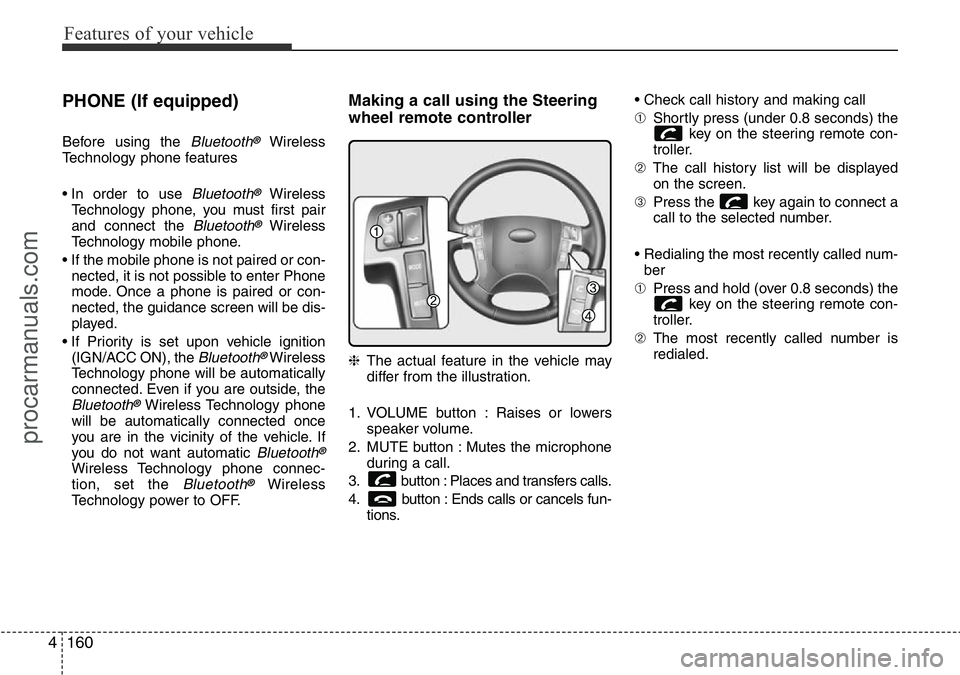
Making a call using the Steering
wheel remote controller
❈The actual feature in the vehicle may
differ from the illustration.
1. VOLUME button : Raises or lowers
speaker volume.
2. MUTE button : Mutes the microphone
during a call.
3. button : Places and transfers calls.
4. button : Ends calls or cancels fun-
tions.• Check call history and making call
➀Shortly press (under 0.8 seconds) the
key on the steering remote con-
troller.
➁The call history list will be displayed
on the screen.
➂Press the key again to connect a
call to the selected number.
• Redialing the most recently called num-
ber
➀Press and hold (over 0.8 seconds) the
key on the steering remote con-
troller.
➁The most recently called number is
redialed.
procarmanuals.com
Page 251 of 419

55
Driving your vehicle
Illuminated ignition switch
(if equipped)
Whenever a front door is opened, the
ignition switch will be illuminated for your
convenience, provided the ignition switch
is not in the ON position. The light will go
off immediately when the ignition switch
is turned on or go off after about 30 sec-
onds when the door is closed.
Ignition switch position
LOCK
The steering wheel locks to protect
against theft. The ignition key can be
removed only in the LOCK position.
When turning the ignition switch to the
LOCK position, push the key inward at
the ACC position and turn the key toward
the LOCK position.
ACC (Accessory)
The steering wheel is unlocked and elec-
trical accessories are operative.
✽NOTICE
If difficulty is experienced in turning the
ignition switch to the ACC position, turn
the key whilst turning steering wheel
right and left to release the tension.
ON
The warning lights can be checked
before the engine is started. This is the
normal running position after the engine
is started.
Do not leave the ignition switch ON if the
engine is not running to prevent battery
discharge.
START
Turn the ignition switch to the START
position to start the engine. The engine
will crank until you release the key; then
it returns to the ON position. The brake
warning lamp can be checked in this
position.
KEY POSITIONS
OTQ057001OTQ057002
procarmanuals.com
Page 252 of 419
Driving your vehicle
6 5
WARNING- Ignition switch
• Never turn the ignition switch to
LOCK or ACC whilst the vehicle
is moving. This would result in
loss of directional control and
braking function, which could
cause an accident.
• The anti-theft steering column
lock is not a substitute for the
parking brake. Before leaving the
driver’s seat, always make sure
the shift lever is engaged in P
(Park) for the automatic transmis-
sion and set the parking brake
fully and shut the engine off.
Unexpected and sudden vehicle
movement may occur if these
precautions are not taken.
• Never reach for the ignition
switch, or any other controls
through the steering wheel whilst
the vehicle is in motion. The pres-
ence of your hand or arm in this
area could cause a loss of vehicle
control, an accident and serious
bodily injury or death.
(Continued)
(Continued)
• Do not place any movable objects
around the driver’s seat as they
may move whilst driving, inter-
fere with the driver and lead to an
accident.
procarmanuals.com
Page 258 of 419

Driving your vehicle
12 5
Good driving practices
• Never take the car out of gear and
coast down a hill. This is extremely
hazardous. Always leave the car in
gear.
• Don't "ride" the brakes. This can cause
them to overheat and malfunction.
Instead, when you are driving down a
long hill, shift to a lower gear. When
you do this, engine braking will help
slow the car.
• Slow down before shifting to a lower
gear. This will help avoid over-revving
the engine, which can cause damage.
• Slow down when you encounter cross
winds. This gives you much better con-
trol of your car.
• Be sure the car is completely stopped
before you attempt to shift into reverse.
The transmission can be damaged if
you do not. To shift into reverse,
depress the clutch, move the shift lever
to neutral, wait 3 seconds, then shift to
the reverse position.
• Exercise extreme caution when driving
on a slippery surface. Be especially
careful when braking, accelerating or
shifting gears. On a slippery surface,
an abrupt change in vehicle speed can
cause the drive wheels to lose traction
and the vehicle to go out of control.WARNING
• Always buckle-up! In a collision,
an unbelted occupant is signifi-
cantly more likely to be seriously
injured or killed than a properly
belted occupant.
• Avoid high speeds when corner-
ing or turning.
• Do not make quick steering
wheel movements, such as sharp
lane changes or fast, sharp turns.
• The risk of rollover is greatly
increased if you lose control of
your vehicle at highway speeds.
• Loss of control often occurs if
two or more wheels drop off the
roadway and the driver over-
steers to reenter the roadway.
• In the event your vehicle leaves
the roadway, do not steer sharply.
Instead, slow down before pulling
back into the travel lanes.
• Never exceed posted speed lim-
its.
procarmanuals.com
Page 264 of 419

Driving your vehicle
18 5
Good driving practices
• Never move the gear shift lever from P
(Park) or N (Neutral) to any other posi-
tion with the accelerator pedal
depressed.
• Never move the gear shift lever into P
(Park) when the vehicle is in motion.
• Be sure the car is completely stopped
before you attempt to shift into R
(Reverse).
• Never take the car out of gear and
coast down a hill. This may be
extremely hazardous. Always leave the
car in gear when moving.
• Do not "ride" the brakes. This can
cause them to overheat and malfunc-
tion. Instead, when you are driving
down a long hill, shift to a lower gear.
When you do this, engine braking will
help slow the car.
• Slow down before shifting to a lower
gear. Otherwise, the lower gear may
not be engaged.
• Always use the parking brake. Do not
depend on placing the transmission in
P (Park) to keep the car from moving.• Exercise extreme caution when driving
on a slippery surface. Be especially
careful when braking, accelerating or
shifting gears. On a slippery surface,
an abrupt change in vehicle speed can
cause the drive wheels to lose traction
and the vehicle to go out of control.
• Optimum vehicle performance and
economy is obtained by smoothly
depressing and releasing the accelera-
tor pedal.
WARNING
• Always buckle-up! In a collision,
an unbelted occupant is signifi-
cantly more likely to be seriously
injured or killed than a properly
belted occupant.
• Avoid high speeds when corner-
ing or turning.
• Do not make quick steering
wheel movements, such as sharp
lane changes or fast, sharp turns.
• The risk of rollover is greatly
increased if you lose control of
your vehicle at highway speeds.
(Continued)
(Continued)
• Loss of control often occurs if
two or more wheels drop off the
roadway and the driver over-
steers to reenter the roadway.
• In the event your vehicle leaves
the roadway, do not steer sharply.
Instead, slow down before pulling
back into the travel lanes.
• Never exceed posted speed lim-
its.
WARNING
If your vehicle becomes stuck in
snow, mud, sand, etc., then you
may attempt to rock the vehicle free
by moving it forward and backward.
Do not attempt this procedure if
people or objects are anywhere
near the vehicle. During the rocking
operation the vehicle may suddenly
move forward of backward as it
becomes unstuck, causing injury
or damage to nearby people or
objects.
procarmanuals.com
Page 266 of 419

Driving your vehicle
20 5
Power brakes
Your vehicle has power-assisted brakes
that adjust automatically through normal
usage.
In the event that the power-assisted
brakes lose power because of a stalled
engine or some other reason, you can
still stop your vehicle by applying greater
force to the brake pedal than you nor-
mally would. The stopping distance, how-
ever, will be longer.
When the engine is not running, the
reserve brake power is partially depleted
each time the brake pedal is applied. Do
not pump the brake pedal when the
power assist has been interrupted.
Pump the brake pedal only when neces-
sary to maintain steering control on slip-
pery surfaces.
BRAKE SYSTEM
WARNING - Brakes
• Do not drive with your foot rest-
ing on the brake pedal. This will
create abnormal high brake tem-
peratures, excessive brake lining
and pad wear, and increased
stopping distances.
• When descending a long or steep
hill, shift to a lower gear and
avoid continuous application of
the brakes. Continuous brake
application will cause the brakes
to overheat and could result in a
temporary loss of braking per-
formance.
• Wet brakes may impair the vehi-
cle’s ability to sefely slow down;
the vehicle may also pull to one
side when the brakes are applied.
Applying the brakes lightly will
indicate whether they have been
affected in this way. Always test
your brakes in this fashion after
driving through deep water. To
dry the brakes, apply them lightly
whilst maintaining a safe forward
speed until brake performance
returns to normal.
(Continued)
(Continued)
• Always, confirm the position of
the brake and accelerator pedal
before driving. If you do not
check the position of the acceler-
ator and brake pedal before driv-
ing, you may depress the acceler-
ator instead of the brake pedal. It
may cause a serious accident.
procarmanuals.com