Page 158 of 473

3-96
Convenient features of your vehicle
Headlight escort function (if equipped)
The headlights (and/or taillights)
remain on for approximately 5 min-
utes after the ignition key is removed
or turned to the ACC or LOCK posi-
tion. However, if the driver’s door isopened and closed, the headlights
are turned off after 30 seconds.
The headlights can be turned off by
pressing the lock button on the trans-
mitter twice or turning off the light
switch from the headlight or Autolight position.
Headlight welcome function (if equipped)
When the headlight switch is in the
ON or AUTO position and all doors
(and tailgate) are closed and locked,
if you press the door unlock button
on the transmitter the headlights will
come on for about 15 seconds.
If the headlight switch is in the AUTO position, the function can only oper-ate at night.
At this time, if you press the door
unlock button again or door lock but-
ton on the transmitter, the headlights
will turn off immediately.
Lighting control
The light switch has a Headlight and
a Parking light position.
To operate the lights, turn the knob at
the end of the control lever to one of
the following positions: (1) OFF position
(2) Parking light position(3) Headlight position
(4) Auto light position (if equipped)
If the driver gets out of the vehi-
cle through other doors (except
driver’s door), the battery saverfunction does not operate and
the headlight escort function
does not turn off automatically.
Therefore, it causes the battery
to be discharged. In this case,make sure to turn off the lamp
before getting out of the vehi-
cle.
CAUTION
OEU044176
Page 168 of 473
3-106
Convenient features of your vehicle
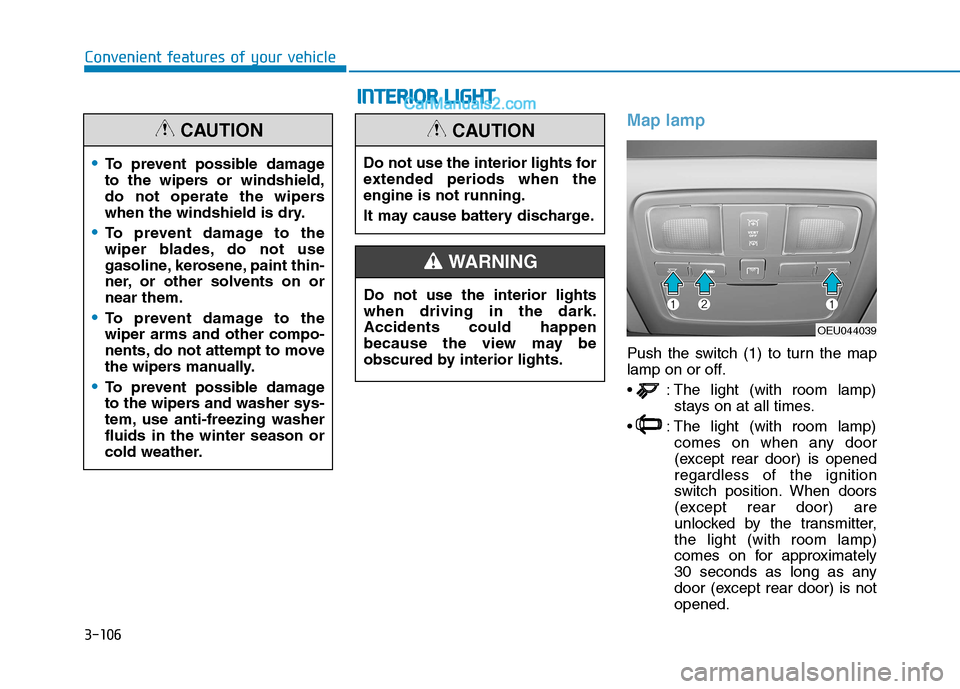
Map lamp
Push the switch (1) to turn the map
lamp on or off.
: The light (with room lamp)stays on at all times.
: The light (with room lamp) comes on when any door
(except rear door) is openedregardless of the ignition
switch position. When doors
(except rear door) are
unlocked by the transmitter,the light (with room lamp)
comes on for approximately
30 seconds as long as any
door (except rear door) is notopened.
To prevent possible damage
to the wipers or windshield,
do not operate the wipers
when the windshield is dry.
To prevent damage to the
wiper blades, do not use
gasoline, kerosene, paint thin-
ner, or other solvents on ornear them.
To prevent damage to the wiper arms and other compo-
nents, do not attempt to move
the wipers manually.
To prevent possible damage
to the wipers and washer sys-
tem, use anti-freezing washerfluids in the winter season or
cold weather.
CAUTION
OEU044039
Do not use the interior lights for
extended periods when theengine is not running.
It may cause battery discharge.
CAUTION
Do not use the interior lights when driving in the dark.Accidents could happen
because the view may be
obscured by interior lights.
WARNING
II
NN TTEERR IIOO RR LL IIGG HH TT
Page 169 of 473
3-107
Convenient features of your vehicle
3
Also, the light (with room
lamp) goes out gradually
after approximately 30 sec-
onds if the door (except rear
door) is closed. However, if
the ignition switch is ON or
all doors (except rear door)
are locked, the light will turn
off immediately.
If a door (except rear door) is opened with the ignition
switch in the ACC or LOCKposition, the light (with room
lamp) stays on for about 20
minutes. However, if a door
(except rear door) is opened
with the ignition switch in theON position, the light (with
room lamp) stays on contin-
uously.Reading lamp (if equipped)
The reading lamp is turned on by
pushing switch and if the switch ispushed on more the reading lamp
will be turned off.To use the reading lamp, push the
main switch with the ignition
switch "ON" position.
NOTICE
OEU044227
OEU044071
■
Main switch
■ Passenger's side
Page 179 of 473
3-117
Convenient features of your vehicle
3
System operation
Ventilation
1. Set the mode to the position.
2. Set the air intake control to theoutside (fresh) air position.
3. Set the temperature control to the desired position.
4. Set the fan speed control to the desired speed.
Heating
1. Set the mode to the position.
2. Set the air intake control to theoutside (fresh) air position.
3. Set the temperature control to the desired position.
4. Set the fan speed control to the desired speed.
5. If dehumidified heating is desired, turn the air conditioning system (if equipped) on.
If the windshield fogs up, set the mode to the or position.
Operation Tips
To keep dust or unpleasant fumesfrom entering the vehicle through
the ventilation system, temporarily
set the air intake control to the
recirculated air position. Be sure to
return the control to the fresh air
position when the irritation has
passed to keep fresh air in the
vehicle. This will help keep the driv-
er alert and comfortable.
Air for the heating/cooling system is drawn in through the grilles just
ahead of the windshield. Care
should be taken that these are not
blocked by leaves, snow, ice or
other obstructions.
To prevent interior fog on the wind- shield, set the air intake control to
the fresh air position and fan speed
to the desired position, turn on theair conditioning system, and adjust
the temperature control to desired
temperature.
Air conditioning (if equipped)
HYUNDAI Air Conditioning Systems
are filled with environmentally friend-
ly R-134a refrigerant.
1. Start the engine. Push the air con- ditioning button.
2. Set the mode to the position.
3. Set the air intake control to the outside air or recirculated air posi- tion.
4. Adjust the fan speed control and temperature control to maintain
maximum comfort.
When maximum cooling is desired, set the temperature control to the
extreme left position, then set the
fan speed control to the highestspeed.
Page 188 of 473
3-126
Convenient features of your vehicle
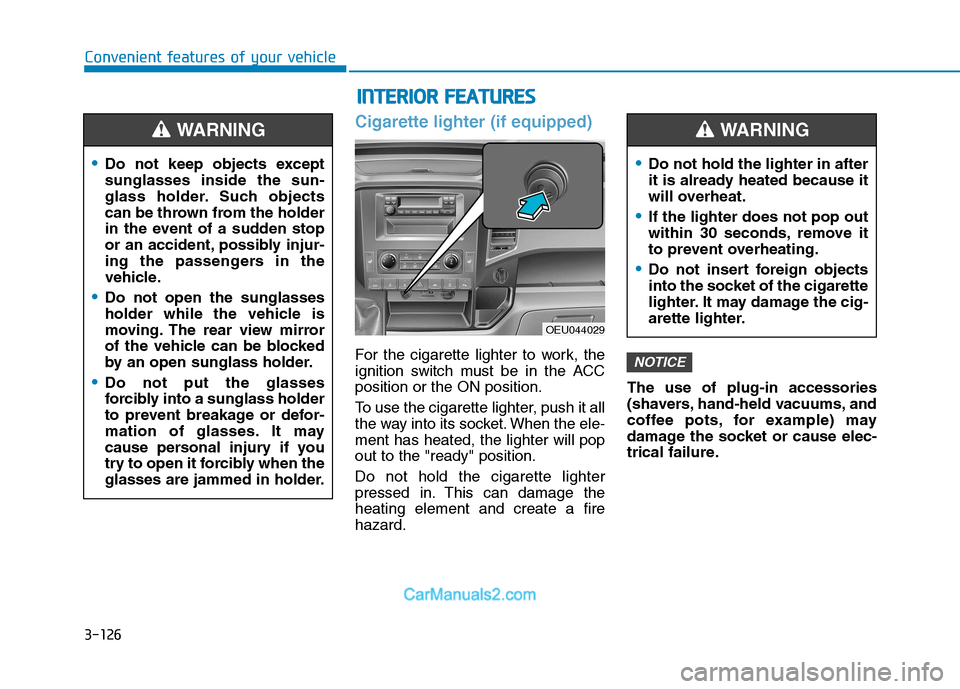
Cigarette lighter (if equipped)
For the cigarette lighter to work, the
ignition switch must be in the ACCposition or the ON position.
To use the cigarette lighter, push it all
the way into its socket. When the ele-ment has heated, the lighter will popout to the "ready" position. Do not hold the cigarette lighter
pressed in. This can damage theheating element and create a firehazard.The use of plug-in accessories
(shavers, hand-held vacuums, and
coffee pots, for example) may
damage the socket or cause elec-
trical failure.NOTICE
Do not keep objects except sunglasses inside the sun-
glass holder. Such objects
can be thrown from the holder
in the event of a sudden stop
or an accident, possibly injur-
ing the passengers in the
vehicle.
Do not open the sunglasses
holder while the vehicle is
moving. The rear view mirror
of the vehicle can be blocked
by an open sunglass holder.
Do not put the glasses
forcibly into a sunglass holder
to prevent breakage or defor-
mation of glasses. It may
cause personal injury if you
try to open it forcibly when the
glasses are jammed in holder.
WARNING
II
NN TTEERR IIOO RR FF EE AA TTUU RREESS
OEU044029
Do not hold the lighter in after
it is already heated because it
will overheat.
If the lighter does not pop out
within 30 seconds, remove it
to prevent overheating.
Do not insert foreign objects
into the socket of the cigarette
lighter. It may damage the cig-
arette lighter.
WARNING
Page 194 of 473

4-2
Multimedia System
Information
If you install an aftermarket HID headlamp, your vehicle’s audio and
electronic device may malfunction.
Prevent chemicals such as perfume, cosmetic oil, sun cream, hand clean-
er, and air freshener from contacting
the interior parts because they may
cause damage or discoloration.Aux, USB and iPod ®
(if equipped)
If your vehicle has an aux and/or
USB(universal serial bus) port, you
can use an aux port to connect audio
devices and an USB port to plug in
an USB.
Information
When using a portable audio device
connected to the power outlet, noise
may occur during playback. If this
happens, use the power source of the
portable audio device. ❈ iPod ®
is a trademark of Apple Inc.
Antenna
Roof antenna
Your vehicle uses a roof antenna to
receive both AM and FM broadcast
signals. This antenna is a removable
type. To remove the antenna, turn it
counterclockwise. To install the
antenna, turn it clockwise.
i
i
MM UULLTT IIMM EEDD IIAA SS YY SSTT EEMM
OLM043373
OEU044035
Page 195 of 473
4-3
Multimedia System
4
Before entering a place with alow height clearance or a vehicle
wash, remove the antenna by
rotating it counterclockwise. If
not, the antenna may be dam-
aged.
When reinstalling your antenna, it is important that it is fullytightened and adjusted to the
upright position to ensure prop-
er reception. But it could be fold-
ed or removed when parking the
vehicle or when loading cargo
on the roof rack.
When cargo is loaded on the roof rack, do not place the cargonear the antenna pole to ensure
proper reception.
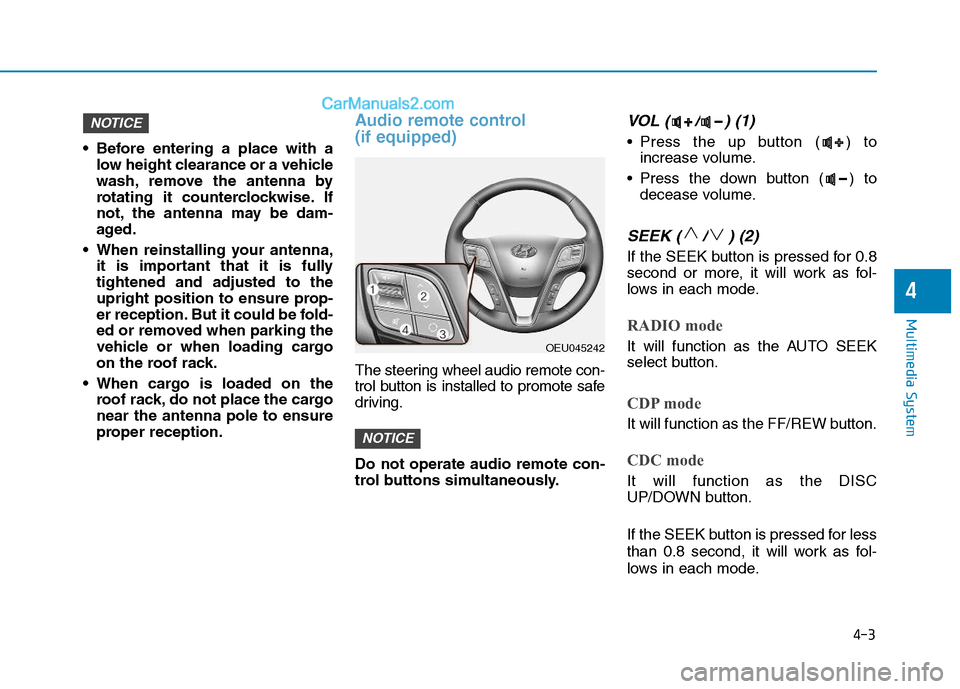
Audio remote control (if equipped)
The steering wheel audio remote con-
trol button is installed to promote safe
driving. Do not operate audio remote con-
trol buttons simultaneously.
VOL ( / ) (1)
• Press the up button ( ) toincrease volume.
Press the down button ( ) to decease volume.
SEEK ( / ) (2)
If the SEEK button is pressed for 0.8
second or more, it will work as fol-
lows in each mode.
RADIO mode
It will function as the AUTO SEEK
select button.
CDP mode
It will function as the FF/REW button.
CDC mode
It will function as the DISC
UP/DOWN button.
If the SEEK button is pressed for less
than 0.8 second, it will work as fol-
lows in each mode.
NOTICE
NOTICE
OEU045242
Page 198 of 473
4-6
Multimedia System
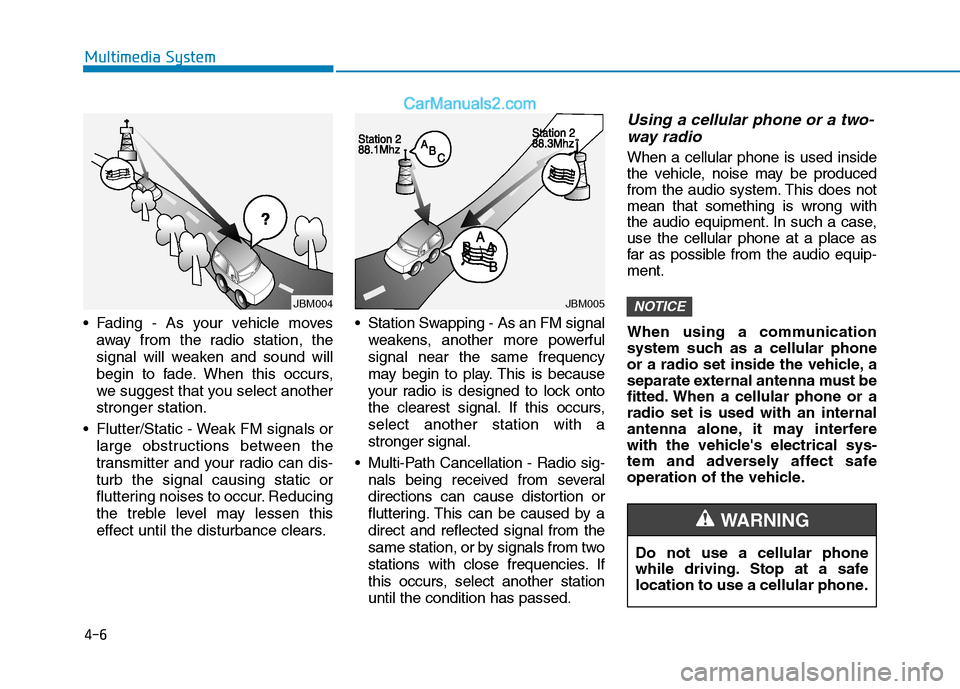
Fading - As your vehicle movesaway from the radio station, the
signal will weaken and sound will
begin to fade. When this occurs,
we suggest that you select anotherstronger station.
Flutter/Static - Weak FM signals or large obstructions between the
transmitter and your radio can dis-turb the signal causing static or
fluttering noises to occur. Reducing
the treble level may lessen this
effect until the disturbance clears. Station Swapping - As an FM signal
weakens, another more powerfulsignal near the same frequency
may begin to play. This is because
your radio is designed to lock onto
the clearest signal. If this occurs,select another station with astronger signal.
Multi-Path Cancellation - Radio sig- nals being received from several
directions can cause distortion or
fluttering. This can be caused by adirect and reflected signal from the
same station, or by signals from two
stations with close frequencies. If
this occurs, select another stationuntil the condition has passed.
Using a cellular phone or a two-
way radio
When a cellular phone is used inside
the vehicle, noise may be produced
from the audio system. This does notmean that something is wrong with
the audio equipment. In such a case,use the cellular phone at a place as
far as possible from the audio equip-ment.
When using a communication
system such as a cellular phone
or a radio set inside the vehicle, a
separate external antenna must be
fitted. When a cellular phone or aradio set is used with an internal
antenna alone, it may interfere
with the vehicle's electrical sys-
tem and adversely affect safe
operation of the vehicle.
NOTICE
Do not use a cellular phone
while driving. Stop at a safe
location to use a cellular phone.
WARNING
JBM004JBM005