2016 Hyundai Grand Santa Fe air condition
[x] Cancel search: air conditionPage 271 of 717
Features of your vehicle
174 4
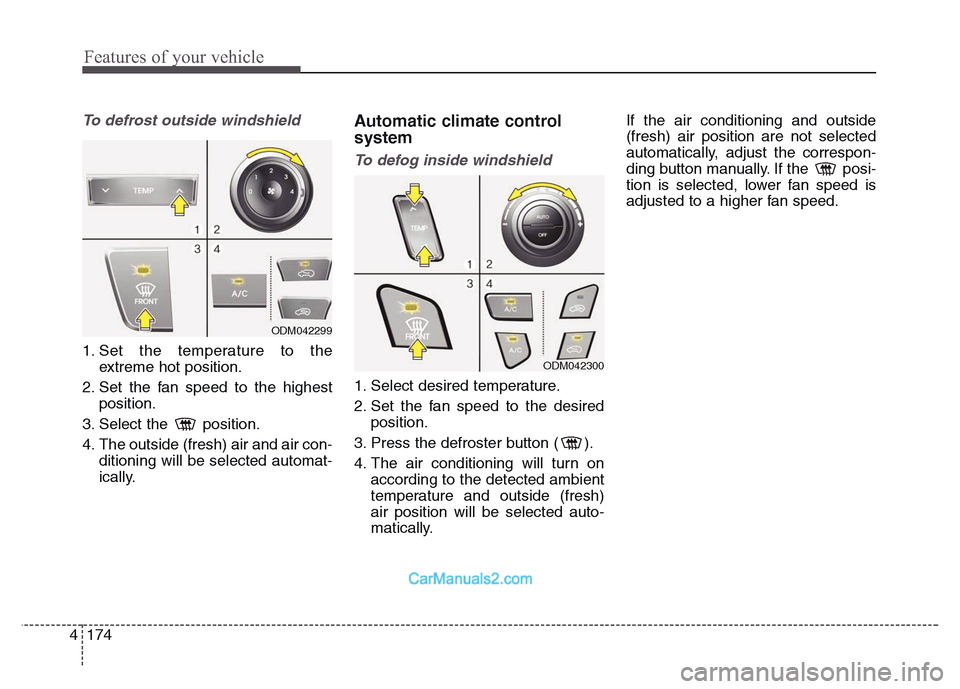
To defrost outside windshield
1. Set the temperature to the
extreme hot position.
2. Set the fan speed to the highest
position.
3. Select the position.
4. The outside (fresh) air and air con-
ditioning will be selected automat-
ically.
Automatic climate control
system
To defog inside windshield
1. Select desired temperature.
2. Set the fan speed to the desired
position.
3. Press the defroster button ( ).
4. The air conditioning will turn on
according to the detected ambient
temperature and outside (fresh)
air position will be selected auto-
matically.If the air conditioning and outside
(fresh) air position are not selected
automatically, adjust the correspon-
ding button manually. If the posi-
tion is selected, lower fan speed is
adjusted to a higher fan speed.
ODM042299
ODM042300
Page 272 of 717
4 175
Features of your vehicle
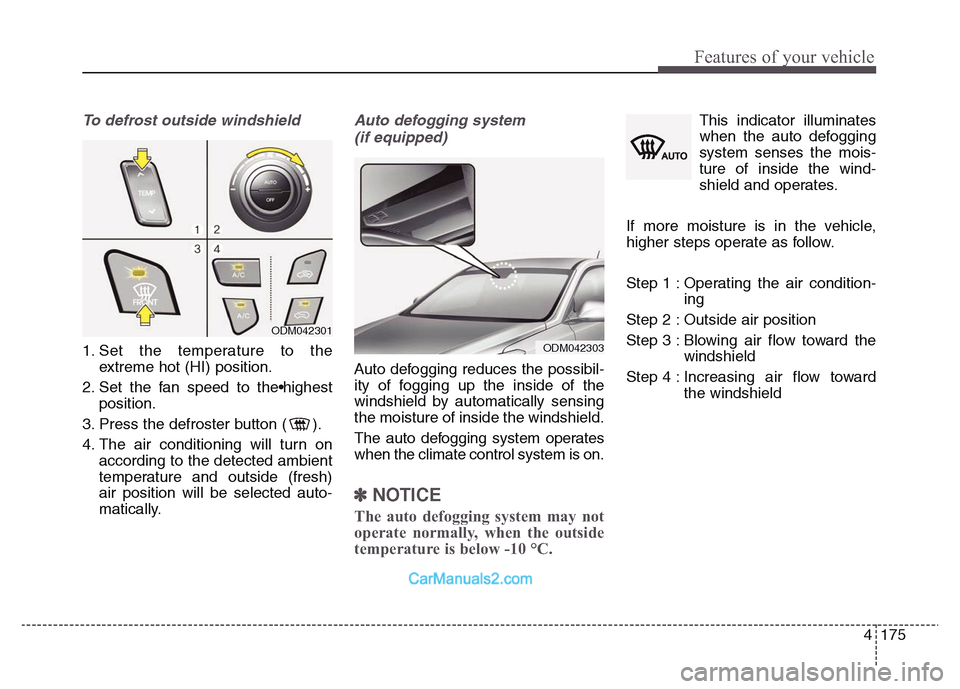
To defrost outside windshield
1. Set the temperature to the
extreme hot (HI) position.
2. Set the fan speed to the•highest
position.
3. Press the defroster button ( ).
4. The air conditioning will turn on
according to the detected ambient
temperature and outside (fresh)
air position will be selected auto-
matically.
Auto defogging system
(if equipped)
Auto defogging reduces the possibil-
ity of fogging up the inside of the
windshield by automatically sensing
the moisture of inside the windshield.
The auto defogging system operates
when the climate control system is on.
✽NOTICE
The auto defogging system may not
operate normally, when the outside
temperature is below -10 °C.
This indicator illuminates
when the auto defogging
system senses the mois-
ture of inside the wind-
shield and operates.
If more moisture is in the vehicle,
higher steps operate as follow.
Step 1 : Operating the air condition-
ing
Step 2 : Outside air position
Step 3 : Blowing air flow toward the
windshield
Step 4 : Increasing air flow toward
the windshield
ODM042301
ODM042303
Page 275 of 717
Features of your vehicle
178 4
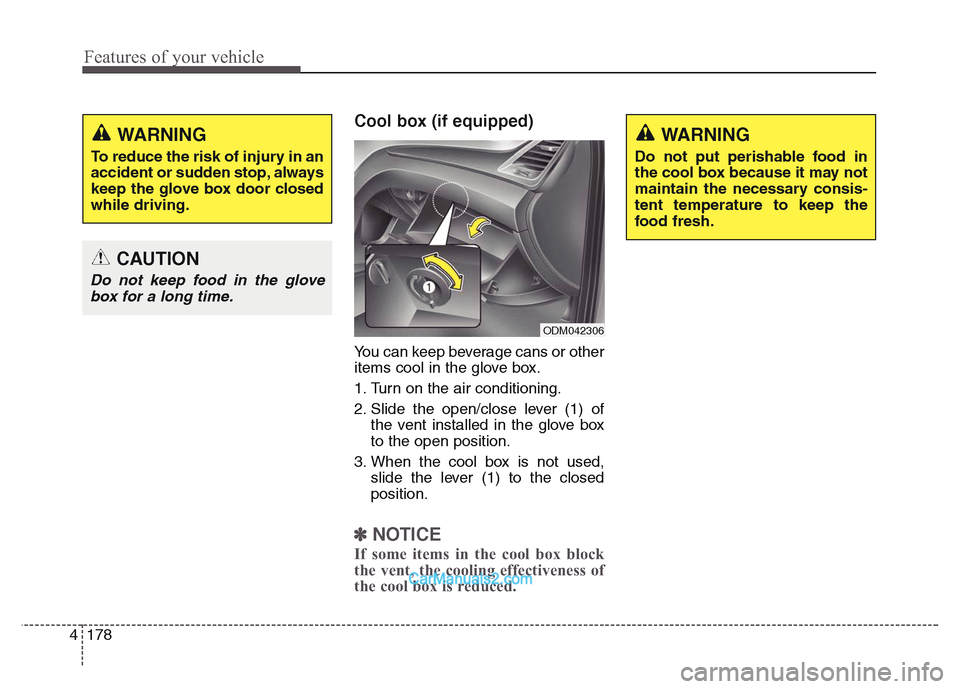
Cool box (if equipped)
You can keep beverage cans or other
items cool in the glove box.
1. Turn on the air conditioning.
2. Slide the open/close lever (1) of
the vent installed in the glove box
to the open position.
3. When the cool box is not used,
slide the lever (1) to the closed
position.
✽NOTICE
If some items in the cool box block
the vent, the cooling effectiveness of
the cool box is reduced.
WARNING
To reduce the risk of injury in an
accident or sudden stop, always
keep the glove box door closed
while driving.
CAUTION
Do not keep food in the glove
box for a long time.
ODM042306
WARNING
Do not put perishable food in
the cool box because it may not
maintain the necessary consis-
tent temperature to keep the
food fresh.
Page 281 of 717
Features of your vehicle
184 4
Power outletCAUTION
• Use power outlet only when
the engine is running and
remove the accessory plug
after use. Using the accessory
plug for prolonged periods of
time with the engine off could
cause the battery to discharge.
• Only use 12V electric acces-
sories which are less than 10A
in electric capacity.
• Adjust the air-conditioner or
heater to the lowest operating
level when using the power
outlet.
• Close the cover when not in
use.
• Some electronic devices can
cause electronic interference
when plugged into a vehicle’s
power outlet. These devices
may cause excessive audio
static and malfunctions in
other electronic systems or
devices used in your vehicle.
ODM042318
ONCDCO3039
■Center
■Rear (if equipped)
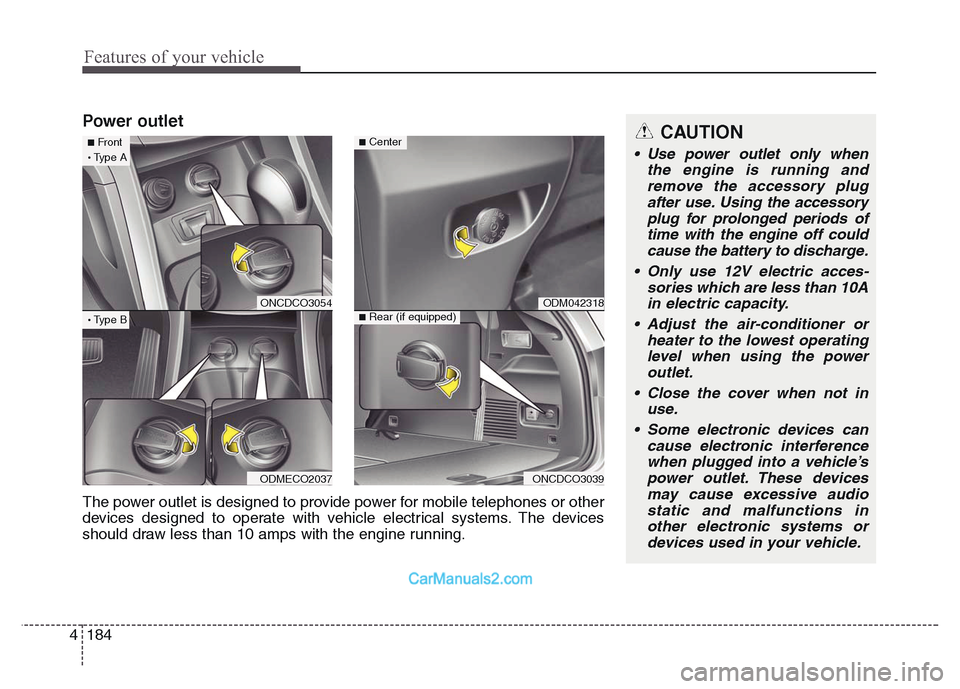
The power outlet is designed to provide power for mobile telephones or other
devices designed to operate with vehicle electrical systems. The devices
should draw less than 10 amps with the engine running.
ONCDCO3054
ODMECO2037
■Front·Type A
·Type B
Page 345 of 717
Features of your vehicle
248 4
✽NOTICE - USING THE
Bluetooth®Wireless
Technology CELLULAR PHONE
• Do not use a cellular phone or per-
form Bluetooth®Wireless
Technology settings (e.g. pairing a
phone) while driving.
• Some Bluetooth
®Wireless
Technology -enabled phones may
not be recognized by the system or
fully compatible with the system.
• Before using Bluetooth
®Wireless
Technology related features of the
audio system, refer your phone’s
User’s Manual for phone-side
Bluetooth
®Wireless Technology
operations.
• The phone must be paired to the
audio system to use Bluetooth
®
Wireless Technology related fea-
tures.
• You will not be able to use the
hands-free feature when your
phone (in the car) is outside of the
cellular service area (e.g. in a tun-
nel, in a underground, in a moun-
tainous area, etc.).
( Continued)( Continued)
• If the cellular phone signal is poor
or the vehicles interior noise is too
loud, it may be difficult to hear the
other person’s voice during a call.
• Do not place the phone near or
inside metallic objects, otherwise
communications with Bluetooth
®
Wireless Technology system or cel-
lular service stations can be dis-
turbed.
• While a phone is connected
through Bluetooth
®Wireless
Technology your phone may dis-
charge quicker than usual for
additional Bluetooth
®Wireless
Technology-related operations.
• Some cellular phones or other
devices may cause interference
noise or malfunction to audio sys-
tem. In this case, store the device
in a different location may resolve
the condition.
• Phone contact names should be
saved in English or they may not
be displayed correctly.
( Continued)( Continued)
• If Priority is set upon vehicle igni-
tion(IGN/ACC ON), the Bluetooth
®
Wireless Technology phone will be
automatically connected.
Even if you are outside, the
Bluetooth
®Wireless Technology
phone will be automatically con-
nected once you are in the vicinity
of the vehicle.
If you do not want automatic
Bluetooth
®Wireless Technology
connection, turn the Bluetooth®
Wireless Technology feature off.
• The hands-free call volume and
quality may differ depending on
the mobile phone type.
•Bluetooth
®Wireless Technology
features can be used only when the
mobile phone has been paired and
connected with the device. For
more information on pairing and
connecting Bluetooth
®Wireless
Technology enabled mobile
phones, refer to the “Phone Setup”
section.
( Continued)
Page 483 of 717
Driving your vehicle
34 5
In the event of brake failure
If service brakes fail to operate while
the vehicle is in motion, you can
make an emergency stop with the
parking brake. The stopping dis-
tance, however, will be much greater
than normal.
Disc brakes wear indicator
When your brake pads are worn and
new pads are required, you will hear
a high-pitched warning sound from
your front brakes or rear brakes. You
may hear this sound come and go or
it may occur whenever you depress
the brake pedal.
Please remember that some driving
conditions or climates may cause a
brake squeal when you first apply (or
lightly apply) the brakes. This is nor-
mal and does not indicate a problem
with your brakes.
WARNING - Parking brake
Applying the parking brake
while the vehicle is moving at
normal speeds can cause a
sudden loss of control of the
vehicle. If you must use the
parking brake to stop the vehi-
cle, use great caution in apply-
ing the brake.
WARNING - Brake wear
This brake wear warning sound
means your vehicle needs serv-
ice. If you ignore this audible
warning, you will eventually
lose braking performance,
which could lead to a serious
accident.
CAUTION
• To avoid costly brake repairs,
do not continue to drive with
worn brake pads.
• Always replace the front or
rear brake pads as pairs.
Page 521 of 717
Driving your vehicle
72 5
Active ECO operation
Active ECO helps improve fuel effi-
ciency by controlling certain engine
and transaxle system operating
parameters. Fuel efficiency depends
on the driver's driving habit and road
condition.
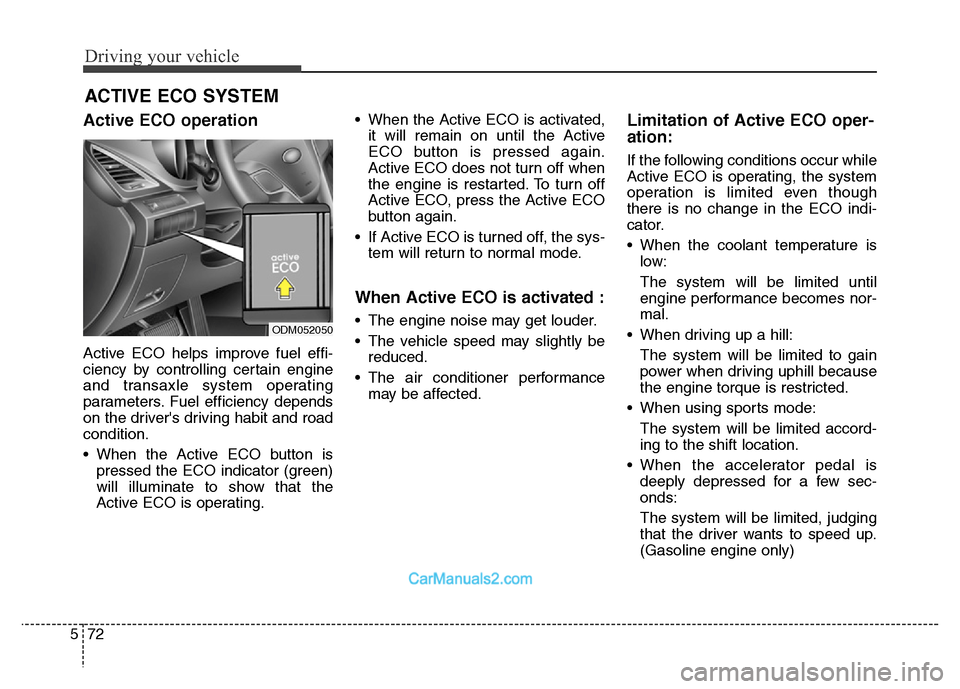
• When the Active ECO button is
pressed the ECO indicator (green)
will illuminate to show that the
Active ECO is operating.• When the Active ECO is activated,
it will remain on until the Active
ECO button is pressed again.
Active ECO does not turn off when
the engine is restarted. To turn off
Active ECO, press the Active ECO
button again.
• If Active ECO is turned off, the sys-
tem will return to normal mode.
When Active ECO is activated :
• The engine noise may get louder.
• The vehicle speed may slightly be
reduced.
• The air conditioner performance
may be affected.
Limitation of Active ECO oper-
ation:
If the following conditions occur while
Active ECO is operating, the system
operation is limited even though
there is no change in the ECO indi-
cator.
• When the coolant temperature is
low:
The system will be limited until
engine performance becomes nor-
mal.
• When driving up a hill:
The system will be limited to gain
power when driving uphill because
the engine torque is restricted.
• When using sports mode:
The system will be limited accord-
ing to the shift location.
• When the accelerator pedal is
deeply depressed for a few sec-
onds:
The system will be limited, judging
that the driver wants to speed up.
(Gasoline engine only)
ACTIVE ECO SYSTEM
ODM052050
Page 522 of 717
573
Driving your vehicle
ECONOMICAL OPERATION
Your vehicle's fuel economy depends
mainly on your style of driving, where
you drive and when you drive.
Each of these factors affects how
many kilometers (miles) you can get
from a liter (gallon) of fuel. To oper-
ate your vehicle as economically as
possible, use the following driving
suggestions to help save money in
both fuel and repairs:
• Drive smoothly. Accelerate at a
moderate rate. Do not make "jack-
rabbit" starts or full-throttle shifts
and maintain a steady cruising
speed. Do not race between stop-
lights. Try to adjust your speed to
the traffic so you do not have to
change speeds unnecessarily.
Avoid heavy traffic whenever pos-
sible. Always maintain a safe dis-
tance from other vehicles so you
can avoid unnecessary braking.
This also reduces brake wear.
• Drive at a moderate speed. The
faster you drive, the more fuel your
vehicle uses. Driving at a moderate
speed, especially on the highway,
is one of the most effective ways to
reduce fuel consumption.• Do not "ride" the brake pedal. This
can increase fuel consumption and
also increase wear on these com-
ponents. In addition, driving with
your foot resting on the brake pedal
may cause the brakes to overheat,
which reduces their effectiveness
and may lead to more serious con-
sequences.
• Take care of your tires. Keep them
inflated to the recommended pres-
sure. Incorrect inflation, either too
much or too little, results in unnec-
essary tire wear. Check the tire
pressures at least once a month.
• Be sure that the wheels are
aligned correctly. Improper align-
ment can result from hitting curbs
or driving too fast over irregular
surfaces. Poor alignment causes
faster tire wear and may also result
in other problems as well as
greater fuel consumption.• Keep your vehicle in good condi-
tion. For better fuel economy and
reduced maintenance costs, main-
tain your vehicle in accordance
with the maintenance schedule in
section 7. If you drive your vehicle
in severe conditions, more frequent
maintenance is required (see sec-
tion 7 for details).
• Keep your vehicle clean. For maxi-
mum service, your vehicle should
be kept clean and free of corrosive
materials. It is especially important
that mud, dirt, ice, etc. not be
allowed to accumulate on the
underside of the vehicle. This extra
weight can result in increased fuel
consumption and also contribute to
corrosion.
• Travel lightly. Do not carry unnec-
essary weight in your vehicle.
Weight reduces fuel economy.
• Do not let the engine idle longer
than necessary. If you are waiting
(and not in traffic), turn off your
engine and restart only when
you're ready to go.