Page 201 of 502
3-110
Convenient features of your vehicle
Also, if the outside rearview mirror
folding switch is in the AUTO posi-
tion, the outside rearview mirror will
unfold automatically.
Door handle lamp (if equipped)
When all the doors (and boot) are
closed and locked, the door handle
lamp will come on for about 15 sec-
onds if any of the below is performed.
• When the door unlock button is
pressed on the smart key.
• When the button of the outside
door handle is pressed.
• When the vehicle is approached
with the smart key in possession.
Headlamp and Parking lamp
When the headlamp (lamp switch in
the headlamp or AUTO position) is on
and all doors (and boot) are locked
and closed, the parking lamp and
headlamp will come on for 15 seconds
if/or any of the below is performed.
• When the door unlock button is
pressed on the smart key.
At this time, if you press the door lock
or unlock button, the parking lamp and
headlamp will turn off immediately.
You can activate or deactivate the
Welcome Light from the User
Settings Mode on the LCD display.
For more details, refer to "LCD
Display" in this chapter.
Interior lamp
When the interior lamp switch is in
the DOOR position and all doors (and
boot) are closed and locked, the
room lamp will come on for 30 sec-
onds if any of the below is performed.
• When the door unlock button is
pressed on the smart key.
• When the button of the outside
door handle is pressed.
At this time, if you press the door lock
or unlock button, the room lamp will
turn off immediately.
Page 214 of 502

3-123
Convenient features of your vehicle
3
✽NOTICE
Sensor may not recognize objects
less than 30 cm from the sensor, or it
may sense an incorrect distance.
Smart Parking Assist System
(SPAS) (if equipped)The Smart Parking Assist System
helps drivers park their vehicle by
using sensors to measure parking
spaces, control the steering wheel to
semi-automatically park the vehicle
and provide instruction on the LCD
display to help through parking.
Additionally, the system provides
assistance when leaving (parallel
exit) a parking space.
The volume for the Smart Parking
Assist System can be adjusted from
the User Settings Mode on the LCD
display. For more details, refer to
"LCD Display" in this chapter. Do not push, scratch or strike
the sensor with any hard
objects that could damage the
surface of the sensor. Sensor
damage could occur.
CAUTION
Your new vehicle warranty does
not cover any accidents or dam-
age to the vehicle or injuries to
its occupants related to a
Parking Assist System. Always
drive safely and cautiously.
WARNING
ODH044179R
ODH043180
ODH043181
■Parallel parking
■Reverse parking
■Parallel exit
Page 221 of 502

3-130
Convenient features of your vehicle
1. Activate Smart Parking Assist
System
• Press the Smart Parking Assist
System button (the button indicator
will illuminate).
• The Parking Assist System will be
activated (the button indicator will
illuminate).
A warning sound will be heard if an
obstacle is detected.
• Press the Smart Parking Assist
System button again for more than
2 seconds to turn off the system.
• The Smart Parking Assist System
defaults to the OFF position when-
ever the engine is turned on.
2. Select Parking Mode
• Select parallel mode or reverse
mode by pressing the Smart
Parking Assist System button with
the shift lever in D (Drive) and the
brake pedal depressed.
• The right side parallel mode is
selected automatically when the
Smart Parking Assist System is
activated.• The mode changes from parallel
mode (right →left) to reverse mode
(right →left) whenever the Smart
Parking Assist System button is
pressed. (for LHD)
• The mode changes from parallel
mode (left →right) to reverse mode
(left →right) whenever the Smart
Parking Assist System button is
pressed. (for RHD)
• If the button is pressed again, the
system will turn off.
ODH043316LODH043315L
ODH043314LODH043313L
■Right side
- Parallel parking■Left side
- Parallel parking
■Right side
- Reverse parking■Left side
- Reverse parking
ODH044069R
Page 227 of 502

3-136
Convenient features of your vehicle
System malfunction
• If there is a problem with the sys-
tem, when the system is turned on,
the above message will appear.
Also, the indicator on the button
will not light up and a beep sound
will be heard 3 times.
• If there is a problem with only the
Smart Parking Assist System, the
Parking Assist System will operate
after 2 seconds.
If you notice any problem, we rec-
ommend that the system be checked
by a HYUNDAI authorised repairer.
How the system works
(Exit mode)
The Exit Mode operates in the below
condition:
• When vehicle speed is below 3
mph (5 km/h) the first time after the
engine has been started.
• After parallel parking is completed
with the Smart Parking Assist
System.
1. Activate the Smart Parking Assist
System
The shift lever should be placed in
P (Park) or N (Neutral).
2. Select Exit Mode
3. Check Surroundings
4. Steering Wheel Control
(1) Shift according to the instruc-
tion on the LCD display.
(2) Drive slowly with the brake
pedal applied.
5. Exiting Complete
If necessary, manually adjust posi-
tion of vehicle.
✽NOTICE
• Before activating the system check
if the conditions are possible to use
the system.
• For your safety, always apply the
brake pedal except for when driv-
ing.
ODH043336L
Page 228 of 502

3-137
Convenient features of your vehicle
3
1. Activate Smart Parking Assist
System
• Press the Smart Parking Assist
System button (the button indicator will
illuminate).
• The Parking Assist System will be acti-
vated (the button indicator will illumi-
nate).
A warning sound will be heard if an
obstacle is detected.
• Press the Smart Parking Assist
System button again for more than 2
seconds to turn off the system.
• The Smart Parking Assist System
defaults to the OFF position whenever
the Engine Start/Stop button is turned
on.
2. Select Exit Mode
• Select the mode by pressing the
Smart Parking Assist System but-
ton with the shift lever in P (Park)
or N (Neutral) and the brake pedal
depressed.
• The left side parallel mode is
selected automatically when the
Smart Parking Assist System is
activated.
• To select the right side parallel
mode, press the Smart Parking
Assist System button once more.
• If the button is pressed again, the
system will turn off.
3. Check Surroundings
The Smart Parking Assist System
checks the front and rear space to
exit the vehicle from the parking
space.ODH044069R
ODH043338LODH043337L
■Left side
- Parallel exit■Right side
- Parallel exit
ODH043340LODH043339L
■Left side
- Parallel exit■Right side
- Parallel exit
Page 245 of 502
3-154
Convenient features of your vehicle
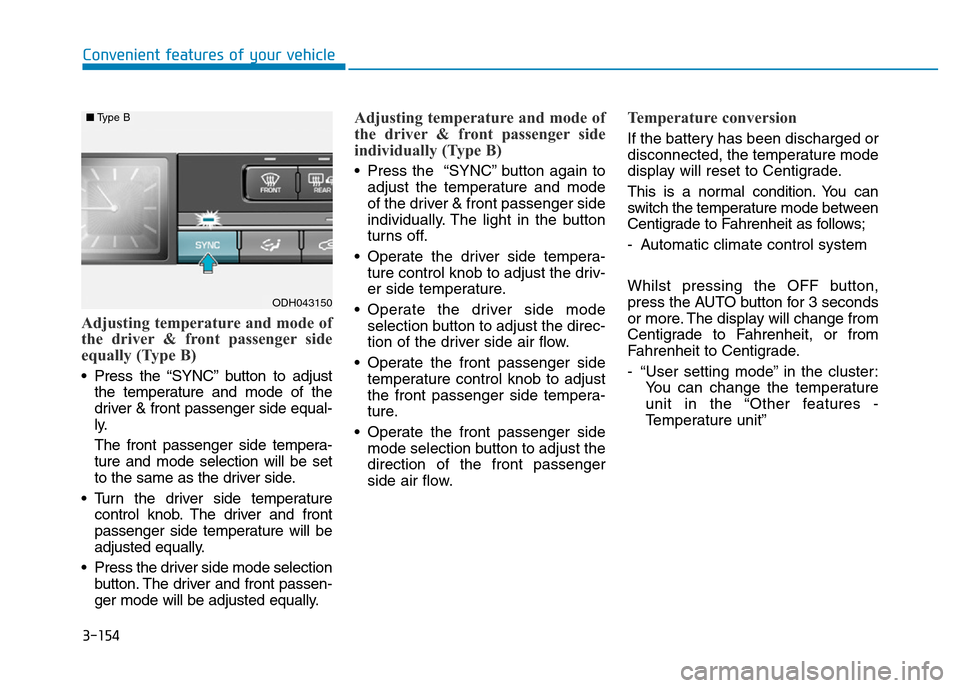
Adjusting temperature and mode of
the driver & front passenger side
equally (Type B)
• Press the “SYNC” button to adjust
the temperature and mode of the
driver & front passenger side equal-
ly.
The front passenger side tempera-
ture and mode selection will be set
to the same as the driver side.
• Turn the driver side temperature
control knob. The driver and front
passenger side temperature will be
adjusted equally.
• Press the driver side mode selection
button. The driver and front passen-
ger mode will be adjusted equally.
Adjusting temperature and mode of
the driver & front passenger side
individually (Type B)
• Press the “SYNC” button again to
adjust the temperature and mode
of the driver & front passenger side
individually. The light in the button
turns off.
• Operate the driver side tempera-
ture control knob to adjust the driv-
er side temperature.
• Operate the driver side mode
selection button to adjust the direc-
tion of the driver side air flow.
• Operate the front passenger side
temperature control knob to adjust
the front passenger side tempera-
ture.
• Operate the front passenger side
mode selection button to adjust the
direction of the front passenger
side air flow.
Temperature conversion
If the battery has been discharged or
disconnected, the temperature mode
display will reset to Centigrade.
This is a normal condition. You can
switch the temperature mode between
Centigrade to Fahrenheit as follows;
- Automatic climate control system
Whilst pressing the OFF button,
press the AUTO button for 3 seconds
or more. The display will change from
Centigrade to Fahrenheit, or from
Fahrenheit to Centigrade.
- “User setting mode” in the cluster:
You can change the temperature
unit in the “Other features -
Temperature unit”
ODH043150
■Type B
Page 250 of 502

3-159
Convenient features of your vehicle
3
✽NOTICE
• When using the air conditioning
system, monitor the temperature
gauge closely whilst driving up
hills or in heavy traffic when out-
side temperatures are high. Air
conditioning system operation
may cause engine overheating.
Continue to use the blower fan but
turn the air conditioning system
off if the temperature gauge indi-
cates engine overheating.
• When opening the windows in
humid weather air conditioning
may create water droplets inside
the vehicle. Since excessive water
droplets may cause damage to
electrical equipment, air condi-
tioning should only be used with
the windows closed.Air conditioning system operation
tips• If the vehicle has been parked in
direct sunlight during hot weather,
open the windows for a short time
to let the hot air inside the vehicle
escape.
• Use air conditioning to reduce
humidity and moisture inside the
vehicle on rainy or humid days.
• During air conditioning system
operation, you may occasionally
notice a slight change in engine
speed as the air conditioning com-
pressor cycles. This is a normal
system operation characteristic.
• Turn the air conditioning system
every month only for a few minutes
to ensure maximum system per-
formance.
• When using the air conditioning
system, you may notice clear water
dripping (or even puddling) on the
ground under the vehicle. This is a
normal system operation charac-
teristic.• Operating the air conditioning sys-
tem in the recirculated air position
provides maximum cooling, how-
ever, continual operation in this
mode may cause the air inside the
vehicle to become stale.
• During cooling operation, you may
occasionally notice a misty air flow
because of rapid cooling and
humid air intake. This is a normal
system operation characteristic.
Page 257 of 502
3-166
Convenient features of your vehicle
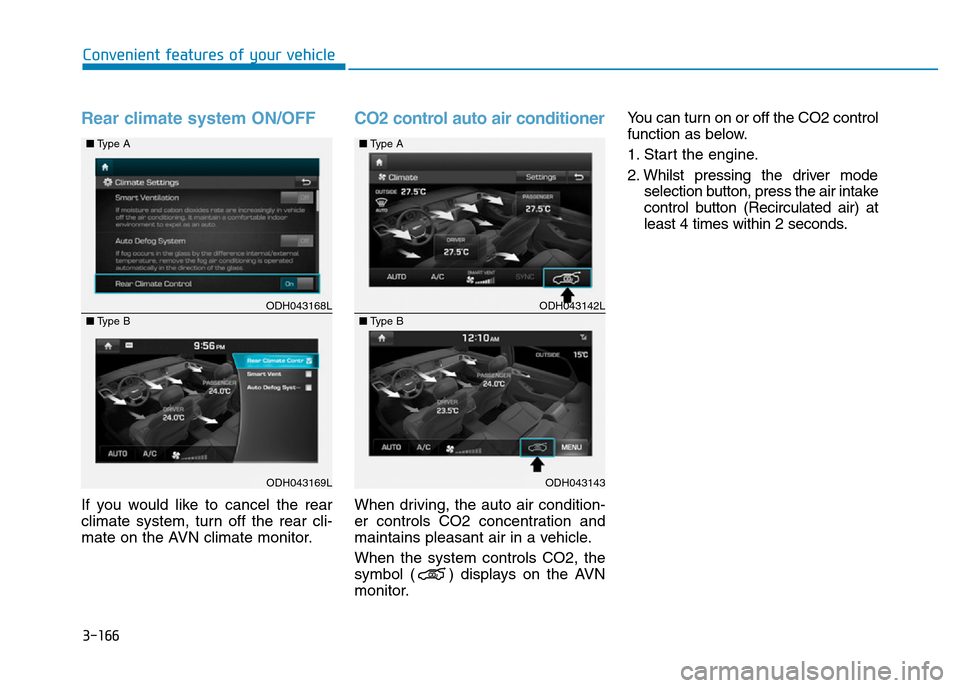
Rear climate system ON/OFF
If you would like to cancel the rear
climate system, turn off the rear cli-
mate on the AVN climate monitor.
CO2 control auto air conditioner
When driving, the auto air condition-
er controls CO2 concentration and
maintains pleasant air in a vehicle.
When the system controls CO2, the
symbol ( ) displays on the AVN
monitor.You can turn on or off the CO2 control
function as below.
1. Start the engine.
2. Whilst pressing the driver mode
selection button, press the air intake
control button (Recirculated air) at
least 4 times within 2 seconds.
ODH043168L
ODH043169L ■Type A
■Type B
ODH043142L
ODH043143 ■Type A
■Type B