2016 Hyundai Genesis climate control
[x] Cancel search: climate controlPage 41 of 502
2-23
Safety system of your vehicle
2
(Continued)
•Do not place materials such as
plastic bags or newspapers
under the seats. They may
block the air intake causing
the air vents to not work prop-
erly.
•Do not change the seat cov-
ers. It may damage the seat
warmer or cooler.
•If the air vents do not operate,
restart the vehicle. If there is
no change, we recommend
that you have your vehicle
inspected by a HYUNDAI
authorised repairer.
To prevent damage to the seat
warmer, seat cooler and seats:
•Use the seat warmer and cool-
er ONLY when the climate
control system is on. Using
the seat warmer and cooler
for prolonged periods of time
with the climate control sys-
tem off could cause the seat
warmer and cooler to mal-
function.
•Never use a solvent such as
paint thinner, benzene, alco-
hol or petrol to clean the
seats.
•Avoid spilling liquids on the
surface of the seats and seat-
backs; this may cause the air
vent holes to become blocked
and not work properly.
(Continued)
CAUTION
Page 93 of 502

LCD display ...........................................................3-57
LCD Modes ........................................................................3-57
Trip Computer Mode.......................................................3-58
Turn By Turn (TBT) Mode ............................................3-59
ASCC/LDWS/LKAS Mode ..............................................3-59
A/V Mode..........................................................................3-59
Information Mode ...........................................................3-60
User Settings Mode ........................................................3-62
Warning Messages..........................................................3-69
Trip computer .......................................................3-80
Overview............................................................................3-80
Trip Modes ........................................................................3-80
Trip A/B .............................................................................3-80
Fuel Economy...................................................................3-81
Warning and indicator lights ..............................3-84
Warning lights ..................................................................3-84
Indicator Lights ................................................................3-93
Head Up Display (HUD) .......................................3-98
Description ........................................................................3-98
Head Up Display ON/OFF .............................................3-99
Head Up Display Information .......................................3-99
Head Up Display Setting .............................................3-100
Light .....................................................................3-101
Exterior lights ................................................................3-101
Smart High Beam ..........................................................3-103
Traffic change ...............................................................3-109
Welcome system ...........................................................3-109
Interior lights..................................................................3-111
Wipers and washers ..........................................3-116
Windscreen wipers ......................................................3-116
Windscreen washers ...................................................3-118
Driver assist system ..........................................3-119
Rearview camera...........................................................3-119
Parking assist system ..................................................3-120
Smart Parking Assist System (SPAS) .......................3-123
Parking guide system (For Europe) .........................3-142
Around View Monitoring (AVM) System .................3-143
Defroster .............................................................3-145
Rear window defroster ...............................................3-145
Automatic climate control system ...................3-147
Automatic heating and air conditioning ..................3-148
Manual heating and air conditioning .......................3-149
System operation ..........................................................3-157
Climate control air filter ............................................3-160
3
Page 94 of 502

Convenient features of your vehicle
3
Windscreen defrosting and defogging..............3-162
Climate control additional features.................3-165
Cluster ionizer ................................................................3-165
Smart ventilation ...........................................................3-165
Rear climate system ON/OFF ....................................3-166
CO2 control auto air conditioner ..............................3-166
Storage compartment ........................................3-167
Centre console storage ...............................................3-167
Rear console storage ...................................................3-167
Glove box ........................................................................3-168
Sunglasses holder .........................................................3-168
Interior features ...............................................3-169
Ashtray ............................................................................3-169
Cup holder.......................................................................3-169
Sunvisor ...........................................................................3-170
Power outlet ...................................................................3-171
Clock .................................................................................3-172
Clothes hanger ..............................................................3-173
Bag hanger .....................................................................3-173
Floor mat anchor(s)......................................................3-174
Rear curtain....................................................................3-175
Side curtain.....................................................................3-175
Luggage net holder ......................................................3-176
3
Page 118 of 502

3-27
Convenient features of your vehicle
3
The Engine Start/Stop button must
be in the ON position to be able to
raise or lower the windows. Each
door has a Power Window switch to
control that door's window. The driv-
er has a Power Window Lock switch
which can block the operation of pas-
senger windows. The power windows
will operate for approximately 30
seconds after the Engine Start/Stop
button is placed in the ACC or OFF
position. However, if the front doors
are opened, the Power Windows
cannot be operated even within the
30 second period.✽NOTICE
• In cold and wet climates, power
windows may not work properly
due to freezing conditions.
• Whilst driving with the rear win-
dows down or with the sunroof (if
equipped) opened (or partially
opened), your vehicle may demon-
strate a wind buffeting or pulsation
noise. This noise is normal and can
be reduced or eliminated by taking
the following actions. If the noise
occurs with one or both of the rear
windows down, partially lower
both front windows approximately
one inch. If you experience the
noise with the sunroof open, slight-
ly close the sunroof.
Window opening and closing
To open:
Press the window switch down to the
first detent position (5). Release the
switch when you want the window to
stop.
To close:
Pull the window switch up to the first
detent position (5). Release the win-
dow switch when you want the win-
dow to stop. To avoid serious injury or death,
do not extend your head, arms
or body outside the windows
whilst driving.
WARNING
ODH044027R
Page 121 of 502

3-30
Convenient features of your vehicle
If your vehicle is equipped with a
sunroof, you can slide or tilt your
sunroof with the sunroof control lever
located on the overhead console.
The Engine Start/Stop button must
be in the ON position before you can
open or close the sunroof.
✽NOTICE
• In cold and wet climates, the sun-
roof may not work properly due to
freezing conditions.
• After washing the car or after
there is rain, be sure to wipe off
any water that is on the sunroof
before operating it.
Sunshade
• To open the sunshade, press the
sunshade control switch (1).
• To close the sunshade, press the
sunshade control switch (2). If you
press the switch when the sunroof
glass is opened, the sunroof glass
will close then the sunshade will
close.
To stop the sliding at any point, press
the sunshade control switch momen-
tarily.
PANORAMA SUNROOF (IF EQUIPPED)
ODH043034Do not continue to move the
sunroof control lever after the
sunroof is fully opened, closed,
or tilted. Damage to the motor or
system components could occur.
CAUTION
Never adjust the sunroof or sun-
shade whilst driving. This could
result in loss of control and an
accident that may cause death,
serious injury, or property dam-
age.
WARNING
ODH043035
Page 146 of 502
3-55
Convenient features of your vehicle
3
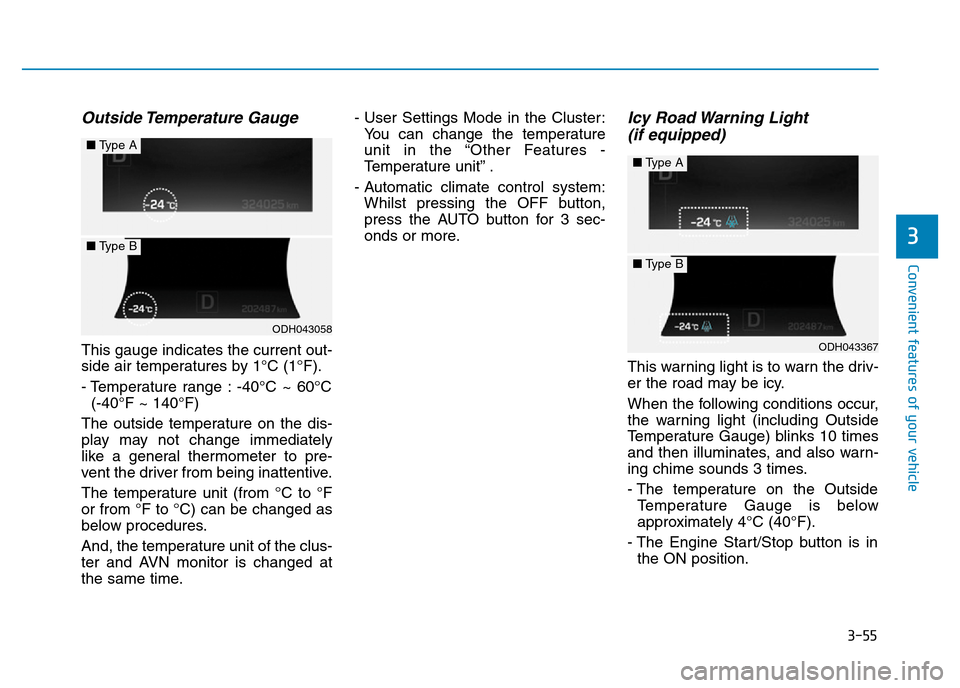
Outside Temperature Gauge
This gauge indicates the current out-
side air temperatures by 1°C (1°F).
- Temperature range : -40°C ~ 60°C
(-40°F ~ 140°F)
The outside temperature on the dis-
play may not change immediately
like a general thermometer to pre-
vent the driver from being inattentive.
The temperature unit (from °C to °F
or from °F to °C) can be changed as
below procedures.
And, the temperature unit of the clus-
ter and AVN monitor is changed at
the same time.- User Settings Mode in the Cluster:
You can change the temperature
unit in the “Other Features -
Temperature unit” .
- Automatic climate control system:
Whilst pressing the OFF button,
press the AUTO button for 3 sec-
onds or more.
Icy Road Warning Light
(if equipped)
This warning light is to warn the driv-
er the road may be icy.
When the following conditions occur,
the warning light (including Outside
Temperature Gauge) blinks 10 times
and then illuminates, and also warn-
ing chime sounds 3 times.
- The temperature on the Outside
Temperature Gauge is below
approximately 4°C (40°F).
- The Engine Start/Stop button is in
the ON position.
ODH043058
■Type A
■Type B
ODH043367
■Type A
■Type B
Page 238 of 502
3-147
Convenient features of your vehicle
3
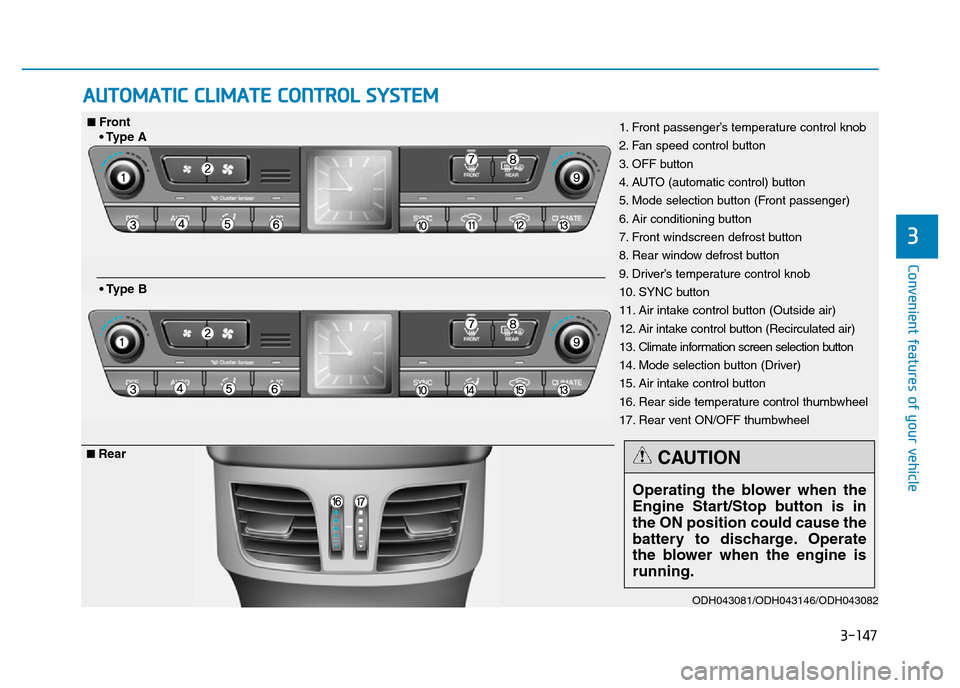
AUTOMATIC CLIMATE CONTROL SYSTEM
ODH043081/ODH043146/ODH043082
1. Front passenger’s temperature control knob
2. Fan speed control button
3. OFF button
4. AUTO (automatic control) button
5. Mode selection button (Front passenger)
6. Air conditioning button
7. Front windscreen defrost button
8. Rear window defrost button
9. Driver’s temperature control knob
10. SYNC button
11. Air intake control button (Outside air)
12. Air intake control button (Recirculated air)
13. Climate information screen selection button
14. Mode selection button (Driver)
15. Air intake control button
16. Rear side temperature control thumbwheel
17. Rear vent ON/OFF thumbwheel■Front
• Type A
• Type B
■Rear
Operating the blower when the
Engine Start/Stop button is in
the ON position could cause the
battery to discharge. Operate
the blower when the engine is
running.
CAUTION
Page 245 of 502
3-154
Convenient features of your vehicle
Adjusting temperature and mode of
the driver & front passenger side
equally (Type B)
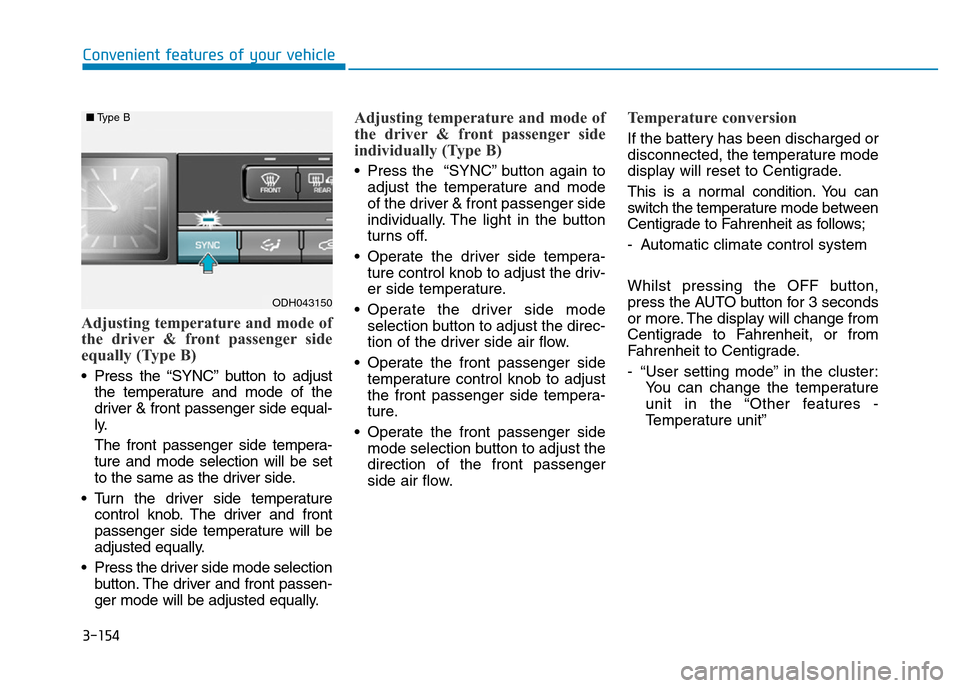
• Press the “SYNC” button to adjust
the temperature and mode of the
driver & front passenger side equal-
ly.
The front passenger side tempera-
ture and mode selection will be set
to the same as the driver side.
• Turn the driver side temperature
control knob. The driver and front
passenger side temperature will be
adjusted equally.
• Press the driver side mode selection
button. The driver and front passen-
ger mode will be adjusted equally.
Adjusting temperature and mode of
the driver & front passenger side
individually (Type B)
• Press the “SYNC” button again to
adjust the temperature and mode
of the driver & front passenger side
individually. The light in the button
turns off.
• Operate the driver side tempera-
ture control knob to adjust the driv-
er side temperature.
• Operate the driver side mode
selection button to adjust the direc-
tion of the driver side air flow.
• Operate the front passenger side
temperature control knob to adjust
the front passenger side tempera-
ture.
• Operate the front passenger side
mode selection button to adjust the
direction of the front passenger
side air flow.
Temperature conversion
If the battery has been discharged or
disconnected, the temperature mode
display will reset to Centigrade.
This is a normal condition. You can
switch the temperature mode between
Centigrade to Fahrenheit as follows;
- Automatic climate control system
Whilst pressing the OFF button,
press the AUTO button for 3 seconds
or more. The display will change from
Centigrade to Fahrenheit, or from
Fahrenheit to Centigrade.
- “User setting mode” in the cluster:
You can change the temperature
unit in the “Other features -
Temperature unit”
ODH043150
■Type B