Page 319 of 498
515
Driving your vehicle
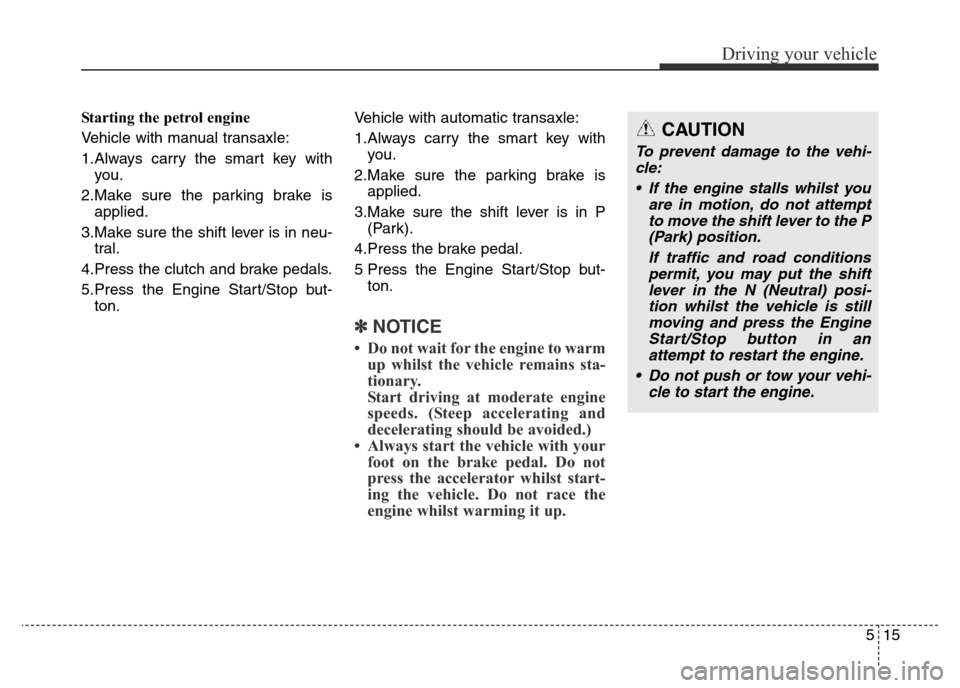
Starting the petrol engine
Vehicle with manual transaxle:
1.Always carry the smart key with
you.
2.Make sure the parking brake is
applied.
3.Make sure the shift lever is in neu-
tral.
4.Press the clutch and brake pedals.
5.Press the Engine Start/Stop but-
ton.Vehicle with automatic transaxle:
1.Always carry the smart key with
you.
2.Make sure the parking brake is
applied.
3.Make sure the shift lever is in P
(Park).
4.Press the brake pedal.
5 Press the Engine Start/Stop but-
ton.
✽NOTICE
• Do not wait for the engine to warm
up whilst the vehicle remains sta-
tionary.
Start driving at moderate engine
speeds. (Steep accelerating and
decelerating should be avoided.)
• Always start the vehicle with your
foot on the brake pedal. Do not
press the accelerator whilst start-
ing the vehicle. Do not race the
engine whilst warming it up.
CAUTION
To prevent damage to the vehi-
cle:
• If the engine stalls whilst you
are in motion, do not attempt
to move the shift lever to the P
(Park) position.
If traffic and road conditions
permit, you may put the shift
lever in the N (Neutral) posi-
tion whilst the vehicle is still
moving and press the Engine
Start/Stop button in an
attempt to restart the engine.
• Do not push or tow your vehi-
cle to start the engine.
Page 320 of 498
Driving your vehicle
16 5
✽NOTICE
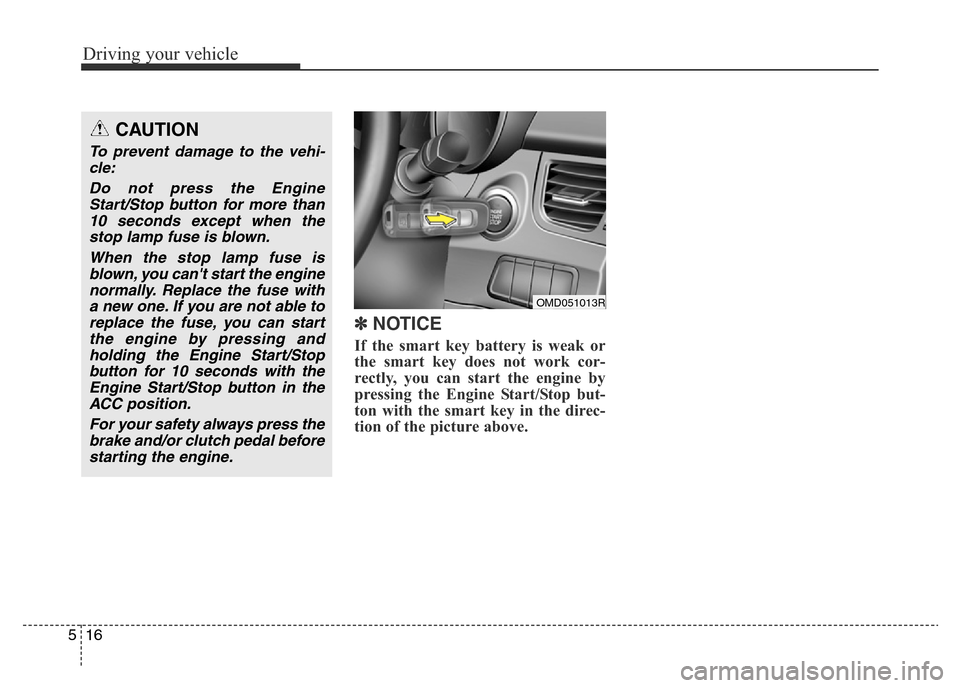
If the smart key battery is weak or
the smart key does not work cor-
rectly, you can start the engine by
pressing the Engine Start/Stop but-
ton with the smart key in the direc-
tion of the picture above.
OMD051013R
CAUTION
To prevent damage to the vehi-
cle:
Do not press the Engine
Start/Stop button for more than
10 seconds except when the
stop lamp fuse is blown.
When the stop lamp fuse is
blown, you can't start the engine
normally. Replace the fuse with
a new one. If you are not able to
replace the fuse, you can start
the engine by pressing and
holding the Engine Start/Stop
button for 10 seconds with the
Engine Start/Stop button in the
ACC position.
For your safety always press the
brake and/or clutch pedal before
starting the engine.
Page 329 of 498
525
Driving your vehicle
✽NOTICE
• Only the six forward gears can be
selected. To reverse or park the
vehicle, move the shift lever to the
R (Reverse) or P (Park) position as
required.
• Downshifts are made automatical-
ly when the vehicle slows down.
When the vehicle stops, 1st gear is
automatically selected.
• When the engine rpm approaches
the red zone the transaxle will
upshift automatically.
• If the driver presses the lever to
the + (Up) or - (Down) position,
the transaxle may not make the
requested gear change if the next
gear is outside of the allowable
engine rpm range. The driver
must execute upshifts in accor-
dance with road conditions, taking
care to keep the engine rpms
below the red zone.
• When driving on a slippery road,
push the shift lever forward into
the + (Up) position. This causes
the transaxle to shift into the 2nd
gear which is better for smooth
driving on a slippery road. Push
the shift lever to the - (Down) side
to shift back to the 1st gear.
Shift-lock system
For your safety, the automatic
transaxle has a shift-lock system
which prevents shifting the transaxle
from P (Park) into R (Reverse)
unless the brake pedal is depressed.
To shift the transaxle from P (Park)
into R (Reverse):
1.Press and hold the brake pedal.
2.Start the engine or place the igni-
tion switch in the ON position.
3.Move the shift lever.
Shift-lock release
If the shift lever cannot be moved
from the P (Park) position into R
(Reverse) position with the brake
pedal depressed, continue pressing
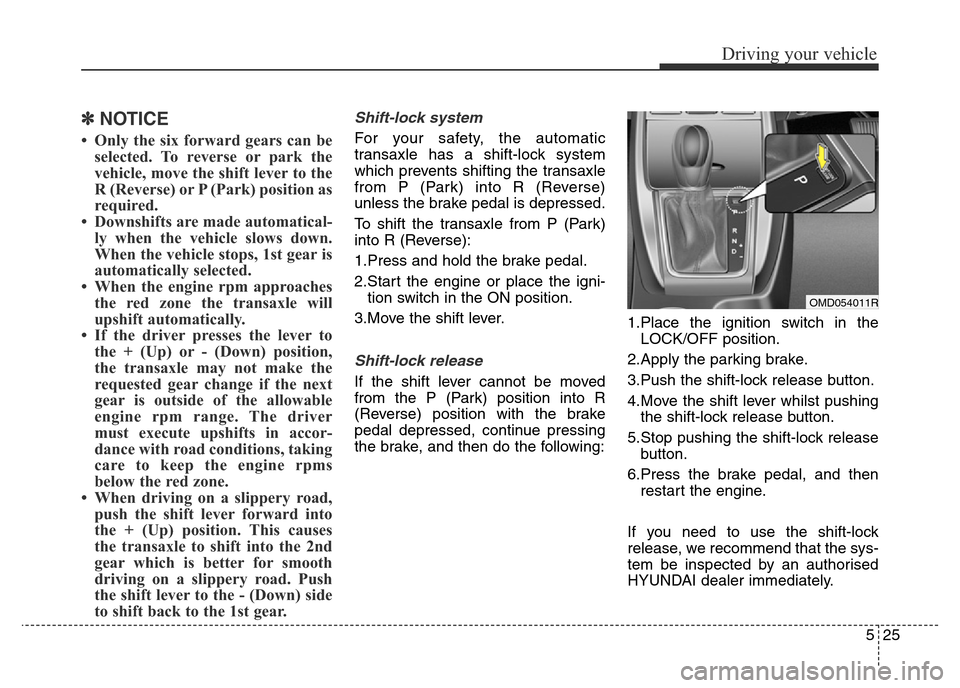
the brake, and then do the following:1.Place the ignition switch in the
LOCK/OFF position.
2.Apply the parking brake.
3.Push the shift-lock release button.
4.Move the shift lever whilst pushing
the shift-lock release button.
5.Stop pushing the shift-lock release
button.
6.Press the brake pedal, and then
restart the engine.
If you need to use the shift-lock
release, we recommend that the sys-
tem be inspected by an authorised
HYUNDAI dealer immediately.
OMD054011R
Page 344 of 498
Driving your vehicle
40 5
VSM OFF condition
To cancel VSM operation, press the
ESC OFF button. ESC OFF indicator
light ( ) will illuminate.
To turn on VSM, press the ESC OFF
button again. The ESC OFF indicator
light will go out.Hill-Start Assist Control (HAC)
(if equipped)
The Hill-Start Assist Control (HAC)
prevents the vehicle from rolling
backwards when starting a vehicle
from a stop on a hill. The system
operates the brakes automatically for
approximately 2 seconds and releas-
es the brake when the accelerator
pedal is depressed or after 2 sec-
onds.
✽NOTICE
• The HAC does not operate when
the shift lever is in P (Park) or N
(Neutral).
• The HAC activates even though
the ESC (Electronic Stability
Control) is off but does not acti-
vate when the ESC has malfunc-
tioned.
WARNING
If ESC indicator light ( ) or
EPS warning light ( ) stays
on, your vehicle may have a
malfunction with the VSM sys-
tem. When the warning light illu-
minates we recommend that the
vehicle be checked by an autho-
rised HYUNDAI dealer as soon
as possible.
WARNING
Always be ready to press the
accelerator pedal when starting
off on a incline. The HAC acti-
vates only for approximately 2
seconds.
CAUTION
Driving with varying tyre or
wheel sizes may cause the ESC
system to malfunction. When
replacing tyres, make sure they
are the same size as your origi-
nal tyres for this vehicle.
Page 379 of 498
If the engine stalls whilst driv-
ing
• Reduce your speed gradually,
keeping a straight line. Move cau-
tiously off the road to a safe place.
• Turn on your hazard warning flash-
er.
• Try to start the engine again. If your
vehicle will not start, we recom-
mend that you contact an autho-
rised HYUNDAI dealer.
If the engine stalls at a cross-
road or crossing
If the engine stalls at a crossroad or
crossing, if safe to do so, move the
shift lever to the N (Neutral) position
and then push the vehicle to a safe
location.
If you have a flat tyre whilst
driving
If a tyre goes flat whilst you are driv-
ing:
• Take your foot off the accelerator
pedal and let the vehicle slow
down whilst driving straight ahead.
Do not apply the brakes immedi-
ately or attempt to pull off the road
as this may cause loss of vehicle
control resulting in an accident.
When the vehicle has slowed to
such a speed that it is safe to do
so, brake carefully and pull off the
road. Drive off the road as far as
possible and park on firm, level
ground. If you are on a divided
highway, do not park in the median
area between the two traffic lanes.• When the vehicle is stopped, press
the hazard warning flasher button,
move the shift lever into P (Park,
for automatic transaxle vehicle) or
neutral (for manual transaxle vehi-
cle), apply the parking brake, and
place the ignition switch in the
LOCK/OFF position.
• Have all passengers get out of the
vehicle. Be sure they all get out on
the side of the vehicle that is away
from traffic.
• When changing a flat tyre, follow
the instructions provided later in
this chapter.
IN CASE OF AN EMERGENCY WHILST DRIVING
63
What to do in an emergency
Page 456 of 498
761
Maintenance
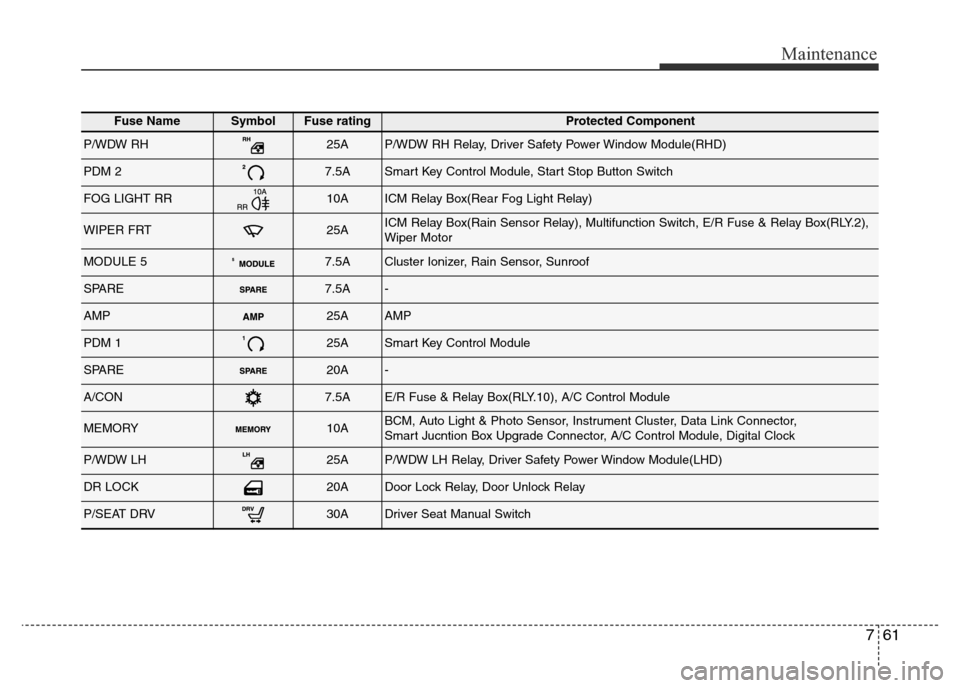
Fuse NameSymbolFuse ratingProtected Component
P/WDW RH25AP/WDW RH Relay, Driver Safety Power Window Module(RHD)
PDM 27.5ASmart Key Control Module, Start Stop Button Switch
FOG LIGHT RR10AICM Relay Box(Rear Fog Light Relay)
WIPER FRT25AICM Relay Box(Rain Sensor Relay), Multifunction Switch, E/R Fuse & Relay Box(RLY.2),
Wiper Motor
MODULE 57.5ACluster Ionizer, Rain Sensor, Sunroof
SPARE7.5A-
AMP25AAMP
PDM 125ASmart Key Control Module
SPARE20A-
A/CON7.5AE/R Fuse & Relay Box(RLY.10), A/C Control Module
MEMORY10ABCM, Auto Light & Photo Sensor, Instrument Cluster, Data Link Connector,
Smart Jucntion Box Upgrade Connector, A/C Control Module, Digital Clock
P/WDW LH25AP/WDW LH Relay, Driver Safety Power Window Module(LHD)
DR LOCK20ADoor Lock Relay, Door Unlock Relay
P/SEAT DRV30ADriver Seat Manual Switch