2016 Hyundai Elantra key battery
[x] Cancel search: key batteryPage 230 of 498
Features of your vehicle
150 4
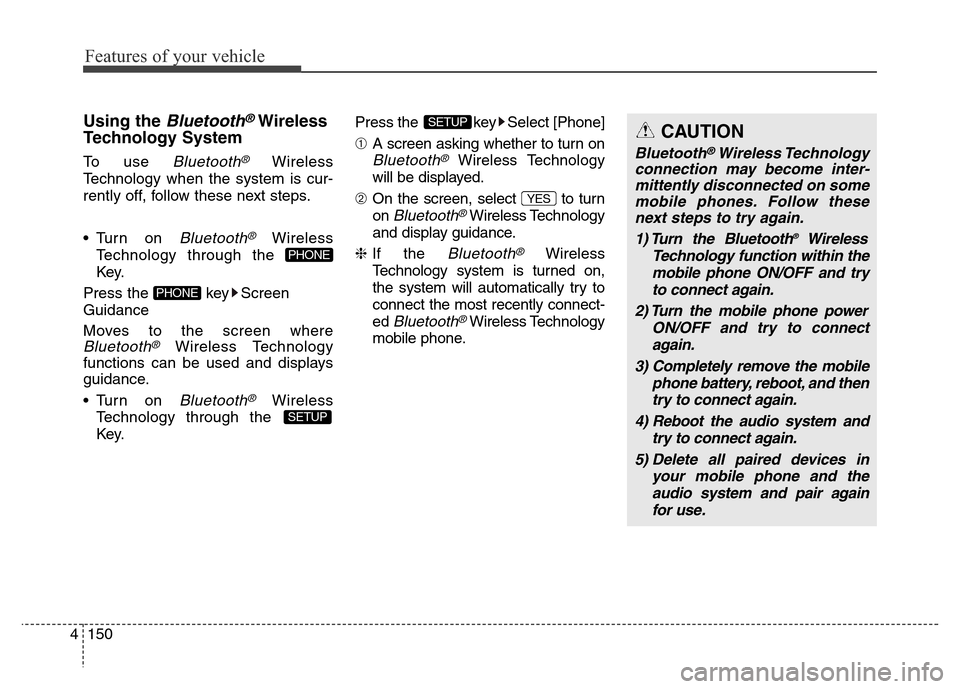
Using the Bluetooth®Wireless
Technology System
To use Bluetooth®Wireless
Technology when the system is cur-
rently off, follow these next steps.
• Turn on
Bluetooth®Wireless
Technology through the
Key.
Press the key Screen
Guidance
Moves to the screen where
Bluetooth®Wireless Technology
functions can be used and displays
guidance.
• Turn on
Bluetooth®Wireless
Technology through the
Key.Press the key Select [Phone]
➀A screen asking whether to turn on
Bluetooth®Wireless Technology
will be displayed.
➁On the screen, select to turn
on
Bluetooth®Wireless Technology
and display guidance.
❈If the
Bluetooth®Wireless
Technology system is turned on,
the system will automatically try to
connect the most recently connect-
ed
Bluetooth®Wireless Technology
mobile phone.
YES
SETUP
SETUP
PHONE
PHONE
CAUTION
Bluetooth®Wireless Technology
connection may become inter-
mittently disconnected on some
mobile phones. Follow these
next steps to try again.
1) Turn the Bluetooth
®Wireless
Technology function within the
mobile phone ON/OFF and try
to connect again.
2) Turn the mobile phone power
ON/OFF and try to connect
again.
3) Completely remove the mobile
phone battery, reboot, and then
try to connect again.
4) Reboot the audio system and
try to connect again.
5) Delete all paired devices in
your mobile phone and the
audio system and pair again
for use.
Page 273 of 498
4193
Features of your vehicle
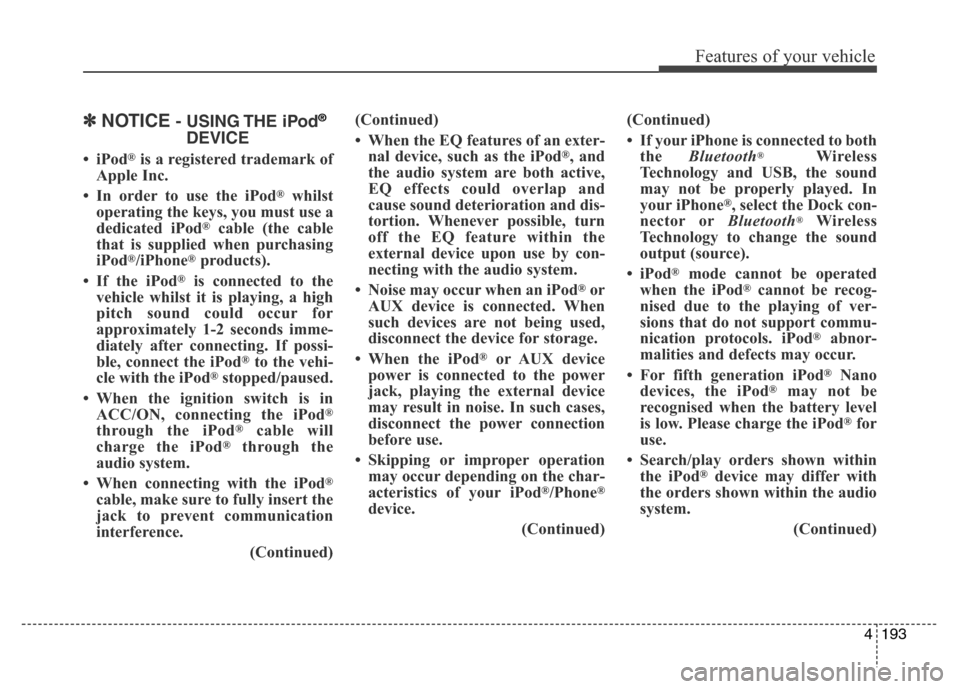
✽NOTICE- USING THE iPod®
DEVICE
•iPod®is a registered trademark of
Apple Inc.
• In order to use the iPod
®whilst
operating the keys, you must use a
dedicated iPod
®cable (the cable
that is supplied when purchasing
iPod
®/iPhone®products).
• If the iPod
®is connected to the
vehicle whilst it is playing, a high
pitch sound could occur for
approximately 1-2 seconds imme-
diately after connecting. If possi-
ble, connect the iPod
®to the vehi-
cle with the iPod®stopped/paused.
• When the ignition switch is in
ACC/ON, connecting the iPod
®
through the iPod®cable will
charge the iPod®through the
audio system.
• When connecting with the iPod
®
cable, make sure to fully insert the
jack to prevent communication
interference.
(Continued)(Continued)
• When the EQ features of an exter-
nal device, such as the iPod
®, and
the audio system are both active,
EQ effects could overlap and
cause sound deterioration and dis-
tortion. Whenever possible, turn
off the EQ feature within the
external device upon use by con-
necting with the audio system.
• Noise may occur when an iPod
®or
AUX device is connected. When
such devices are not being used,
disconnect the device for storage.
• When the iPod
®or AUX device
power is connected to the power
jack, playing the external device
may result in noise. In such cases,
disconnect the power connection
before use.
• Skipping or improper operation
may occur depending on the char-
acteristics of your iPod
®/Phone®
device.
(Continued)(Continued)
• If your iPhone is connected to both
the Bluetooth
®Wireless
Technology and USB, the sound
may not be properly played. In
your iPhone
®, select the Dock con-
nector orBluetooth®Wireless
Technology to change the sound
output (source).
•iPod
®mode cannot be operated
when the iPod®cannot be recog-
nised due to the playing of ver-
sions that do not support commu-
nication protocols. iPod
®abnor-
malities and defects may occur.
• For fifth generation iPod
®Nano
devices, the iPod®may not be
recognised when the battery level
is low. Please charge the iPod
®for
use.
• Search/play orders shown within
the iPod
®device may differ with
the orders shown within the audio
system.
(Continued)
Page 305 of 498
Driving your vehicle
Before driving . . . . . . . . . . . . . . . . . . . . . . . . . . . . . 5-3• Before entering the vehicle . . . . . . . . . . . . . . . . . . . . . 5-3
• Before starting . . . . . . . . . . . . . . . . . . . . . . . . . . . . . . . 5-3
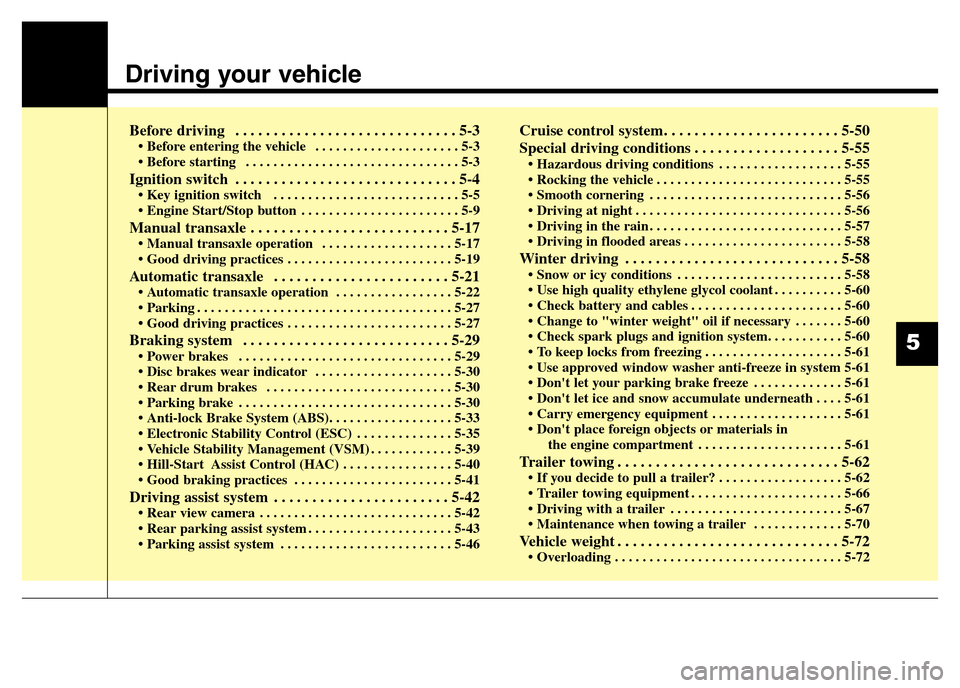
Ignition switch . . . . . . . . . . . . . . . . . . . . . . . . . . . . . 5-4• Key ignition switch . . . . . . . . . . . . . . . . . . . . . . . . . . . 5-5
• Engine Start/Stop button . . . . . . . . . . . . . . . . . . . . . . . 5-9
Manual transaxle . . . . . . . . . . . . . . . . . . . . . . . . . . 5-17• Manual transaxle operation . . . . . . . . . . . . . . . . . . . 5-17
• Good driving practices . . . . . . . . . . . . . . . . . . . . . . . . 5-19
Automatic transaxle . . . . . . . . . . . . . . . . . . . . . . . 5-21• Automatic transaxle operation . . . . . . . . . . . . . . . . . 5-22
• Parking . . . . . . . . . . . . . . . . . . . . . . . . . . . . . . . . . . . . . 5-27
• Good driving practices . . . . . . . . . . . . . . . . . . . . . . . . 5-27
Braking system . . . . . . . . . . . . . . . . . . . . . . . . . . . 5-29• Power brakes . . . . . . . . . . . . . . . . . . . . . . . . . . . . . . . 5-29
• Disc brakes wear indicator . . . . . . . . . . . . . . . . . . . . 5-30
• Rear drum brakes . . . . . . . . . . . . . . . . . . . . . . . . . . . 5-30
• Parking brake . . . . . . . . . . . . . . . . . . . . . . . . . . . . . . . 5-30
• Anti-lock Brake System (ABS). . . . . . . . . . . . . . . . . . 5-33
• Electronic Stability Control (ESC) . . . . . . . . . . . . . . 5-35
• Vehicle Stability Management (VSM) . . . . . . . . . . . . 5-39
• Hill-Start Assist Control (HAC) . . . . . . . . . . . . . . . . 5-40
• Good braking practices . . . . . . . . . . . . . . . . . . . . . . . 5-41
Driving assist system . . . . . . . . . . . . . . . . . . . . . . . 5-42• Rear view camera . . . . . . . . . . . . . . . . . . . . . . . . . . . . 5-42
• Rear parking assist system . . . . . . . . . . . . . . . . . . . . . 5-43
• Parking assist system . . . . . . . . . . . . . . . . . . . . . . . . . 5-46
Cruise control system. . . . . . . . . . . . . . . . . . . . . . . 5-50
Special driving conditions . . . . . . . . . . . . . . . . . . . 5-55
• Hazardous driving conditions . . . . . . . . . . . . . . . . . . 5-55
• Rocking the vehicle . . . . . . . . . . . . . . . . . . . . . . . . . . . 5-55
• Smooth cornering . . . . . . . . . . . . . . . . . . . . . . . . . . . . 5-56
• Driving at night . . . . . . . . . . . . . . . . . . . . . . . . . . . . . . 5-56
• Driving in the rain . . . . . . . . . . . . . . . . . . . . . . . . . . . . 5-57
• Driving in flooded areas . . . . . . . . . . . . . . . . . . . . . . . 5-58
Winter driving . . . . . . . . . . . . . . . . . . . . . . . . . . . . 5-58• Snow or icy conditions . . . . . . . . . . . . . . . . . . . . . . . . 5-58
• Use high quality ethylene glycol coolant . . . . . . . . . . 5-60
• Check battery and cables . . . . . . . . . . . . . . . . . . . . . . 5-60
• Change to "winter weight" oil if necessary . . . . . . . 5-60
• Check spark plugs and ignition system. . . . . . . . . . . 5-60
• To keep locks from freezing . . . . . . . . . . . . . . . . . . . . 5-61
• Use approved window washer anti-freeze in system 5-61
• Don't let your parking brake freeze . . . . . . . . . . . . . 5-61
• Don't let ice and snow accumulate underneath . . . . 5-61
• Carry emergency equipment . . . . . . . . . . . . . . . . . . . 5-61
• Don't place foreign objects or materials in
the engine compartment . . . . . . . . . . . . . . . . . . . . . 5-61
Trailer towing . . . . . . . . . . . . . . . . . . . . . . . . . . . . . 5-62• If you decide to pull a trailer? . . . . . . . . . . . . . . . . . . 5-62
• Trailer towing equipment . . . . . . . . . . . . . . . . . . . . . . 5-66
• Driving with a trailer . . . . . . . . . . . . . . . . . . . . . . . . . 5-67
• Maintenance when towing a trailer . . . . . . . . . . . . . 5-70
Vehicle weight . . . . . . . . . . . . . . . . . . . . . . . . . . . . . 5-72• Overloading . . . . . . . . . . . . . . . . . . . . . . . . . . . . . . . . . 5-72
5
Page 310 of 498
Driving your vehicle
6 5
Key ignition switch positions
Switch
PositionActionNotes
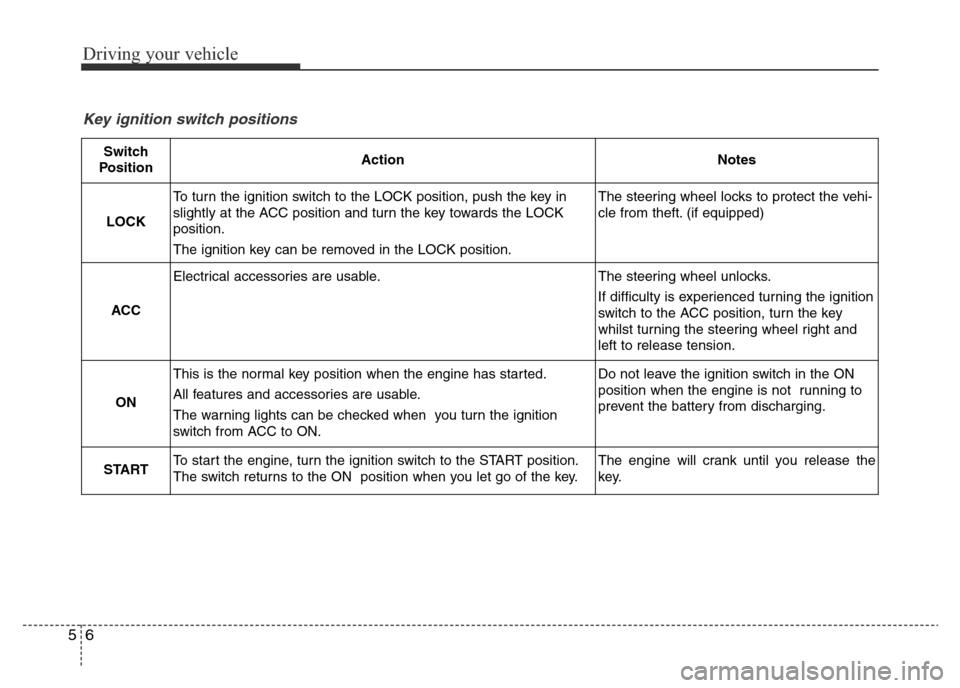
LOCK
To turn the ignition switch to the LOCK position, push the key in
slightly at the ACC position and turn the key towards the LOCK
position.
The ignition key can be removed in the LOCK position.The steering wheel locks to protect the vehi-
cle from theft. (if equipped)
ACC
Electrical accessories are usable.The steering wheel unlocks.
If difficulty is experienced turning the ignition
switch to the ACC position, turn the key
whilst turning the steering wheel right and
left to release tension.
ON
This is the normal key position when the engine has started.
All features and accessories are usable.
The warning lights can be checked when you turn the ignition
switch from ACC to ON.Do not leave the ignition switch in the ON
position when the engine is not running to
prevent the battery from discharging.
STARTTo start the engine, turn the ignition switch to the START position.
The switch returns to the ON position when you let go of the key.The engine will crank until you release the
key.
Page 320 of 498
Driving your vehicle
16 5
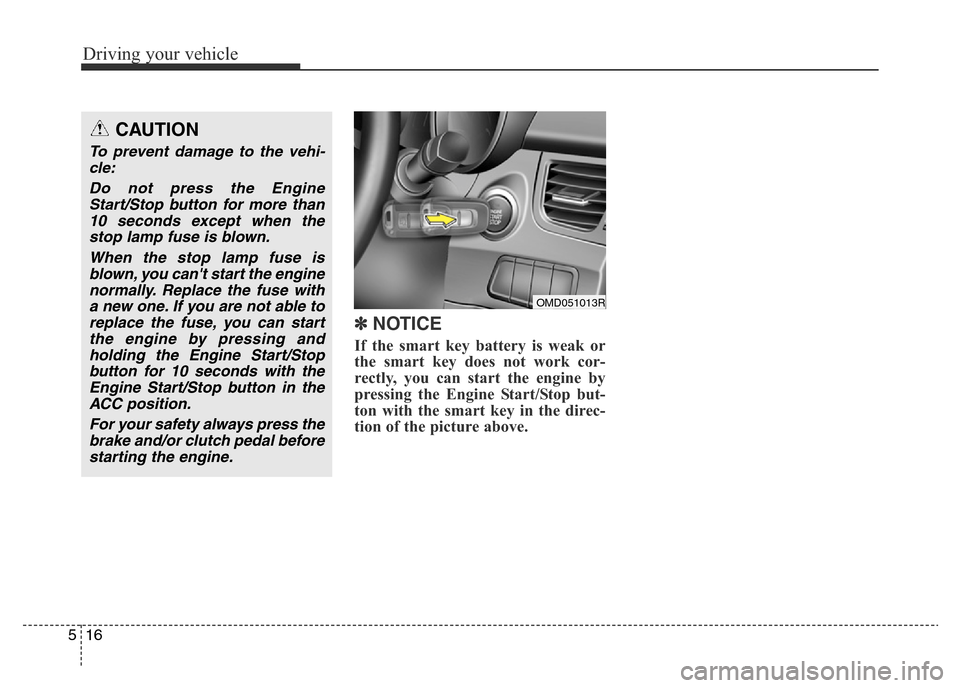
✽NOTICE
If the smart key battery is weak or
the smart key does not work cor-
rectly, you can start the engine by
pressing the Engine Start/Stop but-
ton with the smart key in the direc-
tion of the picture above.
OMD051013R
CAUTION
To prevent damage to the vehi-
cle:
Do not press the Engine
Start/Stop button for more than
10 seconds except when the
stop lamp fuse is blown.
When the stop lamp fuse is
blown, you can't start the engine
normally. Replace the fuse with
a new one. If you are not able to
replace the fuse, you can start
the engine by pressing and
holding the Engine Start/Stop
button for 10 seconds with the
Engine Start/Stop button in the
ACC position.
For your safety always press the
brake and/or clutch pedal before
starting the engine.