Page 246 of 661

245
uuAudio System Basic Operation uAudio/Information Screen
Continued
Features
■Info
Displays Trip Computer or Clock/Wallpaper. To see all available information, Trip
Computer , Voice Info , Clock/Wallpaper , or System/Device Information , select
on the Info Menu screen.
Trip Computer :
• Current Drive tab: Displays the current trip information.
• History of Trip A tab: Displays information for the three previous drives. The
information is stored every time you reset Trip A.
To delete the history manually, select Delete History on the History of Trip A
tab. The confirmation message appears on the screen, then select Yes.
Voice Info : Displays the all commands list.
Clock/Wallpaper :
Displays the clock and wallpaper.
System/Device Information :
• System Info : Displays the software version of the audio system.
• USB Info : Displays the memory usage of the USB device.
■Audio
Displays the current audio information.
■Settings
Enters the customizing menu screen.
2 Customized Features P. 349
■Navigation*
Displays the navigation screen.
2Refer to the Navigation System Manual
* Not available on all models
16 PILOT-31TG76000.book 245 ページ 2015年6月15日 月曜日 午前11時30分
Page 263 of 661

262
uuAudio System Basic Operation uVoice Control Operation
FeaturesWhen the (Talk) button is pressed,
available voice commands appear on the
screen.
For a complete list of commands, say “ Voice
Help ” after the beep or select Voice Help.
You can see the list of commands in Voice
Info on the Info menu screen. Select Info,
then select .
*1: Models with navigation system
■Voice Portal Screen■Phone Call
This can be only used when the phone is
connected. When the sy stem recognizes the
Phone call command, the screen will
change the dedicated screen for the voice
recognition of the phone.
• Dial by number
• Call history
• Redial
• Call
• Call
■Music Search*1
This can be only used when the iPod or USB
device is connected.
■Audio
When the system recognizes the Audio
command, the screen will change the
dedicated screen for the voice recognition
of the audio.
• Audio On
• Audio Off
• Radio FM
• Radio AM
• Radio SXM
• DISC
• Pandora
*
•iPod
• USB
• Other Sources
■Navigation*1
The screen changes the navigation screen.
2 Refer to the Navigation System Manual
■Voice Settings
The screen changes the Voice Recog tab
on the System settings screen.
■Trip Computer
The screen changes the trip computer
screen .
* Not available on all models
16 PILOT-31TG76000.book 262 ページ 2015年6月15日 月曜日 午前11時30分
Page 366 of 661
365
uuCustomized Features u
Continued
Features
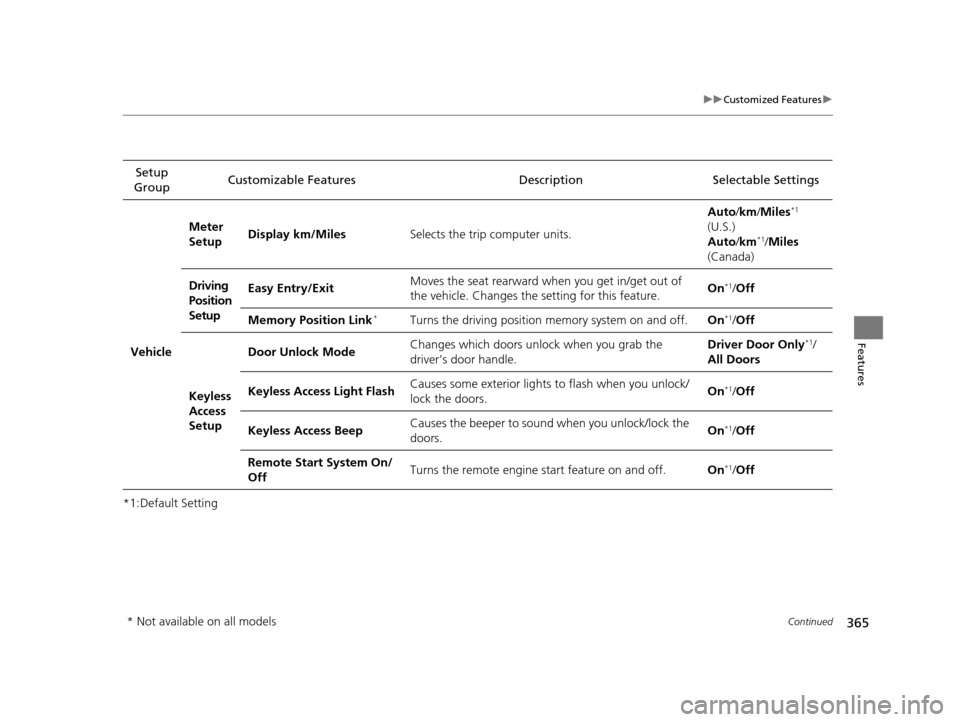
*1:Default SettingSetup
Group Customizable Features Description Selectable Settings
Vehicle
Meter
Setup
Display km/Miles
Selects the trip computer units. Auto
/km /Miles
*1
(U.S.)
Auto /km*1/Miles
(Canada)
Driving
Position
Setup Easy Entry/Exit
Moves the seat rearward when you get in/get out of
the vehicle. Changes the
setting for this feature. On
*1/
Off
Memory Position Link
*Turns the driving position memory system on and off. On*1/Off
Keyless
Access
Setup Door Unlock Mode
Changes which doors unlock when you grab the
driver’s door handle. Driver Door Only
*1/
All Doors
Keyless Access Light Flash Causes some exterior lights to flash when you unlock/
lock the doors. On
*1/
Off
Keyless Access Beep Causes the beeper to soun
d when you unlock/lock the
doors. On
*1/
Off
Remote Start System On/
Off Turns the remote engine start feature on and off.
On
*1/Off
* Not available on all models
16 PILOT-31TG76000.book 365 ページ 2015年6月15日 月曜日 午前11時30分