2016 HONDA PILOT brake sensor
[x] Cancel search: brake sensorPage 110 of 661
109
uuIndicators uMulti-Information Display (MID) Warning and Information Messages
Continued
Instrument Panel
MessageConditionExplanation
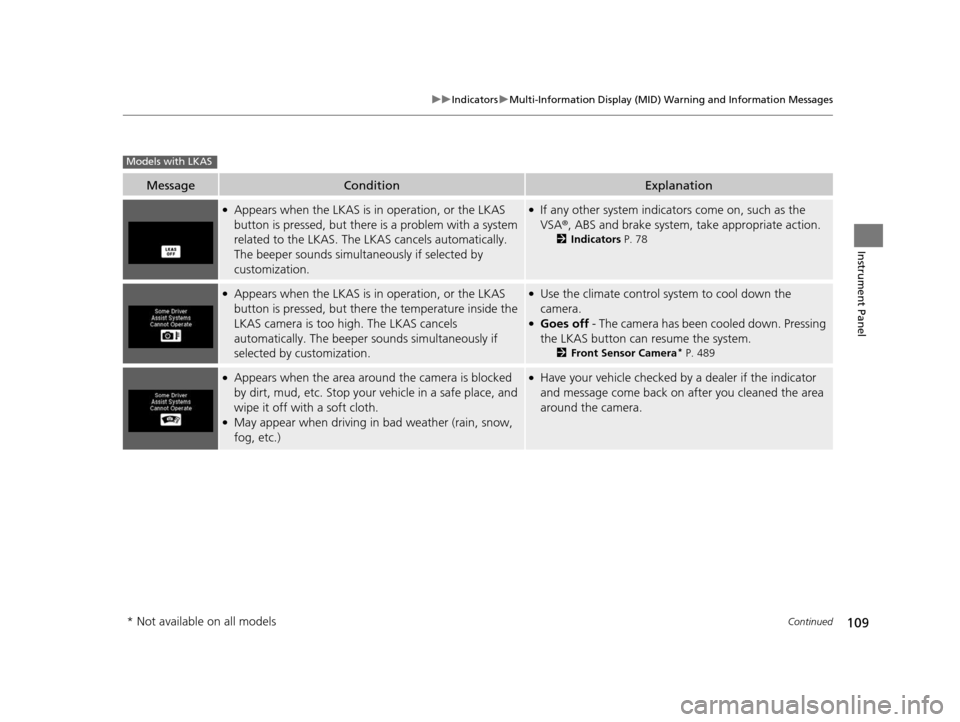
●Appears when the LKAS is in operation, or the LKAS
button is pressed, but there is a problem with a system
related to the LKAS. The LKAS cancels automatically.
The beeper sounds simultaneously if selected by
customization.●If any other system indicators come on, such as the
VSA ®, ABS and brake system, take appropriate action.
2Indicators P. 78
●Appears when the LKAS is in operation, or the LKAS
button is pressed, but there the temperature inside the
LKAS camera is too high. The LKAS cancels
automatically. The beeper sounds simultaneously if
selected by customization.●Use the climate control system to cool down the
camera.
●Goes off - The camera has been cooled down. Pressing
the LKAS button can resume the system.
2 Front Sensor Camera* P. 489
●Appears when the area around the camera is blocked
by dirt, mud, etc. Stop your vehicle in a safe place, and
wipe it off with a soft cloth.
●May appear when driving in bad weather (rain, snow,
fog, etc.)
●Have your vehicle checked by a dealer if the indicator
and message come back on after you cleaned the area
around the camera.
Models with LKAS
* Not available on all models
16 PILOT-31TG76000.book 109 ページ 2015年6月15日 月曜日 午前11時30分
Page 442 of 661

441
Driving
This chapter discusses driving, refueling, and information on items such as accessories.
Before Driving................................... 442
Towing a Trailer ................................ 448
Off-Highway Driving Guidelines ..... 459
When Driving Starting the Engine .......................... 461
Automatic Transmission ................... 468
Shifting ............................................ 469
Auto Idle-stop
*................................ 479
Intelligent Traction Management*.... 484
Cruise Control ................................. 486
Front Sensor Camera
*...................... 489
Adaptive Cruise Control (ACC)*....... 491Road Departure Mi tigation (RDM)
System*...................................... 502Lane Keeping Assist System (LKAS)*.. 507
Vehicle Stability Assist (VSA ®), aka Electronic
Stability Control (ESC), System ............. 515
Agile Handling Assist System............ 517
Blind spot inform ation (BSI) System*.... 518
LaneWatchTM*.................................. 520Intelligent VTM4 (i-VTM4)*................. 522Tire Pressure Monitoring System (TPMS) - Required Federal Explanation ......... 525
Braking
Brake System ................................... 527
Anti-lock Brake System (ABS) ........... 529
Brake Assist System.......................... 530
Collision Mitigati on Braking System
TM
(CMBSTM)*..................................... 531 Parking Your Vehicle
When Stopped ................................ 540
Parking Sensor System
*................... 541
Cross Traffic Monitor*..................... 545
Multi-view rear camera*.................. 549
Refueling
Fuel Information .............................. 550
How to Refuel ................................. 551
Fuel Economy .................................... 552
Accessories and Modifications ........ 553
* Not available on all models
16 PILOT-31TG76000.book 441 ページ 2015年6月15日 月曜日 午前11時30分
Page 492 of 661

491
uuWhen Driving uAdaptive Cruise Control (ACC)*
Continued
Driving
Adaptive Cruise Control (ACC)*
Helps maintain a constant vehicle speed and a set follo wing distance behind a
vehicle detected ahead of yours, without you having to keep your foot on the brake
or the accelerator.1 Adaptive Cruise Control (ACC)*
ACC can not be activated if Intelligent Traction
Management sett ing is snow, sand or mud.
3WARNING
Improper use of ACC can lead to a crash.
Use ACC only when traveling on open
highways in good weather.
3WARNING
ACC has limited braking capability.
When your vehicle speed drops below 22
mph, ACC will automatically cancel and no
longer will apply your vehicle's brakes.
Always be prepared to apply the brake
pedal when conditions require.
When to use
■Vehicle speed for adaptive crui se control: Desired speed in a
range above roughly 25 mph (40 km/h) ~
■Gear positions for adapti ve cruise control: In (D or (S*
The radar sensor is inside
the front grille.
The camera is located
behind the rearview
mirror.
* Not available on all models
16 PILOT-31TG76000.book 491 ページ 2015年6月15日 月曜日 午前11時30分
Page 497 of 661

496
uuWhen Driving uAdaptive Cruise Control (ACC)*
Driving
The system may automatically shut off and the ACC indicator will come on under
certain conditions. Some examples of th ese conditions are listed below. Other
conditions may reduce some of the ACC functions.
2 Front Sensor Camera* P. 489
■Environmental conditions
Driving in bad weather (r ain, fog, snow, etc.).
■Roadway conditions
Driving on a snowy or wet roadway (obscure d lane marking, vehicle tracks, reflected
lights, road spray, high contrast).
■Vehicle conditions
• The outside of the windshie ld is blocked by dirt, mud, leaves, wet snow, etc.
• An abnormal tire or wheel condition (wrong sized, varied size or construction,
improperly inflated, comp act spare tire, etc.).
• The camera temperature gets too hot.
• The parking brake is applied.
■ACC Conditions and Limitations
* Not available on all models
16 PILOT-31TG76000.book 496 ページ 2015年6月15日 月曜日 午前11時30分
Page 498 of 661

497
uuWhen Driving uAdaptive Cruise Control (ACC)*
Continued
Driving
■Detection limitations
• A vehicle or pedestrian suddenly crosses in front of you.
• The distance between your vehicle and the vehicle or pedestrian ahead of you is
too short.
• A vehicle or pedestrian cuts in front of you at a slow speed, and it brakes
suddenly.
• When you accelerate rapidly and approach the vehicle or pedestrian ahead of you
at high speed.
• The vehicle ahead of you is a motorcycle, bicycle, mobility scooter, or other small
vehicle.
• When there are animals in front of your vehicle.
• When you drive on a curved or winding or undulating road that makes it difficult
for the sensor to properly detect a vehicle or a pedestrian in front of you.
• The speed difference between your vehi cle and a vehicle in front of you is
significantly large.
• An oncoming vehicle suddenly comes in front of you.
• Your vehicle abruptly crosses over in front of an oncoming vehicle.
• When driving through a narrow iron bridge.
16 PILOT-31TG76000.book 497 ページ 2015年6月15日 月曜日 午前11時30分
Page 501 of 661

uuWhen Driving uAdaptive Cruise Control (ACC)*
500
Driving
To cancel adaptive cruise control, do any of
the following:
• Press the CANCEL button.
• Press the MAIN button.
• Depress the brake pedal.
■Automatic cancellation
The beeper sounds and a message appears on the multi-information display when
ACC is automatically canceled. Any of these conditions may cause the ACC
cancellation:
• Your vehicle speed slows down to 22 mph (35 km/h) and below.
• Bad weather (rain, fog, snow, etc.).
• When the radar sensor inside the front grille gets dirty.
• The vehicle ahead of you cannot be detected.
• An abnormal tire condition is detected, or the tires are skidding.
• Driving on a mountainous road, or driving off road for extended periods.
• Abrupt steering wheel movement.
• When the ABS or VSA ® is activated.
• When the ABS or VSA ® system indicator comes on.
■To Cancel1To Cancel
Resuming the prior set speed: After you have
canceled adaptive cruise c ontrol, you can resume the
prior set speed while it is still displayed. Press the
RES/+ button when driving at a speed of at least 25
mph (40 km/h) or more.
You cannot set or resume in the following situations:
•When vehicle speed is less than 25 mph (40 km/h).•When the MAIN button is turned off.
CANCEL
Button
MAIN
Button
1 Automatic cancellation
Even though adaptive crui se control has been
automatically canceled, you can still resume the prior
set speed. Wait until the condition that caused ACC
to cancel improves, then press the RES/+ button.
16 PILOT-31TG76000.book 500 ページ 2015年6月15日 月曜日 午前11時30分
Page 510 of 661

Continued509
uuWhen Driving uLane Keeping Assist System (LKAS)*
Driving
The system can be used when th e following conditions are met.
• The lane in which you are driving has detectable lane markers on both sides, and
your vehicle is in the center of the lane.
• The vehicle speed is between about 45 and 90 mph (72 and 145 km/h).
• You are driving on a straight or slightly curved road.
• The turn signals are off.
• The brake pedal is not depressed.
• The wipers are not in continuous operation.
■How to activate the system
1.Press the MAIN button.
u The ACC and LKAS indicators come on.
The system is ready to use.
2. Press the LKAS button.
u Lane outlines appear on the MID.
The system is activated.
■When the System can be Used1Lane Keeping Assist System (LKAS)*
You can read about handling information for the
camera equipped with this system.
2 Front Sensor Camera
* P. 489
If the vehicle drifts toward ei ther left or right lane line
due to the system applying torque, turn off the LKAS
and have your vehicle checked by a dealer.
MAIN Button
LKAS Button
* Not available on all models
16 PILOT-31TG76000.book 509 ページ 2015年6月15日 月曜日 午前11時30分
Page 532 of 661

531
uuBraking uCollision Mitigation Braking SystemTM (CMBSTM)*
Continued
Driving
Collision Mitigation Braking SystemTM (CMBSTM)*
Can assist you when there is a possibility of your vehicle colliding with a vehicle or a
pedestrian detected in front of yours. The CMBSTM is designed to alert you when a
potential collision is determined, as well as to reduce your vehicle speed to help
minimize collision severity when a collision is deemed unavoidable.
■How the system works
1 Collision Mitigation Braking SystemTM (CMBSTM)*
Important Safety Reminder
The CMBSTM is designed to reduce the severity of an
unavoidable collision. It does not prevent collision nor
stop the vehicle automatically. It is still your
responsibility to operate the brake pedal and steering
wheel appropriately acco rding to the driving
conditions.
The CMBS
TM may not activate or may not detect a
vehicle in front of y our vehicle under certain
conditions:
2 CMBS
TM Conditions and Limitations P. 535
You can read about handling information for the
camera equipped with this system. 2 Front Sensor Camera
* P. 489
1How the system works
Rapid vibrations on the steering wheel alert you
when the your vehicle speed is between 19 and 62
mph (30 and 100 km/h) with an oncoming vehicle
detected in front of you.
The system starts monitoring the roadway ah ead when your vehicle speed is about
3 mph (5 km/h) and there is a vehicle in front of you. The radar sensor is
in the front grille.
The CMBS
TM activates when:●The speed difference between your vehicle and a vehicle or pedestrian
detected in front of you becomes about 3 mph (5 km/h) and over with a chance
of a collision.
●Your vehicle speed is about 62 mph (100 km/h) or less and there is a chance of a
collision with an oncoming detected vehicle or a pedestrian in front of you. The camera is
located behind the
rearview mirror.
When to use
* Not available on all models
16 PILOT-31TG76000.book 531 ページ 2015年6月15日 月曜日 午前11時30分