Page 304 of 661
303
uuAudio System Basic Operation uSiri Eyes Free
Features
Siri Eyes Free
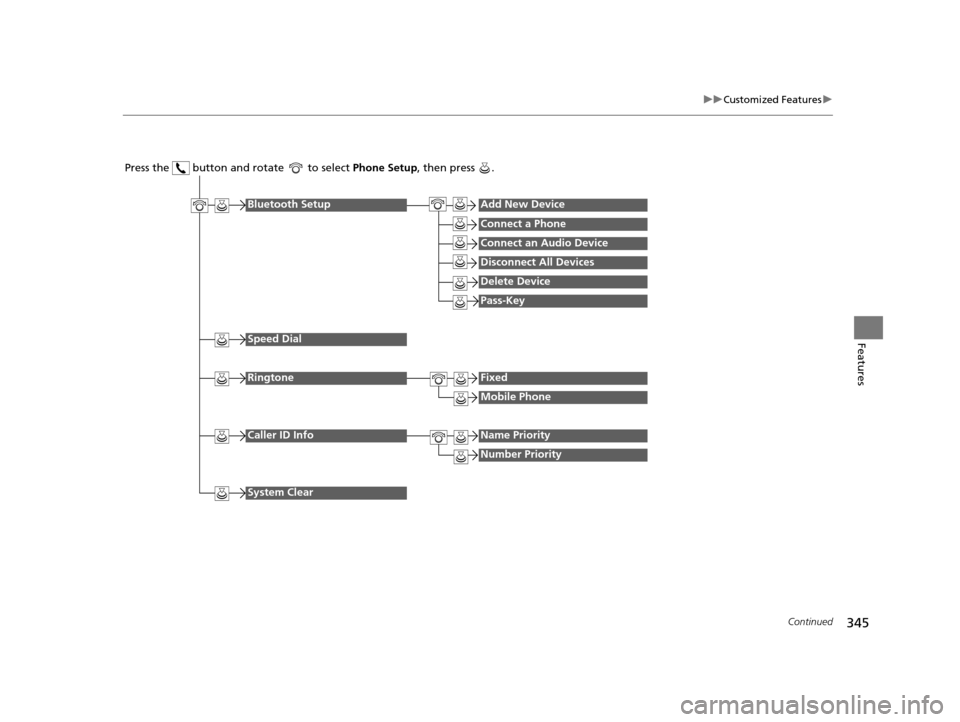
You can talk to Siri using the (Talk) button on the steering wheel when your
iPhone is paired to the Bluetooth® HandsFreeLink ® (HFL) system.
2Phone Setup P. 414
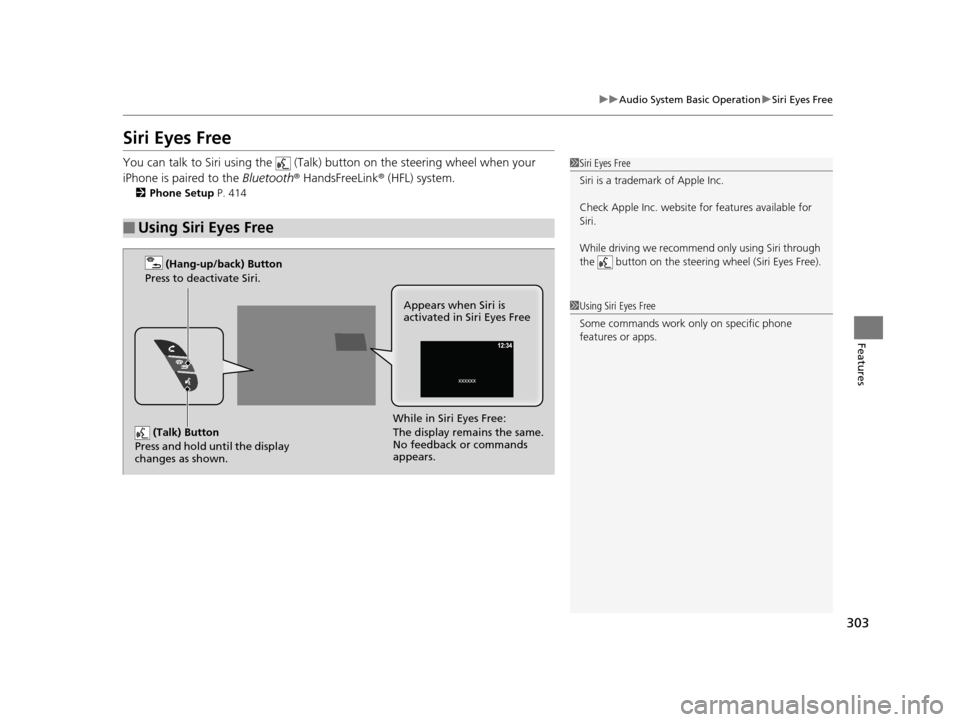
■Using Siri Eyes Free
1Siri Eyes Free
Siri is a trademark of Apple Inc.
Check Apple Inc. website for features available for
Siri.
While driving we recomme nd only using Siri through
the button on the steering wheel (Siri Eyes Free).
1 Using Siri Eyes Free
Some commands work only on specific phone
features or apps.
(Talk) Button
Press and hold until the display
changes as shown.
(Hang-up/back) Button
Press to deactivate Siri.
While in Siri Eyes Free:
The display remains the same.
No feedback or commands
appears. Appears when Siri is
activated in Siri Eyes Free
16 PILOT-31TG76000.book 303 ページ 2015年6月15日 月曜日 午前11時30分
Page 307 of 661
306
uuAudio Error Messages uPandora®*
Features
Pandora ®*
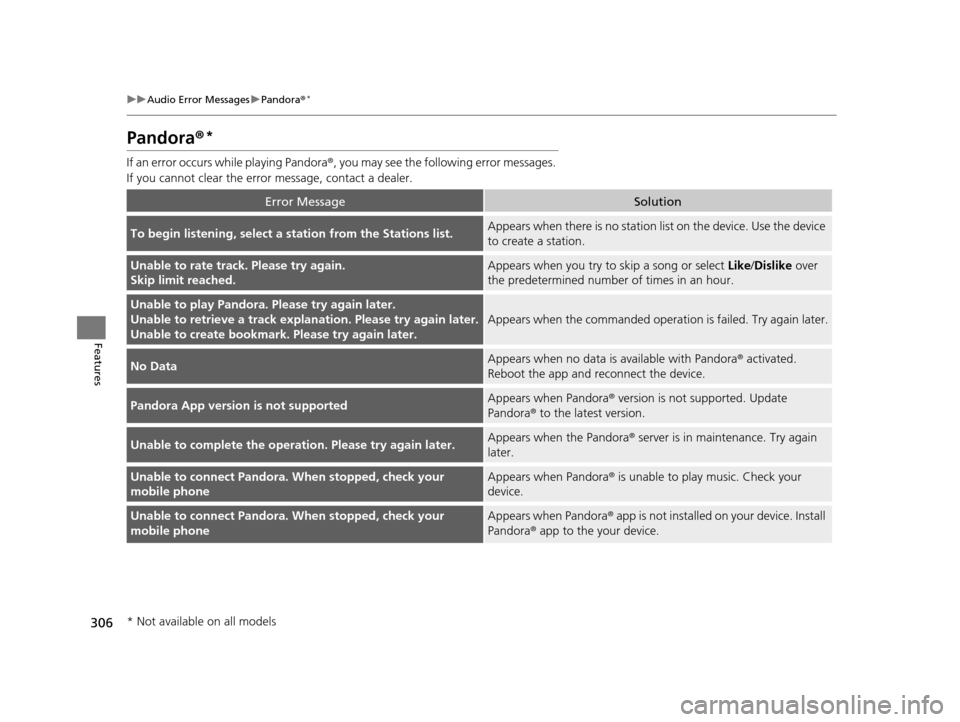
If an error occurs while playing Pandora ®, you may see the following error messages.
If you cannot clear the error message, contact a dealer.
Error MessageSolution
To begin listening, select a station from the Stations list.Appears when there is no station list on the device. Use the device
to create a station.
Unable to rate track. Please try again.
Skip limit reached.Appears when you try to skip a song or select Like/Dislike over
the predetermined number of times in an hour.
Unable to play Pandora. Please try again later.
Unable to retrieve a track explan ation. Please try again later.
Unable to create bookmark. Please try again later.
Appears when the commanded operation is failed. Try again later.
No DataAppears when no data is available with Pandora® activated.
Reboot the app and reconnect the device.
Pandora App version is not supportedAppears when Pandora ® version is not supported. Update
Pandora® to the latest version.
Unable to complete the operation. Please try again later.Appears when the Pandora ® server is in maintenance. Try again
later.
Unable to connect Pandora. When stopped, check your
mobile phoneAppears when Pandora ® is unable to play music. Check your
device.
Unable to connect Pandora. When stopped, check your
mobile phoneAppears when Pandora ® app is not installed on your device. Install
Pandora® app to the your device.
* Not available on all models
16 PILOT-31TG76000.book 306 ページ 2015年6月15日 月曜日 午前11時30分
Page 312 of 661
311
uuGeneral Information on the Audio System uCompatible iPod, iPhone, and USB Flash Drives
Features
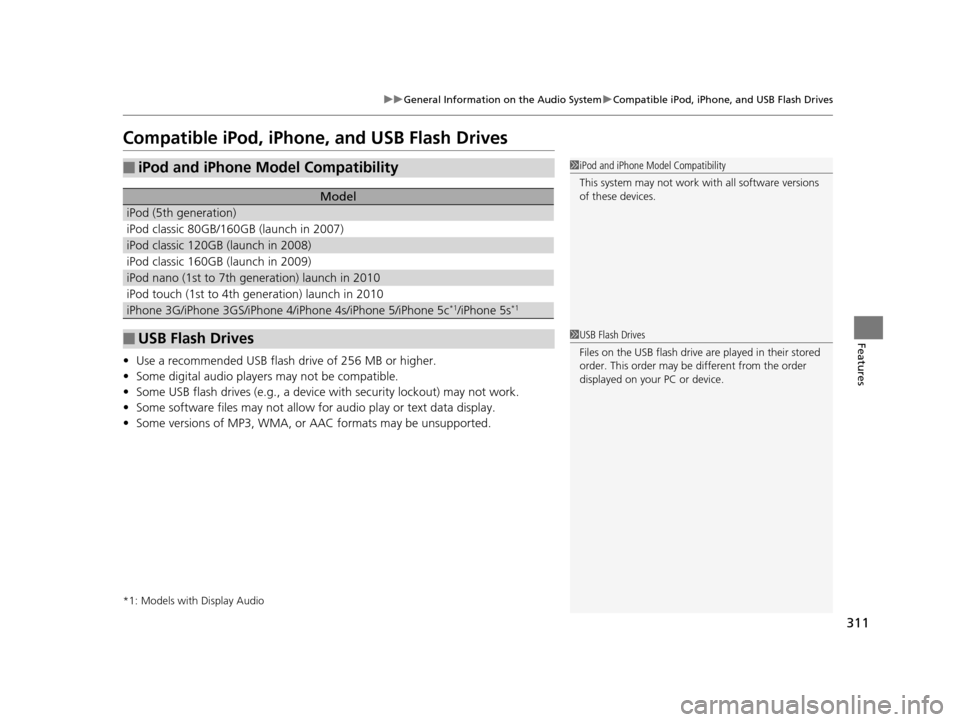
Compatible iPod, iPhone , and USB Flash Drives
•Use a recommended USB flash drive of 256 MB or higher.
• Some digital audio players may not be compatible.
• Some USB flash drives (e.g., a device with security lockout) may not work.
• Some software files may not allow for audio play or text data display.
• Some versions of MP3, WMA, or AAC formats may be unsupported.
*1: Models with Display Audio
■iPod and iPhone Model Compatibility
Model
iPod (5th generation)
iPod classic 80GB/160GB (launch in 2007)
iPod classic 120GB (launch in 2008)
iPod classic 160GB (launch in 2009)
iPod nano (1st to 7th generation) launch in 2010
iPod touch (1st to 4th generation) launch in 2010
iPhone 3G/iPhone 3GS/iPhone 4/iPhone 4s/iPhone 5/iPhone 5c*1/iPhone 5s*1
■USB Flash Drives
1iPod and iPhone Model Compatibility
This system may not work with all software versions
of these devices.
1USB Flash Drives
Files on the USB flash drive are played in their stored
order. This order may be different from the order
displayed on your PC or device.
16 PILOT-31TG76000.book 311 ページ 2015年6月15日 月曜日 午前11時30分
Page 314 of 661
313
Features
Blu-ray/DVD Rear Entertainment System*
Rear seat passengers can enjoy a completely separate entertainment source than
front passengers, including movies, games, and other audio choices.
Wireless Headphones
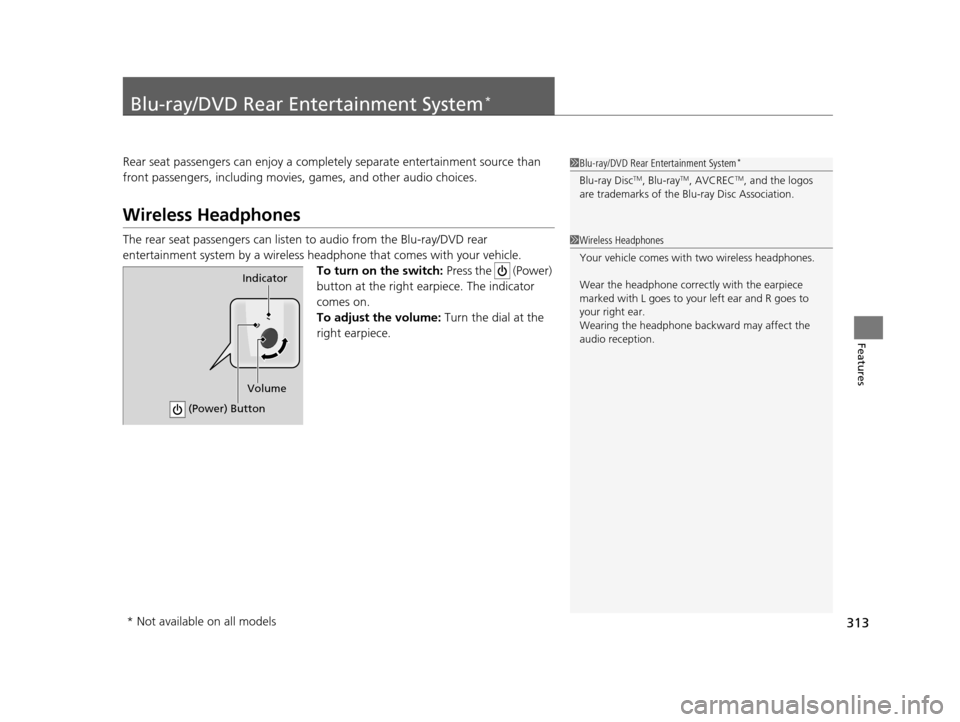
The rear seat passengers can listen to audio from the Blu-ray/DVD rear
entertainment system by a wireless h eadphone that comes with your vehicle.
To turn on the switch: Press the (Power)
button at the right earpiece. The indicator
comes on.
To adjust the volume: Turn the dial at the
right earpiece.
1 Blu-ray/DVD Rear Entertainment System*
Blu-ray DiscTM, Blu-rayTM, AVCRECTM, and the logos
are trademarks of the Bl u-ray Disc Association.
1Wireless Headphones
Your vehicle comes with two wireless headphones.
Wear the headphone correc tly with the earpiece
marked with L goes to y our left ear and R goes to
your right ear.
Wearing the headphone back ward may affect the
audio reception.
Indicator
(Power) Button
Volume
* Not available on all models
16 PILOT-31TG76000.book 313 ページ 2015年6月15日 月曜日 午前11時30分
Page 315 of 661
314
uuBlu-ray/DVD Rear Entertainment System*uAuxiliary Console Panel
Features
Auxiliary Console Panel
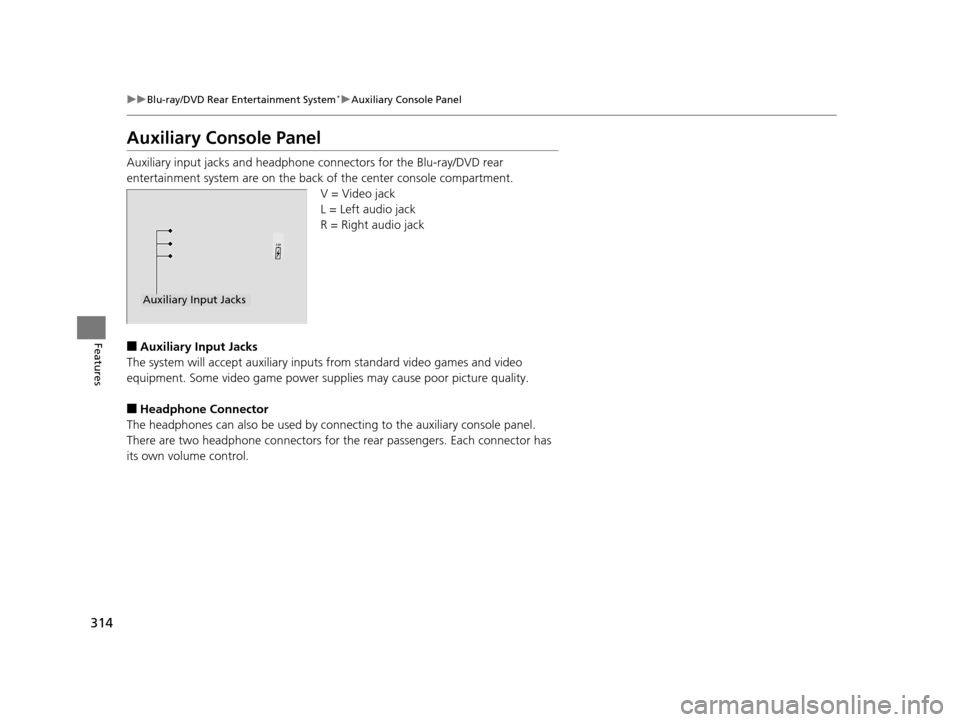
Auxiliary input jacks and headphone connectors for the Blu-ray/DVD rear
entertainment system are on the back of the center console compartment.
V = Video jack
L = Left audio jack
R = Right audio jack
■Auxiliary Input Jacks
The system will accept auxiliary inputs from standard video games and video
equipment. Some video game power supplies may cause poor picture quality.
■Headphone Connector
The headphones can also be used by conn ecting to the auxiliary console panel.
There are two headphone connectors for the rear passengers. Each connector has
its own volume control.
Auxiliary Input Jacks
16 PILOT-31TG76000.book 314 ページ 2015年6月15日 月曜日 午前11時30分
Page 322 of 661
321
uuBlu-ray/DVD Rear Entertainment System*uPlaying a DVD/Blu-rayTM*
Continued
Features
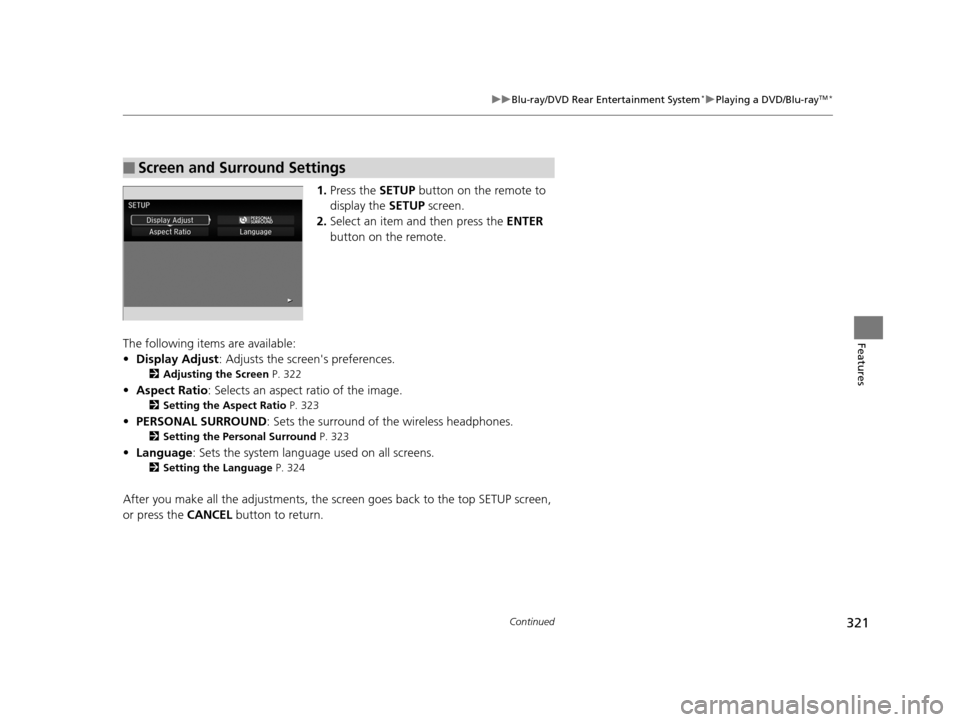
1. Press the SETUP button on the remote to
display the SETUP screen.
2. Select an item and then press the ENTER
button on the remote.
The following items are available:
• Display Adjust : Adjusts the screen's preferences.
2Adjusting the Screen P. 322
•Aspect Ratio : Selects an aspect ratio of the image.
2Setting the Aspect Ratio P. 323
•PERSONAL SURROUND : Sets the surround of the wireless headphones.
2Setting the Personal Surround P. 323
•Language : Sets the system language used on all screens.
2Setting the Language P. 324
After you make all the adjustments, the sc reen goes back to the top SETUP screen,
or press the CANCEL button to return.
■Screen and Surround Settings
16 PILOT-31TG76000.book 321 ページ 2015年6月15日 月曜日 午前11時30分
Page 343 of 661
342
Features
Customized Features
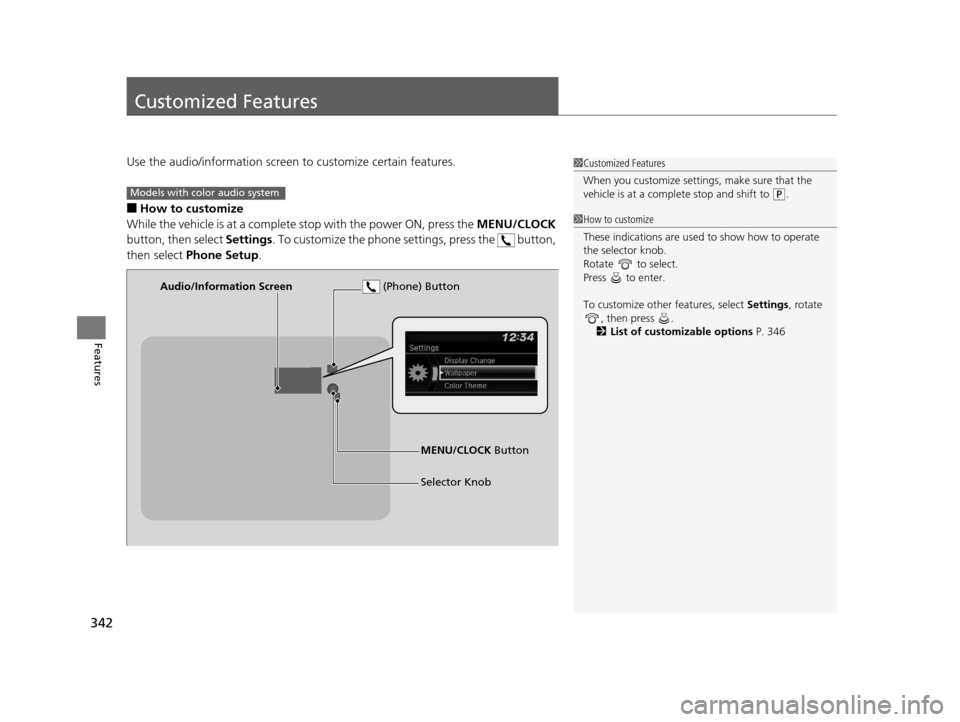
Use the audio/information screen to customize certain features.
■How to customize
While the vehicle is at a complete stop with the power ON, press the MENU/CLOCK
button, then select Settings. To customize the phone settings, press the button,
then select Phone Setup .
1Customized Features
When you customize settings, make sure that the
vehicle is at a complete stop and shift to
(P.Models with color audio system
1 How to customize
These indications are used to show how to operate
the selector knob.
Rotate to select.
Press to enter.
To customize other features, select Settings, rotate
, then press .
2 List of customizable options P. 346
Audio/Information Screen
MENU/CLOCK Button
Selector Knob
(Phone) Button
16 PILOT-31TG76000.book 342 ページ 2015年6月15日 月曜日 午前11時30分
Page 346 of 661
345
uuCustomized Features u
Continued
Features
Press the button and rotate to select Phone Setup, then press .
RingtoneFixed
Mobile Phone
Bluetooth SetupAdd New Device
Connect a Phone
Connect an Audio Device
Disconnect All Devices
Delete Device
Pass-Key
Speed Dial
Caller ID InfoName Priority
Number Priority
System Clear
16 PILOT-31TG76000.book 345 ページ 2015年6月15日 月曜日 午前11時30分