Page 392 of 661
391
uuBluetooth ® HandsFreeLink ®u HFL Menus
Continued
Features
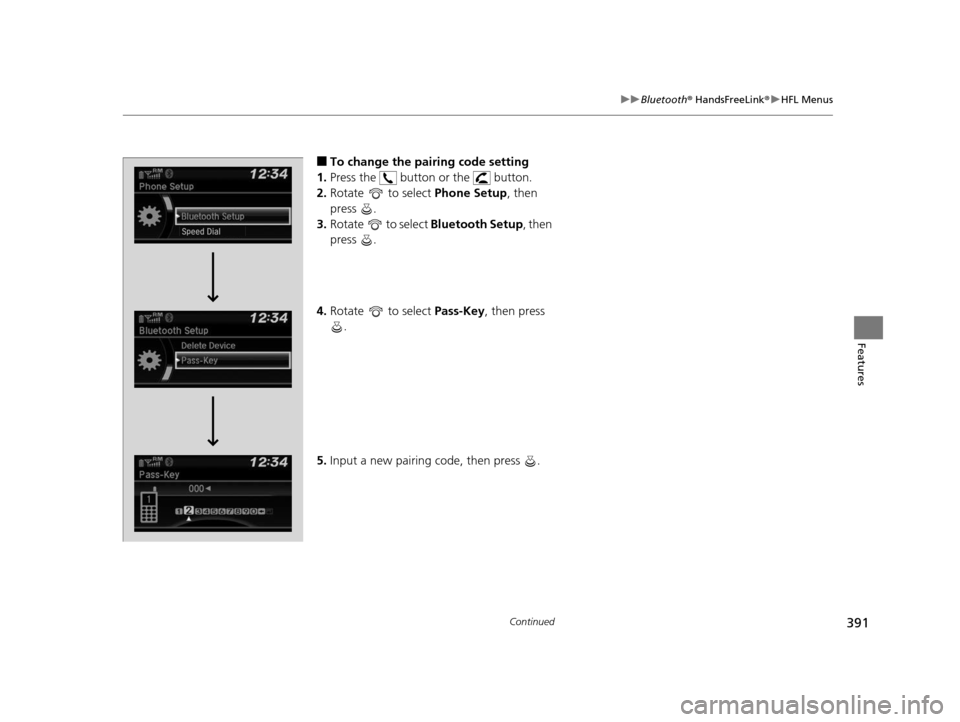
■To change the pairing code setting
1. Press the button or the button.
2. Rotate to select Phone Setup, then
press .
3. Rotate to select Bluetooth Setup, then
press .
4. Rotate to select Pass-Key, then press
.
5. Input a new pairing code, then press .
16 PILOT-31TG76000.book 391 ページ 2015年6月15日 月曜日 午前11時30分
Page 429 of 661
428
uuBluetooth ® HandsFreeLink ®u HFL Menus
Features
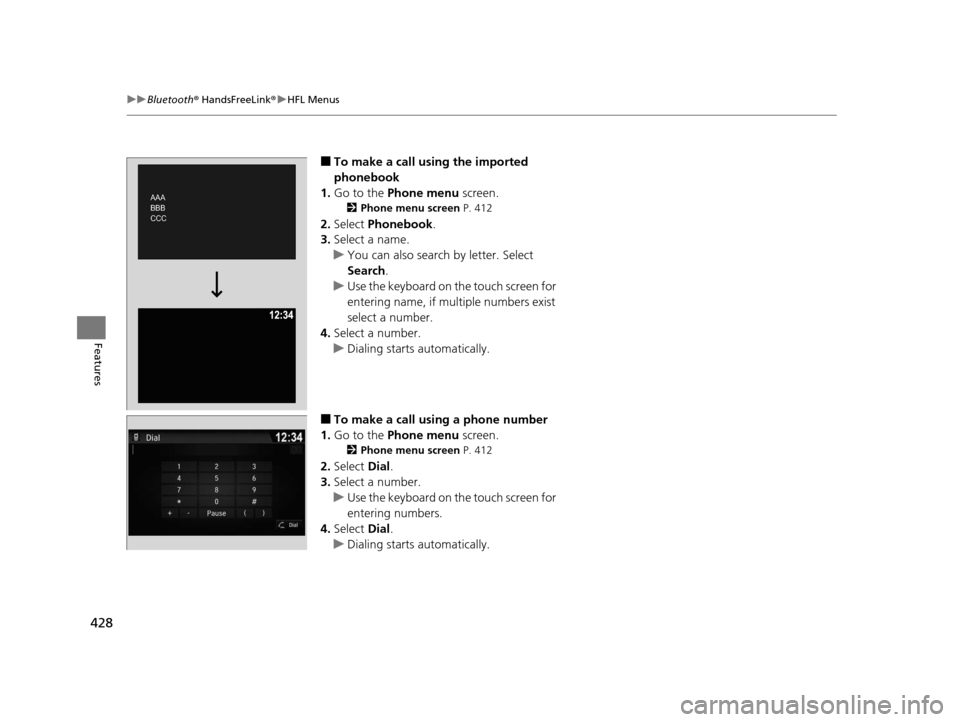
■To make a call using the imported
phonebook
1. Go to the Phone menu screen.
2Phone menu screen P. 412
2.Select Phonebook .
3. Select a name.
u You can also search by letter. Select
Search .
u Use the keyboard on the touch screen for
entering name, if multiple numbers exist
select a number.
4. Select a number.
u Dialing starts automatically.
■To make a call using a phone number
1. Go to the Phone menu screen.
2Phone menu screen P. 412
2.Select Dial.
3. Select a number.
u Use the keyboard on the touch screen for
entering numbers.
4. Select Dial.
u Dialing starts automatically.
AAA AAA
BBB
BBB
CCC CCC AAA
BBB
CCC
16 PILOT-31TG76000.book 428 ページ 2015年6月15日 月曜日 午前11時30分
Page 443 of 661

442
Driving
Before Driving
Driving Preparation
Check the following items before you start driving.
• Make sure there are no obstructions on th e windows, door mirrors, exterior
lights, or other parts of the vehicle.
u Remove any frost, snow, or ice.
u Remove any snow on the roof, as this can slip down and obstruct your field of
vision while driving. If frozen solid , remove ice once it has softened.
u When removing ice from around the wheel s, be sure not to damage the wheel
or wheel components.
• Make sure the hood is securely closed.
u If the hood opens while driving, your front view will be blocked.
• Make sure the tires are in good condition.
u Check air pressure, check for damage and excessive wear.
2 Checking and Maintaining Tires P. 585
•Make sure there are no people or ob jects behind or around the vehicle.
u There are blind spots from the inside.
■Exterior Checks1Exterior Checks
NOTICE
When doors are frozen s hut, use warm water around
the door edges to melt any ice. Do not try to force
them open, as this can damage the rubber trim
around the doors. When done, wipe dry to avoid
further freezing.
Do not pour warm water into the key cylinder.
You will be unable to insert the key if the water
freezes in the hole.
Heat from the engine and exhaust can ignite
flammable material s left under the hood, causing a
fire. If you’ve parked y our vehicle for an extended
period, inspect and remove any debris that may have
collected, such as dried grass and leaves that have
fallen or have been carried in for use as a nest by a
small animal.
Also check under the hood fo r leftover flammable
materials after you or so meone else has performed
maintenance on your vehicle.
16 PILOT-31TG76000.book 442 ページ 2015年6月15日 月曜日 午前11時30分
Page 465 of 661

uuWhen Driving uStarting the Engine
464
Driving
■To stop the engine
Press and hold the button
for one second.
1Remote Engine Start*
•There is any antenna failure.•Door is unlocked with the built-in key.
•The engine oil pressure is low.
•The engine coolant temper ature is extremely high.•The telematics unit malfunctions.
•The security system alarm is not set.
The engine may stop whil e it is running if:
•You do not start the vehicl e within 10 minutes of
starting the engine with the smart entry remote.
•The engine is stopped by using the smart entry
remote.
•There is any antenna failure.
•The security system alarm is not set.•Door is unlocked with the built-in key.
•The hood is open, or any door, or the tailgate is
unlocked.
•Any door is open.
•The gear is in a position other than ( P.
•The telematics unit malfunction.•The engine coolant temper ature is extremely high.
•The battery is low.
•The engine oil pressure is low.•The Malfunction Indicator Lamp (MIL) comes on if
there is a problem with the emissions control
systems.
* Not available on all models
16 PILOT-31TG76000.book 464 ページ 2015年6月15日 月曜日 午前11時30分
Page 597 of 661
596
Maintenance
Remote Transmitter Care
Replacing the Button Battery
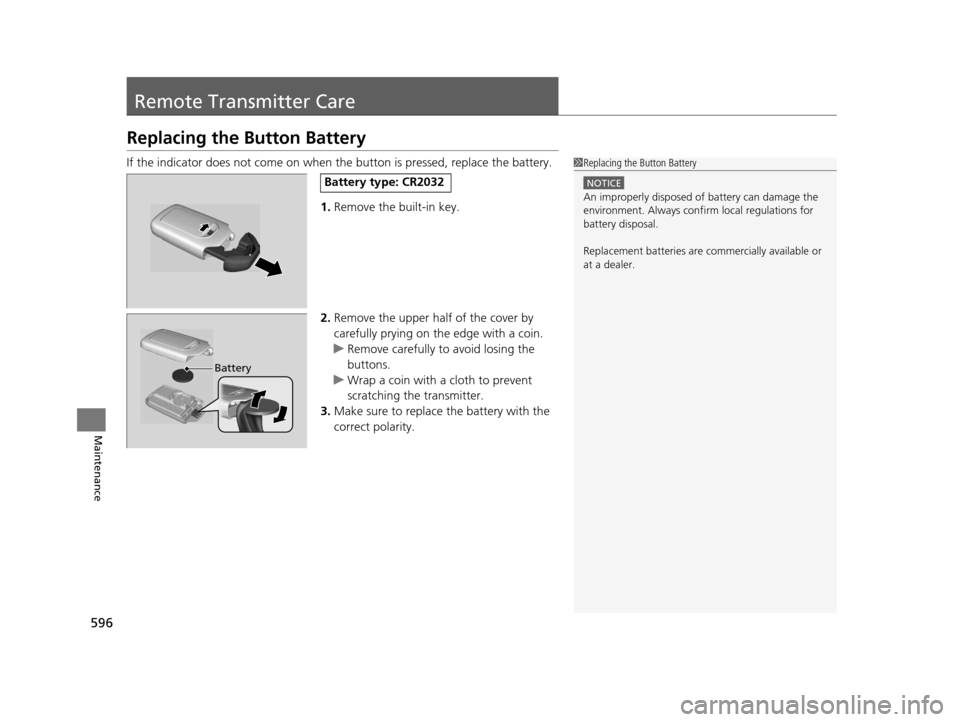
If the indicator does not come on when the button is pressed, replace the battery.
1. Remove the built-in key.
2. Remove the upper half of the cover by
carefully prying on the edge with a coin.
u Remove carefully to avoid losing the
buttons.
u Wrap a coin with a cloth to prevent
scratching the transmitter.
3. Make sure to replace the battery with the
correct polarity.1 Replacing the Button Battery
NOTICE
An improperly disposed of battery can damage the
environment. Always conf irm local regulations for
battery disposal.
Replacement batteries are commercially available or
at a dealer.
Battery type: CR2032
Battery
16 PILOT-31TG76000.book 596 ページ 2015年6月15日 月曜日 午前11時30分
Page 619 of 661
618
Handling the Unexpected
Shift Lever Does Not Move*
Follow the procedure below if you cannot move the shift lever out of the (P
position.
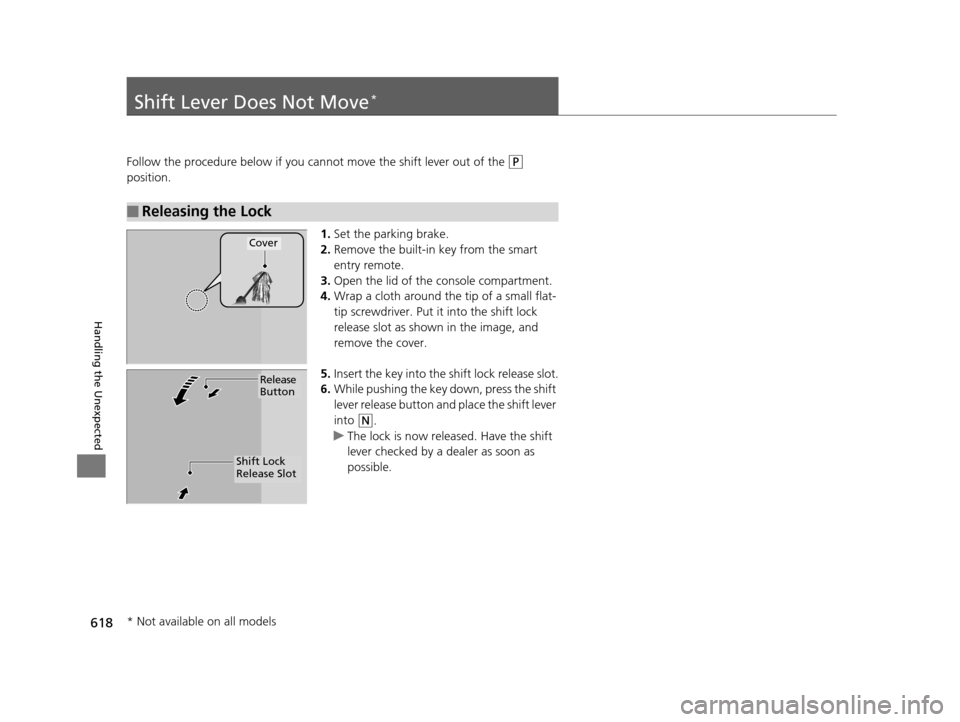
1.Set the parking brake.
2. Remove the built-in key from the smart
entry remote.
3. Open the lid of the console compartment.
4. Wrap a cloth around the tip of a small flat-
tip screwdriver. Put it into the shift lock
release slot as shown in the image, and
remove the cover.
5. Insert the key into the sh ift lock release slot.
6. While pushing the key down, press the shift
lever release button and place the shift lever
into
(N.
u The lock is now released. Have the shift
lever checked by a dealer as soon as
possible.
■Releasing the Lock
Cover
Release
Button
Shift Lock
Release Slot
* Not available on all models
16 PILOT-31TG76000.book 618 ページ 2015年6月15日 月曜日 午前11時30分
Page 631 of 661

630
uuFuses uFuse Locations
Handling the Unexpected
Located under the dashboard.
Fuse locations are shown on the label on
the outer side of the side panel cover.
Locate the fuse in question by the fuse
number and label number.
■Interior Fuse Box Type A
Fuse Box
Fuse Label
■Circuit protected and fuse rating
Circuit ProtectedAmps
1DR P/W20 A
2DOOR LOCK20 A
3SMART7.5 A
4AS P/W20 A
5FR ACC SOCKET20 A
6FUEL PUMP20 A
7ACG15 A
8FRONT WIPER7.5 A
9IG1 SMART*17.5 A
ABS/VSA*27.5 A
10SRS10 A
11REAR LEFT P/W20 A
12−−
13REAR RIGHT P/W20 A
14FUEL LID20 A
15DR P/SEAT (REC)(20 A)
16REAR FOG(7.5 A)
17FR SEAT HEATER(20 A)
18INTR LT7.5 A
19DR REAR DOOR UNLOCK10 A
20AS SIDE DOOR UNLOCK10 A
21DRL7.5 A
22KEY LOCK7.5 A
23A/C7.5 A
24IG1a FEED BACK7.5 A
*1:Models with Auto idle-stop system
*2:Models without Auto idle-stop system
25INST PANEL LIGHTS7.5 A
26LUMBAR SUPPORT(10 A)
27PARKING LIGHTS7.5 A
28OPTION10 A
29BACK LT*17.5 A
METER*27.5 A
30REAR WIPER10 A
31ST MOTOR*17.5 A
MISS SOL*27.5 A
32SRS7.5 A
33AS SIDE DOOR LOCK10 A
34DR DOOR LOCK10 A
35DR DOOR UNLOCK10 A
36DR P/SEAT (SLIDE)(20 A)
37RIGHT H/L HI10 A
38LEFT H/L HI10 A
39IG1b FEED BACK7.5 A
40ACC7.5 A
41DR REAR DOOR LOCK10 A
42−−
Circuit ProtectedAmps
16 PILOT-31TG76000.book 630 ページ 2015年6月15日 月曜日 午前11時30分
Page 635 of 661
634
Handling the Unexpected
When You Cannot Unlock the Fuel Fill Door
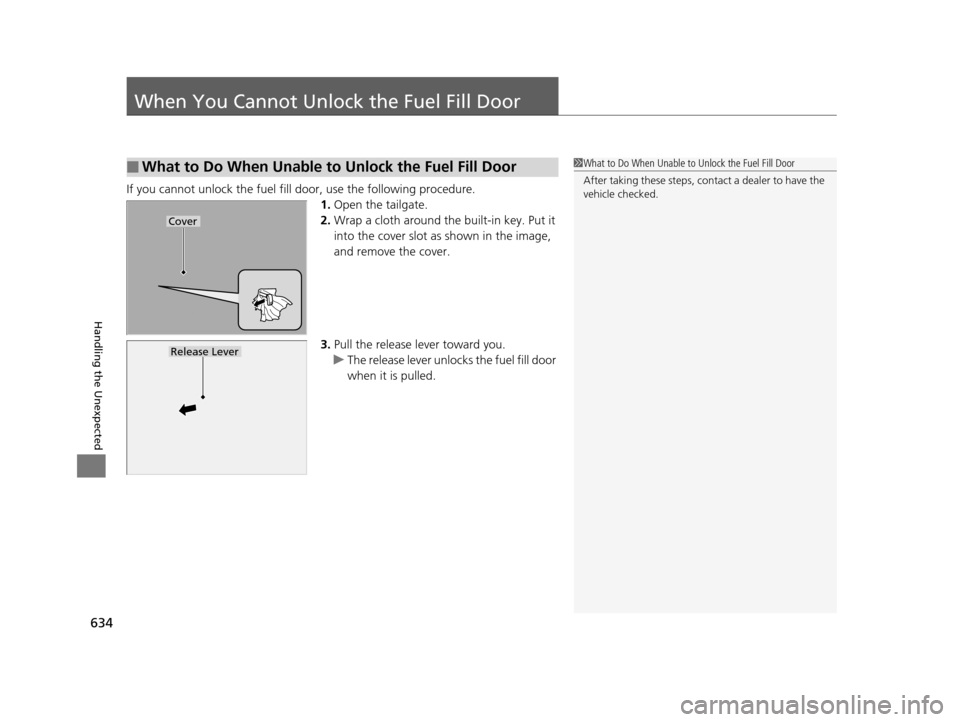
If you cannot unlock the fuel fill door, use the following procedure.1.Open the tailgate.
2. Wrap a cloth around the built-in key. Put it
into the cover slot as shown in the image,
and remove the cover.
3. Pull the release lever toward you.
u The release lever unlocks the fuel fill door
when it is pulled.
■What to Do When Unable to Unlock the Fuel Fill Door1What to Do When Unable to Unlock the Fuel Fill Door
After taking these steps, cont act a dealer to have the
vehicle checked.
Cover
Release Lever
16 PILOT-31TG76000.book 634 ページ 2015年6月15日 月曜日 午前11時30分